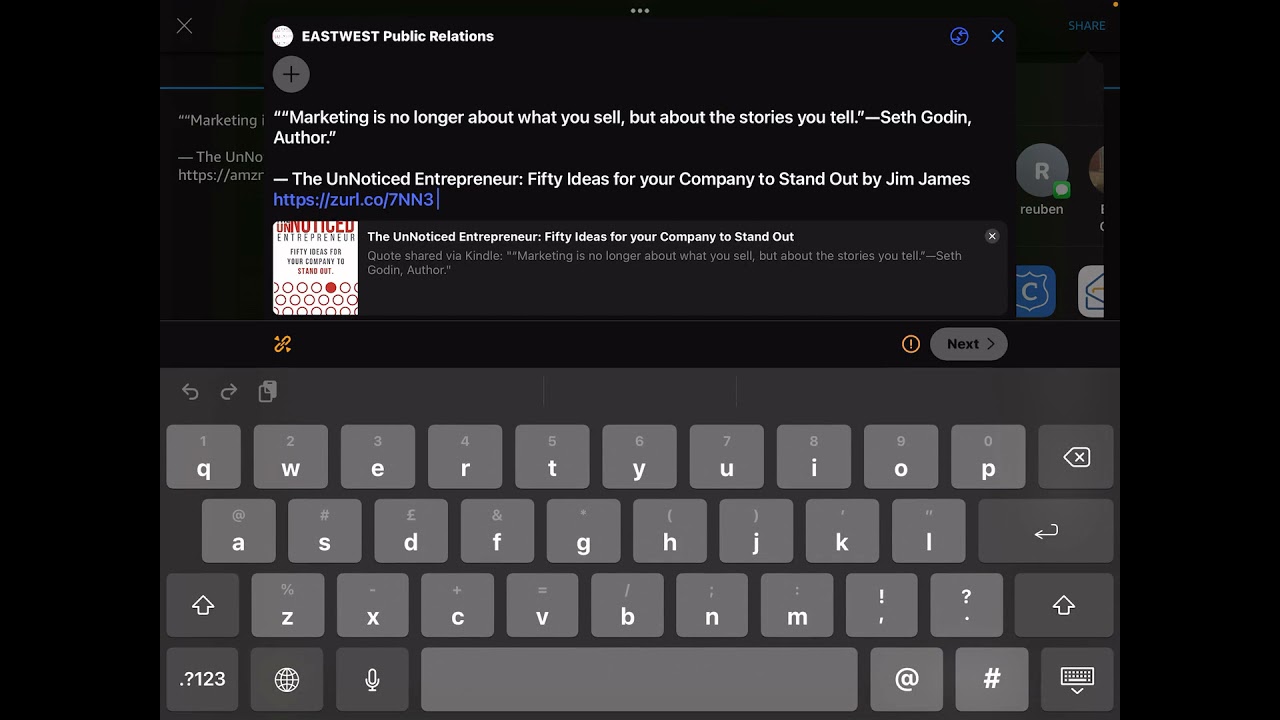
Jim James shows how to turn Kindle highlights into social posts. Select a quote in the Kindle app, tap share, send it to Zoho Social, pick which platforms get it, and let Smart Queue schedule it for peak engagement. One 244-page book becomes dozens of ready-to-post snippets.
Chapters
Okay, I want to just explore with you the opportunity for Kindle to be a social media share platform for your book or for the book that you are helping to promote. So this works on your mobile device. I'm doing this currently on my iPad, but you can do this on your phone, but obviously a tablet is better. The iOS on Kindle works really nicely. So if I open up my Kindle, I can see here my library and my bookshelves, and for those of you listening, what I've done is I've opened up the Kindle app on my iPad and I have on the home screen, from your library, recommended for you, and below that, pick up where you left off. So I've got here a number of books on my shelf including of course The Unnoticed Entrepreneur. Now what I'm going to do is I'm going to click on The Unnoticed Entrepreneur, and you'll see that opens up to obviously the reading screen. Now what I'm going to do is I'm going to share with you how I can take a section by highlighting, in this case, marketing is no longer about what you sell but about the stories that you tell. By Seth Godin, author. Now, if you highlight that text, you get a couple of options, a dictionary or a Wikipedia search. I don't want those. What I'm going to do, I'm going to press one of the keys that appears just above the text. I've got a little row of 4 dots, pink and blue and yellow and orange. Then I've got the paste, and I've got the notes, and I've got the share, I've got the magnifying glass, and I've got the information. I'm going to choose the icon which is the page with an arrow pointing up. When I choose that, what happens is it says I've got a quote, I'm going to share the quote, and it says, marketing is no longer about what you sell, about the stories that you tell. Seth Godin. And then underneath it says, The Unnoticed Entrepreneur: 50 Ideas for Your Company to Stand Out by Jim James. And it leaves the Amazon link. Now the reason I'm doing this is because I want to repurpose my content, but for anybody that's got 244 pages of content as I have, going through that as a PDF and cutting and pasting that into a Twitter or Facebook or LinkedIn is really laborious. Kindle enables us to share the content within our books in a seamless way, from your mobile device, and you can schedule that and use an amplification tool, which is the one I'm going to use, is Zoho. I'm going to show you how to do that. So what I've got now in front of me is a screen that has the text and the quote. Now what I'm going to do, I'm going to click on the top right-hand corner where it says share, and I've got some options here. I can share by AirDrop, Messages, by email, by LinkedIn, by Facebook, By click, by Zoho. Now I'm going to choose Zoho Social. Okay, now if I choose Zoho Social, it brings up the control bar, and in that what I do is I'm going to choose in my Zoho Social all the accounts that I have linked to my Zoho Social account, which includes my Facebook account, my Facebook group account, East West Public Relations, my Twitter, which is my East West PR Twitter, my LinkedIn profile, which is my personal Jim James, and my LinkedIn company. It also has my Instagram, but because that needs a certain square graphic, I tend to leave that out. And the Google My Business. Now it says here, next, when I click next, it says, do I want to post this thumbnail on Twitter, and that basically is the thumbnail of the book cover. I'm going to choose yes. Now in Zoho Social, it gives me a number of options, gives me 5 options. One with a green arrow says publish now, second is custom schedule, third is smart queue, the fourth is custom queue, and the fifth is save as draft. Now what I'm going to do is I'm going to let the system decide when it can post this, and it's going to do that by deciding how much content I've already got ready to go, and also by the times that my posts have been most engaged with. So it's pretty smart. So I'm going to click Smart Queue, and now it's scheduling, and what it says is it's going to have the 26th at 9 AM. Now I've already got 2 posts going out to the same channels from other books for 9:00 AM on the 26th. So actually, I don't want it to do that. So I've got a choice. I can either select today now, and I can select, for example, now I've got in front of me the next 7 days as a calendar. So From Sunday the 21st to Sunday the 27th, I can choose which one of these days. And what the Zoho Social is doing is telling me that if I issue this at 10, uh, at 12 PM on the 30th of November, uh, I will have a 20% chance of a good response. If I send at 11, I get a 10%. At 4 PM, I only get a 10%. So it's optimizing for me what's the best time. It's saying if I send it on the 25th of November at 7 AM, 7 AM, I have a 10% chance of engagement. Now if I choose the 26th, I've got 2 posts already but a 20% chance of a good engagement. But if I do it at 1 PM on Friday, I have only one post but I also have 20% engagement chance. So let's see if I did Saturday, it says there are no Smart Queues for that. So what I'm going to do is I'm going to choose to have that Thursday slot because I don't have anything else on that day. I'm going to click schedule and my post is now done scheduling. Now what's good about this is I can obviously go through my book chapter by chapter and I can choose any one of these small snippets to share either with all or some of my Facebook or my LinkedIn or my Twitter accounts. Now one thing then to think about is, what if I just want to choose one piece And send that to one place. So what I'm going to do is I'm going to choose one piece of content, and I'm going to just cut and paste this content. And this, for example, is about John Lee Dumas saying, hey, Fire Nation, you're the average of the 5 people you spend the most time with— you've been hanging out with myself and Jim today, so keep up the heat. Now I'm going to share that. You'll see this time I'm just going to share that to my LinkedIn account, and then I can share in a post, and I can share to anybody, or I can share, share to connect it to my connections or to anyone on Twitter, and that will go out to both. So now what I'm going to do is I'm going to share that to Twitter. Now it says I've got 15 characters too many, so I'm going to just delete some of these characters. 50 ideas to get noticed. A little bit of editing. Now then, I'm going to post that to my LinkedIn. Now what we could do is if we just have a quick look on LinkedIn, then we can see if that has come out. And there it is already. Hey, Fire Nation, how quick is that? You are the average of the 5 people you spend the most time with.