Using Webinars to build a sales funnel
Paul walks through building a webinar sales funnel with WebinarGeek, covering registration, lead capture, and conversion. Email follow-up often makes more money than the live pitch. Most buyers need 7-8 touchpoints before they convert.
Chapters
Interesting. And I've seen some instances of AI being used within the business that actually make customer experience really, really good. So some interesting insights from work and also listening in. Great.
Sorry, sorry, Craig, for confusing you there. Just like I had opened a YouTube and so it played, but now I've shut that browser. So Uh, we're now live streaming, so sorry, uh, if that confused you. Um, it's fine. So that's great. So yeah, Craig, I love what you're doing, and hopefully that podcasting, you know, conversations we had about setting up the podcast—
Yeah.
Is helping to move that forward, um, for you as well. Because the, the point with the Unnoticed Entrepreneur group is that, you know, there are so many different ways to build a business as there are, like hearing you, Vijay, with property. It's like, how do people, you know, how do you think of that? So brilliant, right? And so the idea of the group is, is to help share all these different tools and tips that are out there. And like for you, Bimby, thinking about a business that there isn't a right or wrong, and it's not all just Facebook ads, and I'm not just trying to sell PR. There's everything from signage on your van to doing QR codes to making you know, printed brochures or to using a little flyer. You know, over 30 years I've built businesses in Singapore, China, India, now the UK, and I've worked with hundreds and hundreds of clients. And there really isn't one rule, you know, for what's right or wrong. And I interview people on my podcast, and, you know, I've got the podcast The Unnoticed Entrepreneur. I've had— I've got 750 shows now, um, and I've written 2 books. And the recurring theme is that you can really do it your own way, you know. And so the whole idea of the group is to highlight all the options, you know, rather than to say this is just the one rule. But the webinar, when I— when, you know, Paul and I met in another group, I was like, I'd love to have Paul on and share his skills because, you know, Sharing when we're not there with communities is just a brilliant, a brilliant way to do it. So, and I, I really don't know how to do it properly at all. So, Paul, I'm gonna pass over to you now. Um, I'm gonna record this. Paul, should I record this and livestream it? Is that how that works? Here you go, he's already an expert.
Yeah, I think so. Um, because once— obviously the great thing about a recording is as well as being able to publish it on any of your social media channels like TikTok, Instagram, YouTube, which you're already doing, you can cut it up into pieces and use it as content. If you, if you're posting on social media, you can just take little snippets and put it out there. So you've got like micro content and put it on, just put it everywhere, you know.
And Paul's had a haircut specifically for this session. You'll be pleased, you'll be pleased to know. So I'm going to start recording. There's also an AI summary Uh, that now is on Zoom. So everyone okay if I record it? Anyone got any objections? We're not going to go, well, I'm supposed to be at work, or my wife doesn't know I'm here, right? I'm gonna, I'm gonna record. Super.
Got it.
Paul, over to you.
Thank you very much. Okay, right, I'm just gonna do a bit of jiggery-pokery while I share my screen. Uh, Screen 2, share. So hopefully you can see a nice colorful presentation popping up in front of you very soon.
Can everybody see that okay?
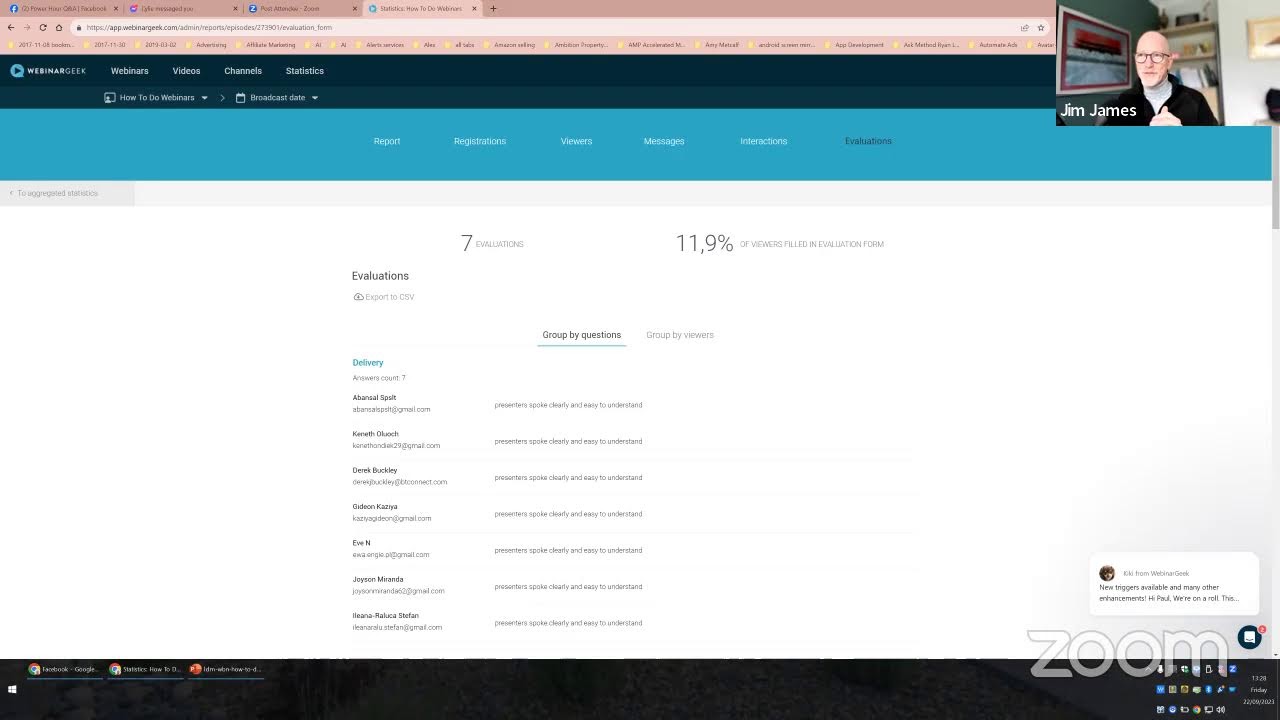
Yeah, lots of color. Now I apologize in advance because I've got 2 screens, so my camera is on the screen that I'm looking at now, obviously, but my slides are over here. So if I look over here, I'm not being rude showing you my ear, I'm just looking at my slides. So I'll probably be like looking back and forth, so Bear with me. So how to— this is, this is very, very brief. There is a lot of, a lot of detail in a webinar. There's lots of moving parts, and I've just tried to distill down the absolute essence of webinar funnels today to give you an insight into what they're about, what they are, how to do them. But there's a lot more to it than meets the eye. But I'll go through this 20 minutes and answer questions. And what I'm also gonna do is I'll show you the webinar platform that I use, And just give you a little tour around inside and show you all the wonderful things it can do. So how to create a webinar sales funnel. So I think first thing is to actually make sure we're all on the same page and what actually is a webinar sales funnel. So to some extent, this assumes you're familiar with the term a sales funnel where you get, you know, leads, conversions. As you go down the funnel, you go from people being brand aware to actually becoming customers right at the bottom of the funnel. So with a webinar funnel, Um, it's very much the same thing, but your lead magnet or your reason for people to come and look at you is that you're going to run a webinar and they can book on a webinar registration page, submit their email address, put their name in, and then they turn up on the day when you give your live presentation, um, give them some valuable content, and then convince them to either book a call with you or make a sale depending on what your offer is at the end of the webinar. But the great thing about a webinar registration, of course, is that you can capture somebody's email address And I think that's really important in the, in the days of Facebook because people, you know, Facebook is very fickle. Um, one day a group is there with thousands of members, the next day it's gone. Facebook can just do whatever it likes. So if you've got your email list in the background, you've got an independent way of staying in touch with your clients. If you're just relying on a Facebook group and the group gets deleted, gone. So having your own email list, very, very important, and a webinar registration page is a great way to do that. So next definition, what is a webinar? So firstly, as I said, it's a means to capture an email address because people have to register for the webinar. You don't really want anonymous people viewing you because otherwise what's the point? You want to be able to find out who's watching you and get back in touch with them if you need to. It's a platform whereby you can sell to your audience. I'm not just talking about selling in terms of like cash transactions, but obviously selling yourself, selling your brand, increasing awareness. And in the world of the internet, we have something called KLT, which is know, like, and trust. People get to know you, they can get to like you, you can build up the trust. And although they may not do business with you on day 1, maybe a few weeks down the line when they get to know you and see you in different places on the internet and interact with you directly, the trust builds up, and hopefully they'll, they'll convert, which means they're gonna actually pay you some money to provide a service or a product depending on what your business offer is. And also in a webinar, it's very interactive. You can chat with the audience, you can give them downloadable resources such as MP3s, PDF files, worksheets, pretty much anything you like. You can offer them a free gift, and that's a great way to get people to sign up for a webinar. You can entice them to sign up by saying, well, once you sign up, I'll give you this amazing free gift which will teach you XYZ, and that's like a bit of an incentive for them to part with their valuable email address. So what can you use webinars for? Coaching, training, teaching, pretty much anything. People use webinars for selling food blenders, nutritional supplements, coaching services, hypnotherapy sessions. If you do some research, webinars, you know, I think COVID did us a big favor because the amount of webinars that happened during COVID absolutely flew through the roof and certainly shares in Zoom benefited from that massively. But webinars can be used for just about anything. As I say, they're just a great way of getting in front of a large audience, much easier than hiring a room and selling tickets and seating and all the logistics that go with that. A webinar is a great way to get in front of your existing audience or your prospective audience and sell them your offer ultimately. So what do you need for a webinar? So obviously you need a PC or a Mac, you need a decent camera, A decent microphone because the quality of your voice during the webinar is very important. It all helps to make that human connection with your audience. So eye contact, good voice quality, all helps to build that very important human connection as if you were in the same room with somebody. Ethernet cable might sound crazy, but Wi-Fi is improving a lot, but there's nothing as solid as an Ethernet cable. Plug your PC into your router and you'll get a much more solid connection because webinars are very bandwidth hungry. They're very resource hungry. Wi-Fi can be a bit flaky. It can come and go. But if you've got an Ethernet connection, you're going to get the fastest possible bandwidth. And the best possible webinar experience. Webinar software. So you'll need some webinar software, which I'm going to show you my one later on, WebinarGeek, and a slide deck. There are a few other things, but as I say, I've tried to kind of keep this very kind of broad brushstrokes and get through it fairly quickly. So we're at 10 to— coming up to about 10 to 1 by my clock here. So I'm getting through it fairly quickly, which is good. So it's time for questions and answers afterwards. Webinar content. Now this is probably the most— well, it is the most important thing, because During the— during your presentation on a webinar, you're going to be doing several, several things. Firstly, you're going to be providing lots of value to your audience, whatever it is that your subject expertise is in. You're going to be building up your credibility by demonstrating your knowledge, hopefully getting people to like what you're saying and how you say it, and getting to like your personality as well. Because that's the thing with, with business, we do, you know, we do business with people we like, and if we don't like the person, chances are we're not going to do business with them. So it's a great way to build that rapport with your audience there. So as well as delivering your actual content with your, which is your subject matter expertise content, the real magic sauce is how you, how you pitch that in with the very gentle and subtle sales structure that goes with that. And we have a lot of psychology webinars. We have something called an open loop where you ask a question and it's a semi-rhetorical question. You're planting a seed in your audience's mind to get them thinking, but you don't answer that question straight away. You very subtly come back to it later on, but in the meantime, you've left them bit curious, wondering about what's the answer to that question, and then you can come back to it. And that's called an open loop in psychological terms. And the other thing that's very good on a webinar is to have something called a pattern interrupt. So as you go from slide to slide, you don't just have like a nice— in my old days of corporate life, I had a, you know, the standard company webinar template, same color, same header, same footer, and just the content would change from slide to slide. And that's just a great way to make your audience go With the pattern interrupts, you're going bang, bang, you're changing the color, you're changing images. So from one slide to the next, your audience don't know what's coming. Every slide is going to catch them out and make gravity— it's going to re-engage their attention on every slide. If you just have slides that look very samey, audiences just slowly tend to switch off. You've got to do everything in your power during a webinar to capture your audience's attention, keep them engaged, keep them interested, and make sure that they come up— come back to you at the end of the webinar to hopefully book a call or part with some cash. So what does a webinar funnel look like? So this is a very, very simplified diagram, but basically we've got here on the left-hand side, this is a web page, it's the webinar registration page. So this is where people will come along, they'll put their name, they'll put their email address, and they'll click submit, and then they'll be taken to a confirmation page, or a thank you page as it's also called, which will just say thank you for signing up for the webinar. And as I was saying earlier on, if you want to provide a lead magnet, you can put a download link on the thank you page, which means you've got their email address, they go to the thank you page, they're presented with a link whereby they can download whatever your lead magnet is. If you're a hypnotherapist, it might be a meditation MP3 file. If you're, um, a dentist or something like that, it might be a special guide on tooth whitening. Could be anything you like, but it's got to be something of value to your audience. And the next thing that happens is an email sequence. So once people register for a webinar, and again the lead time, so you generally want to be starting to publicize that you're going to be running your webinar roughly 2 weeks in advance of the webinar itself, ideally. And of course people sign up with great enthusiasm, but as time goes by they forget about it. So it's very important to send them an email reminder sequence, and I would suggest that they— you send an email the day before an hour before, 15 minutes before, and when the webinar actually starts. And that gives you the maximum opportunity to ensure that the person who registered 2 weeks ago actually shows up on the day, because you're keeping it in there, keeping it in their mind. And most of these reminders will have a link inside the email that they can click, and it will automatically add it to their Google Calendar, their Outlook calendar, or whatever app they use for their calendar, so they, they've got every opportunity to ensure they remember that they're coming to the webinar on the day. The dollar symbol, so that represents that you maybe do your webinar and at the end you make an offer. It could be a purchase of a hypnosis course, it could be a purchase of a business coaching program, whatever it is that you do, a blender, nutritional supplements, whatever it is you do, you present an offer page to your audience and hopefully some of them will sign up, put their credit card details in, ka-ching, you get paid. But not everybody's gonna convert on the day. People are different. Some people will sleep on it and come back tomorrow to make a purchase. Some people will come back next week, a month's time, 6 months' time. And this is where the email sequence comes in. Really, really important in the world of the internet. It's reckoned that the money is in the follow-up. And what that means is that although people may not buy from you on the day, they— if you keep in touch via a nurturing email sequence, so you keep out sending emails on a regular basis, still providing value, not irritating the potential customer, keeping in touch, it keeps them in front of mind. And who knows, you know, 6 months' time, that person may come back and make that purchase from you. Everybody's different, but that email sequence is very, very important. And I'm sure if you do some research, you'll find out that all the webinar gurus and all the online marketing gurus will say the same thing. They make more money from emailing their audience and getting purchases post-webinar than they do on the day. So that follow-up sequence is so important. And it's like a follow-up in life, though, in business generally. So many people that are really bad in business, the tradesman will come around and give you a quote to paint your room, and you never hear from them again. A good businessman will ring you up a week's time and say, oh, hi, Mr. Smith, we came around to do a quote for your house. What did you think of it? How was the price? And they don't do it. So most people in business don't follow up, which is shocking. But an email sequence does that automatically for you. So it's beautiful, really easy to do. So at the end of the webinar you've got your email list, which is building because you've got all your people that are signed up, and you can continue to email those and market to them. You've got your webinar statistics. So what I'm gonna do in a second is go to my webinar platform and show you some of the statistics that are available to you, so you can see what's been going on with your webinars. So here's my Webinar Geek demo, which I'm gonna show you in a second. Jump into if I can get the right tab open. So this screen here, this is WebinarGeek, which is— I've evaluated dozens of webinar platforms. To me, it's by far the best for all kinds of reasons. I've got lots of webinars loaded in here, but here's a report. So for example, this particular webinar, I can see how many subscribers, how many people viewed it, how many people were live, how many people viewed the replay of the webinar. Then I can go to registrations here on the next, next page, see how many visitors I've got to my registration page, see how many people unsubscribe from the sequence. And I can go to the viewers tab, see how many people actually viewed on the day, how long they watched it for, look at messages. So during the webinar you'll get a web chat going on, you'll get interaction with your audience. So I've got some statistics on the messages here. And these dates across the top are for all the different dates that I run this particular webinar. Interactions. So in the webinar you can set up different interactions. You can set up a link, you can set up a button, you can do polls and surveys. So you can actually sort of get data from your audience. And very importantly, I think, you know, after your webinar is to send out an evaluation form to your audience. What did you think of the webinar? What did you like? What didn't you like? So for example, here I've set up a form. I've got some good feedback here. Presenter spoke clearly and easy to understand. Slides were informative and easy to read. Would they recommend it? Yes, they would. I would recommend to others. And I've got my star rating here for what people think of my webinar. And this is really important because a webinar is an ongoing thing. Every time you run a live webinar, you should be looking to improve on the previous one, and that might be your own delivery. Your speech, the content on the slides, the order in which you say things. There's lots of variables in the webinar, and if you improve by 1% every time and you run a webinar every week, then by the end of the year you're gonna be 50% better. A lot of people make a mistake in the online world and think, okay, I've run a webinar, where's the money? Like anything, it takes a lot of testing, a lot of practice, a lot of rehearsing to optimize it, to refine it, to get it very polished. And there will come a time, of course, like any online business, when all the hard work materializes into some cash sales. So that's the statistics inside the webinar platform. There's a lot more to it because it shows you how to set up a registration page, a thank you page, a sales page. There's lots of moving parts, but if I go too far, I'll probably overwhelm you. I've probably said quite a lot already. We're coming up to 1 o'clock here, so phew, I'm running out of steam. I think that's quite a good point to sort of wrap up my broad brushstrokes spiel on webinars. So maybe it's time for some questions. What do you think, Jim?
Yeah, and forgive me for— I've been just on the other screen making sure that we're on YouTube Live and put it on Twitter and put it on also on Facebook. So I'm trying to figure out how to livestream this in a way that you're showing us. Um, which is brilliant. Um, yeah, do you— anyone got any questions so far? Uh, that they're like— Bimby?
Uh, yeah, thank you very much, Paul. Uh, apologies that I had to take a call from a solicitor that I've been waiting 2 and a half days for, so it comes at this time. So apologies for that.
Okay.
Um, um, but very fascinating and, and important to see it, and you suddenly recognize that you know, in, in this space, you know, you can actually begin to distinguish between the good companies and the bad companies based on how they behave around the webinars and who actually thinks effectively as a business. So I think it reflects on the business as to how well organized they are with their webinars. I think that that is a subliminal message in terms of adding value.
Yes.
That's my perspective just from what you're saying. I've got a couple of questions. One is the sort of confidentiality aspect. You know, you're going to keep a lot of information in your databases relating to individuals who've shared stuff, and, you know, and that's quite privileged information. I presume that's all covered with ICO or, you know, GDPR sort of arrangements.
Absolutely.
So I just wanted to get your advice for people setting this up and making sure that they stay on board. That's the first question. The second question, you can answer that first, you know, is really relating to information from the stats, but I could ask that after you've answered the first question.
Sure. Yeah, no, GDPR compliance, it's absolutely paramount these days, isn't it? Absolutely paramount. It's probably not the most interesting subject, but in my IT background, I've done a lot of work with government organizations, signed this Official Secrets Act, all that kind of stuff. So it's totally important. Now the Webinar Geek platform accommodates that inside the platform with just with the wording that they do. Now in the world of email, which is a very general thing, obviously, because there's lots of email service providers, which is another tool that you may potentially need. There's something called double opt-in, and what that is, is when somebody signs up for anything, they give you an email address, they're then sent an email And they have to click the link in the email to agree to being opted into your email list. And that's called double opt-in. That's not obligatory, but it's the safest thing. I don't actually use it myself because it creates more what's called friction. It's more resistance to getting people signed up. You wanna make it as easy as possible for people to sign up with you. The more resistance they have, the less they might say, oh, sod it, can't be bothered. But that's the safest way, is double opt-in. They send you the email address, you send them an email, they click the link, they've opted in, and then you start to email them your content. Double opt-in. So yeah, all the email providers, they all recognize the paramount importance of GDPR compliance. Very, very important if you have a website, and indeed if you're doing Facebook ads, which I do, you must have a privacy policy and a terms and conditions page on your website. And in the Facebook account manager, you would put that URL in there so that any of your clients can link through to your To see your T&Cs and to see your privacy policy. Very, very important. But yes, very important. All catered for, all taken care of with the right words. WebinarGeek are a Dutch company. Lots of webinar providers in, you know, lots of American ones. WebinarGeek I found very— the support is excellent, and being European, the GDPR compliance is absolutely top-notch. So it's all catered for. Long answer.
Thank you. No, and sorry if it's a slightly regulatory question, but I think it's still an important one.
Yes.
The second question, if I may, is really with respect to WebinarGeek. I think that's a great resource just looking at that, but I'm just interested to know what your— in terms of advice, input, and what sort of improvements you've made based on your interpretation of your own stats, such as things of how many touchpoints, for want of a better phrase, does it take for people to engage and hand over their credit card details?
That is an excellent question. Touchpoints. I'm glad you're familiar with that terminology. So touchpoints is usually, just for everybody's clarity, it's the number of times people interact with you in some shape or form. It might be a piece of static content, it might be a video impression on YouTube, it might be coming to a webinar. It's the number of times they encounter you online. Touchpoints, user journey, and industry stats usually say it's about 7 or 8 of those. as an average, 7 or 8 touchpoints before people commit to buying. Now that's a very broad brushstrokes figure again, because with low ticket items, you know, if you're buying a USB cable, you might see an advert on your Facebook timeline, new USB cable, Bosch, bought it. It's not, it's a no-brainer. You don't care who it is. It's $10, you just buy it. But if it's like a higher ticket item such as the coaching program that I'm offering, like, you know, several thousand dollars, people aren't gonna be quite so impulsive, and they probably want to get to know you Get to know you, get to like you, get to trust you over sort of more of a period of time, and they might see you on YouTube or Instagram, Facebook. And again, if you have that exposure in different channels, that just helps to get you out there so that people start to be comfortable seeing you in different places, and it shows you're not a fly-by-night, you know, it shows that you've got a bit of kudos and a bit of longevity. But yeah, 7 or 8, and as I say, that will vary, you know, if you look at the user journey for someone buying a car, and they might see an advert And the whole lead time for buying a new car, it might be a year. And they might sort of look at an advert, they might get a brochure. So an advert's a touchpoint, the brochure's a touchpoint, they might visit a showroom, they might go for a test drive, all of that. So there might be a lot more touchpoints because it's a very high-ticket item. Does that make sense?
Yeah, that's great. Thank you. Great questions, Bimby. Vijay, Craig, have you got any— Craig, you still with us? We can sort of see your light bulb. Oh, there you go. I just saw that someone's got it. Vijay? I'm muted. So the dog was barking at the door. So anyone got any— Vijay or Craig, any questions for Paul?
No, Jim, I don't have any question at the moment. Okay. Nothing from me either.
Okay, then I've got— oh, Bimby, you've got another one? Go for it.
Oh, sorry. Why don't you go first?
No, not at all.
So my follow-up question was really what sort of learning practically have you implemented yourself from Webinar Greek, just out of interest, just to share your experience from that 1% marginal gain, if you want to look at it, you quoted that, just what sort of examples can you give us?
Absolutely. I think, well, let me sort of rewind my history of webinars. When I first started doing webinars, about a year or so ago, 18 months ago, um, I— it was quite a big challenge to set one up because you've got the landing page, the registration page, you've got the slide deck, you've got the graphics to make it look nice, you've got the copywriting. There's a whole bunch of moving parts, and I was kind of focusing on that. Um, and although I put the, the content in the webinar, the actual subject matter content, I was very good at doing that. But what I didn't initially realize in my naivety is that a web— you know, if you're looking to actually have a webinar generate business and make a sale, there's a lot more subtle things that you have to do in it. And I'm still improving myself every day. And those subtle things go back to what I was talking about earlier, because as well as delivering your value content in your subject domain, you're also wrapping that up in a sales pitch and you're trying to solve— potentially trying to solve a problem for your audience. So it's like a big exercise of taking that user on a journey from the place where they are in terms of the problem that they're facing that your solution addresses to bringing them on board, getting them over that bridge to purchase your service or product. So you're kind of doing a lot of psychology to visualize where they are, and you're trying to encourage them in subtle ways to actually visualize how their life's going to be once they've purchased your solution, how much better life will be, how much more money they're gonna make, or whatever it is that your solution offers. And things like open loops, so you can plant these little questions that get people thinking. Yeah, they might be watching the webinar and you ask a really good question and they might think, hmm, you might kind of actually, you know, it's also good to stir up some pain points. You've got to try and make people, remind people of their pain. Because that's why they're here, to learn from you and hopefully make a purchase with whatever your solution is. So you're stirring up a bit of agitation, and you want the agitation to sort of simmer through the webinar because you're keeping in mind the problem that they have, and then you're presenting the solution to that problem. So you're kind of trying to draw them in and offer them the solution to their problems that will make them feel wonderful and make their life very different. So weaving all that in with the subject matter is a secret sauce. There's lots of little psychological tricks. I wouldn't say tricks, I don't like that word. It's kind of, it sounds like it's deceptive and I'm a very honest person. There's lots of little things you can do with people's psychology to actually plant the seed of interest, pique their interest, get them thinking and really trying to win them over. And also there's a lot of things in selling. It's like if you get several yeses in a row, people are kind of more primed to say yes to the big question of buy the course or buy the product solution at the end. So you, you have to answer some— ask some open questions during the webinar, and then you need to ask some closed questions to steer them towards a purchase. So there's lots of these little techniques that I've learned and I continue to learn. I, I love reading, I love learning. I'm currently reading a book by, um, Jason Fladlier, who's a webinar guru in the States, and he talks about all the these little subtle psychological tricks. Again, he uses the word tricks, which I don't like. I should stop saying that. But these psychological factors that you can do to maximize the opportunity of getting a sale at the end of the webinar. And that's a continuing process, you know, I haven't marked, you know, it's an asymptote. You get 99% there, 99.9, 99.99. You never hit perfection, do you?
Well, Paul, can I ask a question then? about a sequence of webinars? Because what you've also highlighted is that people are on a journey maybe 7 or 8 times before they decide to do business with you or buy with you, depending on the value of the products. What's your experience in sort of setting up a sequence so that you're not trying to do everything in one webinar? Because that also seems to be you know, part of a strategic approach over a period of time. And Vijay, you were saying about getting people involved in putting money into a property, right? You know, people don't necessarily make an impulse purchase like that. So what's your experience and guidance, Paul, on sort of webinars over time to get people to move along the funnel?
I'm really pleased to ask that question because it opens up a good subject to talk about. So yes, a series of webinars. And again, they can be used for multiple purposes. Some people, again, depending on the nature of what it is that they're offering, some people will set up a weekly challenge or a monthly challenge and they'll have a series of webinars and it might be every day of the week, every Monday of the month, whatever it is. And they'll set up a challenge so they get people to sign up and they'll do the first webinar and they'll, and maybe they'll have a workbook that they'll send to their audience that they work through during the webinar. According to what it is that they're offering. So yes, very much so. And they can have any number of webinars. Obviously you've got a balance between nobody wants to sign up for 100 webinars, but if it's like 3 webinars as a webinar challenge or a 5-webinar series, it's up to you to obviously structure it according to your audience and the time of day and what it is that you're doing. But yeah, very, very, very easy to do with WebinarGeek. And the other thing you can do with WebinarGeek, which I love, And one of my clients has actually done this. She created a series of webinars and she's monetized it. She's actually turned it into a course. So WebinarGeek, for example, it's got a payment gateway so you can actually sign up for a collection of webinars or a group of webinars which have been rolled up into an online course.
That's very nice, isn't it? That's really cool, isn't it?
Charge for a webinar if you want to, you know, But yeah, series of webinars, very, very good to do that, easy to accommodate in the platform that I use.
That's nice. And Craig, like with what you're doing with the mental wellness, you know, if you get memberships and subscriptions, like, you know, really see some value in that, especially if you get some subject matter experts in. Paul, my other question, if I— at the risk of, um, also asking a follow-up while maybe Vijay and Craig maybe, you know, get prompted by one of these What about using, for example, Zoom? I mean, we're using Zoom now, and Zoom has a sort of— has a lot of tools attached, like it's now got the AI summary, everyone knows how to use it. What's your view on, if you like, an off-the-shelf package like Zoom?
Yeah, it's obviously, it's very well known. It's probably the most popular online tool. I think officially Zoom is defined as an online meeting tool because we can all see each other for collaboration. And with a webinar, that's not always possible. And again, that swing— it's a double-edged sword because not everybody in your audience will want to be on camera in front of everybody else. They'll be shy, privacy concerns. So there's that aspect. And I know you can switch your camera off or not even have a camera with Zoom. And the other thing with Zoom is it doesn't have all of the other tools with it for sort of analyzing your statistics, setting up your landing pages. Because with a landing page, WebinarGeek will provide you with an entire landing page which you can customize, but it'll be on their domain. But what I do is they have something called embed code where they create the webinar and then you just paste the special code into your own website. So you have your own website and it appears in your own domain. So there's lots of tools in the likes of WebinarGeek like polls and surveys. I know you can do some of that with Zoom, But it's just a different type of way of doing a webinar. It integrates with some email service providers as well. And it's all the peripheral bits and pieces like that go around it because you can actually, although it's not an email platform, as well as the follow-up emails, you can actually do like an email sequence, a nurturing sequence inside WebinarGeek. It doesn't have all the sophistication of an email platform that allows you to count how many people clicked your email and open rates and all that kind of stuff. But you can still do some good stuff within it.
Interesting.
So Zoom's good, but it's not officially a webinar tool. Not everybody wants to have their face on camera, and you have to download the app. You don't have to, but you get a far better experience downloading the app. And with WebinarGeek, it just works inside your browser. So again, you don't have to install the app to make it work smoothly.
Thank you for that. Bimby, you had another question?
Yeah, I suppose it was touching on what you mentioned earlier on about in WebinarGeek, how there's that potential for people to pay for a series of webinars.
Yeah.
So just really wanted your perspective just from working with different people who set up webinars as to whether you fundamentally see a difference between asking for money upfront for a webinar versus having it as free content as part of that establishing and getting your name service, what you're selling, out there. And just to see, I'm interested more in the psychology of it all from the individual signing up. Would you say that there's a higher conversion rate to the full service expectations if they pay upfront versus if they watch it free from the start? It's just the perspective because we see that in— the reason why is I see that in aspects of education within medicine, such as using the simulation suite, you know, and if people pay for it, they're more likely to use it. Whereas if it's offered free, they may use it but not engage in quite the same sort of level. Just sharing some insights from, from different domain.
Another really good question, and I've got 2— I've got— I'm forming 2 answers to that. I think firstly, in the general sense, anything that's free— well, again, let me step back. I, I made the mistake of building a course and offering it to people for free to get testimonials. And people, when they're offered something that's free, I don't care what it is. Oh yeah, yeah, great, thanks, free, that's worth $5,000, I'll have that. But they don't commit to it because they've not invested in it, whereas people that spend money usually are serious about what it is they're spending money on, even if it's a small amount. They're going to be more invested and more committed to using it than people that get it for free. So that's the first answer to the question. The next thing I wanted to say, and forgive me if this doesn't actually relate to your question, but I think it kind of does. I think with paid-for webinars, you know, if I think if we relate it to people that we know in the world, you know, if we were going to see someone like, I don't know, Elton John or a famous celebrity, we would be happy to go and pay a lot of money to go and see them in concert at the O2 or wherever because they're an amazing person. But if it's like a band you'd never heard of or a celebrity you never heard of, you know, who's gonna pay money for somebody they don't know? They might go for free to try them out. So I think in the world of the— in the online world, there are online celebrities. I would say there's a guy called Frank Kern, Russell Brunson. They're very big. They're known by marketers. They've got massive following. If they charge for something, they'll fill up the door, you know, they'll fill it out as cost with no problem at all. But if you're new in the online space and your face is new out there, it's gonna be quite hard to get people to spend money because why should they? Who are you? They don't know you. And the great thing about webinars and all the online content, it might take quite some time for you to actually be known in the space so that when people are having a conversation, they'll say, oh yeah, oh, Bimby, yeah, he does so and so. But you've become a bit of a known character in your industry, uh, so with yourself, Craig, you know, people will eventually get, oh yeah, Craig, I've seen his Facebook page. But when you're a complete newcomer, to expect people, um, to pay to come and see you unless there's, you know, If there's a book with a lot, let's say some kind of reference that you could present. So I've written this book, it's got 5,000 reviews. I'm a real authority. They might not have heard of you, but if they can actually look at some social proof that you're a real authority in your subject matter, then they might sign up. But if you've got nothing out there to prove your credibility and authority, it's gonna be really hard to get people to part with the money. And with a webinar, of course, it's a great way to build up that know, like, and trust and lead them along a journey so they get to know you. They get to trust you, they get to like what you've got to say, and I think, yeah, I like this guy, he makes a lot of sense. Yeah, I'm, you know what, I'm gonna sign up for that course because they've had that opportunity to the 8 touch points.
Yeah, that, that's a really, really good point. Craig, you had your hand raised.
Yeah, so, um, I've got a couple of questions. Um, if you're first starting out with a webinar and what What would you expect sort of the sweet spot to be for the length of your webinar? About an hour. About an hour. Again, like today, it depends on the questions and answers. If you allocate space for Q&A at the end, um, what you can also do during a webinar is you can have a moderator who's a second person who's like a friend or colleague who sits in the background. He doesn't go on camera, but he's operating some of the controls. And it could be that he's responding to the web chat that people are, you know, if you've got several people asking questions and chatting while you're focusing on your delivery, you can't attend to answering their questions, but a moderator can do that on your behalf. So the Q&A, you might have the 45 minutes of content, maybe allocate 10 minutes for Q&A. And again, Q&A, it can be that long or that long. And again, there's tips for that about, you know, I've had, I always say to people, If nobody turns up for your webinar, deliver it anyway because you get an opportunity to rehearse and just put your energy out into the universe. So it's always a good opportunity to polish. So do excuse me, I've just had a knock on the door.
That's probably a customer going, this is so good, I don't want a webinar anymore, I want the real thing.
I was listening when I was driving down the road, I've just called in.
What was your second question, Craig? See whether we can answer that between us while we just wait for Paul.
The second question was around recording— sorry, live and prerecorded delivery of webinars.
Okay.
Apologies.
Okay, no problem.
Apologies.
So yeah, it's probably someone, they like your haircut. I think they've come, they go, you're the man with the swanky haircut that does webinars. Well, the question was about— well, Craig, sorry, you just repeat your question, please.
Yeah, sure. So the, the question is around delivery of webinars live versus pre-recorded. Preferences and previous experience would be useful to know. Sure. Well, the key thing is, now assuming you're using your webinar to generate business, which is to sell something at the end, you need to get your live webinar doing that first.
Yeah.
You need to refine and polish your webinar, and it might take many deliveries before you actually start to see people convert at the end. So once you've got a live webinar which you've optimized and tweaked and played around with and all the rest of it, once that's working, as in you are getting sales from it, that is the point at which to automate it. Because you take that recording— because everything gets recorded, by the way, they all get recorded— you take that recording that's been successfully converting Turn it into an automated webinar. But people make the mistake of recording their first webinar, making it automated, and expect to generate money. No, it doesn't work. You've got to get it converting first because then it works. It proves— you've proved that it works. Yeah. And then you automate it or set it up as on demand. It's fascinating.
That's fascinating, Paul. Vijay, have you got any questions? Not that you have to, but if you had anything that has come to mind for you?
Uh, nothing for now, Jim. Everything's going fine. So yeah, most of the things that I wanted to know, like, I've already got them.
Okay, perfect.
Thank you.
Well, I have one small question about integration with third parties. So you've mentioned this, you know, WebinarGeek, for example. But, uh, like, I use Zoho CRM.
Okay.
You know, so Or if someone's using, let's say, AWeber or HubSpot as a, you know, as part of an overall CRM, how does this integrate into that? Because what we're trying to do is not have lots and lots of standalone, you know, email, da da da, right?
Absolutely. Well, certainly WebinarGeek, I use ActiveCampaign as my email provider. And it integrates very nicely with that. It also integrates with Eventbrite because the great thing about Eventbrite is you can publicize your event for free, which is, yes, a little really nice thing to do. It integrates with HubSpot. There are a lot of standard products where it integrates with. Of course, the word integrate doesn't tell us very much, but for example, with webinars, what you can do is you can tag people, which means that in your email list you can keep track of which webinars people have attended, what date and time. You can put tags on people for any, any reason you like, and it's a great way to be able to personalize your emails. So let's say you've got 1,000 people on an email list, 30 of them have attended a particular webinar, 50 have attended a different webinar. You can tag them according to which webinar they attended, and then you can send them an email personalized and say, oh, Hi, Jim. Notice you came to a webinar on the 4th of July regarding blah blah blah. How did you find it? So you can use certain keywords, certain words, and make it apparent that you've really got some knowledge about that person. It shows personalization, and it shows care of attention. So you're actually, you know, showing that you care about what you're writing about. And HubSpot, you know, it does a similar thing. You can tag people, dates and times, have a conversation. Lots of good stuff.
That's really, really useful. That's really— do you want to just show your last slide there, Paul? You've got a slide there at the end about you as well, haven't you? Yeah.
Am I— so I've got this still. Hopefully you'll see it. It should be a pale blue slide that you can see there.
Then there's one last slide about you and the course that you actually have to offer.
Okay. So what do you want to show?
The last— the last you've got to—
Yeah, I'll just do a little spiel. So I've, I've put the link there to the page if anybody's interested. Um, I've set up a special code called Jim James because it's— I'm a—
you know how to make a guy feel special.
And that's, and that's the page. And if you put the Jim James code in there, you can see you get 50% off my webinar program if that's of interest. So there we are. That's pretty much it from me.
And Paul, presumably You know, you, you offer your Webinar Mastery Program, but you're also available for people that would just, you know, a lot of us, I'm personally not trying to become a webinar master. I might just say, sure, can you just, do you just provide the consultancy and the kind of doing for people?
Absolutely. The program that I offer is to teach people how to do everything themselves, but there's done-for-you options because you might think, I want to do the slides, but I don't want to create the webinar. So whichever bits you don't want to do, we'll do them for you. Everything— we can't stand in front of the camera for you, you have to do that. But in terms of creating the webinar, we can do everything for you. Or you can— it's like everything, you can either learn how to do it yourself, save some money, do it when you want to, pay us to do it for you, or anything in between. Absolutely. And I'm very happy to have a chat with anybody. I've got my contact details on the page there.
Yeah, great. You're also in the, in the Facebook group. Anybody got any other questions? We've got just a, you know, a few more minutes. I've been, uh, seeing, funny enough, whether this is working on YouTube, going from Zoom to YouTube, and I'm not sure that it's working. So a dedicated webinar platform, uh, would seem to be really, really, uh, the way to go. Any other final questions anybody's got? Okay, so what I like to do is I always like to ask that anyone that's worked with me in my masterminds, uh, knows I always like to ask for takeaways, to just ask what people have learned from being, uh, in the session today. Um, I'm just going to go across my screen. Uh, Bimby, do you want to give a takeaway that maybe you've got from today?
I hadn't heard of Webinar Greek and having that as a platform to resource, and the statistics looks really powerful. And if you pick out terms such as the, you know, the key touchpoints and which ones has the impact, I find that really useful, especially to think of setting it up because you need to position yourself. And of course, every time I get invited to a webinar from now on, I'll be looking out for this as a performance metric. know, as to how serious to treat them. So that's my takeaway. And thank you, really enjoyable.
Thank you.
Yeah, great. Thanks, Bimby. Vijay, a takeaway for you today?
Yeah, the first thing about, just similar to what Bimby mentioned about is, because even I wasn't aware of WebinarGeek. So yeah, that's one of my major takeaways today. And also, like you mentioned, that it takes care of all the GDPR and things as well. So that's something, and how it integrates with your own website. So those are the 2 things that I really like about it, to see how we can use it for our presentations and webinars. So that's, that's basically something that I definitely liked.
Great. Craig, for your takeaway?
Yeah, a couple of things. Being able to have the numbers to understand the interaction, the engagement rate, drop-off rates are really powerful. And the other thing is that the opportunity to certainly utilise consultation services is very beneficial as well. So I may be giving you a call in the future. Love to talk to you, Craig. Be very happy to do that.
Yeah, that's, that's great. And Paul, takeaway for— I know you gave the seminar, but from the questions as well, any takeaway for, for you today?
Well, it's been a pleasure to be here. I've met some really nice people, which is very good. Um, Vijay, you've got a fellow property investor there who we hopefully will have a further chat about that, um, because I'm interested in property. And, um, Bimby, it's been a pleasure to— you've asked some really helpful questions because I'm sure the questions you asked help everybody get a further in-depth understanding. And Craig, mental health, so important these days, getting a lot more attention than it used to. I think as men, we're starting to open up a bit more, but you know, that's a really important subject. So I wish you well with that as well. Thank you.
Great. And for me, takeaway, I'm glad I'm not listening to Russell Brunson talking about funnels, to be honest, because, you know, he's amazing, but it's like a million miles an hour. So I think, Paul, what you've done today is you've really made this so much more accessible.
Thank you.
And, you know, with the complexity of what goes on before, during, and after a webinar, you know, I've definitely been guilty of going, well, I, you know, I've got a few people there and we livestream, you know, very tactical. And I think, and you've really broadened my mind to the strategic aspects of it and how it can really play a role within the overall marketing of the, of the business. I've got the, you know, I've got the web and I've got the podcast and I've got the books and the new podcast course I'm launching. So, you know, this has really opened my eyes to a new tool, which is why I was so keen to invite you on this show as well. I know it's slightly short notice, so we've broken your rule about 2 weeks notice before announcing it, but I didn't want to miss the opportunity. So gentlemen, thank you so much for joining us. It's half past. I always make a point of you know, trying to start on time and finish on time. Paul, thank you for being willing to step up, and I know you changed your slides for me and stuff, and appreciate that you, you know, took the time to do that so, so quickly.
A genuine pleasure. I'm really grateful for the opportunity to be here, truly. So thank you. Thank you.
Yeah, yeah, pleasure. Gentlemen, have good weekends. If you've got a chance to put in the, um, Unnoticed Entrepreneur group I've taken a picture of us being here, so if you're okay with that. But, you know, I'll put the video up, but do make comments, you know, say thanks, it was useful, or what you've learned, so that other people will, you know, want to show up. My, my mission is just to try and serve people with tools that none— if we didn't know Paul, we wouldn't have learned these things. And, and I just happen to get to meet, and so I really try and bring people together that wouldn't otherwise get to know each other. So if you can let people know it's useful, that would be great from my perspective.
Brilliant.
Great.
Thank you, everyone. Thanks, Jim.
Thanks, everybody.
Thanks, Bimby. See you next Friday. Thanks, Jim.
Bye. Pleasure to meet you.
More from Jim











2 people, infinite agents, 1 billion dollar idea #AIAgents #Startup #Productivity