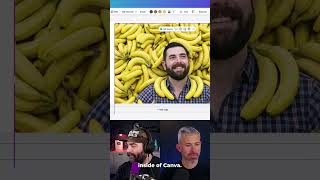
How to design a YouTube thumbnail in Canva that actually gets clicks. Start with a headshot, surround it with bananas, stretch to fill the frame, add big text at the bottom with a thick black outline. The specific visual choices matter for your CTR.
Chapters
So what I would probably do, put it into create image, pull in like a headshot, and then I'll say like, make this guy surrounded by bananas. Right? So what I would do is I would download this image at full size. I would go into someplace like Canva. I would pull my image into Canva. Okay. So here's my image with me surrounded by bananas inside of Canva, stretch it out like this. So now I've got a thumbnail that looks like that. And then I would pull in some text and say like, Nano Banana is here. Put it down at the bottom, stretch it out. So it fills out the whole area. I'll go up to effects and outline. And then I'd put like a, probably a thick black border outline around it like that, just so it stands out a little bit more. And boom, that's how I would do a thumbnail.