A short walkthrough and personal reaction to Cursor's new visual editor from a designer/developer who prototypes with Cursor. The speaker praises the editor for enabling small visual tweaks without costly prompting, faster iteration, integration with design systems and GitHub, and for improving efficiency in building demos and prototypes—while noting it is not yet a full replacement for tools like Figma.
Chapters
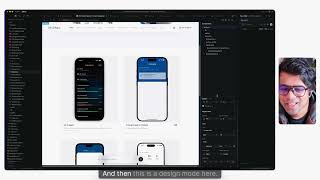
Okay, so Cursor made this new updates the visual editor, and it's definitely causing a lot of debates on Twitter and LinkedIn and everything. Anyways, I find it very helpful, especially like, I'm lately prototyping a lot with code and build my portfolio and apps and everything with Cursor. And it has been a great enabler for me. But, oh, I. I did have that problem where I wanted to, like, make small tweaks, edit your thing without having to prompt. So for example, this was like, if I have to make change here, I had to go here, select this component one by one and prompt. And the more you prompt, it burns more credit. So that it soon become expensive, especially for designers, because we make this small, small tweaks like one pixel here, one pixel there, and it's like a natural way of working. Cursor was kind of not enabling that before, but now they launched the editor, makes it much easier to do that. So let me show you a quick demo here. So let's go here. And then what I can do is let's say I want to change this thing one, and then I can go and like quickly change that. Okay, I don't need 12. Maybe I'll try 16. No, that's too much. So this makes it a little easier for me. So instead of like going and stuff. So yeah, you do apply like, variables and stuff when you work on, like, enterprise and large products and things. But for like, quick iteration and ideation and building demos, which I really enjoy, this goes a long way to kind of help you kind of tweak those little things. And maybe like, this will also, like, enable like, you know, setting up variables much easier. I know, like, designers don't want to go in a code and apply for variables and things like that, but sometimes you're just like, feeling things out, vibing and figuring things out. This helps a little bit for sure, and without burning a lot of credits and everything. So this helps. So I think once we kind of go into the variables territory, this much becomes easier to like, you know, inspect and stuff. And then you can also do some part, and then the agent will do the rest. So it kind of helps you be more efficient. And one more thing is, let's say you want to change order of it. So I have to manually say, move this from here and things like that. But now you can just quick move this container here on the top and it moves things. It broke my layout. So in this situation, you can just do undo. So that's one good thing that I found but you can always move these layers and also make sure that you are organizing the files properly. You can also tell the agent to organize and clean for you. That's the cool part. And then this is a design mode here. So this is a visual editor. And then these are all like the CSS properties. Right now it's like kind of agent, kind of uses like the reference of what I told on the visual language. But once you connect to your design system and the thing about Cursor is like connecting to a design system and everything is like pretty much better. And also connecting to a GitHub and all that stuff is much better. So this gives like a lot of opportunity for like designers to kind of get into wipe coding and like prototype their ideas, build their vision and everything. So it's kind of cool. It's not that I would say it's not that has simple has like Figma is. I think Cursor definitely have a long way to go to do all these changes and make it, you know, feel like a design tool. It's not definitely oh like you can replace the design tool. It's not. But it enables designers and AI product builders to kind of tweak little things without burning a lot of credit, save cost and also a great way to kind of envision your ideas. Before I got into ux, I was industrial design where I used to use physical product, fill the material and create things. This kind of feels like that where you are actually building out the product. Now portfolio is even launched and I'm working on apps, web apps and stuff like that, mobile apps. A lot of it still feels so much good because you're experimenting with code. You can see the interactions and things like that without having to work on the abstractions. And this is kind of taking out the abstraction layer. It's a great tool for you to argument what you're designing in figma, bringing it here or setting it from and going there. So whatever you're trying to accomplish, you can get better outcomes with all this. But I really love this new visual editor. Do check it out. I'll also include this in my wipe coding course as well. But yeah, this is really awesome. Thanks Cursor.