The onboarding that will 2x your client retention
Julius Forster builds an AI-powered client onboarding portal that automates the first weeks and pulls in branding, stakeholders, and tools like Slack and 1Password with one click. The system syncs data to your CRM, captures 90-day goals, and signs legal docs automatically. He argues you need an engineer who can prompt AI well, not just vibes.
Chapters
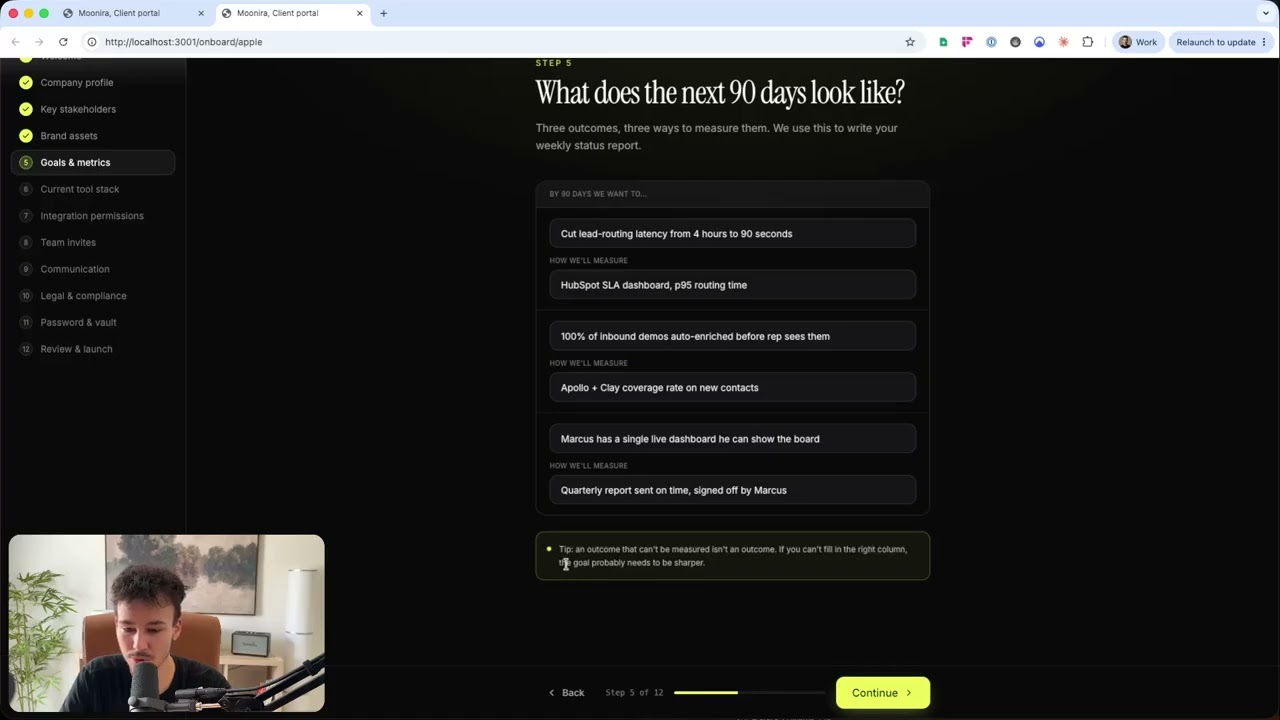
Now, one of the easiest things you can have someone do right now is upgrade your client onboarding. This will pretty much influence everything. Like, this is the very first kind of interaction after a client is won, after a prospect is won. So if you level up your onboarding, client retention will go up, everything will go up, they'll be much happier, and everything will go much faster. Because we all know if you deliver a client actual real value, actual real progress, something achieved within like the first 72 hours, especially if it's something like promised for within the first 14 days or something like that, that will highly increase client retention. How do you do that? By making sure that the onboarding automatically covers everything so that they are onboarded quickly, efficiently, and you can instantly deliver them results. So let me show you the kind of onboarding. This is not actually, this is just a demo. So this is not our actual onboarding for Munira, But this is how you can, and this was quick to set up, how quickly you can set up proper onboarding by just using something like Claude Code. And I do not recommend you, if you're not technical, I do not recommend you to do it yourself. I've seen some founders, some of our clients trying to white code things. They turn out okay, so you can totally do it, but obviously there are risks with it. So I recommend you to get someone on board who's actually, who has an engineering background, and it's not hard to find them, who can then use Claude to quickly spin something like that up, right? So let me show you, we have 4 categories right here in this demo. First one is creating a new client onboarding. Second one is walkthrough onboarding, how that onboarding will then look for the client. After that, we have the actual client portal, and that is pretty much, pretty much the entire thing. You can see it lives on localhost, which means it's a local demo right here that doesn't run on a server at the moment because it's just a demo. So let me show you. This is obviously how your internal console could look like, right? We have Apple right here, we have Stripe with some random MRRs, uh, put in here. We can open their workspaces. These are really just random numbers here. We, we don't work with any of those companies, obviously. Um, we'd probably charge a lot more than this if, if we worked with Apple. Um, now let me create a new client right here. Now let's just say this is, um, testing website. Might be— let's just take monera.com as the website, or let's take Apple. Let's, let's just create another Apple, and you can see instantly pulls their website logo right here. So this is something that can be done via— there are multiple logo APIs So we can instantly pull— we can instantly customize the whole onboarding experience, right? We select, um, consumer electronics and continue right here. Who's our primary contact? This is a placeholder profile picture, by the way. So let's use what we have right here, Sarah Chen. Okay, yeah, VP of— VP of Operations. Sarah.Chen@apple.com. Okay, always shows us different profile picture. So, um, yeah, it's as I said, it's just a demo right here. Let's continue. Generate onboarding link. So now we can send the link. Onboarding link could look something like this, for example, app.monero.com/onboard/apple. Uh, that doesn't— by the way, that's not a good onboarding link except if they get it like via email and they are getting authenticated, typically you would want a, like, with a randomly generated, um, thing right here, uh, so that it's— there are multiple ways to make it secure, but this, if they don't have like some sign-in, this is not very secure. It's, as I said, a demo. So we can say send via email, and most likely in this case she would have to sign in with her email right here, which is the correct approach in this case. So now we can click on Done. I'll just see if we can actually open that. Yep, perfect. So I'm going to click on Done, um, and now I'm going into the onboarding. Does that not look nice? We have the Monera logo here, which doesn't— isn't, isn't shown correctly. It didn't pull our logo correctly here. Welcome Sarah, we're going to spin up your entire workspace in the next 10 minutes. Slack, Drive integrations, your team billing. By the time you're done, every credential is shared clearly, every stakeholder has the right access, and your first work stream is in flight. 10 minutes, end-to-end credentials stay yours, you're not starting from scratch. Press Enter at any time to move to the next step. So let's just press Enter right here. It does not work. So these are all small fixes, uh, that can obviously be done. So company profile, we obviously already put in the company name, the website, the industry headquarters. It pulled automatically. We can do cool things like that. Company size, it also pulled automatically, but they can edit any of those by just clicking the edit button right here. Uh, what does your company do in one sentence? Uh, it pull— it pulled that automatically as well. So with those things, what's really cool with onboarding, something like this would typically take quite long, but we can pull those things in automatically by, um, using something like XII we can pull in, or even, even the, um, Perplexity API. We can pull in like from their website, we can generate things like that. What's your single biggest constraint slowing your operations, uh, slowing down your operations right now? We can pull things like that from your actual sales call because this is most likely something that was talked about on your sales call. So we can directly integrate with Fireflies or any call recording software to pull in those things automatically so they can just edit it or Continue. Now, key stakeholders— who needs access? We can specify one primary contact right here with different roles. We can add other people, just a few test people in here already. Those can also be specified by us in the beginning, but typically this is the best way to do it. So let's continue. Uh, we could also add more stakeholders here, change their roles and their positions and everything. And this can also directly sync to our CRM, obviously, and it should sync to our CRM. So this automatically creates new contacts in in our CRM as well that are related, that are basically connected to this deal and company. Now, brand assets is the next thing. So this is something that a creative agency would need more access to than we as an automation agency. We would probably have some other things here in place. First one, the logo already have the SVG. They could replace it by just clicking on it. They can click here to upload or drag in the brand guidelines. Same with the color palette, the fonts, and then they can specify anything else they want to specify down here. So we instantly have that. Now we can continue right here. And this, I think, is really, really cool. What does the next 90 days look like? We want to know what would make this perfect, right? So, um, by 90 days, we want to— and these are all examples again, so these would be, these would be empty, for example, and they would fill them out. Cut lead routing latency from 4 hours to 90 seconds. How we'll measure HubSpot SLA dashboard P95 routing time. Um, then we want to 100% of our inbound demos auto-enriched before rep sees them. We can measure that through Apollo and Clay coverage rate on new contacts. And then Marcus has a single live dashboard. He can show the board quarterly reports sent on time, signed off by Marcus. Now They can fill that out, and with that we know what is our North Star for this client, right? Uh, tip: an outcome, outcome can't be, uh, an outcome that can't be measured isn't an outcome. If you can't fill in the right column, the goal is, uh, the goal probably needs to be sharper. Yes, exactly. Let's continue right here. What are you running today? So this is super cool. They can select, and what I would do here is if they search, or there's another button custom tool where they just specify the name of it, maybe the website, so they can add all of the tools. This is something that especially with an automation agency like ours, where we are able to build you custom dashboards like these custom onboarding sequences, custom internal dashboards, custom reports, anything, this is super important, something like that, because it allows us to instantly get an overview how does your stack look like, right? Salesforce and HubSpot both selected here doesn't make much sense. You're probably either using either of them. Um, so let's say you're using Salesforce. Slack, obviously, if you're using Salesforce. Um, yeah, Notion, Asana, um, Apollo, Calendly, maybe Outreach for emails. Um, probably Loom and Zoom for meetings. Google Meet is better than Zoom, by the way. Um, Don't like Zoom very, uh, a lot. Stripe, yep. Greenhouse, let's say. 1Password, yeah, you might be using a bit of Zapier and Airtable. Like this general no-code stack right here. And obviously QuickBooks, who doesn't use QuickBooks? That looks like a good stack. Mercury, best bank account out there, best fintech. Um, now let's continue right here. And this can really be customized to anything. So whatever you need, we can have this awesome, awesome onboarding flow. Now next, hook in your tools. One click. We use OAuth, store nothing. You can revoke access at any point. So this, as I said, is especially useful for someone like us where we can now use something like 1Password, like Secrets, any secrets manager to now let them connect right away. So we don't have to go through like big strategy sessions where the clients have to connect one tool at a time, they can connect all of them right here. And any that don't have that, we can have APIs. Any, any custom ones, we can have API keys. I mean, any custom ones, they can basically just give us credentials, give us a login via a custom email. That's also one thing we can generate here that is not part of this flow. We can automatically generate like a custom email for them, like clientname@moneera.com, for example, that they can then add to any of their tools so we can access it and then get the API, uh, connection set up there. Um, but yeah, can pretty much connect anything right here. And there are tools that allow you to do that, right? You don't— for every platform, you don't have to set up like a custom app to connect it. There are platforms that let you do that. Now let's click continue right here. Now next, we, uh, they bring in the team. So this would obviously preload all of the people that they added under the key stakeholders, right? Now it's them. They can add anyone else right here, but I would probably combine that with the key stakeholders right away, like a little checkbox, maybe invite to platform or something like that. Um, but yeah, just to cut one step, right? The shorter we make it, the better. And each step Super simple to understand and do. Now, communication. How should we talk? Um, set the rhythm we respected from day one. Less than 1 hour reserved for direct responses, less than 1 hour reserved for production, production down incidents, uh, meaning if something's down, if there's something, uh, same business day default for client comms within 24 hours for low priority threats. Now, um, these, these things would, uh, already be clear in the beginning based on the plan. Um, one thing we can add here, so this, um, yeah, I don't know, this selecting them, this might be a bit confusing because these are all condition-based, right? If there's some— something is down, we respond in less than 1 hour, and same business day for general things. Um, Now these, yeah, that's, that's something that we can specify somewhere but not have selected, right? Uh, what does that mean, right? But what we can do is sync cadence, like how often do you want to jump on a call? Do we want to do that weekly, biweekly, monthly? What time works for you here best? And from that we can automatically have that scheduled. Now next one is the Slack channel. We don't, we don't have to do that because once you're invited to a Slack via Slack Connect. You specify the name yourself, obviously, of that Slack channel, how it should be named for you, um, who is the escalation contact, uh, do not contact ours, stuff like that, right? Uh, general things about communication. There are a few more things that we can add here. For example, paragraph saying we only, we only communicate on Slack, please don't generally don't send us emails. We will not be able to read them as quickly as we're able to read Slack, just to make sure we don't have like 5 different ways of communication, because you typically want to have one central place. Same thing for most things, don't directly DM us. Instead, keep it in the Slack channel so everyone can see it and we can actually work on it, um, and stuff doesn't get lost, right? Things like that you should have here and can have in here as well. Now, next one, legal and compliance. Obviously, there tools, there are self-hosted tools out there that could replace DocuSign or PandaDoc or something like that. Um, the thing is, that isn't really— that doesn't really work too well if it's on your own servers. You cannot really prove the integrity of a signature, right? So you want to have it hosted externally with an external provider. So now we have the, um, non— the NDA pretty much right here. They can click here, sign the NDA. Then we have the, um, service agreement sign, sign that, data processing agreement, sign that. Once all of them are signed, so we have that information back from DocuSign in this case, or PandaDoc, they can click on continue. Now the cool thing in our case here is, um, they already connected some of the things, but now for any other tools we can, we can have either or, but we can also have both. If they are already using 1Password, which is the password and secrets manager that we are using, they can directly connect, um, or they they can— we can create a new shared vault that will be created by the SDK in our 1Password, where they can then actually have like a built-in password manager in their client portal where they can share passwords with us, um, securely. So they don't have— those have— don't have to be sent into Slack, but instead they are shared securely directly via 1Password, um, which, which is quite awesome. Right. And then the last thing is, ready to launch your workspace, Sarah? One quick, one click and we'll spin up Slack, Drive, your vault, every integration, and your portal. Takes about 30 seconds. Then a quick overview over everything again. Your workspace is one click away. Launch workspace. Now we have a nice little loading animation here that goes through every single one. Each of them is initiating. And automatically being set up. This also instantly shows them what is being set up here. Okay, Slack right here, um, that Slack channel. Okay, Google Drive, shared Google Drive, awesome. And all the other things, I wasn't able to read all of them that quickly, but boom, instantly in the client portal. Looks really nice. I really like this kind of font, um, for, for these highlight— it looks really professional, looks really, really high quality. That is also the reason why we are using a similar one here on our website, right? Website has a lot of improvement potential hours, but yeah, really like, really like this kind of text. Instantly see active workflows right here, hours invested this month, which we personally don't track hours, we track results only. If you, you, you're interested in working with us. We don't care about work hours, we care about results. So we will work on a results-only basis. We don't care about how many hours we put in. If we, if we put in fewer hours but get you incredible results, the results are what matter, right? But typically we put in quite, quite a few hours across, across, across quite a few people, right? Time saved this month, ROI multiplier, active workflows, right here, 3 3. That is a very early, very early project right here, very early client with only 3 automations. Um, your team at Monera, like who, who can you access right here, can message on Slack. Um, upcoming meetings, nice little overview. We have the active, um, okay, in this case, the active work streams means active projects we're working on. So you have this, you can click into those, see them. We have milestone timeline, this very light greenish, is a bit, is a bit too light, don't like that a lot. Now what else do we have here? We have quick actions, request a meeting, send a message, upload a brief, request new project. We have a full search that allows them to search through anything in the workspace, their profile up here, nice logo embedded also here, Apple Incorporated, X Munira, with the client portal. We can go into the team, see the team right here. That's definitely not a profile picture of me, that's a placeholder here again, um, with the emails. And I mean, I just said we have one primary Slack channel to communicate, not via email, so this doesn't really align with that, right? Um, yeah, we have your team pretty much Then we can have the different workflows right here. When you click in them, you can post updates that might even get sent to Slack. So we can have like similar to how Linear has it, where for projects you can post updates, and those, those updates we could then say get sent in Slack automatically, like new update, the project XYZ on track, with an update text, and then they can respond, um, to that and stuff like that. Um, yep, that's how that can look like. Obviously a shared drive here, kind of. Now this can plug directly into Google Drive, but if we have a shared Google Drive, it typically looks a bit different, doesn't look that clean. If you have like Google Drive, um, you know how it looks like, it looks a bit outdated, right? But if we wanted to go a step further and instead of using Google Drive, which might even make sense, that's something I'll I'll probably think about instead of just using a shared drive, um, you could set up an S3. So you could set up a cloud storage and then have it directly in your application. The only downside is obviously how are we handling Google Docs, Google Sheets, etc. That is why we'll probably stay, um, with a Google Drive, with a shared Google Drive, because, um, yeah, we, we rely a lot on Google Sheets, Google Docs. We don't rely a lot on them, but we use them in instead of the whole Excel, um, and Microsoft Suite. Now here we have meetings on a nice calendar, right, with the upcoming ones down here with a way to join. Now if a meeting is right around the corner within the next like 30 minutes or currently going on, we can also display it up here, um, highlighted pretty much. We can have the activity in here, what's been going on. We can have invoices, contracts, uh, settings, yeah, that's not set up, and pretty much the entire thing here. So yeah, that is really, that is just really a quick overview over, like, all I want to show you with that is get someone on board who is actually a developer who knows how to work with AI, because the difference, the difference between a Vibe coder is a Vibe coder and an actual, an actual engineer is the engineer typically prompts the AI in a much more technical way. The vibe coder says, I want this and that in whatever way, like they can talk about visual things and stuff like that. Typically that means that AI makes decisions that shouldn't have been made in many cases and writes a lot more code than it has to write, bloats the whole thing up a lot more. Um, so you typically still want to have someone who can actually understand what the AI is doing. But with that, you can get something like that set up really quickly, to be honest, with custom, your own database. And especially if you, if you've seen my other videos, you've seen that I'm a big fan of setting up a custom database for you so that we can then set up automations that sync data from all of your different apps that you're using into a central database and are able to connect that data. And that then allows you to, for example, a recorded call can be synced in based on the participants, can instantly be connected to the contacts or the sales pipeline, whatever deal is in your sales pipeline, instantly be analyzed. Data, all the data from that call can be extracted by AI and then automatically the whole deal filled with extra details that were talked about on the call without your closers having to do like post-call forms, long ones, all fully automated. There are, there are so many things like there's So many upsides to setting up a custom database and syncing all your data in, including this right here. You can then run the client dashboard and everything on the same database. The onboarding, all details saved, like you have one workspace. And this is actually something that I could do in the next, in the next video, set up a quick team dashboard. How could this whole thing look like from your team's perspective and how much you can, you can really do with that. Based on like your role in the company, like where leaders, where managers or C-suite has like a full overview that is able to analyze all of the calls that are happening in the sales team, that is able to automatically based on meetings, based on Slack communication, keep track of health of every single client. So you instantly know if something slips, if a deadline is missed, if a client based on their style of communication is unhappy or has like early signs, like passive-aggressive and stuff like that. Um, yeah, there's really so much that is possible. Um, I recommend you to get someone on board who knows what they're doing and can actually implement something. And obviously I would highly recommend us for that role. Um, we're pretty much able to do, to do anything in terms of that. There's so much you can do, so much I recommend you to do. Um, but obviously you as someone in charge of the company don't have, don't have the time to implement something like that. It is very, it's very time intensive to properly implement something like that, but once it's implemented, it will save a ton of time. It will save a ton of time. Um, so yeah, that's pretty much it. There will be a link somewhere, probably in the description or somewhere else, um, that you can click if you want to check out our website and maybe book a call with me or, um, my rep. That's it. Thank you for watching.