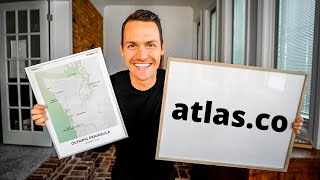
Nate and Kara launched Atlas Co, a service that turns your travels into custom framed maps. You input your stops, choose colors and layouts, and they ship it worldwide. They've already helped 500+ customers and spent over $50,000 building it.
Questions this video answers
On Cyber Monday.
Code 'karaandnate' for 20% off.
December 12.
Over $50,000.
Over 500 people.
Chapters
We are currently back home in Nashville, Tennessee. I've taken over my dad's office. But before we jump in, I just wanted to tell you that today's video is not going to be a travel video. We just finished driving route 66, stopping at a bunch of quirky places along the way. And we'll have that video ready for you on Wednesday. So if you only want to see travel videos, check back then. But we hope you'll stick around today so I can share a special announcement with you about a project that we have been working on behind the scenes for the last couple months.
We are Kara and Nate. We've spent the last four years traveling to 100 countries, but 2020 brought us back to the US where we bought a converted sprinter van to explore our own backyard.
Before we jump into this video, I just wanted to explain why I'm here at my parents house alone, without Kara. After our Pacific coast highway road trip got canceled due to new travel restrictions, we decided to make the long sprint home to our families for Thanksgiving. And after over 2,500 miles of driving, two negative Covid tests. You did it. We finally made it home just in time.
Hey. After Thanksgiving, Kara went home to be with her family. But I stayed here to help my mom take care of my grandmother who's sick. And because she's high risk, we figured the smart thing to do would be just not to see each other for a few days to minimize the possibility of COVID coming into this house. Will be reunited in just a few days. But for this video, you're stuck with me.
Hi, y'. All. I'm editing Nate's video right now, and it's seeming like since I wasn't there to help him, he set his focus just a tad bit off, and he wanted to reshoot the whole thing and upload this video a day later. But I convinced him to leave it as it is. Just go ahead and post it now so that y' all have as much time as possible to check out Atlasco before Christmas. So hopefully it's not too unbearable to watch.
All right, so this new company, it's called Atlas Co. And we officially launched to our email list and Instagram on Cyber Monday. In short, the website allows you to design custom travel maps and turn them into beautiful wall art for your space. Like this map that I created of our road trip around the Olympic Peninsula. This was as far as we got on the Pacific coast highway before our trip got cut short. And this flight map, which without a doubt is the most special to me this is a map of every flight we took to visit 100 countries. I was actually pretty blown away seeing this all put on a map for the first time. This took me hours, but I'm so excited to have this. And I didn't know either of these stats until I took the time to design this map, but we flew 387,000 miles and flew four years and took 251 flights. You can also do city maps. This is a map that I created of our hometown of Nashville. So this doesn't have a route if you just want to go for something more simple. Before I give you all the details about Atlas Co, I want to share a little bit of the backstory about how it came to be. But in case any of you are clicking over to the site now, I did want to let you know that in order to celebrate the launch, we're doing a 20% off sale between now and December 12, which is. Which is the last day that you can order maps to get them in time for Christmas. So if you do go ahead and jump over to the site and you don't watch any more of this video, make sure you use the code karaandnate at checkout to get 20% off. It's pretty fun being able to give a coupon code for our own site. All right, so the backstory. I actually dreamed this idea up back in August when I was on the bike trip riding 500 miles across Colorado. It was one of the many things that kind of tumbled around in my head as I was pedaling for 12 hours a day. So when I got back to civilization, I did a quick Google search and I couldn't find anybody else who was doing this or at least doing it. Well, don't get me wrong, there's other websites out there that let you create custom maps. But what makes Atlas Co unique is that you can create road trips and flight routes on top of maps. So you can actually customize the travel experience that you had and hang it on your wall. So this is what got me really excited. Bringing something into the world that I was really passionate about that didn't exist anywhere else. And I figured, how hard could it be? We'll design some cool maps. We'll create a website that lets people put their root on top of the maps.
Yeah. Several months later, after working with a small team of designers and a small team of developers, I learned that I vastly underestimated just how much work this would be and how much it would cost. I'm just going to be completely Transparent. Because I'm a business nerd and I would be wondering this. We've spent over $50,000 to bring this to life.
But I'm really excited about it. I think it's going to be totally worth it. The team that we worked with was incredible. We didn't cut any corners. And before I go any further, I should probably say a big thank you to them for working nights and weekends to help us be able to share this project with you before Christmas. And because they were able to help us get the site launched, we've already been able to help over 500 people create custom maps. It's just been super awesome to hear people sharing the same passion that we have for this idea and to hear some of the cool stories behind special maps that people have created. All right, so that's kind of the backstory and where we're at today. Now let me jump into the website and show you how it works.
Actually, I'm going to do it. All right, to get started, just go to Atlas. Cool. And click Create your map. The first thing you're going to do is choose between a road trip map, a flight route map, or a simple city map with no route. Just to keep it simple for now, I'm going to show you the steps to making a flight route map. Each type of map has a destination or a route already entered. As an example and fun fact, the reason we have this flight route here is because this was Nate and I's first flying flight of our entire 100 country trip back in 2016 from Nashville to Dallas to Tokyo. But we're going to start fresh. So this is where you're going to enter the destinations that you want to display on your map. I'm going to type Nashville. You can either type the city or the airport code. And then next let's say we flew to Miami. And then you can add as many new locations as you want. So. So I'm going to add one more, Rome, which is the airport code. Fco. Now, you can rearrange these airports by dragging these arrows. You can add another location, delete locations with this trash can. And once you have all of your stops entered, come over to the map. And this is where you can adjust it however you'd like. So you can click and drag to move it around. And then if you're on a laptop, you can use the trackpad to zoom in and out by pinching it. Or. Or you can use this plus and minus key up here. There's also an option to make the map Vertical, if you'd like, you can do the same thing. Zoom in and out and adjust it however you want. Next, adjust your labels. You can click and drag the airport codes and place them wherever you want on the map. Now, Nate and I are kind of airport code nerds, so we like to leave them this way. But if you'd like to change the labels, just click Edit Labels. Whatever you type on this side is going to show up on the map. So if you wanted to do the city names instead, then you can do it this way. Also, if you don't want labels at all, all you have to do is delete them from this Edit Labels tab. So since we didn't actually travel to Miami, if I was getting this map, I'd probably just leave Nashville and Rome and leave Miami blank. Whatever you prefer. Next, you'll give your map a title by just clicking directly on the map. I'm going to call this one our Second Home. Then you can give it a subtitle if you want. I'm going to put summer 2017 because that's when we went for the first time. Now, once you're happy with the placement of the map and your title and subtitle, click on the second tab, which is Customize. This is where we have six different layouts, which is basically just moving the text from around. We have eight different color schemes. I love all of them, but I'm a little biased but I'm going to go with this one. And lastly, Frame and finish. This is where you select the size of the frame, what type of frame, what color frame, and how many you want.
I actually have most of the frames that we offer on the website here with me. So we offer metal frames that come in three different colors. We have wood frames that come in three different colors. And, and we have the poster hangers which also come in three different colors. And then once you've chosen your frame, that's it, you just place your order. And this is probably the thing that I'm most excited about. This is the first physical product that we've ever launched that's available worldwide. We've partnered with the fulfillment company that has locations on all six inhabited continents. So no matter where you live, you can get your map quickly. And the best part is shipping is free to any location in the world, unless you live in Antarctica. Then we'll have to figure that out. But send me an email.
This was just a super quick run through of Atlasco, but Nate has uploaded three detailed videos of each type of map over on the Atlas Company YouTube channel.
Alright, so that's it. That's Atlas Company. I hope you're as excited about this as we are. I hope you'll go check out the site, play around with the map, put some of your travel routes on there and hopefully you can design something that's worthy of being hung on your wall. And if you do, don't forget to use the code karandnate to take 20% off your purchase now. And December 12, which is the cutoff day to get your map before Christmas. Oh yeah, one last thing. I think these maps will make an incredible Christmas gift. But if you don't know what type of map someone wants, what color scheme they want or what trip that they want to hang on their wall, we do have gift cards available on the website. So you can go pick one of those up and then give that as a gift for Christmas. And then that enables the person to come back to the site and create the exact map that they they want to hang on their wall. Thank you for watching. And the travel videos will be back on Wednesday as we drive 2,500 and something miles, a lot of it, along.
Route 66 to get back to Nashville.