Kevin McCann shows how Otter.ai transcribes meetings and calls in real time, with speaker labels and keyword search. He uses the transcripts to write blog posts and pull long-tail keywords for SEO, and walks through the free tier and referral program.
Chapters
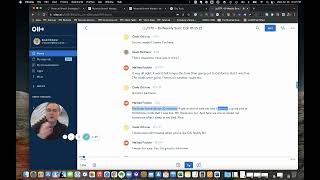
Hey, everyone, it's Kevin McCann here. Hey, I just had a client ask, like, what do we use as an application for transcribing audio or video? And the tool is Otter. So I want to show this to you real quick just so you can see how it works. And I'm going to put a link here below this video so that you can try it out and get a thousand or a hundred. Was it 100 minutes for every person you refer to, Otter. So you'll get a free hundred minutes. So it's kind of like you get free minutes. We get free minutes. Kind of cool. But, but, but basically we use this all the time. So I'll either, like, I'll open up Otter and if I'm on a conversation with someone, like a Zoom conversation, it'll integrate directly with Zoom if you want to make the connection, which is super easy to do, or you just hit the record button and hit like, new recording. And it'll start recording everything I'm saying. So it'll literally transcribe as I'm speaking. And then the cool thing is like, as the other guy or the other gal speak, so. Or multiple people speak in the conversation, it'll break out them as an individual speaker. And then at the end. Let me just stop this here. Stop recording. We'll come back to conversations. You'll see here, like, there's multiple speakers. Wait for it. There you go. So you can see Carlos spoke 35% of the time. Melissa was 25%, Kevin 23%, Colin, 17. Speaker number two, who we didn't know is 1%. Sometimes it's just kind of like blurred, like it's one of those three speakers or whatever. But it's just. It's awesome to not have to take notes anymore and not feel like you're going to miss something. And then you can actually, when you play it back. Let me move my head up here. You can play it back at fast speed. So, for instance, so like, like you don't have to go and listen to the meeting at 1x. You can actually listen to the meeting at 1.5, 1.75x. They start to sound like chipmunks. But I was like, oh, these are fun. And here we are. So. So some of it is like, I just want to get to the part where she talked about or he talked about, I don't know. Curveball, Right, Curveball. Where was that? Boom, right there. Start playing. Great. So now I know Curveball. So cool thing about Otter is that actually is all of this stuff. But you can keep all your conversations, you can throw folders in there together. And I just kind of use my naming convention for my, my my customers. There's one too for like strategy calls or strategy sessions. Like right there, strategy sessions. That's kind of like new business stuff for us. So anyhow, so you to import super easy, you just click import audio video. So like for instance, we just did a Zoom Q and a call session. So I'll grab that M4A, drag it here, it'll transcribe it and then I can post it on to Revenue Growth Mastery or to wherever I need it to go. And in some cases we actually use it for like blog posts. So like we'll do resources and if you've been inside Revenue Growth Mastery at all, you've already seen some of these transcriptions. But like for instance if I go to blog and then actually I'll show tools here. Wait for it. So the Go to market how to create a go to market sales strategy. And for this blog post we put a video embedded a video in there and like a little summary and transcription of everything I said in that video. Guess where that came from? Otter straight up. So cool part about that is anything I said here, there'll be long tail keywords in here and it'll just help to boost our SEO long term. So anyhow Otter, awesome. Check the link out below. Feel free to comment if you have any questions on it. But you guys will love it. Talk to you soon. See ya.