Kevin McCann shows how to use the Deals tab in Lead Launcher, a customizable seven-stage sales funnel that tracks how long deals spend in each stage. You can filter by sales rep and timeframe, add notes and reminders to individual deals, and manage primary and secondary contacts.
Chapters
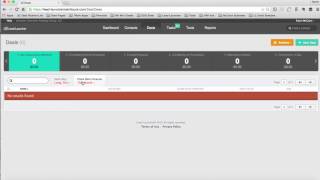
Hi there. I'm Kevin McCann with the Executive Strategy Group. And in this video I'm going to show you how to use the Deals tab in your lead launcher, marketing and sales system. So you see, I've clicked on deals here and what shows up right away is the sales process, or what we call a sales funnel. Sales process funnel with a number of deals at each stage of your sales process. So for instance, we've customized it for our purposes so that on stage one deal, a new opportunity has been identified and for it to get to stage two, we've identified that we've got a first meeting or demo scheduled. To get to stage three, we will have had to provide a proposal. Stage four is we presented the proposal, maybe we've had a second meeting. Stage five is negotiation. Stage six is commitment to buy. Maybe we've gotten a verbal from them and then stage seven is won. Or stage seven could also be lost. So we look at those seven stages in our particular sales process. So we've got the ability to customize that to your particular needs. And then as the deals progress through your sales process, we'll watch and see how many days the deals stay in each one of these stages so that we can accelerate the sales process as much as possible when we're coaching the sales team and working with sales leadership. So couple filter capabilities we have is to filter by sales rep. So we could say I want to look at all users or I only want to look at an individual sales rep. We can also filter by time frame, so I can say I want to look at any time for Tim's opportunities. And we can see that he's got different opportunities scattered throughout the sales process so that we know exactly what deals are at what stage for what sales rep, at which time they're supposed to close. So very intuitive. We could look individually at deals from here as well. So say for instance, we wanted to click on a deal and then we could track any kind of activity, sales activity with that deal, any notes updating what's going on, we can add a new note. We could even create a reminder for a sales rep or someone on our team to follow up with this person at a particular point in time. Or we could edit contacts on that particular deal, whoever the primary contact or secondary contacts would be. So that's the deals tab. And thanks for watching. In future videos, we're going to walk through tasks, tools and reports. Have a great day.