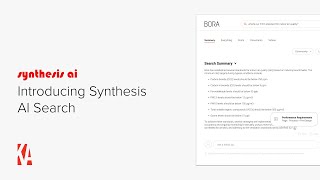
This is a recorded product-demo video (speaker: Christopher Parsons) introducing Synthesis AI Search, a firm-wide AI search tool that indexes intranet and common AEC platforms. The video demonstrates four core use cases—Design Technology (Revit/BIM), Marketing (project sheets, proposals, resumes), Practice/HR (standards, policies, benefits)—by showing live queries, generated search summaries with citations, follow-up conversational questions, content filtering, and draft generation (e.g., narratives for marketing). It highlights features such as citation links to exact content sections, search-result ratings/feedback, respect for firm privacy/permissions, and a CTA to book a demo.
Chapters
Hi, this is Chris from Knowledge Architecture Synthesis AI Search provides a single search box for firm wide knowledge which can search across all the content under Intranet as well as common AEC software platforms. While Synthesis AI Search is great at providing answers to a wide range of searches. In this video I'll focus on four use cases for AI Search to help you understand its capabilities. Design technology queries such as what is a bxp? Marketing queries such as what projects have we designed with a glass atrium practice area? Queries such as what are some sustainable concrete options? And HR queries such as what's our family leave policy? Let's get started. I'm on the homepage of my Synthesis intranet and I'm going to start by showing how AI Search can work with design technology content. I'll hover on Technology and then I'll click on the Design Technology page. You can see that our Design technology team has created sections for each of our core applications. I'll click on Revit and you can see on the Revit landing page that we have Revit resources, training videos and recent posts about Revit from our DT team. If I click on the Revit Standards guide, you can see that I have a wealth of information about BIM basics such as levels of detail and BIM execution plans. Let's see how Synthesis AI Search makes all this knowledge super accessible to our employees. I'll start by asking why is my Revit model slow? Synthesis is searching across all the content on your pages, documents, videos, posts and uses AI to generate a result. You can see that Synthesis suggested six different strategies to speed up your Revit model and then it's provided citations for each of those strategies here to provide context. It cited model construction for the first strategy and you can see that it's cited model upkeep for how to use groups and in place families. And if I click on that citation, Synthesis will take me to the exact section of the Model Upkeep page which was cited in the search summary. Nice. You can see that I've got the ability to rate and copy my search summary which I'll come back to. And on the right side of my screen are the top search results for my Revit model is slow. I also have the ability to ask follow up questions. So in this example you see Manage Linked Files as one of the strategies for improving the performance of Revit models. Now let's say I don't know what a linked file is, so I'll submit my follow up question and same thing. Synthesis will search across all the content on your intranet and then generate an answer also containing citations. So I can just keep going having a conversation with our firm's knowledge. But let's try a few more searches. I'll search on LoD again. Synthesis is searching across the content on your intranet and generates a search summary that tells us that LOD stands for level of Detail and provides definition of each level of detail. Here are search summaries for work sharing, revit plugins, automating, revit schedules, and what does a BIM coordinator do? So you can see that by using AI search, our users can easily find the best knowledge our firm has to offer without having to know where to look. Let's talk about marketing in AI Search next. I'm on the homepage of our marketing community and you can see that our team has published posts about recent project news, photography, awards and wins, made information about our brand available, as well as templates marketing resources like a presentation library, proposal library, boilerplate library, resume library, and project sheets library. And if I click on the project sheets library, you can see that the marketing team has uploaded project sheets and grouped them by market. If I navigate to the project directory, I'll find current and completed projects and if I click on one of the projects, I'll go to a project profile which contains images and data points which our marketing team has uploaded to our CRM and image library and has made available to the firm and AI search through synthesis. Nice. Let's try a couple searches. What's our approach to using mass timber on projects? You can see by looking at top results that I returned a variety of content from the Internet, including a video on mass timber basics from the learning community, an approach document from the marketing community, and a page on building structure from the projects and practice community. Let's say I want to narrow my search scope down to just used documents from our boilerplate library. I'll apply an AI search filter and click Apply. And now my search summary will regenerate and you can see that we're now only using content from the boilerplate library to generate our search. Now this is a nice looking summary, but let's say that instead of bullets, I want a narrative. So I'll ask aisearch to please rewrite this as a narrative and boom. I've created a draft narrative about our approach to using mass timber on projects based on documents from our boilerplate library. I could do the same thing using filters for proposals or project sheets or resumes or combine them. Oh, and now I can copy this draft and take it into InDesign or wherever I'm working. Let's dig into a few more marketing searches. I'll search on Dropbox, which is an active project at our firm, And in the search summary you'll see that we're citing content from a project update at a recent town hall, a project sheet, and a project profile from the project directory. I'm curious to know more about the recent project updates, so I'll click on that citation and I'm taken automatically to the section of the video which contains the project update. Pretty cool. Queries like projects with floor to glass ceiling walls and summarize Burt Smithfield's top projects. Show how AI search effortlessly searches through years of vetted proposals, project sheets and resumes to give you a head start on your next marketing project and queries like how do we approach cross office collaboration? And draft me a blog post about the Wake Forest Business School win. Show how synthesis draws on the diversity of unstructured content on your intranet, like blog posts and town halls to help you create content which is relevant, up to date and interesting. It's like having a research assistant on your marketing team who does the hunting and searching for you to leave your team to spend more time strategizing, writing and winning work. Let's touch briefly on using Synthesis AI Search with practice NHR content Creating resources on your intranet like project management guides, sustainability guides, and standards libraries unlocks the ability for your employees to use AI search to answer questions like what's the difference between WBS1 and WBS2? What's our recommended window to wall ratio? And what standards apply to water sprinkler installation? And adding HR content such as benefit information, policies and role descriptions lets employees get answers to questions like do we have a 401k match? How do I get a raise? And what does a job captain do? Two more quick things before we wrap up. First, Synthesis AI Search respects your firm's privacy settings, ensuring confidential data stays protected and that users only see results they have permission to access sensitive client standards, proprietary knowledge and private communities remain secure while being searchable for the right people. Second, when users search and provide feedback through our Ratings feature, content managers know what content to add, update, or remove. And Knowledge Architecture gets more clarity on how to improve synthesis, creating a flywheel effect that makes knowledge more accessible, accurate, and valuable over time. Synthesis AI Search doesn't just find answers, it fuels continuous knowledge improvement. So that's it for this introduction to Synthesis AI Search. If you'd like to learn more, you can book a demo@knowledge architecture.com demo happy searching.