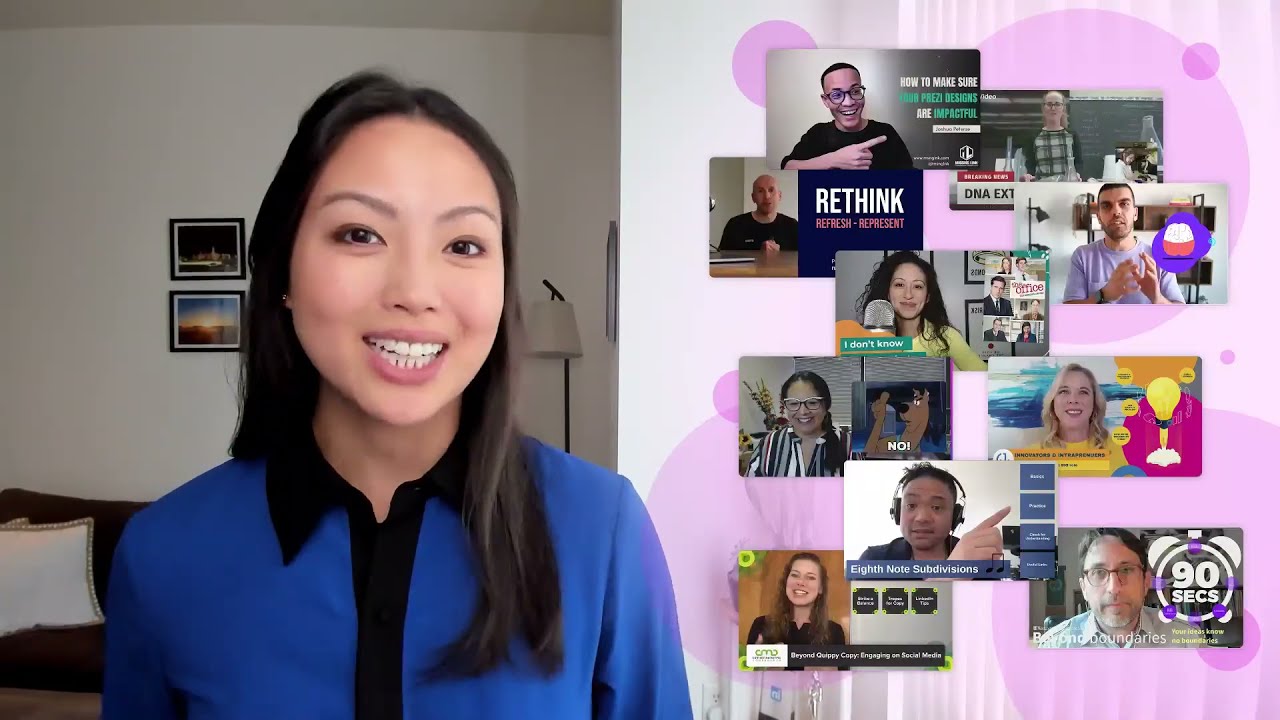
In this video, Lorraine K. Lee, head of Prezi's editorial team, showcases the platform's 2021 Staff Picks, a curated collection of standout Prezi Video creations from business professionals, educators, and virtual presenting experts. She explains the selection criteria—design excellence and content quality—and highlights each featured creator, describing their unique approaches: Ashley (Atlassian) on social‑media engagement and hand gestures; Josh on scene‑based design versus traditional slides; Bonnie’s simple template for a live DNA‑extraction experiment; Teacher Nucleo’s rhythm lesson with pause‑friendly content‑only views; Professor Morgan’s concise intro using a timer visual; Jessica (CBS) on source communication with GIFs and stickers; Carla’s conference‑ready bright template and B2B marketing insights; Elena’s storytelling hook, sleek design, and crisp audio; Boris (365 Labs) on virtual‑meeting presentation design and leadership pitfalls; and Russell’s memorable virtual drink demo using practical effects. The video concludes with a call to action, inviting viewers to create their own Prezi videos at prezi.com/video and submit suggestions via prezi‑editors@prezi.com.
Chapters
Hi everyone, my name is Lorraine Lee and I lead the editorial team at Prezi. I am so, so excited to be here with all of you today to present Prezi's 2021 staff picks. In this video, I'll be sharing our favorite videos from this year from business professionals, educators, and virtual presenting experts. We chose these videos based on a number of factors including design and quality of content. First up, we have Ashley, the content strategy lead at Atlassian. During the CMC conference, she shared how to engage audiences on social media with thought-provoking copy. She's also a great presenter, using her hands for emphasis and to establish trust with her audience. Next up, we have Josh, who hits the nail on the head when he says that we're no longer designing slides. With more ways to incorporate ourselves and our content into our presentations, we are now designing scenes. He shows 6 different ways to set a scene using Prezi Video, each as simple and effective as the last. My favorite was his mic drop, so make sure to check that out. We also featured Bonnie, who is a member of Prezi's educator community. In her Prezi Video, she used a simple template in order to share on-screen instructions with her students as she performed a live science experiment extracting DNA Strawberries. In our next video, Teacher Nucleo gave students a music lesson on rhythm, and at certain points he shared a content-only view to provide students with the opportunity to pause the video and practice with him. In his 90-second video, Professor Morgan recorded an intro video highlighting the staff and courses that are available to first-year students. He even used a timer as his main image in the video to highlight how short and concise it would be. We also featured Jessica, a news director at CBS. We actually came across her videos on LinkedIn, and we just love her tips for how to communicate with sources. She does a great job of making her content pop through her use of GIFs, stickers, and images. One of our favorite Prezi evangelists to work with is Carla here. Her video is a great example of how to stand out at a conference. As a top keynote speaker, she knows how to captivate an audience with a bright template and compelling visuals. And of course, she's also an expert in her field and shares what's next in B2B marketing. At first glance, what makes Elena's video stand out from the crowd is the sleek design and the crisp audio quality. But what makes us stick around is her storytelling. Elena does a great job grabbing the audience's attention with a hook, then steadily guides her audience through the beginning, middle, and the end of her presentation. Boris here is the founder of presentation design agency 365 Labs, and he shows exactly what your presentation should look like when meeting virtually is the norm. And what's just as important is how you lead these presentations. So Boris shares common mistakes to avoid for executives and managers who lead meetings and presentations. And last but definitely not least, Russell demos a drink virtually like you have never seen before, mixing practical effects and Prezi video features to show the drink's details in an exciting and very, very memorable way. Congratulations again to all of this year's Prezi Staff Picks. If you want to create a video of your own, you can get started at prezi.com/video. And if there's a video that you want us to consider featuring, please email us at prezi-editors@prezi.com. Thank you so much for watching, and I'll see you all next year!