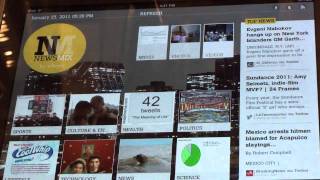
In this walkthrough, the presenter demonstrates the Newsmix iPad app’s social content reader, showing how to add accounts (Twitter, Facebook) and import RSS feeds from Google Reader, noting the lack of deep integration such as Twitter lists or folder imports. The app automatically segregates incoming links into distinct sections: photos, videos, and topic categories like sports and technology, based on inferred metadata. The presenter highlights the usefulness of isolated media streams, the generally accurate but occasionally off‑topic categorization, and the limited “Top News” area that only displays three items with unclear selection criteria. Pricing is mentioned ($2.99) and the app is compared to competitors like Flipboard. The speaker concludes with constructive criticism, suggesting better ranking logic, a “best of the day” feature, and more transparent top‑news algorithms.
Chapters
Alright, I wanted to give you guys just a real quick overview of the Newsmix app for the iPad, and specifically just around some of the functionality for the social content reader that my blog post covers. So here we are, we're in the actual Newsmix app right now. I'll just show you quickly how you add content to it. You just click this button here, and then here you go to add content. What's supported currently is just your straight Twitter account, no deep integration as far as lists, just the main account. Same thing with Facebook, just your straight account. You can import RSS feeds, and from Google Reader you can bring in the different feeds that you have in your Google Reader, although you can't bring in folders, which is a little bit of a bummer. So individual feeds from here, and then you just add all those contents here in these boxes. Now we'll go back to the main page. So after you've imported all the content, the thing that's a little bit unique about NewsMix as opposed to some of the other readers is it uses some logic to place that content in different areas of the app. So one of the cool things is, is if you go over here, you've got photos and videos that are isolated in their own areas. So if I click on photos, it's basically pulling in right now just the photos that are shared across my Twitter, my Facebook accounts. So if all I want to do is just sit here and, and go through photos, just get nice visuals, I can do that. Same thing with videos. If I want to go— let's go back to home. If I want to go just isolate videos, I click on the videos section, and then here we go. You just keep scrolling through all these different videos. That are being shared across Facebook and Twitter. It's pretty cool. So if all I want is, you know, just to watch videos or just look at images, I can do that. Then what it does is it takes all the different links that are shared across Twitter, Facebook, and Google Reader, and I'm not too sure what the logic it uses, but it basically must take some metadata or some information about the feeds and then puts them into different categories. So if I go into sports You'll see that different people that are sharing links on Twitter are ending up in this sports area. Sometimes it's off the mark a little bit, but for the most part it's pretty good. Does a pretty good job of isolating the links that are sports-related. Then same thing for technology. So I click on technology. Here you're gonna see some of the different people I follow on Twitter, what what links they share that are technology-based. So it shows you the source of who sent it out, and then easily enough you can scroll through these. So it's pretty cool. You can actually click on one of the items, and then it's got some other features as well where you can— where it'll show you their display version, their minimal display of the post. You can, you know, also read it on the web, and then there's some sharing options. But I really just wanted to focus on just how the content actually gets segregated in the different areas of the app. The other thing you got here is you've got top news. Now I'm not too sure what actually constitutes top news. That would be kind of interesting to see. And it only shows 3 items, so it's a bit limiting. But, you know, for me it'd be fantastic if this top news was based on how many people actually share these items. So we just got 3 items, I can only click on these 3 items and that's about it. Other than that, you know, it's a pretty cool app. You know, yeah, sure, it's $2.99, it competes with Flipbook, but I like the way that they're taking a unique approach as to how they're displaying the data in their own unique areas. I think it's a good start for kind of taking social content readers into a new direction. I just want to see some logic. Applied so that we can filter stuff up. If you notice as I'm going through these different areas, it's really just showing me the most recent links that were shared across each of these services. So I just want some logic to actually show— prioritize this content for like best of day. Not happening yet, but hopefully we'll see that starting to happen in the near future. Anyways, that's about it.