Set up a PlayStation 3 with a Logitech Harmony 880 remote using a Nyko USB-to-IR adapter, stream local media from your PC with Tversity, and grab web video from Netflix, Hulu, and YouTube using PlayOn, which costs $30 after a 14-day trial.
Chapters
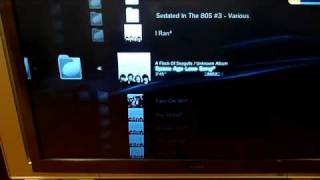
Alright, so I'm here to show you guys basically how to trick out your PlayStation 3 with a few things I did on my system that really improved the experience quite a bit. So the first is basically just getting a universal remote. In this case, it's the Logitech Harmony 880, which is an infrared remote to work with the PlayStation 3. And the problem with the PlayStation 3 is that it uses Bluetooth for its remote technology. So if you get basically a, uh, this The particular one that I got was a Nyko, which basically converts the— from the USB it gives you an IRR signal to go to the Logitech. So it takes a little bit of setting up, but once you get it going it's really cool. So what I'll do now is we'll go ahead and plug this guy into the PlayStation 3. You'll see it just basically just goes into a USB port. Get that guy in there. That's it. Now go grab the, uh, go grab this Logitech remote, and you'll see that basically, uh, I go over here to, um, I've got an activity button here for PlayStation 3. We'll just go ahead and click that on, and, uh, basically see it turns on my TV, and it, uh, Turns on the stereo, puts it at the right input. One thing it doesn't do is turn on the PlayStation 3. That's got to be turned on manually. There's no way to do that from the remote. That can only be done— could be done from the controller if you want to, but anyways. Now you'll see the system's all coming on, all audio, video, all set properly from the Logitech. So now we're in the Media Bar. So you'll see that basically I'm controlling the media bar from the Logitech, which is really cool. So what we'll do right now is, uh, now I'm going to show you the first application I'm running, which is called Tversity. That allows you to basically stream all media from your computer to your PlayStation 3. So I'm basically streaming my music, photos, videos, everything over. So first thing we'll do is go ahead and show you, go ahead and go into look at music. I'm streaming it all from this folders area. So gotta tell it once again, go to audio. So now it's— this is basically showing you all the media from my computer. So we'll go into my '80s folder here, and here you go, start seeing all the music in my '80s folder. Go ahead and play a little bit of Flock of Seagulls. So anyways, see, that's basically all working. We'll go ahead and stop that. So Tversity, so like I said, it also does video, photos, everything. Now I'll go over to another application I'm running. So this application is called PlayOn, and what it lets you do is basically also you install this, um, on your computer and allows you to stream from the web, from Netflix, from Hulu, CBS, YouTube and ESPN. Now, I had a little problems with Netflix today when I got this going because basically Netflix has just moved down to a Silverlight media player instead of the Windows Media Player they were using. So PlayOn's basically aware of the problem, they're working on fixing it. Also, PlayOn is a beta I'm running. It's a 14-day free trial, and I think the full version costs $30. So we'll go to Hulu and go find a video clip. So we'll go over here to TV Clips. Go down to— saw something pretty, pretty funny earlier. So we'll go down to S. There we go. Go down to Stacked. Never seen the show, but watched this clip earlier and it was pretty funny. Actually, I can't find which clip I saw before. Let's— no big deal, let's go ahead and just go ahead and click play. Then you'll see basically that now this is streaming straight from Hulu from the web from my computer. To my PlayStation 3. So, anyways, basically just wanted to show you guys how this works. It's pretty cool. So once again, you got Logitech Harmony 880, you've got TiVercity, streaming media from the computer over to PlayStation 3. And then you've got PlayOn streaming from a bunch of web services over to the PlayStation 3. Um, that's about it. Hope you enjoyed this.