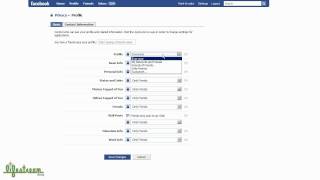
Learn how to change your Facebook privacy settings to make your profile visible to everyone. Go to Settings > Privacy Settings > Profile and change each dropdown from Friends to Everyone for your profile page, basic info, personal info, status updates, and wall posts. This is required if you want third-party apps to access your Facebook data through the API.
Chapters
Hey, so with today's Facebook announcement about them opening up their API to be able to share data between third-party applications and websites, I thought it'd be a good idea to show people how to change their privacy settings, as I'm pretty sure that being able to set a lot of your items that you share publicly is gonna probably be a requirement for that data to make its way these third-party apps and services so that other people can, can view the data you're sharing. So with that being said, I'm here on my home page of my profile, and all you need to do is go over here to Settings, Privacy Settings, and click on that. So once you're on this screen, you have several different options. But you basically just wanna click on profile. So now you're gonna see here that Facebook gives you pretty, uh, granular ability to set your privacy across a bunch of different items that are related to your profile. So also you'll notice that there's dropdowns for each of these items and the default, and I'm pretty sure I reset this to show you guys the demo, but I'm almost positive that it defaults to only showing friends all of these items. So for you to be able to share any of these individual pieces of your profile openly across a lot of these new third-party services, I believe you're gonna have to set it to public. So you can choose, choose them one by one. So the first one would be your profile itself. So here you'll see I'll click on the dropdown and you have several choices to determine who you want to share this information with. So you've got the default, which I believe is only friends. You've got friends of friends, my networks and friends, or everyone. So I believe everyone is, is basically the most open you can get, but even then Unlike sites like Twitter or FriendFeed, you still have to have a Facebook account to be able to look at somebody's profile. You can't just hit a URL and, and view the profile. So that is one caveat with, with sharing your Facebook profile. Also take a look at this Customize. So here you can choose everyone on Facebook or only friends, or friend of friends. So it gives you just a little bit more granular ability to set who you're going to share your profile with. So, and so I'm going to choose everyone. And so you see here we've got basic info. I'm not too sure what that is, but you've got personal info, your status updates. So you can choose who you want to share each of these individual pieces of information with. So anyways, you just need to determine what you want to share, who you want to share with, choose them from the dropdown, and you're set. There's a bit of a difference here down in the wall post area. So you see this dropdown has a couple extra choices. So for wall posts, you can allow whether or not friends friends can post to your wall by that setting. And then here you can determine who you want to share it with. So you can set that privacy to only share the wall post from friends with yourself, no one, a couple other options here, or customize. And then this customize gives you even further options on who can see the actual wall posts. So you'll see that, you know, Facebook does give a lot of granularity on the privacy settings, and I just wanted to highlight all of this stuff because it's probably going to make a difference what data gets pumped through the API to these other services, you know, based on what your settings are here. So I don't want to go into a whole lot of detail, but I just wanted to show you guys this is probably, you know, turning all of this stuff to everyone is probably going to be a requirement to a certain degree, to get data across, out there. And after you've chosen everything, you just click on Save Changes and you're done. I am now publicly sharing everything with everyone on Facebook. That's it. Hope you enjoyed this.