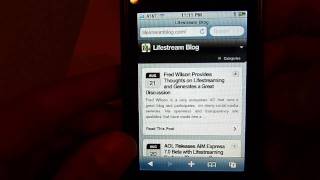
WPtouch transforms a WordPress blog into a mobile site for iPhone, iPod, and Android. The plugin includes a custom home screen, navigation with icons, Ajax-loaded excerpts, inline images that scale automatically, social sharing buttons, and an archives view with tag clouds. Mark shows how it handles comments, orientation changes, and full articles without requiring coding.
Chapters
Hi, it's Mark from Livestream Blog, and today I wanted to show you guys the WPtouch WordPress plugin. So what this plugin does is it basically allows your site to be displayed properly and really nice on an iPhone, iPod touch, and an Android. Um, 'cause, you know, normal blog themes just don't really translate well to, uh, to these devices. So what you're looking at here is, uh, when I first hit my homepage You'll see that I got the, uh, my own little custom icon, uh, and I describe in the blog post basically how to get that done and appearing there. Uh, the name of the blog, and, um, here we see a couple of blog posts. And you'll see I can scroll down and you can see each of these posts. Um, there's the ability to load more entries, and then also I can turn off this mobile theme and go back to what the default theme would be. Um, and another really cool thing is this navigation bar. Navigation dropdown. So if I click on this, now you see this little dropdown that comes up, and you can define which pages in your blog actually appear in this dropdown. And then you see all the different ones that I've chosen. And beyond just showing the title of the page, it actually— you can assign a custom icon to be displayed alongside the page name. And then there's also a search button available to be able to search through the blog as well. So I'm gonna go back to the homepage, and another thing you can see is that here on the blog post, this little arrow, if I click on that, I see a nice little Ajax-y way of displaying an excerpt from the blog post. And if I wanna go ahead and read the whole post, I can go ahead and click Read the Post. So we're gonna go to the blog post right now. And here you can see a really nice clean way of displaying it on the iPhone. So it's got the title and here's the actual post and there's an inline image and you can see that it does a really nice job of scaling the image properly for the blog post. Also displaying a block quote. It's just got a lot of nice features for displaying stuff. And really nice to read, simple to read. And here is actually one of the more impressive features with this plugin. You see all these little icons down at the bottom here? Each of them have a lot of custom functionality. The, the envelope basically lets you send an email with a link to this post to anybody in your address book. The little birdie there If you click on that, you can see that it allows you to post it to Tweety, Twitterific, or TwittleLater. I think it basically identified all my Twitter clients on here and will let me send a tweet out by clicking on any of these links. If I click on this icon, it'll basically let me social bookmark it to a bunch of different sites. And that icon there— whoops. Okay, that one seemed to have a problem. I think that one was search, and I'm not too sure what this other one is, but you can basically see there's quite a lot of features that are with the custom. And here you see my discuss comments also that you can scroll through. I mean, it supports showing comments as well for a blog post. And I'll also show you that if we go ahead and tilt this guy that renders it nice in this mode as well. So, and it rescaled the image. So you can see it's really pretty cool. So I'm just going to go back to normal. If I can get it. There we go. Okay, so I'll go back to the home page. And, uh, now go down to the navigation and we'll go ahead and click on the archives. Um, just to show you, I think it gives a custom view of my archives. It shows a nice tag cloud. So you can click on any of those. Um, and then you can also navigate through the different archives here. Um, And always you can click on the blog's title to go back to the homepage. So, anyways, just wanted to give you guys a quick look at this really awesome plugin. I think it just does an amazing job of rendering your site with a bunch of nice useful features and functions. That's it. Hope you liked it.