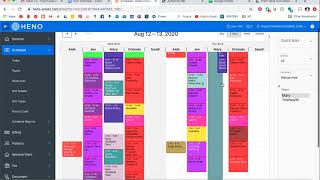
A brief instructional video explaining the color coding and organization of a clinical scheduling system. The speaker (Mary Kostka) describes colors for one-time available vs. consistently available spots, color assignments for therapists (Jen, Orlando, Mary), special appointment types (eval, first-after-visit, QRI), darker colors for telehealth visits, use of reminders, and how to create, block, and delete schedule entries.
So in this video, I'm going to explain kind of the different colors of the schedule and explain a little bit of how the schedule works because it can be overwhelming to look at if you're not familiar with it. So like I explained in the other video, these green appointments, one time available appointments. So that means the patient called and canceled their spot for whatever reason. That means we can fill it this time, but it's not available as a consistent spot. Spots that are available for consistent spots are yellow and we'll say available, whereas this one just says one time available. Right now we have it color coordinated. Jen's appointments are purple, Orlando's are red, and Mary's are this color. Or you can see better. See next week they're usually this color. She's covering for Atlanta next week, so that's why they're all that color. Or they're all white text because she doesn't usually see them. But anyways, the schedule is a little bit weird right now, so we'll go back here. And this is the color for eval spots. And I do have. I printed out kind of a diagram of the different colors and what each appointment type means. So this one you can see this one is a little bit different. This is a first after visit, so that helps us know what the therapist needs and just kind of marked. We know this patient is only coming in for the second time. They've been in for the eval. This is their very next visit. It's just kind of helpful to know. And like I mentioned in the other video, the darker appointments, I just kind of changed the color to be darker for telehealth visits. So that just helps us know that the therapists will be probably in the kitchen. They've been doing telehealth from the kitchen, so they'll be in the back there with one of the computers. And we also know that that means, like at this appointment time, there's only one kid going to be in the clinic, or there's no kids in the clinic because this one is a telehealth visit. And same here. Later this afternoon we have a telehealth visit and Serenity is coming in. And that will be just one kid. Serenity is the only one coming in. So that's helpful to know. This type of appointment is for qri. You can see it's under the aid section. That's just a reminder for us that we have a QRI appointment at that time. You can always list reminders as well. This can be helpful for the people who are going to be looking at the schedule. If there's any reminders we need to know about or things we need to do maybe or call somebody. That's an easy way to get it on the schedule. This is just. Morgan's going on a trip this weekend so she's leaving earlier today. And that just kind of reminds me. Oh, Morgan's leaving at 3:30 today. So yeah, if you need to create a spot, you can click anywhere on the schedule. You can change the time and date of the appointment. Or if I need to block, say I needed to block Mary for sp something. Let's see, we'll just say we need to create a spot here. So I would say 10am to 11am and we're gonna block. We're not assigning it to any patient. It's just for a block. But I would say why we're just doing a test now. Mary's gonna think she has a test tomorrow. Okay. So there's that shows up there and I'm going to delete that because she doesn't need that on her schedule. Okay.