Schedule Building
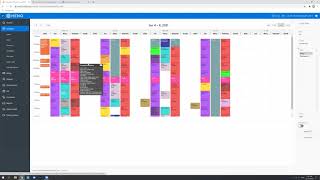
A step-by-step tutorial demonstrating how to build a clinic schedule in the Eno system for the month after Christmas (January). The speaker shows copying consistent appointment slots from the current schedule into future weeks, handling telehealth slots, distinguishing consistent vs picked-up spots, using 'check appointment' slots for uncertain follow-ups, and mentions an upcoming separate video about slot types.
In this video, I'm going to tell you guys how to build a schedule in Eno. So we usually build the schedule a month or so out. So we're going to be looking at the schedule in January, which is after we come back after Christmas. So usually I open two tabs so I can look at our current schedule to help me build the next schedule. So I'm going to click schedule here. This is going to take me to January 4th, which is when we're back in the clinic again after Christmas. And then in order to open a new tab, you have to, you know, won't let you just open a new tab up here. You have to click the new tab button. So I'm going to open a new tab. This will open a new tab so that I can kind of go back and forth from one tablet to the next. So I basically copying each of the names into the new week. So I'm going to click to the next week. And we can see all the appointments are blank. They don't have patients assigned to the slots. So we're basically copying this information into the following weeks and we'll try and build all the way through January. I won't include all of that on the video because it takes some time, but it's more of just kind of a tedious task that you just have to do. It's kind of fun though because it's like copying, just copying things. But so from looking at the original schedule, which is here, there's a few. These are just reminder notes for us when we get back in the new year. So we don't need to copy any of those. It's mostly just copying the consistent spots into the new schedule. And when you've done this for a while, you kind of have memorized some of the spots and where people are. So a lot of it is kind of memory. But I always keep this tab open just for reference. So I'm going to look at kind of the first few names. I see Henry, Brantley, Brooklyn, Oliver. So I'm just going to enter them in here looking for Henry. So you can just type the first couple letters of their name. Enter and then save Perfect. And then Brantley and Brooklyn. And I see from here that Oliver is. He's a different color. And you can also see the T here. That means it's a telehealth visit. Jen's telehealth look like this. They're just a darker color. And I've color coded them in the slot types here so that it's Just easy to tell at a quick glance that it's a different type of appointment. It's still the same therapist, but just a different type. So we're going to make sure we change that to match that. This is a telehealth visit. So we'll click here, we'll find Oliver's name. Okay, double check that you have the right patient because like you saw when I looked that up, there's Oliver. Olivia, you want to make sure double check that you have the correct patient selected. Because this is a telehealth visit. We're going to go down to the slot type. We're going to make sure it is Orlando telehealth and we'll go ahead and save that. It'll change the color in the system. I'm going to ignore this for now. We're trying to work through this error message for max visits, but we'll just override it for now. Okay, so that shows up there. There's some of Mary's spots are consistent spots. We want to be careful to check these accordingly. You can see that the black text means it's a consistent spot. The white text means it's a picked up spot. So you can see Julian, Xavier, Trevor and Jared and these two as well, Brooklyn and Joseph. These are consistent spots for Mary. So we want to make sure those are included in her schedule here. And again for this one we will want to make this match. So this is Mary. It's a consistent spot. So it's just going to be OT Mary. I have Trevor's appointments in here because they've been long time patients. They're pretty routine. So his spot probably won't change anytime soon. So we're just to going gonna enter him in. And I do jump around in the schedule. Like oftentimes I'll do it a day at a time, like do all of Mondays and then do Tuesdays, Wednesdays, Thursdays. But as you start learning the schedule and kind of memorizing it, like I totally jump around. I know Alex has a spot here and here, so I'll just like enter them in. But you can kind of do that as you're comfortable. So that's kind of a basic way to build the schedule. That's how we do it. You'll just go through and match all of these. You'll see the QRI appointments as well. I think Jack is getting close to being done. He might actually finish before the new year. So this one he may or may not do. I'm just going to leave it on there. For now, Kaden still has quite a few more, so he'll probably be on there. But that's like for this we're probably going to put Kaden's name in because he just started before the new year. He's also the QR counts as appointments, so it's a little messy there. But see what else. So one way that we note appointments that may or may not be coming in like this one at the end of the year, he's almost out of office for next week, which is December 15th is his last visit on this off. So we don't know if we're going to get a new off that he can come back. So that's why this is his consistent spot. But since we're still waiting on an off, we just marked it as check appointment because we don't want to give that spot away to anybody else if we are able to get an off. It's just kind of an unknown at this point. So the check appointment slot type is a way to notate like don't cancel this appointment yet. We just don't know the status of it at this point. So that's helpful so that we can quick look and you can see that on. Let's see. So this is next week. This is today is Thursday the 10th, but next week we've been trying to contact this patient about finding out if this spot still works for them because it's been a few weeks since they've been in. So we have a couple check appointments next week that we're just following up with and if they don't fill like we have some backup plans anyway. So that's helpful for the check appointment. That is about it for building the schedule. But I do want to make a separate video for building slots and the slot types. So I will do that next.