How I Went from $500,000 to $4 Million Per Year Using Email, Web Push and Facebook Messenger
Recorded webinar presentation by Matt Paulson (MarketBeat) describing how email, web push (browser) notifications and Facebook Messenger bots helped grow MarketBeat’s revenue from ~$500k to multi‑million yearly. The session includes presenter background, company metrics (traffic, revenue, subscriber counts), implementation tips and tools (OneSignal, PushCrew, ManyChat, Mail Monitor, EdataSource/SendGrid), split‑testing and list‑hygiene strategies, and a short Q&A.
Chapters
Hey everybody, Matthew Paulson here. I have Will Bushy on the line with me from Bright Planet. He is going to be my kind of moderator today. So if you guys have any trouble seeing the screen, you don't see my slides, anything like that, Will will help you with that. And if something is wrong and my audio is not coming through, he will yell at me. So Will is certainly here to help. While we kind of wait for everyone to come in, I've got a poll I made and really it's just for me to understand who's watching the webinar so that I can make the content most relevant to who's here. So if you see the poll on GoToWebinar, the question is how would you best describe yourself? Are you an online business owner? Are you a successful online business owner? Do you own a physical business? Are you a service provider, like a banker, attorney, insurance person? Or are you an employee that wants to be an entrepreneur someday? We're getting some answers. Thank you for participating. It looks like a third of you voted. Wow, you guys are actually voting. That's great. Oh, the numbers are changing. Interesting. We've got quite a mix of people. I don't know if you guys can see the responses or not. Maybe you can. It looks like pretty even on all different categories except for service providers. We have quite a few of them in here. Have 33 of you watching right now. That's great that you all showed up. I'm sure everyone else is probably going to watch the recording. I did get several people ask about that, which is always the case because people have jobs and can't watch webinar at 11am. Just a little bit of background, guys. This is not for me to sell anything. It's not for me to pitch anything. The only thing I have to sell you guys is a $10 book. Even that $3 ebook. And I care less if you buy it or not. I give out free books all the time. This is just give me some experience hosting a webinar because in my other business, MarketBeat, I've learned that webinars are quite a profitable sales tool and I wanted to get a little bit of practice teaching something that I'm very familiar with just to get used to gotowebinar before I try to solve something on the webinar. So that's kind of what we're doing today. It is 11:01. We'll give just a couple more minutes, maybe another minute before we get started. Got 41 of you in here now. Looks like the poll responses 19% online business owners that make more than $1,000 a month, 12% online business owners that make less than $1,000 a month, 14% physical business owners, 39% service providers and 17% future employee or entrepreneurs that are currently employees. If you do have questions, feel free to type them in the chat as we go. Will will be monitoring them and he'll be asking them at the end. We already have one question, but if we have more than one business, well then you can certainly apply what you learned today in multiple businesses based off what's most relevant. Certainly not everything is going to be relevant to every business. Like for us, Facebook ads is something we can't do because our audience of 60 and 70 year old men really aren't on Facebook. So that's just not something we can do. A lot of. We can certainly do push notifications, we can do email marketing. Those things work really well for our industry. So you kind of have to pick and choose what's most relevant to you. Okay, it is 11:02. I've got 53 people in here now. So I think we are going to go ahead and get started. And today's kind of topic we're going to learn about email marketing, some advanced tactics. We're going to learn about browser notifications, web push notifications, same thing. And how to use Facebook messenger bots. If I can get there. A little bit about me for those of you that don't know me. I sent this out to my email list and not everyone has really knows who I am in detail. So I'm just going to go through this in a minute or two. I've got a nice picture of my kids over there. My wife's name is Karine. She was a schoolteacher. She's a mom. Yes.
The poll is still showing so I think I might need to end that.
How do I end? Okay.
There you go.
Okay. I shared the poll. Is it showing up now?
Okay, go ahead.
Okay. So you guys are seeing. Will you see the right thing now?
Yes, we do.
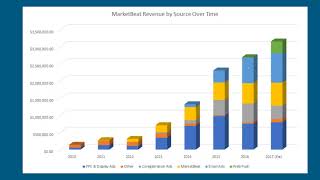
Yep. Okay. Yep. So my wife Karine, my five year old son Micah, we just had kindergarten registration yesterday. And then my daughter Adelyn, that's probably a year old picture but she's going to turn two next week. So that's us. I have a computer science degree from Dakota State. I also did the MSIS Master of Science in Information Systems program there. And then after that I decided to get a seminary degree. So I have a MA in Christian Leadership as well. Really? What? Most of my time in the last 12 years has gone to is entrepreneurship and businesses. So I've started I guess six different businesses. I mean there are certainly more and lots of failures in there. So don't, you know, don't think that I've only had successes because there are plenty of businesses that I tried that never got off the ground. My first business was called American Consumer News. It was a network of personal finance blogs that we ran from 2006 to about 2011. When the Google Panda update happened that business became unprofitable so we shut it down. Around then we Transitioned to our MarketBeat which is a financial media company. We'll talk a little bit more about that later. I ran a press release writing and distribution business called Lightning Releases. I sold that and 2014 to some guys in Utah company I still run called Goko Photo Contest. Helps animal shelters raise money through online photo contest fundraisers. Started that with a couple friends, That's Jason and StevieJ. I was involved with a company called U.S. golf TV for the last three years. I sold kind of out of it at the end of last year. Sold me equity back to the other two owners. And then Paulist Angel Fund is a community based angel fund and Followstadt I am the chair of and we invest in early stage high growth companies in South Dakota and surrounding states. So that is a little bit about me. What we are going to do today over the next kind of half hour or so we're going to learn how email and push notifications have grown our company's revenue over time. We're going to talk about how to leverage web push notifications on your website. We're talking about Facebook messenger bots and there's been a little bit of an update in the last couple of weeks. I know. So we'll talk about that too. And then we're going to talk about some more advanced email marketing strategies. Maybe at some point we'll have more of a basic email marketing course which I think some of you would probably want. Today we're going to go over a few advanced tactics and we'll have a little bit of time for Q and A at the end. So Markavy, we're a web based financial media company. We get about 50 million page views a year on our website. We're going to do about $4 million in this year in revenue. We did about three and a half million last year. Our profit margin is 75%. It's now a digital business so we have great profit margins and not a whole lot of expenses. So we actually get to Keep the money we make, which is nice. We have 610,000 email subscribers and 200,000 people that have subscribed to our browser notifications, web push notifications. And we were on the Incat 5000 list the last two years and we are anticipating that we'll make it again this year. And then there are four employees in our company which is, which is me, Rebecca, Stevie and Dawn. If you want to see how all this stuff works, like what our push notifications look like, what our email opt ins, how those things work, just go to MarketBeat.com and you'll see them and how they get implemented in real life. So one chart that I like to show about MarketBeat is that how much money we make for every thousand people that visit our website over time and 2010, 11 and even into 2012, we were making $30 for every thousand people on our website and that was just display advertising revenue. And to get past that in 2013 here, that's when we started doing email kind of in a big way. In 2015 we started doing browser notifications. In 2017 we ended up doing the messenger bot stuff. So as we gain new ways to capture our audience and are able to remarket to them and recommunicate with them in the future, the amount of money we make for every person that's on our website has not quite tripled. So these things are really powerful and just allows you to maximize the people that are paying attention to you. So email marketing, push notifications and Facebook messenger bots aren't necessarily ways to get new people to your website, but they are kind of tools to make the best use of the people that are coming to your website. One metric that I really like to track that not everyone that has an online business for sure and if you have a physical business or a service provider, this is less relevant to you. But how much of your company is dependent on any one big company? So Google, Apple, Amazon, Microsoft, whoever, many people build businesses based on top of these things and then those businesses, their interests aren't aligned with yours perfectly and then they change something and then you don't have a business anymore. I Learned that in 201011 when 80% of my revenue was dependent on Google and when the Google Panda update happened, I lost a bunch of money and then I realized I'm never going to make that mistake again. So every year we try to be a little bit less dependent on Google, get traffic from other sources, buy email signups from elsewhere and we've really built a resilient business now because we're not reliant on any one big tech company. Another chart that I like to show is how our revenue has changed over time. So these are the different revenue sources. This light blue is display advertising. The gray is co registration advertising. So those are ads that show up after you sign up for a mailing list. Yellow is subscriptions, then this lighter blue is push notification or lighter blue is email advertisements. So ads in our newsletter, ads sent to our email list. And then the green is web push notifications. So if you look over the last couple years without push notifications and email ads, our revenue would have been flat if not declining a little bit. It's because of these extra things has enabled us to keep our business growing over time. First topic of the day is push notifications. Some people will call these browser notifications. They are the same thing. You can use these in Chrome, Firefox and Safari. And probably about next month when Microsoft releases their new version of Windows 10, support will be added for Microsoft Edge. So with it you'll kind of get all of the big desktop web browsers. The only thing that doesn't support it is Safari on the iPhone. Chrome on Android devices does support it. Safari on the iPhone just doesn't support technology called service workers. So that's not there yet, but hopefully it will be eventually. And one thing that's cool about push notifications, browser notifications is that they aren't dependent on Apple, Google or any single company. So there is some security in knowing that like one of the big tech companies won't just change it because it is an open specification and it can't just arbitrarily change like the rules on a Facebook page might. You build a push list in the same way that you build an email list so you have an opt in on your website. Dailypolitical.com is a website that I own. So when you go there, it'll say this site wants to send you notifications and you click Allow or block. And if you click Allow then I'm able to send you notifications. And each even if you're on a different website in the future, you'll still get my notifications. That's really what's powerful. So you could be on MarketBeat, click the Allow button, head on over to ESPN. I send a notification, you still get it, and then maybe you'll click on it and come back to my website. So it's incredibly powerful technology. Even if you're just sending out new blog posts to your push notifications list, it's a Very powerful thing. And then in the bottom here, you see an example of an advertisement that ran to our push notification list last year. For a while, marijuana stocks was the thing that people were advertising in our space. And that's what the Agora financials and all the big financial publishers were advertising. So this was an ad that went out to our list. There is kind of an ephemeral nature to push notifications. People don't stay subscribed as long as they do with an email. They might see a notification they don't like, they might block it, they might switch web browsers, they might be a Firefox user and then they go to Chrome and then they're not subscribed anymore. They might get a new laptop or a new phone, and then they're not subscribed anymore. So these are less persistent than email notifications. And that's okay. It's just recognizing it's part of the technology. And, you know, hopefully people will come back to your website and then they'll sign up again. So that's okay. One requirement of these things, to do it right is that you really need to have a secure website. So you need to have an SSL certificate set up, have the HTTPs, your web URL that part of this technology requires that if you don't do that, you have to do a workaround which doesn't work as well, and you get lower opt in rates. So if you can make your site 100% secure, there's a lot of good reasons to do that. Then you can also do this really cool native browser push notification ask and get higher opt in rates. Some of our stats of push notifications, we have about 200,000 people that get these subscribers or get these notifications from us. For every thousand people that go to our website, 1.5% of them will opt in. So we'll get 15 opt ins out of 1,000 people, which is probably lower than most of you would see because of the industry that we're in. Your numbers are going to vary. So if you have a more smaller audience, more engaged audience than we do, you'll get a higher rate than that. We send four push notifications a day. We get an average of 1,750 clicks on each notification that we get. And then we make between 60 and $80,000 in revenue a month from these notifications. And most of these are from ad sales, like the ad that I showed you guys before. And then we also have 10 page articles on our website, slideshows where you click next to next to next. They're really annoying, but lots of people do them because they make lots of money. So if I can get you to look at 10 ads versus 1 ads, certainly I'm going to make more money on those. And if I do send out five tips of the list, I'll make maybe about 25 cents for every person that clicks on it. You can sell clicks back to them. Obviously, if you're a service provider, you have something to sell, you can send that to like a lead form and have them contact you and say, hey, set up an appointment so we can go over, you know, whatever it is that I happen to sell. Depending on what spaceship, you could do affiliate offers, you could use offers on like Commission Junction or another platform like that. If you have your own products to sell, like an ebook or an online course, you could do an ad for those slideshow articles. Again, talked about those. Even if you have new blog posts, you can send people back to there just to get people on your website. There was a done for you push ad network, so you could just kind of give it to them and let them send ads to your list. They're called push earnings that shut down. I think there is another one now. I can't think of the name of it off the top of my head, but there's a guy named Kevin Gilbertson, he goes by Gilby, runs tinyurl.com, he's working with them that new network. And I can't remember the name of it for the life of me, but there is another one out there now. And it is okay to be aggressive with your notifications and how many you send. You know, it's okay to send three of them a day, four of them a day because they are ephemeral. People come and go on your list. You know, they don't use that computer anymore and whatever. And so you really need to engage your push list and kind of make the best use out of it while you can. Because people may only be subscribed to browser notifications for a month, where in email they might be subscribed for like a year and a half. There are kind of two platforms for push notifications. One Signal and PushCrew are kind of the two big ones. I happen to use One Signal, it's free, which is nice, has a full API, there's some good stats, they do sell your data, so they do like a retargeting pixel on your website that won't affect most people. And it's a really good tool for programmers because their API is really good for most people that are here. Push Foo is probably a better solution. It is a paid solution. The API is not as good, but their user interface is much better. And you can do auto responders, you can do autoresponder messages on those. So like day one somebody gets a message, Day three, they get a message. Day five, they get a message just like they would with email. You can also just set up your RSS feed on your website to go directly to push notifications. So you can kind of automate that really easy and it just is easier to set up. So if you're a marketer a little bit less technical, push crew is definitely the solution for you. Again, another tip, don't use the two click opt in. So if you don't have a secure website, you don't have the HTTPs URL set up on your website or SSL certificate, you have to kind of do a workaround where this is kind of this fake opt in thing and then you click a button, then it pops up a new window and then you click another button. Just the very fact that there are two steps there really hurts your opt in rate. So if you can at all use the native opt in notification on the left you'll see an ad with like a large image. Those work really well. I think they only show up in Chrome, but those really help click through rates and then you can add buttons to the bottom. So like, you know, we added one here with this little icon that says click here for details. Those call to actions really improve your click through rates. You can set an expiration time on your messages. We do that with all of them because if you might not use your computer for a week, we don't want to have somebody have 50 messages waiting for them or whatever. It would be maybe like 20, but we set them to expire after a day. I think that's just a good practice so that you're not really annoying people. And then push notifications have most of the service have what's called smart timing. So this means that I can send it to you at say 7am or 10am Regardless of what time zone you're in. So here at 10:00am if you live in New York, you get at 10:00am Eastern. If you're in California, you get at 10am Pacific. And that's a really good thing to do just in case you have people like in Europe or Asia that are on your mailing list and that way they're not getting browser notifications on their phone in the middle of the night. So that's a good way to be less annoying. Okay, let's move on a little bit to Facebook messenger bots. You can see what an opt in looks like. Could be a pop up, a bar on top, something in content, anything like that. I'll show you an example of this that's live on one of my websites right now. I can try to open the browser window here. Get over. Will. Are you seeing the Chrome window now?
Yes, we can see that.
Okay, this is one of our websites. And then this, this is an ad from manychat, our Facebook messenger bot, right there. So you can kind of see what that looks like and then say if you click on that button, it'll send it to you on MSN Messenger. So you'll get a message from MarketBeat and it'll say, hey, here's your free copy of my book. And then just a notice saying, hey, we're gonna send you some information over a period of time. And then if you don't want it anymore, just type stop. And then it'll stop. And then there's a copy of my book in PDF format. So that's kind of how it works. And you can go to this domain, stocknewstimes.com anytime you want. You can see how it works. There's plenty of websites that do that now if you want to try it out. There are some limitations to this technology. Facebook messenger bots and the newest limitation is Facebook's whole privacy thing with Cambridge Analytica and how they ended up leaking a bunch of our data. They have temporarily pressed the pause button on adding messenger bots to new Facebook pages. So you might not be able to do this now unless you've already hooked it up. You might have to wait a little while until they come out with some new rules for that to protect users privacy. So that's kind of on pause right now. If you want to read a little bit more about that, you can go to the manychat blog. They have a nice article on that right now. So this is paused for new people right now, but it will definitely come back soon. That's what it sounds like. So for Facebook messenger bots there are different type of messages. You can do a subscription broadcast, which is kind of a broadcast anybody. You can't do ads and no's and then for promotional broadcasts. If you're going to try to sell something, they really only want you to message people that have been active within the last day or two so that you're not annoying people. So far I haven't Seen Unlimited, they don't really like check what you post. So you could put an ad for your subscription broadcast. Maybe you'll get in trouble for it at some point in the future. But now it doesn't really look like it's being enforced. You can do autoresponder sequences with these things. They are limited to 10 days. With email you might be 30 days. But with Facebook messenger, like we'll do one message every other day for 10 days. And then also because you're sending messages to people over Facebook from your Facebook page, people are going to chat with you back whether you want them to or not. So you had better be prepared to start answering Facebook messages if you're going to do this. So it kind of by default becomes a new customer service channel for you because people are going to message you about your stuff just because you have that set up. And you probably should respond to them as well. The other limitation is that you don't own your audience. You know, Facebook owns your audience. Facebook could just get rid of the messenger bot platform altogether and then we would have no way to contact our audience. So just be aware of that. It's like building a Facebook page or a Twitter list. You don't own that audience. Facebook does, Twitter does, whoever else does. Here you can see our autoresponder series. It's an older screenshot, but right now I think we have about 3,000 Web push subscribers. It's not a great fit for our audience because our audience mostly isn't on Facebook. They're primarily older men and those people aren't on Facebook. So we don't do a whole lot with this now. But you can kind of see what the numbers look like. And you know, people open Facebook messages because they show up on their phone, they show up in a browser and people look at them. So you see the incredibly high open rates that we get. Like this sequence. Message number two, we had an 81% open rate and actually 130% click through rate. And the reason that the click through rate was over was because there are multiple links in that message and people clicked on them. You get really high engagement on Facebook. So if you have an audience that's on Facebook, you definitely want to do a Messenger bot, if you can. Some tips I use manychat most people do for marketing. If you want to write a true chatbot that integrates with other software, ChatFuel might be a little bit better. But for most people that are marketers, have an e commerce website, just want to chat with people. Manychat is a very good solution. Manychat has what are called growth tools. There are different types of opt ins. I'm going to go to their website quick and show you what some of those look like. I'll show you the growth tool we're using right now. We just set it up today. That's the marijuana stock thing that's on Stock News Times that I showed you before that. See if I can get it to show up. We had this growth tool might be hard to see right here. It was a little side thing that popped up on the side and they have lots of different kinds of these. Let's see. Yeah, you can do like a bar on top. You can do a sliding thing on the bottom right or the bottom left. You can do a modal pop up like my email pop up on MarketBeat. You can do a full page takeover. You can just embed a button or a box too. So you have a lot of creativity in terms of the placement and the colors. You can really make it match your site. Well, Let's see. Yeah, so when you're sending messages to people on your Facebook messenger bot list, keep them short and conversational, just like I'm sending you a Facebook message. Keep them. So be like, hey Matt, check out this new article I just posted. Here's the link. Keep it really simple like that. So definitely make an autoresponder series for your list. That way people can get engaged with your content over kind of that 10 day period where you can send them new messages with kind of your core content offerings. So say you're, you're on a knitting site. You might say, you know, day one is here's knitting 101. Day two is here's my best knitting tools. Day three is here are some cool knitting patterns that you want, you might want to, might want to try and then you go on from there. So just really kind of basic engagement content in that autoresponder series. You can use your list to identify your customer avatar. So like a customer avatar is kind of a fake person that kind of embodies who your audience is. So here you can see people that have signed up for my messenger bots. You see it's a lot of, you see it's a lot of older men, certainly some women, but primarily men, people that are in their 40s, 50s, 60s and 70s. So it's really easy to figure out who your audience is just by clicking on some people and just learning a little bit about them. It's very easy to figure out the types of people that are consuming your content on your messages. You can target by gender, by age, by location if you want to. We don't get that complicated. But you can again, be prepared to provide customer service through it because people are going to message you. And this is a platform where you really shouldn't overdo it. One message a day, one message every other day is about the right fit. Because if you're sending a Facebook message every day to somebody, you're going to become that annoying friend on Facebook that you just want to block. So be concerned about how many messages you send. There's a guy named Ezra Firestone. Smart marketer is his brand, but he probably has the best Facebook messenger bot training that's on the web. So if you want to pay for a course that's really good, check out his stuff. Don't have an affiliate link, just google it, smartmarketer.com you'll find it. He's got really good stuff there. The last topic is email marketing. When I did this presentation first at the Rhodium weekend conference in 2017, it was to a more advanced group. So these tips are going to be a little bit more advanced. If you don't have a good background in email marketing, read my book. I have a link to a free ebook copy, marketbeat.com images, EMD, zip, and maybe we'll put that link in the chat. But that will give you a free copy, digital copy of the book and you can read through that. Learn really the basics about email service providers, about email, opt ins, autoresponder series, all that stuff. So if you want the basics, go grab that book. So we're going to have kind of five more advanced tips that will help people improve their email deliverability here. Most people overestimate their email deliverability. They think that, oh, it's showing up in the inbox and my inbox, so it must be doing the same with everyone else's. Or if it's showing up in the spam filter in my inbox, it's probably doing that for everyone. But that's not the case. Every email service provider, Hotmail, Yahoo, aol, Google, they all have kind of different filters and you might be in the inbox in one of them and the spam filter in the other. So there are tools that will kind of show you if you have a deliverability problem or not. They'll show you which email messages you're sending out that are getting in the inbox and what percentages they'll tell you if you're on a blacklist or if you have an issue with like Hotmail, which we do. And then they can show you how your numbers compare to industry averages and will help you identify technical issues early on. So the cheap one is called Mail Monitor. That's a really good solution for most people. It's like $79 a month. And then we use a solution called SendGrid Insights. It's actually called EdataSource. But I'll show you deliverability by different email service providers and kind of a chart over time. So you can see our deliverability for Gmail, Yahoo and AOL is fine. And then Hotmail, it's a dumpster fire because Hotmail has the strictest spam filter out of anybody. And that is just a problem we have to deal with. So this is the tool we use to monitor and then we can track by campaign too. So we can say, oh, here's today's newsletter. There were 246 people on the panel that got the message. And of those, Gmail, Yahoo, AOL and then international stuff, none of those have been tracked yet. So there are some really good tools out there. If you got a bigger email list that'll show you how like your reputation for your different IP addresses and all that stuff, you can see those then Return Path is the most expensive solution. I tried it for a year, I didn't think it was worth it. It was $20,000 for us. I definitely wouldn't recommend people buy that, but it's out there for enterprise level clients. Yeah. This is a return pass screenshot that shows campaigns by inbox percentages. It's their old interface. I think they've updated a little bit since then. And then they'll show you for each kind of message, like, oh, we found a broken link in your message. Here's how to fix it. Or your Gmail and Yahoo users. There isn't a high reading rate and that can cause problems. Or your spam report rate on this message was a little bit higher than usual. That could be a problem. Then it shows you all the things that you did right as well. So those are some kind of the tools that are out there that are helping with deliverability. Tip number two. This is a tip that I saw from the digital marketer team Ryan Dice and company. They have a lot of good trainings, but depending on what you send for a subject line and message body can dramatically impact the number of sales you generate from any email. So here is a test that we did on the left here, a different split test we did for Subject lines and you know, the worst one got 15.3% open rate. The best one got 19.5. So depending on what you use, it can dramatically impact your open rates, your clicks, your sales, everything. So what we will do is 15% of our list will get several different subject lines and then another 15% will get the best subject line with a couple different email bodies and, and then the best combination of subject line and email body will get sent to the remaining 70% of a mailing list and then you know, if your email service provider supports it. Try to go by, try to measure success by sales and not by just opens. Opens aren't always a good measure of effectiveness because I could send you a message saying your spouse just died right now and you probably open a message but you wouldn't buy anything. So try to go by the finalist, the most final metric you can. So by sales as possible. I think we go by clicks now. That way we know people are engaging with content sales. We don't always have enough to get big data. So I think we go by clicks. But the idea is to split test your subject line, split test your message body and then send the best combination of those to most of the people on your list. Number three for email, don't reinvent the wheel. Sign up for your competitors email lists. You have competitors sign up for their stuff with maybe a fake email address and just see what kind of stuff they're sending out and open and click their email so that you keep getting your messages. That way you don't accidentally get removed from the list. And sometimes you get really good ideas from other people's mailing list. We have a company that we work with, it's called Zach's out of Chicago and we have plenty of deals with them. They wouldn't care to copy this, but they had a subject line called 20 Stocks to Sell now. And so we kind of replicated that. We made our own version of that report. We got a 70% open rate which at the time was 25% better than our average. We got a 16.5% click through rate which was five times better than what we normally do. So we saw that report, we kind of made our own version of it and it worked. So it worked really well. So then we just now every couple months we will send out that same email and we're going to keep sending it out until it stops working. Tip number four, you can make an affiliate program for your email list. So if an email signup for you is worth $7.10 like it is worth for us, you know, you would gladly pay somebody 2 to $3 for that email opt in for every time you know that somebody collects an opt in for you. So we have other websites that we pay a couple bucks to collect email opt ins for us. We do this directly through our affiliate program and also through co registration advertising like if you go on Forbes and you sign up for their newsletter. If you go onstreet.com and sign up for a newsletter, there's a pretty good chance that you're going to see an opt in for MarketBeat there. You should only pay for unique validated signup. So if somebody's already on your list, you don't pay for that. If they don't click the confirm email link, you don't pay for that. Because then they could just be typing in a bunch of fake email addresses into their forms. If somebody tried to do that to me, once tried to scam me, that does happen. Whenever you're paying people as an affiliate and you're not requiring a sale, there will be people that try to scam you. So you should thoroughly write your affiliates. Make sure they're on the up and up before you start working with them. And then what I found is that for the affiliate sites that we work with that run our pop up that their signups perform pretty similar to like organic signups on our own website. So you know, organic signups are always going to work the best. And then stuff that you pay for through co registration advertising or any other kind of email sign thing, they're not going to perform quite as well because they just don't. And you have to know that. But what I found is the people that we collect through our affiliate program, they work perform pretty well. So we've got a page on our website MarketBeat.com affiliate program if you want to learn a little bit more about how we do that, maybe model that for your own business. Tip number five. This is a tip that everyone should follow. The biggest mailing list doesn't always win. The most engaged list does. So if somebody is not actively engaged in your mailing list, you should kick them off your list. If somebody's email bounces, you should remove them right away. If somebody hasn't opened an email from you in a year, you email say once a week or a couple times a month, you should remove them right away or remove them after a year. If you email every day like we do, we'll kick somebody off the list. If they haven't opened an email from us in 90 days, we'll cut it down that much because that means there's 90 emails somebody's getting that they aren't opening. That tells us they're not engaged with our list. And if we have an unengaged list, we're going to show up in a spam floor more, which is just going to hurt the people that actually want our content. You really need to maintain good list hygiene so that you can keep your messages in the inbox. Kind of the best practice from the email service providers we talk to is to tell people that they don't open 50 consecutive emails, then you should kick them off the list. So depending on your frequency, that might be 90 days, like it is for us, or six months or 12 months, just depending on how often that you send messages. And then finally put a unsubscribe button in the header and the footer of each email. So that way people will unsubscribe from your list rather than pressing the spam report button, which will get more of your messages in the spam folder as well. So make it really easy for people to unsubscribe. That way they unsubscribe and don't click the spam report button. Really, you would rather have a smaller list of engaged people than a larger list of unengaged people just because that way your messages actually get into the inbox? That is kind of the end of that part of the presentation. If you want to stay in touch with me, here's my website. There is lots of blog posts from over the years that you can learn stuff from. There's some good stuff about email marketing, push notifications on there. Want to send me a message? There's my email in the 1990s. There is my ICQ number. I think with that, we're going to bring Will on and Will kind of go through the questions for us. I do see some came in and we'll try to answer those as best we can. Excellent.
Well, thanks, Matt. I'm going to go friend you over on MySpace right now.
Okay. I think you already did that. No, I remember that happening. I put the screenshot on Facebook.
Well, thanks for all the great information, Matt. I mean, you really dived into some interesting topics, and I feel like I know some about this type of marketing, but.