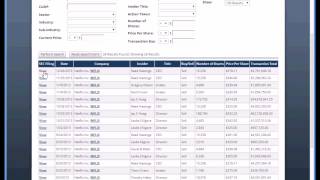
Matt Paulson walks through RatingsDB, a platform tracking nearly 250,000 analyst ratings from over 400 brokerages. The demo shows how to search and filter ratings by company, sector, and brokerage, plus tools like EarningsDB and InsidersDB, with examples using Netflix and Citigroup.
Questions this video answers
More than 250,000 stock ratings.
More than 400 different brokerages.
86.2%.
Chapters
Hi, this is Matthew Paulson with Analyst Ratings Network. I wanted to take a moment to introduce you to ratingsdb, our advanced stock research tool that provides exclusive access to our database of hundreds of thousands of stock ratings. With RatingsDB, you can identify which brokerages issue the most reliable recommendations. You can perform advanced scans to find ratings that meet the criteria that you specify. And you can keep track of new ratings as they're reported throughout the day. Let's dive in. This is the RatingsDB search page in which you can search a database of more than 250,000 stock ratings. You can find ratings that meet any criteria that you specify. You can search by brokerage, by company, by industry, sector, date, action, rating, price, target, upside and keyword. For example, you could find ratings for technology companies. You could get the latest ratings for any particular brokerage, or find ratings on stocks priced under $5. For example, let's look up ratings for Netflix. After performing the search, you'll see a table of all of the ratings that we've tracked for the company. You can click on the view link for any particular rating to see the details of that rating. For this particular rating, we see that Citigroup raised their price target on Netflix from $355 to $390. They have a neutral rating on the stock. Here is an excerpt from the research note and here are some other websites that mentioned the ratings. Here are more ratings for Netflix and more ratings from Citigroup. There are two other search features in ratingsdb I wanted to make you aware of. Earningsdb allows you to search through our database of earnings results. For example, here's a recent history for Netflix. You can see the analyst estimates, how they actually did, some information about their revenue, and if available, we provide links to the conference call and links to the company's earnings release. The second tool, Insiders db, allows you to see a recent history of insider trades for any criteria that you specify. For example, here is a recent history of insider trades for Netflix. So you can see a list of insiders that have been buying and selling the stock recently. The number of shares they sold on any particular date, the total size of the transactions. And we also provide you a link to the official SEC filing that has more details. Let's move on to the brokerage rankings page, which provides a 7 day, a 30 day and a 12 month ROI for the buyer recommendations from each brokerage. For example, if you had purchased all of the stocks that Dawson James gave a buy rating to in the last year, held them for 12 months and sold them, you would have gotten return on investment of 86.2%. The average variance column shows how accurate the price targets are. Brokerages with lower variances offer more accurate price targets than those with higher variances. You can also rank brokerages that cover a particular sector or look at how brokerages have done over a particular period of time. Options and Activity and headlines as they come in throughout the day Currently, I'm receiving updates for ratings in US Markets, so upgrades and downgrades will automatically appear on this page as they've been tracked by Analyst Ratings Network. Throughout the day, you can get updates for all stocks that trade on a particular market, or only for those stocks that you've specified on your watch list. Finally, let's look at the Company Profile section. This is a list of companies that have received the most coverage from analysts. And this is a list of companies that received the highest average ratings from analysts. Let's take a look at Netflix's Company Profile page. Here you can see a variety of tabs that show the most recent analyst ratings, earnings announcements, dividend announcements, and insider trades for the company. You can also see the most recent social media mentions about the company. You can view a chart of today's performance, and you can also see a variety of other information on the Company Profile tab. So that's the basic functionality of ratingsdb. I believe we have the most comprehensive database of ratings that exist on the web. As of the date of this recording, We've tracked nearly 250,000 different stock ratings from more than 400 different brokerages. We believe that RatingsDB can provide you the insights from analysts that you need to become a successful trader, and we hope that you'll find it as valuable as we do. Thank you.