The BEST Performance Logger | An All New Redesigned VBOX Review
Michael Chuang reviews the Racelogic VBOX PBox Touch, a performance logger with 10Hz GPS that measures acceleration, lap times, and deceleration. It comes in base and premium kits, mounts easily, and beats competitors like Dragy and AIM Solo in accuracy, though the glossy screen reflects badly and it costs more.
Questions this video answers
US$680
US$1,195 (transcript contains a mis-typed '11.95' but context indicates $1,195)
8 GB SD card; quoted good for up to ~120 hours of data logging
Rated for six hours of continuous use
About 17–25 seconds (speakers report ~25s to acquire satellites and ~17s for boot screen to clear)
Chapters
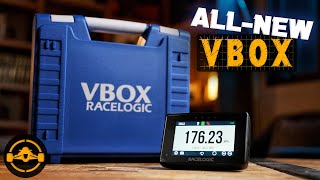
Sam. So you're a car guy or girl, you got a cool ride and you like to go fast, maybe in a straight line, maybe around a track, maybe you even compete. Or maybe you're just like me and you're obsessed with performance metrics. Doesn't matter, because at some point, if you're serious about what you like to do, then you need to buy the right tools. And frankly, this here is probably one of the best tools out there. It's the all new racelogic Performance Box Touch. Many people will just call it a vbox, but for us we'll refer to it as the P Box Touch because we still have our original p box from 13 years ago, so we don't want to confuse it with the Classic. And the VBOX Touch is actually a completely different product line that carries a much higher premium. But it's the middle of 2021 and I know there's a bunch of options out there on the market for this kind of stuff. Now the first ones that really come to mind are Draggy and Aim Solo. There are a few others like racebox and the new Garmin Catalyst. But we'll talk about the alternatives later. Right now I want to focus on this. The Pebox Touch comes in two kits. The basic package which retails for $680, and a premium kit which is fully loaded at $11.95. The biggest differences between the two are this external antenna, the clip on battery, and this gorgeous blue Race logic carry case. Now you can buy the basic kit and then add on each of these Items separately for $50, $90 and $240 respectively. I would definitely recommend the first two, but despite how much I love looking at this case, I would have a hard time shelling out 240 bucks for it.
A quick correction, the case is actually US$350 and that's a steep price. But I do want to add that it really does make everything much safer to transport and ultimately cheaper than replacing the P Box if you do end up dropping it or something.
Anyway, let's take a look at what you do get in the box. The first thing you'll notice is obviously the data logger itself. It's really well built. Even though it's made primarily of plastic, it still feels really premium. Now, because it's a P Box Touch, that means that it's touchscreen, so there are no buttons on the outside to press. The only exterior ports that matter are this micro USB for power, the antenna input, and this SD card slot. Speaking of which, it does come with an 8GB SD card. That should be good for up to 120 hours of data logging and, and that's plenty. I've been using this unit for almost a year now, and I've barely dented half a gig. To attach it to your car's windshield. You're going to take the Richter style suction mount here and then just kind of place it in the back and it locks into place. It's really quite secure. The suction cup is solid too. This solution is a lot better than the old three suction cup thing over here that they used to have on the PE box, which are easy to lose and they're actually just pressed on instead of actually able to create a true vacuum. Once you mount it up, you can then power it on via the included right angle micro USB cable, which will make for a nice clean look. For an even cleaner look, you can take the optional battery pack which will slide in where the Richter style mount was. It'll create a second one on the back so that you can still mount the suction cup to it. When you plug in micro USB power, it'll automatically boot up the P box and It'll take about 25 seconds or so to acquire satellites and load. But I would say that's pretty standard. The battery option gives you a power button here on the back and that you can use to switch the unit on and off when you're not using it. And that's handy so that you don't drain the battery throughout the day. But honestly, I don't think you'll be able to because it's rated for six hours of continuous use. And I don't know about you, but unless you're in an endurance race, it's going to be hard to be on track for that amount of time.
Now, if you don't get the battery.
You can still power it on via the USB cable into the included 12 volt cigarette port or an external USB power bank to connect the external antenna. What you do is you simply just line it up here and press it in. The cable itself is six and a half feet long and the module is magnetic. So what you do is you run it up your windshield out the window to the roof of your car and it just kind of snaps on. Being magnetic, it's convenient, but it has its limitations. The problem is that nowadays most sports cars are almost all fiberglass or carbon fiber, so this won't work. But if it does work with your car, it's nice because the magnet's really Strong and I wouldn't be worried about it flying off the car. I'll talk more about accuracy later, but unless the vehicle you're testing has an obtrusive windshield like a G Wagon does, then I find that the built in 10Hz antenna is plenty good. Now overall, I really like the aesthetic of the new P Box Touch. It looks professional, it's modern, it, it doesn't feel like a toy. And this mounting solution is on point. But there are a few things that I wish that it had. The first is built in memory. I'm sure they could have crammed, I don't know, maybe a gigabyte of internal flash memory in there because the SD card is nice, but it's just one extra variable that you have to account for. Which actually happened to me because I went all the way to Pocono Raceway one day and did all this testing and went home to find out that none of it was actually there because the SD card was still on my computer. My fault completely, but hey, it would have been a nice touch to save the day. The second thing I would complain about is that although I like the micro USB port and it's a big improvement over this old barrel style connector, it's 2021. USB C would have been preferred. Not a big deal. Plenty of stuff is still micro USB and cables are plentiful. The last thing I would improve is the glossy screen. It's full color, it's nice, it's high quality, it's plenty bright. But sometimes when you look at it off axis, it creates these weird reflections and it can be hard to read when you're just driving fast and you're glancing over at it. So what we did was we self fabricated this antique glare film to put on to prevent some crazy reflections on harsh days and also for when we do hero shots of the P box. None of this stuff is actually really detrimental to the functionality of the P Box. It's just me nitpicking because this is a professional tool and at this price point, those are the things that I would have liked to see. Anyway, let's move on and see how we actually use this thing.
Operating the PBox Touch is straightforward and idiot proof because as long as you turn it on and have an SD card inside, it's constantly recording data. After mounting and powering the unit up, you're greeted by the boot screen and that takes about 17 seconds to go away, after which you'll be in whatever mode the pbox was last left off on. In this case, we have the speedometer on the top left. You'll see the mode to let you know which timing mode it's on. Don't worry, it records everything regardless of what mode you choose to view. The middle is a record indicator to let you know if you are indeed recording data to the SD card. An SD card status icon and satellite status indicator. Then there's the battery indicator on the top right if you are using that option. In the middle is the actual display of information for the particular mode you're in. You can swipe side to side to see different pages or displays. There are always arrow buttons on the bottom right here to do the same thing. The little circle button resets the data. The camera icon takes a snapshot of the screen and saves it to the SD card. And the gear icon is obviously where you can tweak settings for the mode.
As well as general settings of the.
P box and see advanced options and diagnostics. Hit this door button to go back. You can change your timing mode by pressing this mode button in the bottom middle. Let's check out the acceleration mode. Here you can see the speed of your vehicle as well as the test that is in question. Now, unlike the original pbox, it can only display one metric at a time, which is a little annoying, but it's not a big deal because all that data is saved for analysis later anyway. The little clipboard icon here lets you.
See the acceleration data that is saved onto the P box itself.
It's not the same as having the data saved on the SD card, but more of a quick look at whatever you've been testing in that particular metric. Go into the settings and you can change your test metric to a plethora of different preset options. I'm told that at some point you can start to customize this because frankly, 0,400-0 mph is a test that no production car can do right now. You can also do custom tests like our in house 4 160, 130. By hitting the custom button here, you can enable one foot rollout and disable it as well, which will also give you the ability to slope correct your runs. That's really neat because slope actually makes a much bigger difference than you think in acceleration metrics. Next, we have the deceleration mode. It works almost the same as acceleration, except it's obviously measuring braking capabilities. Again, I don't know what car you'll be in that will require you to brake from 400 miles per hour, but I guess that's nice to have lap timing is a really important one, and it's a really versatile mode because you don't need to be limited to a closed loop course to be able to set lap times. If I remember correctly, the AIM solos are limited to being closed circuits in order to record laps. The P Box can manually set start and finish gates so that you can do timing tests like an autocross or sort of how we do it at our airport handling course. It also has a database of tracks saved on board so it can automatically recognize the gates at most of the road courses around the globe. The cool thing about the lap timer is that as you go through a track, the LEDs on top will glow green or red depending on your progress through the lap. It's predictive as well, so it's letting you know whether or not you're going faster or slower at a certain point in the course. It's missing a few mode screens from the original PBOCs like G Force measurement and the ability to see multiple acceleration metrics on one page, but I feel like this is an issue that can be solved down the road by firmware. Ultimately, it has a wide variety of handy feature sets built in.
But the most important thing about any performance tool is accuracy. No matter how cool the watch is, if it doesn't tell you the right time, then what's the point? Like I mentioned in a previous portion of this review, the PBox Touch has a standard 10Hz GPS and GLONASS antenna built into it, as well as the options add an external antenna for more accuracy if your car has a tricky windshield situation. It's worth noting that V boxes have generally been the standard for a lot of automotive testing companies and magazines, and there's good reason for that. They are probably one of the most reliably accurate tools out there. I mean, I've got one here that's still ticking after years and years of continuous use. Anyway, for our purposes, because we need to move quickly between cars, we generally don't use the external antenna, so I'm going to base my accuracy findings off of just the internal gps. Let's get started with the straight line stuff.
First, we took our X6 M50 to ATCO Dragway, where we ran it down the quarter mile to see how close it was to the physical time. We found that for the most part it was fairly accurate, being off by about 300ths of a second at most, with an average Delta of approximately 1/100th of a second. That's extremely accurate, and it's more than acceptable for something this portable or any anything for that matter. Next, let's look at the times around a road course where we used my buddy Luca's BRZ as a test mule. We ran five full laps but found that the laps right after and before the entry and exits exhibited more deviation regardless, it was extremely accurate otherwise. Also about a hundredth of a second in the average delta. I would be really confident using this for lap timing, which is its forte in my opinion. Now rolling accuracy is harder to test because we would need a specific set of timing gear. Luckily our friends at racemotive have exactly that because they host high end roll racing events. That means that they are able to capture our speed at two separate gates. I found that here the deviation was greater, but you can see that the delta was consistent at around 0.11 seconds, which means that the VBOX is functioning just fine and that the physical gates may have just been actually slightly further away than advertised.
These findings are pretty much what I've come to expect. It's consistent and accurate. It's also ISO 17025 certified and I'm not going to pretend like I know what that means, but all you need to know is that if push came to shove, I'm going to trust this thing over some $150 magnetic USB stick that's made in China. Not hating on Dragy, we use them all the time too. But like I said, there's a reason why professionals rely on VBox. One of my favorite aspects of the Racelogic product line is their software for post analysis. It's really quite simple to get the hang of. AIM has post analysis software as well, but they've got kind of a steeper learning curve with not that many tutorials online with the VBOX test suite. It's pretty self explanatory and there are a bunch of written tutorials and some videos to kind of walk you through the process. Having the ability to see this data is extremely helpful for both straight line analysis and lab breakdowns because you can see every millisecond of what's going on in the data. So you can see if you could have nailed the faster shift launch, better brake later, or carry more speed through a corner. You can even overlay a Google Earth image of the track itself over the data. So being able to see what's actually going on is really a crucial aspect of any performance data logger I will say though, I do like the legacy software a little bit better. It's called vboxtools, which I'm not sure if you can download anymore, but I still have a copy of it somewhere in this house. I think it's just that I grew up using that one so I feel like I can navigate through it much faster. However, Vbox Test Suite is just as good and it's a much cleaner looking software. But I've been talking so much about this P Box that you must be wondering to yourself, why should you spend all your hard earned cash on something like this when there are plenty of other options on the market? Well, let's talk about that.
There are quite a few alternatives to Vbox these days. You've got Dragy, extremely popular, extremely affordable, and also extremely easy to use because it pairs to your phone. It offers decent accuracy, but it's limited in its ability to do deep dive analysis as well as lap timing, which is crucial if you do anything more than straight line racing. And if you let your phone fall asleep during the runs, it'll usually fail to record the data. On top of that, the battery life isn't great. You get a couple of hours out of a charge, which is enough for casual users, but I know people who are on their second or third draggies because the batteries have a hard time holding charge after a year of normal use. The Racebox is a newcomer to the market and I did a review of it not too long ago so you can check that out if you want to learn more. I like its price point at 300 bucks and is relatively easy to use. It's like a draggy P Box hybrid. You can do both straight line metrics and lap timing, plus you can use your phone to perform analysis. It's not as in depth as VBOX or AIM Solo software, but it gets the job done for the most part. The downside is that it feels cheap, the mounting point is fragile and you can only do four metrics at a time, which means it doesn't record all the data, just a test that you selected. My biggest problem with the Racebox is that it doesn't offer the same amount of accuracy that I would deem acceptable for professional testing. The Aim Solo 2 is probably its biggest competitor. It's got equally as good build quality, offers both drag and lap timing. Accuracy is also solid as well as offers ECU connection to your vehicle for more information and data logging. If you get the DL model, which costs a little more than the Pbox touch, it gives you the ability to hook up a camera to your logger. So it's a really good overall value, but within the logger itself it can't customize acceleration metrics. And you also can't do point to point lap timing such as Autocross without deep diving into software. And that's pretty annoying. The last option is if you only care about lap timing. You can use apps like Harry's Lap Timer or other phone based software, but in order to get reliable accuracy, it requires you to get an external Bluetooth antenna which costs about the same as a draggy. And then you're really only limited to lap timing. So if you wanted to do both straight line metrics and circuit stuff, you'd.
Basically be at the price point of.
A racebox with less versatility and more parts to lose. Every option has its pros and cons, but I feel like the new P Box is definitely a great all arounder despite its higher price point.
Okay, so now that we know pretty much everything, we need to know, who.
Is the PE Box Touch 4?
Even though I think it's a fantastic product, obviously it's not going to be for everyone. At the enthusiast level. If you only do casual drag racing and roll racing, a draggy may very well fit the bill for the most part. And even if you do plan to spend some time around a road course, a lap timer app on your phone and is probably gonna satisfy your hunger.
For the first few track days.
But once you start finding yourself having to do the dishes in order for your wife to let you have a little bit more track time, then you're gonna want something that's more accurate, more reliable, more consistent and just downright better. And like I said at the beginning of this episode, if you are serious about getting faster, learning where you can improve from figuring out what modifications did what to your car, then the Peat Box Touch starts to make a lot of sense. Yeah, it's a little bit more involved.
Than pulling out your phone and seeing.
The basic data, but hey, the results are worth the effort. So in my opinion, this product is really aimed at a few groups of track enthusiasts, club racers of all levels, serious drag racers, automotive testers like moi, and really anyone who's even remotely competitive at this sport. Because at the end of the day, the P BoxTouch is a professional tool made by a motorsport company that's been in the business for probably longer than some of us have been Alive. And at $680 US dollars, it sits somewhere between a AIM Solo and a Garmin Catalyst. So the base kit represents a decent value. However, for most people this is still a pretty steep cost of entry. But remember, a VBOX is something that'll probably last you over a decade, as long as you're not abusing it. And as with most things that are quality in life, you buy once, you cry once. I do miss some of the onboard functions from the previous pee box, but I'm just really glad that racelogic decided to do a full refresh on it and make it a more modern and aesthetically pleasing package. The update was definitely long overdue, and I look forward to using it for another 10 years or so, at least in all my automotive activities. Anyway, I hope you guys found this video helpful, useful, or enjoyable in some way or another, and as always, catch you all in the next one.
I hope you guys enjoyed this video as much as I did making it. If so, it'd be awesome if you can hit that like button and share the video with your friends. I can't cover everything I want to in the short amount of time that.
I have, so if I missed something, let me know in the comments below.
As you probably know, it's mainly just me and my wife doing this channel in our spare time, so if you.
Want to show your support, I'd really.
Appreciate it if you took a look at our merch store or maybe bought.
Something through our Amazon affiliate links in the description below. And if this is your first time here, don't forget to check out some.
More videos on the channel.
I produce all sorts of cinematic car.
Content, so if you like what you see, smash that subscribe button for new episodes whenever they come out.
Thanks for watching. Subscribe.
More from Michael


Straight out the box subscription product, everything is listed already on our website! Check it out