Mastering Office 365: Unlock Savings and Simplify Licensing
Mike Austin walks through how to cut Microsoft 365 costs before your renewal. He covers why discounts have shrunk, where licenses get wasted (oversized tiers, unused features, batch buffers), and how to reclassify users and unbundle SKUs to save money.
Chapters
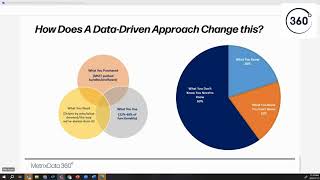
Sa. Sam. Okay, good morning, afternoon or evening depending on where you are as you join us today. I believe Haley's got everything set up so this is broadcasting it on LinkedIn where I know a number of people are watching. So for those of you that are in the teams meeting, please feel free to ask questions in the chat or raise your hand Ask question if you feel like coming on mike and asking but welcome to Metrics Data360's July webinar on Mastering Office365. Today we're going to talk about how you can unlock savings and simplify licensing when it comes to I never know whether to call it Office 365 or Microsoft 365 anymore, but anyways the Microsoft 365 or Office 365 suite. And so I thought I would start with why are we having this webinar this month and sort of especially just coming through Microsoft year end. The real reason is there's a broad contrast between what companies are trying to accomplish in the market today and what Microsoft is doing. In fact, I would say this even goes beyond Microsoft. I'm about to publish a paper on my thoughts on 2024 and 2025, the remainder 24 and into 25 around the software market and the cloud market. And I really think it's about damage control and you're going to see why. And when I say damage control, if you look at most organizations, they're trying to reduce their spend, they're trying to do cost optimization. So you hear a lot of people when we start talking to them are saying, I want to save 20% on my Microsoft, you know, EA renewal or whatever it is. And that's getting harder and harder. And the reason is if you look at what Microsoft is doing in the market, they're decreasing discounts. So if you were a large enterprise that had a fairly significant discount, we are seeing those discounts being reduced by, you know, half or more sometimes. So, you know, somebody that maybe had like a 20% discount is getting single digits now, right? And Microsoft has also increased their prices. So if you think about the price increases they had about two years ago, I think now, so EAs that are coming up for renewal were protected from that price increase. So if you look at decreasing your discount plus an 11% or more average increase of price, you know, some organizations are facing 30 to 40, maybe even as high as 50% increase in, in their Microsoft renewal costs, let alone trying to figure out how to get a 20% decrease, right? So if we look at that, that's a big challenge. And so organizations are looking to decrease cost. They're looking to get risk mitigation. And risk mitigation comes in a number of ways. Whether that's avoidance of audits. There's still a lot of conversation about is Microsoft going to audit me? We're going to talk a little bit about where we think they're going to start to audit on O365 specifically here in a little bit. They're also trying to get into efficient resource allocation. Looking at. Although this is more. When you talk about finops and stuff like that, you're typically talking a little bit more around Azure and things of that nature. But even with O365, they're really trying to figure out, do my users really need an E5? What users can use, the frontline workers, SKUs, all of those things. They're looking for data to make improved decisions and they're looking to realize the value. We're having a lot of conversations about time to value realization because one of the tactics that Microsoft is using nowadays is what I'll call decreasing discounts. So in other words, they'll give you a higher discount in year one, a little bit lower in year two, and lower in year three, so that your exit price is higher. Now, Microsoft says that they're doing that because, let's say, you know, they're trying to sell you the E5 suite and you're not using it all. So they're giving you time to value, so give you a higher discount when you're using less of it. The assumption is you're going to use more of it over the term of the contract. The reality is, you know, Microsoft wants a higher exit price, right? So that when you come up for renewal, if it was say, 40, 50, $60 a unit, you know, you're exiting at $60 and they're negotiating with you at $60 a unit versus the average of 50 or $40 in that year1. So they're really using that as a tactic. The other thing that we're seeing with them is they're selling, you know, selling up the stack. And what I mean by that is they have a lot of products now that aren't just it centric. Right. If you look at, you know, what they're trying to do with the Dynamics 365 products, they're moving into the business and having conversations within the business itself. PowerApps is another thing. Although PowerApps, you know, can be seen as a technical product, it solves business problem problems. A Lot of the time. And so they're talking to the business people about power products, you know. And so not only now are you dealing with Microsoft selling to it. They're selling within the business. They're expanding out doing that. They have trained their sellers significantly on especially that first point on how to avoid giving discounts and how to say no and how to push back on that. And so it's becoming more and more complicated and tough for organizations to realize what they're trying to do. Right, which is reduced spend. Most organizations are coming to us and I need to reduce my cost. And yet they're facing these 30, 40, 50% price increases based on all the things that Microsoft is doing. So probably should put this first. But for those of you who don't know me, I'm Mike Austin. I used to work at Microsoft in licensing. I think it was licensing specialist, eight or nine in the world. So I have a lot of experience negotiating well over $2 billion in Microsoft contracts. And I'm not going to do a pitch on metrics data 360 today, but we're really here to help organizations buy what they need and pay a fair price for it when it comes to software. I was asked for a quote the other day and I thought I would actually start with this here because managing your enterprise agreement, when people managed an EA, and I know we're talking about Office 365, but really is about renewals typically is when you're buying, it is most organizations started their renewal process six to nine months, maybe 12 months before the renewal. And that's not the case anymore. You need to be actively managing your Microsoft contract weekly, if not monthly. Now, you know, at a minimum, especially with Office 365 and Azure. And we'll talk about why here in a little bit. And the only way to combat what Microsoft is doing is to know your data better than they are. And that's the only way that you're going to reduce cost or stay flat is you may have to actually unbundle. There was a Gartner paper that was released recently that they basically said that in order to decrease cost, you're going to have to look at maybe moving from M365 to O365, moving from E5s back to E3s and maybe some a la carte. And we're going to talk about that today. But the challenge with that is if you leave those sorts of strategies until the final quarter of your renewal, you've got to go through all the change management and things like that, that's necessary to make those changes within 90 days. And that is difficult if not impossible to. And the other thing is this is not a one person on your team. I think a few years ago it used to be like sort of Microsoft was owned by one person and that person typically would do the EA renewal and sort of maybe work with legal and some other things. But nowadays it's going to take a team to get this done. And so I think that the key message here is you can't manage your EA as a renewal and kind of look at that as a once every three year event. You have to be looking at it, you know, in some cases weekly, other, you know, at a minimum, I believe no matter the size of the organization, you have to be looking at your O365 and your Azure spend on a weekly or sorry, on a monthly, monthly basis moving forward. Again, I'll explain why I say that. Right. But this, you know, just, I pulled a couple of things, you know, CIO Dive and Coreview did a study and they basically said that 44% of Microsoft 365 licenses are underutilized or oversized. So in other words, people are only using 44% of what they have paid for or they bought a bunch of shelfware, bought E5s and aren't using them or the features of it. Our data actually suggests it's actually worse than that. I've got data to show that. I think it's actually closer to 27% of what people pay. And I'm going to show you how we get to that here in a little bit as well. They say it's caused by purchasing licenses and batches without understanding use profiles. And really what that means is you're buying based on an EA renewal and chasing sort of a price discount and whatever bundle Microsoft is purchasing because we buy in batches. So you think about the EA renewal, I'm buying for everybody. And then organizations, typically even when they're in an ea, what we see a lot of times is they're buying a buffer of licenses that are sitting on the shelf. So as new people come on, they don't have to go through a procurement process to purchase. You know, you look at some organizations, they're they're managing a 10% buffer or more. In some cases that could be hundreds of thousands if not millions of dollars depending on the size of your organization. Because they're buying in batches. Like it's like we run out of license, we buy another thousand and then they chew through Those thousand and then they buy another thousand. And you know, if it takes six, seven months to chew through those thousands that thousand licenses, that could be hundreds of thousands of dollars. Right. And that's just a process thing. And not to mention, you know, purchasing wrong licenses for their users. Microsoft's great at selling the bundle, right. They make the E3 and E5 look very attractive. You know, they will offer discounts to incentivize you to move from one to the other when the reality is most users could utilize, you know, frontline user licenses in some organizations and E1s that don't include the full bundles in others or a la carte models. Right. And I'm going to talk about that as well because we see a lot of lot of information in the data that can show you show that you know, you're not using these licenses. You know, we have an organization that has bought E5s and when we analyze their usage, they had 5,000 users that never even used Office that they're buying E5s for. They were all frontline workers. And so they can move those 5,000 users to F use like the Frontline, F use SKUs and save something like $2 million. But they didn't have the data to make that they just bought based on these batch purchasing that they were doing. And so you can see how it happens. Another thing is that they say the number one reason that they do this is that it's a complexity of managing licenses. And the reality is it's not as complex as Microsoft definitely makes it out to be and as most organizations think it would be. In fact, the reality is because of the waste in the way that people are purchasing it would, it's costing them more than it would cost even if they had to hire an FTE to manage it. Now a lot of cases it's not an fte. I've got a client that has what they call a Frankenstein profile where they have E1s and some windows licenses and some EMS licenses with a couple of other add ons in there. And it's, you know, they're looking at it going for that profile users and we're managing seven users. And they keep saying it'd be nice if we could just make those all E5s. But when they look at the cost of it, they're like, yeah, it's really, they admit it's really not that hard to manage. So this is the reasons that this is happening. But where this really stems from is I always talk about it in two ways, right? When you look at what you purchased. So you think about how Microsoft pushed bundles, aka shelfware, on you. I bought E5s. I wasn't using them, but they gave me a discount. They made it look better than an E3. So we just bought it because we couldn't get them to give us a better deal on E3 versus what you actually use. So, you know, we think it's about 22% of the functionality. Core View says about 40% of the functionality on Office 365. But you're only using, you know, less than half of what you're paying for. And then you look at what you actually need, right? And a lot of the times that need is, you know, a question that I always have for organization is who's driving the needle? Is it being driven by who? Is it driven by the way that you've always done it? And that's typically the case. It's being driven by the way we've always done it. If you think about Microsoft 365 and the evolution of that, you've come from an on premise world and moved to a cloud world and you're still making decisions based on the way you've always done it. Change management can be tough, but if you have users that are on shared kiosks or only using Office lightly, you know, why give them E3s when you can give them F3s and let them have the use the web app, right? But a lot of people say, well, we've always done it that way. We don't want to disturb our end users. And yes, I get that. But at the same time, what's that cost and the balance of that, Right? And the real challenge is most organizations head into a conversation with Microsoft about what they're going to purchase or what they're going to renew with. With this chart on the right, it's like the 20% is what they know, right? 20% is what they know they don't know. And typically they'll go out and hire or seek, you know, advice from somebody around the stuff that they know, they don't know or don't, you know, aren't experts on. But really where it gets you is the 60% is what you don't know you need to know. And you know, it's. You don't even know it's out there, right? So when I, when we go back and talk about that user that was buying all those E5s for their frontline workers, they had no clue, right? They had a process, they went through a thing. When they deployed O365 three or four years ago and they just deployed that process. They didn't have any data to actually go out and look and say, well, hey, what are our users actually doing? Right? They didn't even know that they should go look at that. They just like, this is just an expense within the business. But when they came up for renewal and they were facing significant price increases that couldn't hit their budget, they had to go look. And we helped them figure out what they didn't know so they could make more informed decisions. Right. So I think I'll skip that slide. But the thing that I want to start with is the actual contracts where you purchase Office365. It's typically an enterprise agreement. And the reason that I want to start this is a lot of the times when I have these conversations with people, they're like, okay, but my ea, I'm only in the first year, I can't do anything. And that's not absolutely true when it comes to Microsoft 365. So I want to start with the contracts and then we'll start to get into some of the details here. Right. So I'm not going to go into all of how an EA works, but Office 365 or Microsoft 365 is a user based subscription. And in the EA, Microsoft has a definition of qualified user. And it's right here basically is any of your employees, consultants, conscience, staff who use basically a Windows device or access any server software that requires, you know, basically Exchange, Windows Server, SharePoint, etc. It doesn't include people that are, that fall under a qualified user exception in the product terms. So in the product terms, basically they say anybody, you know, and I'll just paraphrase here, they say for anybody that doesn't have a dedicated device, which they define as being used more than 60%, they can, you know, get these F licenses, Microsoft F1 or F3 licenses. So those F3 licenses are not, not considered enterprise users. So what does that mean? As an enterprise user? If I'm buying M365, E3 or E5, I have to license 100% of my users with the E3 or E5. There's no if, ands or. But if they meet a qualified user, they have to have one of those licenses in the ea unless we can exempt them and then we can give them an F3 or something else. Right. And so the reason that I bring this up is when it comes to what you can do on your anniversary date, there's a bunch of confusion out there, right? So Office365 is a subscription license. And again, I'm just going to paraphrase what's on this slide. For subscription license license, on your anniversary date, you are allowed to decrease those subscription licenses. Okay? Now, there's two categories of product. There's an enterprise online service and then there's additional online services. The Enterprise are your M365 or your O365, E1s, E3s and E5s. The others, additional online services. Everything else, including M365, F3, F1, Visio Online, Power BI, all those odds and sod licenses. So basically what this is saying is that on your anniversary date for the additional products, you can reduce to as low as zero. And for the enterprise products, there's some argument that you'll see in Microsoft, but basically when you sign an agreement, you sign an agreement and you put in their product selection form when you sign it that says, I'm buying 5,000 of this or whatever the quantities are, the contract reads that you can only go to what is in the qualified subscription form. So let's say I signed up for 5000. Year one, I grew to 6000. Year two, I'm at 4000. I can go down to 5000, not 4000, although Microsoft will allow people to go down to 4000. We've seen it. So you know, and they'll tell you if you ask them, can I go below my baseline? They'll usually say yes, but the contract kind of contradicts that, which I don't. Have 30 to 60 days prior to my anniversary date that I'm making the reductions. So all I got to do, let's say I have a thousand project licenses and I find out I'm only using 230 days before my anniversary date. I need to tell Microsoft I'm moving to 200. I don't even need to tell Microsoft. I tell my reseller I'm moving to 200 and it gets reduced to 200. Microsoft can't do anything about it. It's contractually allowed. Okay, so I'm going to pull up a document if you're not. So now. So unless there's any. I don't see any questions on that. I'm going to get into Microsoft 365 and licensing this website here should be your best friend. If you have anything to do with Microsoft 365 and 365maps.com. It's kept up to date by a Microsoft employee. And it basically has all of the different bundles of licenses that you can buy in these nice little charts, right? So the first thing that I always tell people when it comes to Microsoft 365 or Office 365 is that they are not products, they're marketing brands. Okay? The products are the things, once we get into this, that are on this little. In these little red boxes, like exchange online, like SharePoint, like Microsoft to do. Right? Those are the actual products. The other is just A marketing bundle. Microsoft 365 is a marketing bundle. Office 365 is a marketing bundle or brand. Okay? So where people get confused a lot of the times is what is Office 365 versus Microsoft 365? And I know it's a little bit. I think if I zoom out on this, it might make it a little hard to see, but I'll start here and then I'll. I'll zoom in. So this stuff in the red is Office 365. On the left is the E3 version. On the right is the E5 version. Okay? So Office 365 is what is in red. I'll bring that up in a second. We'll go into that in a little bit more detail. Then Microsoft has this product called Enterprise mobility suite, or EMS, that's in the blue. So there's an EMS E3, and then there's a version that you get that is an EMS E5. And then the green at the bottom is your Windows. They call it Windows E3 inside of. Inside of this, but that's your Windows 11. Okay, so what. What is the difference between M365 and O365? Microsoft 365 is Office 365 plus EMS plus Windows. Okay? Office 365 is just the Office 365 or the green stuff. So in other words, Office 365 is a subset of. Of Microsoft 365. Okay, so when we get into this, what you're going to see is when I look at Office365. Now there's an E1 version of Office365 as well. I just haven't pulled that up. The biggest difference between E1 and E3 is this one here. The Microsoft 365 apps for Enterprise Office that is Office is not in E1. Okay? There's a couple other differences around Exchange and a couple other things, but for the most part, the biggest difference is Office. Okay, so inside of Office 365 are the products that I use, right? So I'll see Exchange Online Plan 2, I'll see Exchange Online Protection. I'll see SharePoint, I'll see Sway. Not many people are using that. Teams is in there, right? So those are the products. Now there are also other things that are services that you know aren't products that you buy. They're just things that you get, so to speak, when you set up an O365 tenant, like activity reports. Right. So I see usage reports basically, right. Policies alert policies and things like that. So things to manage the tenant, those are the services that are in there. But if we look at Office 365, it is made up of. What's that seven times seven? Call it 49 products and services. Okay. And that's the E3 version. Now, E5 version adds on the stuff on the right hand side of this screen. So it adds on Defender for Office 365 Plan 1, it adds on Defender for Office 365 Plan 2, it adds on Endpoint DLP, it adds on the Information and Protection and Governance product. It adds on Insider Risk Management and Ediscovery. And then it also has some other products like Power BI, the team's phone, Viva Insights, etc. That it adds on. Right now the thing when you're looking at this chart is anything that is inside a dotted line is a sku, a Microsoft part number that you can buy. So if I look at Office 365E3, that's everything that's in this dotted line. Like I said, Office 365 E5 is there. And yes, I can buy Office 365 E5. What's the difference between that and Microsoft 365 E5? I don't get EMS and I don't get the Windows OS. Okay. But in here you'll also see these little dotted lines around these other products. So I can buy Defender for Office365 Plan 1 as a product I can define by Office Defender for Office Plan 2 as a product, or I can buy those two products in a bundle called the Microsoft 365 E5 Security Suite. Okay. Very similarly, I can buy Information Protection and Governance. Now, you won't see each of these individual services as a part number. Right? Because you don't see the dotted line around them. But there is a product called Information Protection and Governance that includes Endpoint DLP and Dual Key Encryption and whatever these other little boxes are in here. I could also buy Insider Risk Management that's like Lockbox and Privilege Access Management. And A couple other things. And then I could buy E Discovery and Audit, which is E Discovery and Audit. I can buy Information Protection and Governance. I could buy Insider Risk Management. I could buy E Discovery and Audit. I could buy two of those. I could buy Ethics, the three of them. If I buy three of them, I might as well buy what Microsoft has done is bundle those into what they call the M365E5 compliance suite. Okay. And then like I said, you can buy these ala carte products over here as needed. Okay, so that's your Power BI, your team phone, etc. Okay, so I don't have to buy Office 365 E5. If I was using say Office 365 E3 and all I need it was Power BI. I could buy Office 365 and Power BI. If I wanted to buy Information Protection and E Discovery, I could buy Office365E3 Information Protection and Ediscovery. Now I might want to look and see if Microsoft makes it more attractive if I buy two of the three just to buy the E5 compliance suite because they like to do that. But you know, in theory I could just buy Information Protection and Governments and Ediscovery Suite. I don't have to buy all of it into the E5. I can buy those ones that are products themselves. Okay, so now I'm going to go on to what EMS is. EMS is the Enterprise Mobility Suite. And so you'll see again, even EMS is broken down into products called Entra ID Plan 1, Intune Plan 1 and then these. I mean I wish the colors were a little bit better here. I don't know what I would call this blue, but this here is our Windows Server Calrite. So that, that is the rights to access Windows servers on premise. It is the Configured Duration Manager Endpoint Protection. Which is your sccm. So that's your. Oh, the config managers up here in Intune Plan one. So that is your right to use SCCM to manage that user's devices or whatever. So again you can see how depending on how these things get packaged up, I can buy certain things. Now Microsoft's MFA product is at least the first level of it is in this entraplan one. That's where it is in which box, but it is in there. So if you're using Microsoft Multi Factor Authentication, it's Enter Plan one. Then I have Enter Plan two that adds on access reviews or risk based conditional access. Now the great thing about this is I can click on any one of these, because if I don't know what this is, I can click on this in this and it takes me to the Microsoft Learning page that tells me exactly what insider risk management is. And so that's very handy. And I'm going to explain why here in a couple of seconds. Okay. And then I can get down to the Windows E3, which is Windows 11. And then the difference between E3 and E5 is the Defender for Endpoint Plan 2. You notice they'll have up here Defender for Endpoint Plan one. So you do get some free Defender included with the E3. It's the more advanced features, Threat analytics, mass hunting, Endpoint attack notifications, those sorts of things. EDR is one of the big ones that are in this Endpoint plan too. Okay. So one of the challenges is when you think about this, it can kind of be overwhelming and it can be confusing for organizations to go through and say, I don't know what my users need, right? So I'm just going to buy the bundle because Microsoft tells me if I'm buying two or three things in a bundle, it's the cheapest way. It's where they'll negotiate discounts and things of that nature. But the reality is like what you need to do and when we work with our clients, what we do is we actually go out and have conversations with them to understand each one of these little boxes. Basically what are they using, right? And what aren't they using and what are they planning on using, right? So we go out and basically survey them and ask them a couple of things like, are you using this today? Do you plan on continuing using it? If not, are you using a third party competitive product and do you plan on replacing that with Microsoft at any point in time in the future? If so, what would you estimate that to be? Right? Because what we want to do is not look at what we've done when it comes to licensing. We want to understand what we're using today and where we're going in the future, right? So when, when Core View says that people are only using 40% of what they need, think about a Microsoft 365 E5 and everything that's on here. Like, you know, are your users actually using Viva? Are they using Sway? Are they using the white Microsoft whiteboard? Probably not, right? So that's where they say you're only using 40% of the features. Not to mention when you buy an E5 and maybe you're using Okta. Not Microsoft's entrance. Enter a product, right? So in order to kind of combat what Microsoft is doing in market, which is decreasing discounts, raising prices, you need to go through and understand what you're using. Because if I'm at a Microsoft E5 already and that's what's happening, right, how can I combat that? I have to be able to go and say, no, I don't need all this. I'm going to step back to Office365 and, and do this and do that. And people get concerned with how confusing it is to manage. It's really not if I understand exactly what I'm using or need need moving forward. Okay. And I'm going to show you here in a little bit how, how we can help and how you can surface this data to figure out what the best way to license is. Okay. So the reason that I go through that as well is when you're negotiating with Microsoft, the way that I view things is they have strategic and tactical products and low value and high value products. So if you look at tactical low value over here in the left hand box, those are kind of anything that's on premise. Think about your old project, visio, perpetual licenses, SharePoint, Exchange servers, any of that is just tactical to Microsoft. They don't care about it. They won't have a conversation with you about it. They know that you're probably still using it. They may audit you for it if they have suspicions that you're not using it. But they're not going to come in and try and sell you more. Project Online or sorry, Project on Premise. Even Windows and SQL Server are somewhat low value. Like they're a little bit more hive, a little bit more strategic to Microsoft, but they're on the low value side. Unless there's a potential to move those to Azure. Your on premise Windows and SQL Servers are low value to Microsoft. In fact, we believe that Microsoft's not even paying their sellers or retiring quota. If they sell Windows and SQL Servers, we don't believe it's in their quota. There's nobody that's responsible for selling those to you. The only thing that they're focusing on is Azure. Then if you come over here on the right and start to get into the tactical things, you're going to see Office365 in here. You see your Project online, your Visio online. This is. I probably need to update this slide but in the strategic box you're going to see, I would take, I think we are now recommending that M365E3 is down in this box, to be honest. And if only Microsoft 365 E5 is up in here. Copilot should be up in here. Any of their, their AI technology will be up in here. But you'll see these are mostly the new products. Security, team, Voice, Power, be at the Power platform, those things. So if you're looking at your spend, if you actually map your buckets to hear where you're at and then you go out and do an exercise to understand, I guess it's not there, it's in here. And understand what you're using and where you're going. And if you map those purchases, you know, where am I today? So let's say I'm on office365, bunch of on premise stuff today, but we're going to be looking at moving to M365E3, moving to Azure. Most of our spend is here. I might be in a good position to still be able to negotiate with Microsoft because I'm doing what they want. But if I'm the reverse, I'm at Microsoft 365E5. We're already basically all in on Azure and all my current spend is up here. What do I have as a bargaining chip with Microsoft? Right. They're gonna say that they, you know, they believe that they've got you. Right. That's why they can decrease the discounts by 50%, that's why they can increase the price. Right? Because you're not just going to move off of Microsoft 365 and go to Google. They know that. So the understanding where you sit on this becomes very important. Right? Because the only way to beat them is, is to actually take the. And if I'm up in that upper right hand quadrant is to threaten with viable data that I can move backwards and it's not going to hurt me as an organization. It's not strategic. It makes Microsoft a non strategic vendor with us. But I can move from M365E5 to O365E3 with Power BI with Entra Plan 2. I don't need Windows E5 because we're not using the Defender product. We use something else on our endpoint I can go back and I can show Microsoft that that cost me less money and I'm willing to do that because I can't afford to continue doing this. That's the only card you can play with them and you have to have the data to do that. Now we talked a little bit about qualified users and I'm just going to go into a couple of little concepts quickly. And then I'm going to get in and show you a couple of things on how can actually do this. Right. But one of the things that you want to look at is start to get, look at the data. You notice I'm kind of fairly big on these Venn diagrams, right? But basically, if you look at Office365, we talked about qualified users, right? And so we got, what we do is we go in and we look at your user base and we're going to look at what your qualified users that have your O365, say E3 or your M365, E5, whatever it is. We're going to look at your non qualified users that assigned those licenses and then we'll look for qualified users that don't have licenses. And the first thing we're going to do is go and look and say, well, let's investigate these 3,000, 3,700 users that aren't qualified users, right, that are getting an E5. Right. So this is exactly what we did for that company where they had E5s and we find 5,000 because we went out and we worked with them to understand who had a device assigned to them, who was using kiosk, who was using shared devices. And then we took that and put this, a map up against what licenses they were assigned. Then we overlaid that with usage data on the Office applications and found out that there were 5,000 non qualified users assigned M365E5 licenses, which is very expensive. Then we have the data to go and show them. You can use these users with F3 and with enough time they can make the change to move those users from an E5 to an F3. If they were doing that in the last 30 days, last 60 days, just as a negotiation tactic, there's no way they could have pulled that off. But they've been looking at it for a year. These are the sorts of things that you have to do. I'm going to pop into slim360, which is our purpose built Microsoft license and cost optimization tool. It does do Azure as well. But we're going to speak specifically of O365 today. And I'm going to go in and I'm going to go right to just one screen here and we're going to talk about this for a couple of, couple of minutes and then, you know, I'll wrap up with answering any other questions. Oh, sorry, there's one here. Okay. Yes. So Cindy asked a question about E5 and tenant level subscriptions that are turned on. So what happens with Microsoft 365? I might have to. This has been sitting idle for a couple minutes. I might have to log it. Log back in. Just give me one second here and then I'll answer Cindy's question. So Microsoft 365 features can be either turned on at a user level or they can be turned on at the tenant level. Okay, so what's the difference? Take Exchange Online, that Exchange Online needs to be turned on for user in order to get email. A tenant level service gets turned on at the tenant. So as soon as it's turned on, all users become licensed or Sorry, all users have the ability to use that because it's turned on at the tenant. Right. So a good example there would be Exchange Online. Sorry, where is it? Let me find it. Defender for O365. It's a great example of a product that is turned on and protects the entire tenant. Right. Because it's going to do what Defender Online, Defender for Office is meant to do to protect the tenant, not necessarily an individual user. Now as soon as that gets turned on, then every user has it. So what Microsoft will do, Microsoft is a access, not a use license, right? So in other words, if I have access to it, I need to be licensed for it, not if I use it. Now there is documentation out there on the Microsoft sites that say as long as you have a way of controlling that and showing that only that feature is being used by certain users, you can license just those users. You only have to license the ones that are intended to use it. It's not in your contract and it's not in the product terms though. So I don't like that because it's just in some documentation that's online. So Cindy, I don't know all of the ones specifically that are at the tenant level. At the top of my head, I'll send you an email with those. But what's going on, and this is where I think Microsoft is going to start auditing people, is when you start buying E5s and E3s or E3s and purchasing a la carte. Basically what will end up happening is they can potentially. I think that Microsoft's gonna start auditing for that because they're gonna kind of say everybody has use, therefore you need to have licenses even if people aren't using them. And so you either need to figure out how to protect yourself by kind of ring fencing, as I call it, the users that have that or not doing it. In fact, we had Microsoft in June Tell one of our clients they would not let them do a mix of E3 and E5 because it would be a non compliant scenario. I don't know how it can be non compliant if they don't turn those features on. There are ways by the way to tell if that feature is turned on. So sometimes they get turned on by default even though you're not being using it. So it's another thing is you want to go and check and see if they're actually turned on or not. Right. So okay, so go back over here. Second to get to the right screen. Hopefully this loads this time. Okay, so as this is loading, I'm waking up the Power BI server today. It's a little bit of an eye chart, but I'm going to walk you through this over here on the left, these are the Microsoft part numbers that have been assigned inside of the tenant. So you're going to see E3s, an E5, some power BI's. This is just our demo tenant, so it doesn't have a ton of users in here, but we have users that have a million users inside this system. I can see Here's a Microsoft 365 E3. 90 of them have been assigned. We're going to skip the middle section for a second and go over here to the right. These are all the products and services that make up all of these SKUs. Right? So if I pull this up, it's all of the things in the little boxes, right? So if I click on Microsoft 365E3 here for a second over here, it's going to change from whatever the number was to the 49. So remember how I said Microsoft 365 was made up of 49 products or services? These are the 49 products or services that make up the M365 E3. Okay. And so what we're able to do is go in and see, for instance, 90 are assigned, but 59 users have been active are what we consider active. There's a couple that haven't been active in 30 to 45 days. There's 19 that haven't been active in over 18 over 180 days. So do we really need 90 or do we need 59 or maybe 60 some odd licenses so we can go in and dive in and look at all these things. I'm not going to go into a lot of detail on that today, but because I want to kind of focus a little bit on the right over here. Okay, but what, what, what's key to note is Microsoft will look at it and say, because down here you're going to see we've purchased 100 assigned 90. Microsoft considers that to be 90% allocated or use. So Microsoft looks at the number of licenses owned over divided by the number of the number assigned divided by the number of owned and that's what they consider usage. It's important to note that because Microsoft actually pays their sellers based on usage, sometimes not revenue, the higher the usage, the better their compensation, so to speak. Okay, but the reality is that's the usage. And so when I said that, I think that it's closer to 22%. Here's why. Because of these SEP 49 features you can see here, only 41 of our users are using SharePoint, 43 are using Teams Plan 1, 56 are on Azure Information Protection Plan 1, etc. I can go through and I can look and see. Oh, okay. Here's what my users are using 34 have intune. When you take all of those and add that up, only 21% of the features that we're paying for that M365E3 are actually in use. Now I also have the ability to, and I'm going to do this on Power BI and hopefully because like I said, this is some of our data. So I can see again, I can go into Power BI and I can see the same sort of thing. We have 100 licenses, we've assigned 46. Microsoft sees as 46% allocated, 38 have been actively using. We got a number that have been using. So I want to go in and see what's going on here. So I can actually right click on this and I can drill through and now I can come in here. Normally you would see the username, but we've never said that Word anonymized this data so that you can't see who the actual user is. But what you'll see in here is I came in through power BI Plan 2. So this is important because wherever I come in is what I'm going to see. Right, so I'm going to go back to this for a second here. I'm going to click on Power bi. Power BI is three products or services. This is the Power bi. This is Purview and then Exchange Foundations because you need to have an email account in order to get to Power to use Power bi. I'm going to go through, I'm going to drill through on here and I'm going to look at the details. Now what I can see is if it's got A check mark here, it means the users used it. If it's got a check mark here, it means the users use it in the last 90 days or 30 days. If it has a red mark here, they've never used it. And if it has a check mark and a red mark, it means that they've used it, they haven't used it in greater than 30 days. So a few things right, right away, never used it. It was assigned. This is an aging account. So what this means is this account is one of those ones that haven't even logged into our network in over 180 days. So it's probably not even an active employee in this case. So we should be looking at removing all licenses from this individual. But let's look at this one here. You know, they've used it in the past. The last time they used it was April 26th, which is, you know, right around 90 days ago. So, you know, if they haven't used it in 90 days, can we just go pull that license back from. Right. So I have the ability to go in here and start making decisions and I can filter here. So if I wanted to just see who hasn't used it in 90 days, this is going to go down to the six people that haven't used it in 90 days. I could export this, do whatever I want with it to remove those licenses. I have the ability to go in here and see what's going on and what's being used. Now, again, I'm not going to go do. I'm not doing a whole demo of Slim today. I just wanted to show you the type of data you want to start to get. Now, why is this important? Because if you're going to try and beat Microsoft and use data, I need to understand I'm using this box, I'm not using this box. I'm using. Or, you know, maybe not on the E3 because. Maybe. Because if I'm not using some of the. Maybe I'm just using Exchange online. Right? Which we see a lot of the times, by the way. They're just using Exchange and, you know, we have the ability to go in and look at SharePoint. There's other reports that make it easier to see who's just using certain things. But, you know, if they're just using Exchange online and I got E3s for them, why. Right. And I wouldn't, I'd like to be able to see that if they're not using Office, we can show them that as well. Because if they're not using office, does an E3 even make sense? But if I'm looking at like, say like the E5s and stuff like that, I can go in and say like, I bought Microsoft 365E5. I'm not using this, I'm not using this. I'm using this and this, I'm not using any of you know what I mean? And then I can start to say, okay, the reason that when we, we do the interviews or surveys with our clients and figure out the roadmap is because maybe we're not using Entraplan 2 today, we're using Okta. But the plan is in the next 12 to 18 months we want to get off of that. Well, I want to know that particularly I'd like to know how much we spent on Okta as well. So that if I'm going to negotiate that time to value. Remember when I first started I said Microsoft likes doing these time to value discount more in year one, less than year two, less than year three. I want to use that to my advantage to get the best deal I can around time to value. Because if I'm buying, Microsoft could sell me all of this stuff. But if I'm on contracts for the next three years with Okta, hesitate to say crowdstrike today, but you know, crowdstrike silence, whoever they can sell me that, I'm not going to get any business value out of it because I still paying for those other contracts, right? So understanding all those that sort of data becomes important, right? So if you think about it, if I can take this chart and sort of go and say, okay, especially if I can find large groups of users like what I didn't show you is like we can go in and look at by department, by job code, all those sorts of things and slice and dice that data in all types of great ways. But if I can go in and say, okay, you know, I got 20% of my users that are using all of this, but I got, you know, another 30% that's only using Exchange online. You know, their mailboxes are smaller than so and so, they don't have desktops. I can move them to the frontline workers queue or whatever it is. I can create these profiles and make it easy for me to manage using the data. It really is a fairly simple process in theory. It's complicated to get at the data because what I was showing you in here, you wouldn't be able to get this view out of standard reports in the O365 portal. We pull through 50 APIs to create these views around usage and stuff like that. On Power BI, for instance, in the O365 portal, I believe this is still true. Usage is determined if they used Exchange, SharePoint Teams, one driver office, a core M365 feature, not if they use Power BI. Those six users that I was showing you that haven't used it would probably show in the O365 portal as being used because they sent an email. Right? So it doesn't, it doesn't look at Power BI specifically. Right. So again, this is where the power of this comes down to. Right. You can also see as well, like if I go back, I'm going to. Let me just pull this off and I'll just show you kind of. Because this is another thing that becomes powerful. Let me sort this so that I can find it quickly. Power BI is a great example. Where the heck is it here? What is it called now? I'm forgetting the service plan name. Sorry, just a second. Bi Azure. This is Power BI here. Well, Power BI comes in, I can buy it standalone or I can get it in E5, right. So I can click on this and it's going to show me where I'm getting those licenses from. Right? So again, it allows me to look and go, am I using, Is it a Power BI standalone? Is it an E5? Is it coming out of a bundle? Is it not coming out of a bundle? Where, where are we using this feature from? Because there's a lot of things that you'll notice go across the different, you know, products and things, things like that. Right. So anyways, I'm going to leave it at that for today. The key thing, like I said, the message that I really want to get across is in order to beat Microsoft, you have to go through the process now of looking at all of this. Now I also started with looking, saying, okay, we're going to start with the contracts and talk about when you can do this. Because it's not just, I can do this on the EA anniversary date or renewal date, I could do it on an anniversary date, right? So if I'm managing this and understand this and start working on this, let's say I just signed my EA agreement in June, not even a month later. If, you know, we went through this process but we didn't have time to make those changes, I could start planning for that, right? And making those changes on my next anniversary date. So let's say I was that customer that bought those, that had those 5000 E5s. We didn't have enough time to investigate whether there was truly an impact to end user. We're not going to make the change without doing that. And we got to go through our process. Well, it's not a lost cause. I'm not paying that $2 million for the next three years.
More from Mike



Microsoft Add-Ons Hidden Costs Explained | EA Renewal Risk & License Optimization Expertise Sharing

SaaS Sprawl Explained: How Decentralized Software Buying Destroys Negotiation Leverage.

Microsoft EA Renewal Strategy: Mike Austin Explains How the War Room Method Works.





