ServiceNow SAM Pro best practice ITAM Governance model with a 10x return
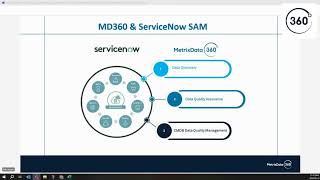
Mike Austin walks through ServiceNow SAM Pro's four-step workflow: discover inventory, normalize titles and publishers, map items to license metrics, and load entitlements. The biggest failure point is CMDB data quality, so aim for 95% discovery coverage before trusting outputs. Better data quality has cut true-up costs and effort in real deployments.
Chapters
Model or connecting to a tool like System Center. Okay. And when I do that, it's just basically going to pull a bunch of inventory and dump that into, you know, the cmdb, for lack of better terms right now. Okay. And that's going to pull back things like, you know, in the software world, we're going to see things like a publisher, we're going to see software titles, we're going to see hot fixes, those sorts of things. But I also need to do discovery of hardware, right? Because, you know, I'm going to need to know processor counts and core counts and host names and things like that in order to create license positions eventually. Okay. Now the other thing that you can do here is not just do a discovery, but sometimes people will do what's called metering, right? So metering basically means I want to look at an application to see how much it's being used. And that becomes important in when we get into software asset management, to look and see. You know, the use case that a lot of people love to use is Project or Visio. It's a lot of Project or Visio out the environment. Can I actually see if the users actually used it? So metering allows me to go and see when was the last time they used it, how long did they use it, those sorts of things. Because if I can see that they launched it and we're using it, I could put a policy in place that says if they don't use it for 90 days, for instance, let me go pull that back. So in that discovery, I kind of put in metering as well as something that you may want to be able to do. Once I discover that data, I need to go into the next box, which is normalization. And what do I mean by normalization? I mean I need to take all of that information that I discover. So if you think about some of the details here, like publisher, version, those sorts of things, and I need to normalize it. And so if you think about what happens when software titles come in, some software titles for a publisher might say Microsoft, others might say Microsoft Corporation. Some might say Office Professional 2019, others might say Office Pro 2019, depending on how things get packaged up. And so normalization is the process of cleaning that all up so that I can get a simplified view. If we just take the publisher, for instance, I want to be able to see everything from Microsoft, you know, regardless of if the publisher that's coming through discovery says Microsoft Corp. Or Microsoft or Microsoft. You know, I don't know what else it would say but, you know, whatever that is, I want to normalize that down into Microsoft. I also want to normalize down the titles into, you know, a single title. So I want that Office Pro or the Office Professional just to be Office Pro and, you know, the version that goes along with that. The other thing that we want to do in normalization is normalize the stuff that's not licensable. Now we don't want to get rid of that because that stuff could be important. Think about hotfixes as an example. We don't need to see hotfixes in the Microsoft world because they're not really a licensable thing. We want to normalize those out. Now, other publishers, we may need to see those because they might. Instead of it being all version 10 is a single license, you'll have publishers out there where version 10.1 needs a specific license. But if you put on version 10.2, it may not be allowed. You may not be able to use the Same licenses that 10.1. All of that gets factored into this normalization piece to say, here's the software titles that are licensable and I've got them in a nice organized fashion so that I can kind of see those things, right? And then what I need to do is take those normalized software titles and things like that and understand the various license metrics that go with them, right? So what does that mean? That means, you know, is it a per device license? Is it a per user license? Does it have concurrency on it? Is it a processor license? Is it a processor value unit license? Is it based on the amount of storage that we're using? So, so whatever the license is that we measure to figure out how many we need, we need to make sure that normalization is done so that it goes, it matches up to license metrics, okay? And once we have that, then what we need to be able to do is create our second source of truth, which is our entitlement database or our contracts database. And so again, TAM Pro allows you to put your contracts in and your entitlements in so that I can go in and put in I own 2000 is going to keep it simple, Office Pro 2019 licenses. So I can go when I discover figure out that we have 1952, I have 2000 licenses, therefore I'm compliant and I've got 48, if I did the math correctly, excess licenses sitting there, our entitlement database is going to do a few things for us. Because if we put our entitlements in there, what we own those are going to have our license metrics based on the license. In an ideal world, if we could put in a part number, I bought this part number and the system knows that part number is a PVU and you bought 10,000 of those, so you own 10,000 PVUs, or it's a processor license and you own 10,000 of them. Or it also includes these rights around disaster recovery and things like that. The part number would have those associated rights built into it within the tool. I can also put in here my contracts. So if I want to put in all my contracts and their end dates and the spend, I can put in how much a license costs so that if we're looking at having to do true reps, the system can calculate what my true UP exposure is and things of that nature. Think about the entitlement databases storing the things related to the contract. I could put the contract in there. The interesting facts about the contract like start and end date, what licenses are associated with it, those sorts of things, that's our entitlement database. And in an ideal world, when I have those four things in place, I should be able to, in theory, this is where I say it's not a silver bullet, but in theory I should be able to go out, discover assets, normalize assets, put in my licensing information and create a license position. And that license position would then tell me whether I'm compliant or non compliant. Okay. And you know, in a very simplified world you can do that, right? You know, a great example is, you know, some simple desktop product, you know, I was going to say Adobe, but with it being subscriptions, a little bit more complicated nowadays. Let's just take Visio 2019, not the online version, just Visio 2019. If I can go out and discover that, normalize it, put in my entitlements, that's a very fairly simple way license position to create. Now if I take a look at IBM for instance, where it's PVU based and you know, there's calculations that need to be done based on the processor that we have, the different license types and things like that. And you know, sub get into sub capacity licensing and things like that, that becomes much more complicated. And that's typically where people are failing in their deployments of things like SAM Pro because they think it should be as simple as a Visio and it's really not. There's a lot of other stuff that needs to go into that to make SAM Pro work. Okay, but something simple like a desktop thing, you should be able to do that. Kind of these four steps, a lot of work that goes into those, right? Because the first thing you want to make sure this is where I'll tell you where 95% of the SAM Pro implementations fail is right here. Populate your cmdb. Okay, if I had a poll up right now, I didn't set one up, but if I put a poll up and polled everybody and said, how much do you trust your CMDB data today? Like, what percent accuracy do you think it is? About 60% of you would say around 60%. Very few of you would have anything, have any confidence in your CMDB data that's greater than 90%. What happens with SAM Pro is SAM Pro. When I install SAM Pro, what SAM Pro does is it actually takes the data out of the CMDB that's relevant for software licensing and creates a bunch of software tables. If I am taking a CMDB that I have 60% confidence in or less converting that to software tables and then thinking that I can make license positions, the validity of those license positions are going to be less than the actual 60%, right? So the challenge that most organizations have, quite honestly, is they go out and they purchase SAM Pro thinking that we can go ahead and install SAM Pro and we can do what this, you know, kind of chart says in a simple world. But they have all kinds of information, they have all kinds of challenges with their cmdb. And so we always recommend that the first thing you actually do is a CMDB health check related to software, you know, to the software that you want to make license positions on. And that's, you know, whether that's whether you want to be, you know, do, you know, be able to defend yourself in audits, whether you want to do cost optimization on those software publishers or titles, you have to start there. Because if we don't have 90% there, we're in trouble. Right. And a good example there would be even just doing something very simple around. If you think about a Venn diagram, I'll take a very simple one and let's just say it's the desktop world. We're going to do that Visio example, I want to know that 95% of my desktops, at a minimum, are populated in the cmdb. So if I look at what I believe to be active devices on the network, do I have inventory for those in the CMDB? If that number is not 95%, I shouldn't move forward. I should clean that up before I even move forward. Right? So if you think about that Venn diagram, is it active on the network, do we have inventory on it? We want that middle overlap to be 95%. If we have, you know, greater than that in the, we think it's active, but we don't have inventory. We need to figure out why we don't have inventory. Is it not reporting? Do we have an SCCM agent problem? Is it on a network that we're not touching? Why is that? And then if, you know, we see inventory on and it's not active on the network, why is that? Are the assets not, you know, retired in the cmdb? Like there's all kinds of reasons for these sorts of things. And you know, and the reality is most people that are on this call are working larger enterprises. It's not a simple two circle Venn diagram, right? One of our clients that we do this for, There are over 75 data sources that are being discovered that are used to populate the cmdb. You have to look at all of that. But that's where most of these projects fail by the way, is right here. It's in first step. The data quality is not strong enough for them to even move forward or they know it's not strong enough, but they put in SAM Pro and they know they can't trust anything that's in there. So they're using SAM Pro more for a little bit of visibility. Like they can go in and see what's on a desktop or they can maybe use it as a storage place for their entitlements because they want to make sure they know what they have as entitlements, but they're not getting the value out of it, which is sort of what, what we've talked about here. Now the last thing that I'll say on this slide and then I'll move on is when you're looking at this, really what ends up happening is if you think about compliance is really the, it's more or less the left side, right? Making sure that we have all those assets correct. You know, that we're accounting for everything. And the contract negotiation side is more the right hand side, the licensing and the contract stuff. And that's more cost optimization. Now if you really want to use this to be a vendor, you need both, right? If I truly understand what I have, I can, you know, get the best deal and be compliant. And, and here's, here's, here's why a lot of people also, even if they have good data fall down in their, their attempts to save money when they put in SAM Pro, right? Because what they're doing is they're, they're putting in what they have, having the tool tell them what they need, trusting that it's the most optimal way, which that might not be the most wise thing to do, but trusting that the way that it's assigning the licenses is the most optimal way, and then making their decisions based on that. Now, what that doesn't do is if I have all this information, so if I have everything here, the missing piece in that equation is the fact that the licenses that I bought and that are in my entitlement database may not be the best licenses for us to use. Right? So let's say that there's two different license metrics or different ways that I can buy those licenses. If I only have the one in my entitlement database, it's going to take and assign the entitlements that I have to create a license position to say that I'm compliant. But that is not necessarily the most effective way for us to be buying licenses. If there are special rules in place around things like, say, disaster recovery rights or something like that, and our entitlements don't state that, or we haven't denoted that correctly in our normalization process or our discovery process, the tool is not going to know that. And so no matter what you do, the tool is only a part of the answer. I think the tool vendors want you to think it's 80% of the answer. I actually think it's probably about 30% of the answer. And that's why when I put in here, you need experts that understand all of this to really make it work. But that's the process. This is what SAM Pro is trying to do in one slide. Now, it's really. There's a lot more that goes into it than that. Now before I jump into SAM Pro and start showing it, a lot of times most people are like, they want to save money, right? So let's just take a quick, let's take a look at cost optimization and what we need to do in order to figure out how to be optimized on cost, right? So there's really three sort of things when you're doing, looking at cost optimization. There's what you paid for, so that's your entitlements, there's what you deployed, that's your inventory, and then what you need, that's the business use. Now, SAM Pro doesn't capture that. Right? Because that's not an inventory and that's not an entitlement. Right. But that's important to know, right? And really what ends up happening is most people are paying for a lot of stuff that they're not using. So, so they get to true cost optimizations where the three circles overlap. Most people, most people unfortunately though, aren't, you know, and the vendors do this on purpose. Microsoft is the, you know, the prime here is they're selling a lot of shelfware, right? They sell you these bundles of products that you're only using. 20% of. You got a lot of it sitting, sitting on the shelf right now. A lot of organizations, when they start down these SAM programs, kind of start with just the blue and the yellow circles here. And they're doing what I would say is license optimization. So they're looking at what they own and what they deployed and they're trying to get rid of excess licenses and things like that. And there's definitely, you know, fruit on that, so to speak. But the true value is when you really understand what you need so that not only can you reclaim licenses, but you can start reducing, reducing licenses based on functionality or optimization and things like that. And so this is really what people are trying to do when it comes to, you know, cost optimization. Now how does SAM Pro help you with this? Again, what you paid for, your entitlements are loaded in the system, right? You know, in the, between the yellow and the blue, I put question mark beside the automation of effective license positions. And the reason for that is, like I said, a simple desktop position. Sampro can do, a complex one like say Windows or SQL servers, it can do, but it needs help to do. Okay? And then, you know, that's, if you really know what you need, you can reclaim licenses and this is where you can start to look for overlap of, of product, right? So, you know, a lot of people talk to me a lot about Microsoft E5s and the security products. And what else do we have in our environment that if we have an E5 that we can potentially peel back on those licenses of other security vendors or whatever, that's really what you're looking for in that green and yellow overlap, right? The green where green and blue overlap is really where you're over deployed, right. Or, you know, and that actually could be a potential compliance issue. Right? But this is sort of how, if you think about those. Again, this slide here, if you think about it, that's how sampro is helping with this cost optimization, right? So I'm gonna, I'm gonna dive out of slides for a few minutes and I'm gonna actually go into, into ServiceNow and I'm gonna Go to. I don't know why I have this hurdler one load it but let's go to the software asset workspace. So this is really what, you know, Sam Pro is right and this is what people are trying to get to, you know, so they want to come in and they want a dashboard. They want to see do we have any publishers that were out of compliance? Do we have any true ups due? Have we saved any money? Are we over licensed, can we go reclaim licenses? You know where, where these true up dollars come from. And so this is sort of like the dashboard when people come in and they want to start to look at things. I'll dive in here a little bit. Let's just go and take a look at publishers where it's saying we're out of compliance. So this is basically saying that there's 10 publishers that are out of compliance. I can take a look at those. I can kind of see what the cost to true up would be. I can see a percentage compliant which grows people all the time. And I'll show you why. Because if you look on Citrix it's going to say that they're 0% compliant. When you dive into it, what this really is doing is it's looking at the two products that are showing that in inventory here and basically saying whether they're not compliant or not is basically saying this product here they're compliant, on the others they're not. The reason is that this one here, they actually don't have any deployments on it does some really wonky stuff in terms of that. But really what this is allowing me to do is go in. So if I go on Zen App Enterprise here, what it's going to show me is I own 450 licenses. We have a requirement for 512. Okay, so that means that we're short 62 and that the true up on this product is just a little over $31,000. Right. So what can I do with this? So it's, it's going to, I'm going to actually go back and go to a different, a different product because Citrix is not, not a great example in here. But let's just go to Visio in here actually let's go to office showing those as being complained as well. Okay, let's go to project. Oh no, this one's complain as well. I am so sorry. See this is why some, this is some of the silly stuff that it does right like this and this is why people struggle with this is if you look, I'M going into Visio, it's saying it's not compliant and it's actually a compliant product. I think maybe Adobe might be a better example here. Here. Oh, here. All right, let's go look at InDesign. So InDesign here we can see there's two versions, there's InDesign CC and CC 2017. 2017 is showing that we have to do a true up. And so we can see here that we're short 15 licenses. So if I click on the remediation opportunity things, it's going to tell me how I can fix if the system can see, see so. Right, see opportunities to fix. So basically what it's saying is now when you set up a publisher, you go in and assign the licenses to the device or the user. These are device licenses, so we would assign the licenses to a device. And so basically what this remove unlicensed installs is saying is there's 15 devices out there that we haven't assigned licenses to. So one of the remediations is I could actually go in and I can see what those devices are. So I can go here and I can see the actual hardware that that is, can drill right down into it and take a look and see what it, you know, if we have a name for it, who owns it, those sorts of things. In the demo data there's not a lot of that filled out. But again I can go and drill in and see on that. And basically what it's telling me is, hey, this one's not compliant. You can go and remove it from that software and I can actually put a workflow in place that actually would go out and do that if I want it to through the system. Now there's other options for remediating. I could just go out and purchase 15 licenses and that's going to cost $5,000. I can remove an allocation. Now what this one here is, I'm not going to drill into it, but what this one here is telling me is that there's a device out there that has a license that no longer needs it. It's probably a decommissioned device that still has a license associated with it. So I could go and remove that to get one back, or I could create some allocations or remove unallocated installs. It's going to tell me what a few of those options are in terms of what I can do to remediate this shortfall. Okay, now if we had metering on, it might actually say that there's a number of devices that have been used in design in 90 days. So I could go and pull back from those if we had a policy that said go pull from anybody that hasn't used it in 90 days. Right. So what we're trying to do here is it's just trying to show you there's a bunch of different options and in terms of how you can go about remediating these shortfalls. And I'm just going to close a couple of these so I don't have a hundred of them open as we're going through here. Okay. So that's sort of how the, you know, if I want to go in and look at some compliance and things like that. Now I'm not going to go into all of this because this can, you know, we could run a whole hour session on how you do things. But ServiceNow has a discovery and it has discovery models. Basically it knows, for instance it's created discovery model for Microsoft SQL Server Enterprise 2017 here. What that means is when it goes out and does inventory, when it gets inventory in, it comes in, it looks at those titles and it goes that title belongs to this software model called SQL Server 2017. So buckets it in there so that the license rights that Go for 2017 SQL Server now will apply to that install. You also see that they have in this demo environment, SAP is. The SAP module is installed. They have specifics for SAP and some of the different licenses there. You'll see things around models for Windows and SQL. Like you could have things for Windows and SQL servers because they're a little bit more complicated than that desktop stuff. Anything that's PVU based, for instance, it has the ability to do that. I create that Basic or sorry, it has a bunch out of the box. If I have something that's not there, I can create that discovery model and tell it how that works. You'll see things like software models. A software model is going to be, once we discovered it and put it into a discovery model, what's the licensing rules for that? That's going to have things in there like whether it's a processor or a device based license, what titles fall into this mapping. There's the discovery map that's associated with this. Then you can see things like you can set different conditions and things like that. But I think it's under here now this is just the product catalog. Anyways. And oh, here's where it goes. This is where it's going to tell us what entitlements we own that are associated with that. If I had, you know, you can see the license metric that's associated with that entitlement. You can see the license type, whether it's subscription or perpetual. And I can also put the cost associated with that. So you can see here, you know we own 122 of these rights. The cost of that was 10,000 or just shy of $11,000. And we're actively using 122 of the purchased 122 here we own 100 licenses, but we're not using them. Right. So this would be an example where if we had that hundred licenses and it was on a renewal, we could very easily see when a renewal came up that we don't need those and we could drop those 100 licenses and save 27,000 because they're not being used. Okay, so this is where some of the power of, of the tool starts to come in. It's all kinds of ways to get those in. You can manually put them in, you can do imports of them, you know, all sorts of different, different things there. Okay, you can see here where there's a part number suggestion. So when a product comes in, what this is doing is it's saying so ServiceNow has a catalog. I'm gonna forget the name what they call it when you subscribe to it for normalization. And so what that does is ServiceNow is looking at inventory that they see. They're creating these models and things like that and it's going to push out to you suggestions. So this here is ServiceNow knows that there's a part number for Microsoft visual studio this AA12772 that it might suggest that we look at whether we have that part number, whether we should be using it, those sorts of things. Okay, so I can go in and start to see those sorts of things through the content catalog. That's what it's called. Finally came to me here. I can subscribe to the content catalog so that as we discover product and something is not in one of these discovery models, it will automatically send that to ServiceNow who research where it should be. So if we got a title that comes in that's new, it'll do that. I can opt out of that. I can, you know, be part of suggesting certain things to that. It's. And it's not an all or nothing. Some customers have like internal apps that they don't want to be published to the content catalog for obvious reasons. So they exclude those. But anything that's sort of commodity based, they want to come through, have it come through, etc. Okay, Now I'm going to, actually, I'm going to go back here for a second. One of the things, a lot of the times some people will say, you know, what do I have coming up? So we talked about being able to see, you know, your contracts and stuff. So there's some alerts over here. So with this 135 remove removal candidates. So what this is telling us is we have software that isn't being used. Go ahead and uninstall this, remove it. Right. So a lot of these, like if we look at these SAP, what I'll tell you is happening here on the back end is this is now a disabled user that still has a license assigned to it. You need to go and remove that again. This is one of the challenges that people have when it comes to operating ServiceNow. Sam Pro is, I like to refer to it almost as a set and forget when it comes to licenses. I assigned licenses to a user. That license gets assigned to the user. Even if the user leaves and is no longer active, SAM Pro doesn't automatically pull the license back. It's still assigned to them until I tell them to remove it. And then once I remove it, it'll go back into the available pool. Okay. And I think that, quite honestly, that's a problem with most SAM tools, not just SAM Pro, is they want to do license assignments at a device or user level. I understand why, I'll explain why here in a second. But the challenge that it does is if you're being audited, what an audit's going to do is it's going to go and say, give us your discovery, we're going to tell you how many you need, give us your inventory of entitlements, we're going to tell you how many you own, and we're going to see if there's any deltas. Right. They're not going to say, did you actually assign that license to Mike? Right. They're just going to say, mike is one of a thousand, you need a thousand. And so the problem is the reconciliations that happen. When you run a reconciliation, that's basically. You run those usually on a weekly basis, and that's going to say, okay, any new inventory, any new licenses, go and assign them and do the reconciliation. It doesn't automatically reset based on what's going on. You have to either manually do that or you have to basically program it to know to do that. That's where it's very easy. It doesn't take long for a lot of these sorts of things to start catching up and you're like, okay, why is this not reporting correctly? Why don't I see what I think I should see in the tool? Okay, so we're also going to see new normalization suggestions. Oh, sorry, I did say I would answer why people do that. Most of the reason that people want to assign things to a device or to a user is for accounting purposes. They want to do billbacks and showbacks and chargebacks, and so they want to assign it there so they can do that. I think that there's better ways to do that personally. But that's really why here you're going to see that this is basically what's happened is we've got this new product that's come in that shows as the SQL Server discovery model. It believes it's Microsoft, it believes the product is SQL Server. And this, I can go in and actually make sure that these are up to date. And you want to do this. It's like, yep, okay, that's correct, what you found there. And again, you can drill in to see the details on it. I'm not going to on this demo, but if this is correct, please go ahead and normalize this discovery asset title to this discovery model. Okay, I can also see. So if we load our contracts and our renewal dates, I can also see, you know, what's coming up, right? So if I want to start planning on, you know, what I got coming up in the next 90 days, I can see here that I got a Citrix renewal coming up. It's about 17,000. We've got an Adobe coming up for 3.4 million. And then we got a couple just demo ones in here that are coming up. So that at a glance I can kind of see where these are coming, what's coming up, right? I can also see if they're assigned to a cost center who owns those, right? So if I'm a SAM professional running this and I see, oh, we got a Citrix, I need, I know I need to go work with a customer support team on their renewal. You know, now's the time to start cleaning up the users that are assigned things or whatever. What can we do to save money, right? So it gives us that visibility into our contracts and when they're coming up for renewal and things like that, that's how that sort of all comes into play. I'm not going to go into that sort of stuff. So I think what else do I want to show in here? I think those are the main things that I really want to show is that's Sort of what you're trying to do. But you can create all kinds of dashboards and things like that and run and things like that. Now, before I go out of SAM Pro, what I will tell you is a lot of people, what they're trying to do in their software, asset management teams are things that SAM Pro itself does not do, but the platform contains the information or has the ability to contain the information to do what they want to try and do. And I'll give you an example of something that we've built for one of our clients that saved them almost $2 million this year already is they're an M365 shop, and they wanted to be able to do chargeback and showbacks. So basically they want to be able to show to their various business units who's using which of their users are using what. And every month they're sending the bill to their end users, right? And they came to us because we're running SAM Pro for them. And they said, okay, guys, can you build this for us? And we're like, we can build it. It's really not a. It's really not a SAM Pro function because in order to do that, we had to have. We had to go and look at things like, you know, what business unit user belongs to. They want to look at job codes and things like that so that they could show the different job codes. Because what they're doing now is they're benchmarking their business units that, you know, think of a location one, location two. They're benchmarks in location one and location two saying you two are the same. Why is it that you're, you know, you're $500 a month for Microsoft software per user, and over here you're 300. They're not saying the $500 one is, you know, worse than the $300 one because they're like, they may be better if they're, if they're not using a bunch of other stuff. But why is that? And they're benchmarking against that. And the other thing that we've done for them as well is we've created a whole reclamation process for their M365 lice. So they got Okta, Sailpoint and a couple of other things. And so all those systems need to talk. So what we've used ServiceNow for is we built reporting for them that every week we go out and look for users that have been inactive on the network or an O365 service for 60 days, and we build that report and then that report is taken and used to go and reclaim licenses. And so where they saved the $2 million was a combination of both of these because they were able to go to their end users and go, do you really need. Because these guys are using, you know, frontline worker licenses or something else and they were able to reduce, you know, right size their employees into proper profiles using that information, benchmarking information, and they were able to do all these reclamation of unused licenses and things like that that they had no visibility into before. And that was all done, you know, part and parcel. Because what we had done is we set up the Office365 connector for SAM Pro for them, started giving them visibility into their cost and then they started asking more questions and then we started just building dashboards for them inside of ServiceNow that extended that. But the point that I want to make is the value becomes not in the SAM Pro, it becomes in the platform. Because SAM Pro itself could not do what they asked us to do, but the platform could because they've connected Okta, they've connected Sailpoint, they've connected their active directory, they've connected their HR system, right? So we're able to see, you know, if people have been terminated or you know, in that 90 day list or you know, we do a lookup against that. I'm not going to get into all the details, but we do a lookup against that to go, are they on leave? If they're on leave, do not put them on the list because we don't want to pull the license from them because, you know, they're on maternity leave or whatever it is and they're coming back. Right. And so that's where the power becomes in the platform. And understanding that's why I started the presentation with what is it that you're trying to accomplish with your SAM program? Because that's how you, that's how you get the results, is understanding what you're accomplishing and kind of working backwards from there in terms of what you're trying to do. And SAM Pro is probably a piece, but not the only piece to what you're looking to do. Okay, so hopefully that, hopefully that makes sense. So here I go back and you know, real quickly I'm going to introduce to you guys our offering that we have around this. So we, we have a program we call SAM Compass. And really what SAM Compass is, is a, you know, a service where we can help you with your ServiceNow software Asset management journey. Right. And so what we do is if you Think about governance and audit readiness and security, you know, like cost optimization, the things that are your key objectives. How do you go about getting at those things? ServiceNow has that holistic approach in what I just showed you, in that you're able. If I go back to that one, slide to this one here. Real quick. Hold on. Did it go, go back on this screen? How do I get back there? Okay, So the quick demo that I just did inside of ServiceNow, you could see that, you could see the inventory, right? It was, you could see that it started to get normalized. You could see that we could put licenses in and you could see that it could create, take those licenses and create these license positions, right? So all of that takes people and process in order to work effectively, right? And so basically we have an offering where will come in and help an organization with that data quality piece, right? So help you make sure that this, you know, if you haven't, if you haven't set up SAM Pro and you're just thinking about it, let's do a CMDB data quality assessment to make sure that the quality of the data that is in there when you turn on SAM Pro is going to give you good results, right? Because like I said, 60% of the time, that's where they fail. If you already have SAM Pro installed, you're not getting the, you're having challenges with the data. Let's do a data quality assessment to make sure that your CMDB is accurate or get it up to accurate. Figure out what's missing, what's not reporting correctly, fix that so then you get better quality, right? And then have that as an ongoing service, right? So for one of our clients that we, that we have, that we run a service for with their ServiceNow, CMDB, basically what we're doing is we're looking at that data quality. So we're looking at the Venn diagram that I talked about in the beginning, where it's like, do we have inventory? Do we have, you know, is it active on the network? Is that 95%? And when we first started out with them, they were, there were less than 60%. And basically we created an automated process for them. Where, you know, we started with Microsoft, we said, okay, what license? What needs to be discovered? So if devices aren't discovered, let's go figure out why so that you guys can fix that. Now that we got more devices being discovered, let's look and see. Are we discovering all the attributes that we need in order to make license positions? If we're not, let's go fix that. A great example is ServiceNow. Sam Pro is not going to be able to tell you a lot of the times whether it's SQL Standard or SQL Enterprise or SQL Express difference from free to 40,000 bucks for a few cores. Right. And so if we know what all. Not only does data quality look at, you know, start with discovery, it starts with the normalization as well. Do we, the data that we need that needs to be normalized so that we can figure out how many licenses we need. Right. So what we do there is we run a monthly process for them now where every, you know, we might even run it weekly where every month or every week they get a report that says here's what's missing so that we can troubleshoot that. And their data discovery has gone from 60% to 95%. What that has done is actually we've been able to show that it has decreased their true ups that they do by over 50% because the quality of the data that they have is so much better. It also means that when they're doing their true ups, they used to strike up a team of 10 people for about five to six months before the true up to figure out what their, their true ups were going to be. It's a big, big organization, but this scales, right? And now last year when we did it was a team of five over three weeks. And the three weeks was just, let's just validate the data and make sure we're 100% comfortable. You know, went from hours and hours of work to, you know, about 10 hours for that team moving forward. And that, that's how this becomes so strong and why we focus so much on that data quality when we, when we start with, start these processes. Right. So our, our SAM Compass program. Why is my screen doing in this? Our SAM Compass program is really around. Let's start with data discovery, data quality, get that working. Let's make that an ongoing service and then we can get into things like if you want, you know, running SAM Pro free, let's create license positions, put those in, whether that's a one time thing or an ongoing thing. Right. So if you're struggling with your, your SAM Pro journey, we can definitely help with that. I think. I don't know if I saw. Let me just see if there's any questions if I missed. So metering, I think Ben answered that one on metering. And then if there was another question here. Okay. Yeah, so Sherry asked a question there. I don't know if you guys saw it in the Chat. She was asking about metering, what the complexities to turning metering on is. Metering is not something that you need an agent on your devices in order to do metering. First and foremost, it can't be IP discovery that's being done. The challenge with metering for many organizations is that it can be quite chatty on the network. So it becomes a little bit of a bandwidth problem on the network. Usually people that are metering are doing that with service or system center, sorry, that's connected into ServiceNow. That's usually the way that that gets done and it does work well. Now when we do metering with clients, we're typically doing it in a fashion that would look like this. We are only you don't want to meter everything because of the chattiness on the network. So we're going to go and meter Project Invisio. We're going to meter it for this 90 day period. Then we're going to stop, we're going to get, reclaim what we can and then we'll run that process again. Another, you know, five months or as licenses are running out, will start to run it again so that we're not hitting the network with all that chattiness. So that tends to be, you know, part of the, part of the challenge when it comes to metering. It can be, it can, it can bear some very good results, but you have to be cognizant of the workload that it brings on the network. Okay. So I think that's all the questions that they are. If anybody wants to have a discussion, dive deeper into, you know, Sam Pro and how it works, how it works in your environment, talk about some of the data challenges you have, please feel free to reach out. Miketricsdata360.com Happy to set up a call. Just have a chat about what you're doing and how we can, how we can help with that. Thanks a lot everybody for joining us today.
More from Mike



Microsoft Add-Ons Hidden Costs Explained | EA Renewal Risk & License Optimization Expertise Sharing

SaaS Sprawl Explained: How Decentralized Software Buying Destroys Negotiation Leverage.

Microsoft EA Renewal Strategy: Mike Austin Explains How the War Room Method Works.





