Understanding Microsoft Bundles
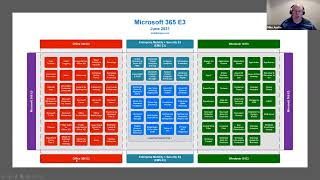
Mike Austin breaks down how Microsoft 365 E3 and E5 bundles combine Office 365, Enterprise Mobility + Security, and Windows. E5 adds advanced security tools like Defender, CASB, and Azure AD P2. Organizations often overpay by buying full bundles instead of mapping actual usage to what they need.
Chapters
Understanding the vehicle of how you buy is really important, right? Because a lot of the times one of the things when I work with clients and they're doing an EA renewal, we go through their contract and actually explain to them how it works. And there's a lot of misperceptions by clients on how an EA works, how CSP works. And by the way, there's a lot of misperceptions within Microsoft on how these things work. I tell people all the time that inside of Microsoft there's a very limited group of people that actually know how licensing works. Most people, even if your account managers especially, but even if they have a, like a licensing specialist title, they're actually not licensing people, they're licensing salespeople. And that's a huge difference. They're taught how to sell these EA programs and things like that and get you to buy subscriptions and annuity licensing and things like that. They don't actually understand how licensing works. And so we'll hear all the time from clients, well, Microsoft told me this and you're telling me, you know, something different. And so we'll actually go in and, you know, find it in the product terms and show them how these things work and then go back to them and document and say, okay, Microsoft, tell us why this doesn't work. And then Microsoft goes, oh, so that's one of the things that you want to be cognizant of is just always validate this stuff. Because even Microsoft doesn't know how a lot of these things work. So what we're going to talk about now is how the different bundles get put together. Because this is the crux of how you end up saving money or how you end up overpaying Microsoft and get stuck on the, you know, the term vendor lock in. I know gets thrown around quite a bit. But this is how they get you, right? They get you on these bundles and they build them in ways that, you know, sometimes you end up buying stuff that you don't want to because you need it. So, you know, for instance, I have a client that wants Teams Data Loss Prevention or Teams dlp. It's all they need. That product is stuffed into a suite with six other products and there's no way to break it out. And they're just banging their heads because this thing's gonna cost millions of dollars and it's not, it's not a product that has any business value of that level to them. Although I, I guess Microsoft argue with them if they get sued because something leaks out of Teams Then it costs them more than the licenses. But anyways. So first off, I can't take credit for the diagrams that we're going to see. There's a guy out there by the name of Aaron Dinich, I think is his last name m365maps.com He's a Microsoft employee that actually puts these together. And it's the best. They aren't official from Microsoft, by the way, although he's a Microsoft employee. They're not a. They're not official diagrams from Microsoft, so to speak. But if you went into the public domain for Microsoft, you won't find anything nearly as good as this. So I always recommend to everybody, go out, grab these things off of m3.65maps.com, follow Aaron on Twitter if you want to stay up to date. Because he does a. He does a really good job of putting these together. And as we go through this, yeah, it's Aaron Dinnich. And so there's this Twitter account, Aaron Dinnich and his LinkedIn. But, you know, I suggest following him because he does do a really good job at these things. And so this is an eye chart. Okay. But this is the crux of how it all starts to work. Okay. So I talked about Office 365E3. And an Office 365E3 is all the stuff here. I don't know if that we would consider that red or orange, but I'm gonna go with red. All the stuff over here on the left in this reddish color. Okay. Then we talked about how the EMS suite was also a product that Microsoft has that's in the bluish stuff here. And then you have your Windows 10 or your Windows desktop OS, and that's in green here. And the boxes inside of the bigger boxes are the products. Remember how I said Office 365 is not a product, it's a marketing label or marketing brand. The products are all the little boxes inside the big O365 box. Okay? And then if we put all three of these into one part number, that's M365E3. Okay? So remember when I talked about an EA, I could buy just Office 365E3. I can buy EMS III or I can buy Windows 10E3. I can buy one, two or all three. Right. And what Microsoft wants you to do as a customer is to move to the Uber bundle and buy all three. Okay. But some customers still aren't there. Right? You see this stuff here? That is in, I don't know, a different Shade of blue, what color I would call that, but the different shade of blue. That's actually that Core Cal Bridge that I talked about earlier. So if I don't want the stuff that's in the EMSE 3, which is this Azure AD Premium Plan 1 and I'm going to talk about all this stuff in a little bit more detail as we go, but this here is that corecal Bridge. And so really you'll see the Windows Server Cal rights that I talked about, the Microsoft endpoint Configuration Manager that is your sccm. Okay, there's some intune stuff in there as well. That's the, both the Mobile Device Manager and the new Application Manager stuff where they're trying to replace System center, but that's that. Then you've got Azure Active Directory, RMS Rights Management Server. Rights Management Server is a product that allows you to control document access and who can email and things like that. You can do that both in the cloud or on premise. Then they have some advanced threat protection that's retiring and things like that. But for the most part, if you don't want to purchase Azure ad Premium Plan 1 and I just want Windows and System Center Cal. So I just want Windows because I don't even use System Center. I don't. I wouldn't go to the full M365. I may just do Office 365, CoreCal Bridge and Windows 10. Okay, so you can break that down this way now inside of the bundles themselves. So if I talk about Office365, some of these things in here are. I will call them services and others are products. Okay. And the reason that I make the distinction between services and products are. Services are something that I just get audit logging, for instance with other products such as SharePoint, wherever the heck that one is. Your SharePoint SharePoint down here. Okay. And so some of these are products that I can purchase and some of them are features of those products or services within those. Within those products. I'll answer that other, other question a little later. Okay, so in an O365 you're going to see that this is made up of something. What's that? 3, 6, 7 by 5, 35 different products and. Or services. Okay. And so there, you'll notice that in here there are things like Exchange Online Plan 2, SharePoint Plan 2, OneDrive for Business Plan 2. Okay, so what is the Plan 2 piece? There's another license that you can purchase that's just called an office 365E1. I don't have a. I Don't have a slide on it. I'm just going to speak to it. And the biggest thing with an Office 365E1 is that it does not include this right Here, this Microsoft 365 Apps for Enterprise, which is how Microsoft renamed Office Pro. Okay? So they used to have Office Pro click to run in Office 365. They renamed it Microsoft 365 Apps for Enterprise. And so that is your Office Pro license, okay? And so in E1 does not have that. Okay? And then what they do is, and I didn't get into all the product details, but with Exchange they have a Plan one and a Plan two. And the difference, there are a couple of things. There are some features around archiving and journaling and DLP that are only in Exchange Plan two, not in Exchange Plan one. And there's differences in the size of the mailbox that you can actually have in Plan one and Plan two. Okay? But the reason that I bring this up are there are an awful lot of users out there that do not use Office. And so some customers may have an E1 with an EMS or CoreCal Bridge and a Windows OS. Now Microsoft has a concept called profiles in their ease, okay? And so profile is a mix of these products or these enter what these enterprise products. And so I could have a profile that's E1, EMS and Windows OS and a profile that's E3, EMS and Windows OS. Because I have users that need Office. So take that manufacturer. All my sort of corporate users get an E3. My shop floor users get an E1 because they don't use Office. Or if they do use Office, they use it on a kiosk. And we license that through an old perpetual device based license or some other mechanism. Okay? And so the key thing to note is there are some differences between an E1 and an E3 and they are around what I'll call the core services. Okay? So if you hear me talk about Microsoft core services, the core services are Exchange, SharePoint Teams and OneDrive. Okay? Those are the core O 365 services. And the reason I say that is every plan has those. And the core services differ in an E1 and an E3. So on exchange it's mailbox size, it's some legal hold and retention things. Now one of the things is everybody says, oh, we need legal hold. No company that I've ever come across, I shouldn't say that. There are some financial institutions that maybe need legal hold for just about everybody, but 90% of the organizations out there do not need need these products for all their users. It's usually like director level and above that require them. Okay. So they don't all need those Plan 2 things. Mailbox size depends on your policies around what you want to let them keep in there and how much OneDrive it's storage, so it's just the size of storage that you get for free. With OneDrive teams. The difference between teams is in the plan one it's chat. So I can do the instant messaging and I can do one to one voice and video but I can't do one to many and I can't do teams meetings. I can't host teams meetings. I can attend them but I can't host them again. Most organizations let's go into hospital are doctors and nurses hosting teams meetings. No. Right. So they don't need a plan two of teams a teams plan two and then with SharePoint again the difference between SharePoint plan one and plan two is going to be some of the legal hold type stuff again. Okay. And so all these other products are out there and what Microsoft wants you to believe is that everybody's using all these great products like yammer. Right. 3 million o3 65 accounts analyzed. Less than 2% of users are using Yammer. Right. Lists. Where's Microsoft lists? Less than 1% of users are using lists. What else can we, what else can we pick on? Delve. The last time I looked it didn't even hit my radar. And I'm going to show you later today how we can see some of this stuff. The point being what Microsoft just did was made an announcement that they are going to be increasing prices on all their E SKUs except for the E5 by anywhere from 7 to 15% because they crammed all these great new products in that nobody's using. So what does Microsoft want you to do as a customer with E3? Office365. Office. Let's say Office365. They want you to sign an EA because it's the infinity but now I'm paying for premium gas, Yammer, Sway, Delve, Liss, all this other stuff versus go to the Maxima and maybe just buy Exchange Online or SharePoint Online. Right. So one of the important things to be able to do as an end user is to figure out what your users are actually using to figure out do these bundles make sense? There are definitely users. Do not get me wrong, there are users where the way Microsoft prices this and E3 makes sense. But there are large portions of populations that they do not. Okay. And so that's one of the key things is being able to go in and look at these products and figure out what they're doing. Okay, so now if we go over and look at this EMS suite. So I'm going to go off of the O365 piece for a couple seconds. I'm going to go over to the EMS suite. Okay, so what is the EMS suite? Like I said, it's mostly your access to your on premise Windows and System center servers and then Azure AD Plan 1. Okay, so Azure AD Plan 1 for Microsoft is password reset, multi factor authentication, conditional access. But it's not full on conditional access, it's basic conditional access. Many organizations are using Okta to do this over in here. I didn't pick on it, but you got things like Exchange online protection. Many organizations are using something like proofpoint to do that. Okay, I bring that up because understanding where you're using third party technologies to do the pieces of this becomes important in your negotiations with them. Right. If I'm using Okta and I'm in a three year contract and I got 27 months left, no matter how much Microsoft gives me Azure ad Premium Plan 1 for, can I get any real business value out of it if they don't buy my Akka contract out? Because I'm not going to be able to go to Okta and go, hey, I want out. Right. So understanding which pieces of these things you're using and I'm going to talk about road mapping a little bit later becomes crucial. Right. Because the way that they bundle all this. So think of any. When you see these charts, you see anything in dotted blue like this Azure, I can buy that a la carte, which means I can break this up. Like I said, most of these you can buy a la carte, but some of them are embedded services that you just get as a part of an O 365 license. Okay, then I'm going to go over to Green. This is our Windows 10 desktop OS. What is the difference between this and the OS that I get when I buy a brand new Dell Lenovo HP laptop? Okay. This is the Enterprise edition of Windows. Okay. The big thing that many organizations are using is mdop or not MD up. Sorry, BitLocker. Sorry. BitLocker. Boom. BitLocker is there. The reason that I said MDOP and MDF is embedded in here and that is the. It's. You'll see it here. MDOP has the management pack that allows you to manage BitLocker with SCCM and some organizations are doing that and others are not. Okay, but the big thing here is BitLocker. But again, BitLocker is not something that organizations put on 100% of their desktops. There are some that do, most do not. Okay, so what am, what else am I getting? And I, you know, for the life of me I can't figure out what the long term servicing channel means and how that impacts operations. But basically it's all around patching and whether it just automatically gets pushed or whether you can bring it in, test it, then to choose when to push it out and things like that. But a lot of the things that are in here, that's, those are the main things that are the difference. Right. So we still have clients, most clients because of the way that the EA worked and that this again why I wanted to go through the history. Most clients, because of the way that the EA worked, went and purchased the OS as part of those easy, got on that train and have it in it. And probably about 90% of EAs have the windows OS in it. And so it was a natural push into M365 for Microsoft. But we are seeing companies that are successful saying I'm not paying for it because I get Windows 10 Pro with my desktops when I buy them. And we're fine with Pro. And so you need to understand when you're looking at these licenses, which parts of the Windows OS that is in the E3 or Enterprise piece you require and do you need them for all users to do an actual cost analysis of whether purchasing this thing makes sense or not? Most people are buying it because we historically always have. And most people are buying it because Microsoft will say, well, if you buy the M365, we'll give you a 20% discount. But if you go and buy Office 365 E3 and EMS and don't buy the OS, we're going to give you a 0% discount and therefore it's more expensive. So they like to play the discount game in order to get you to do that. That's something they can't do on the CSP program. They can only do that in the ea. Okay, but that is one of the key things to note here is that with the os, if this is the Enterprise Edition, there are some differences. One of the things I tell people there's like if you Google Microsoft Windows Pro versus Enterprise, there's a chart that comes up that shows you all the differences. Go through it with your, your, like your desktop team and have them tell you which one of the enterprise features they need. When we, when we do engagements with clients, we're like, go through this and tell us which ones you need and then tell us whether all your users need it or not. Okay, so that is Office 365E3, EMS, E3 and Windows E3. And again, all three of those together are what they call Microsoft 365E3. The thing to note is I do have choice and I have flexibility. My flexibility inside of an E, inside of an EA is to buy Office 365 E3 or E1, which we talked about EMS or CoreCal, Bridge, Windows 10 or Do M365. My choice in the CSP is to do whatever I want based on my use, which could have advantages. But don't forget that the way Microsoft bundles these things. So if I took all the components of an E3 and added them up and then looked at the unit price of what Microsoft caught. So if I bought all, because I can buy all these service all these products, not the services separately a la carte, so to speak, and added those up, I think it's about $100 in a license. But Microsoft sells an E3 for like 27, so they're betting a 70 some odd percent discount in there. But most organizations are only using the core services and Office out of this. Okay, so you have to look at, you have to look at what makes sense. Okay, so the next thing you've probably heard of is Microsoft talk about an E5. So what is an E5? An E5 is the kitchen sink. Okay, and so what, what happens with an E5 is it just, it's going to add more products to the Microsoft Suite. So over here you're going to see an Office 365 E5, an EMSE 5 and a Windows 10 E5. When you buy an E5, you get everything that's here. Then you get this. Okay, so I'm going to start with the easiest one first. The easiest one is Windows OS E5. What's the difference between E3 and E5 on the Windows OS? Microsoft Defender for Endpoint. So if you trust Microsoft from a security perspective and they're going to kick out semantic or McAfee or silence or whoever's doing your Endpoint today, go buy E5. If you don't trust Microsoft for security, do not buy Windows E5 because it doesn't make any sense. Because you're not going to use Defender. Right. If I'm just making a decision on the OS the only difference is the Defender product. Okay, in here, this is one product. This are all the features of it. You can't buy these a la carte. Okay? So either get everything for Defender or nothing for Defender. I can't go and say I just want web content filtering from Microsoft. You have to buy full Defender, okay? In the EMS suite, what I get is cloud app security. Microsoft's CASB solution is called Cloud App Security. And I get Defender for identity and then I get Azure ad Premium Plan 2 step up. What that actually starts to give me is privileged identity and risk based conditional access. You have to be a fairly sophisticated security organization to require either of those. And the other thing is most organizations are not going to need privileged identity and risk based conditional access for 100% of their users. It's usually going to be top employees or employees that have access to sensitive data. Right now in some organizations, maybe even healthcare, where you get into some legislative type stuff like PIPA and things like that, maybe everybody needs to have it, okay? But in many organizations they all, not everybody needs to have it. So the main difference here is in an ems. So I'm just talking EMS right now in EMS is I get their cloud app security or what is Microsoft's CASB solution. I get their defender for identity and I get privileged and risk based conditional access. Okay? And so that's the over and above the Azure ad plan to again, there's other players in this place, this space. Microsoft is new here and these are newer products from them. And so what, what I will say is from adoption perspective, we're seeing people interested. Then they start to get into pricing and they're not so interested anymore. Okay, but that is the difference between EMS E3 and Windows and Windows E5 Office 365E5, the E5 Office. The main difference there is I'm going to add in a couple of extra things. I'm going to add in audio conferencing for teams. So they get a conferencing bridge, they get my analytics, they get the individual. So you're going to see like cloud app security in different spots. This is a lower level than this. This is sort of like individual cloud app security versus enterprise wide. And then they get a phone system so they can use, they can replace their desk phone and they get Power bi. So unless your users are using, you're getting rid of, I don't know, your Cisco desk phones and giving your users power BI and Office 365e5 usually doesn't make much sense. Okay? So now what have they done inside of the full E5? You're going to see these two other products that have creeped in these two in black here. And then they have a couple of extra ones inside of this one. Okay. And so these are their new Security suite and Compliance suite. Okay. And so with the Security suite, I get Application guard and safe Documents and then I get Defender Plan 2 and Defender Plan 1 for Office 365. And so that's anti phishing, it's safe attachments, it's attack simulation. So these are all security real heavy, like they're high end or their security products. And I get that. And then I get inside of this security suite, I would also get the Fender Endpoint and Azure AD Plan 2 and Cloud Security and Defender for Identity. What can I buy separate here? Let's just say I don't need the E5 stuff up above here, but I want it Defender Plan two, I want Azure Ad Plan two and I want Defender for Endpoint. I could buy a bundle called the Microsoft 365 E5 security suite that has all of those. Or I could justify Defender for Endpoint, Azure AD Plan 2, I can buy Defender for identity and CAS app security separately. I can define Defender Plan 1 or Defender Plan 2 separately. Inside of this suite I can allocard everything. Basically when I'm looking at whether I want to use this, I want to go out and find out what the security team is planning, what are they looking at doing with Microsoft technology? Understand which pieces they are and then do a cost benefit analysis. What's the cost of the suite? Eight bucks a user. What's the cost of Defender Plan 2? Because that's all I need. Two bucks. Defender Plan 2 it is, right? Depending. Depending on how that math works. Those are not the numbers. I'm making those up, by the way. But I can pick and choose across that what I want to do. Okay, the next one that they have is a Compliance suite. And the Compliance suite is made up of basically three different solution types. E Discovery and Audit, Insider Risk Management and then Information Protection and Governance. Okay, so what do I get with each of those are in these boxes? So E Discovery and Audit. I get Audit and ediscovery. Right. Insider Risk Management, I get a customer lockbox. I get Privileged Access Management. I get some information barriers. So that's all around insider risk, making sure that we know that our data is being kept inside, that only people that have access to it should. That should have access to it, have access to it. And then the Compliance suite is data loss prevention and records management and information governance types type products. Okay, what can I allocart here? Nothing. It's either this, this, this, or this. Okay, so remember that customer that I talked about that said that the online native teams data loss prevention earlier this morning, they are being forced to buy this entire suite for this one product. So if they go in, like, if you think about it, if you said all of those are equal, there's about 10 different products in there, all of those are equal. They're using one tenth the value of the product and they're being forced into this whole suite. And the reason that they're being forced there, quite honestly, is Microsoft's the only company that has a data loss prevention product for teams today. Right. If you think about it like, some of the names that you hear here are like proofpoint, commvault, Silence. Like, these are the big competitors for Microsoft. So again, when we're doing an analysis of a customer's environment, we want to understand what they're using in here. But you also want to understand what competitive products you're using, if any and if you are, what you're spending on those and when your contracts are up. Because I've had instances where teams have come and said, we're going to go to Defender Plan 2 and Azure AD and we're going to do this and we're doing that. And then you start asking the questions about when are your contracts up? And they're like, well, they're not up for two years. This one's up in 18 months. This one's up in three years. You're like, okay, you're spending $5 million on all those contracts that you can't get out of. And then you want to spend $5 million with Microsoft. So you're going to take that and go to 10 million. And then they go, oh, hold on, that doesn't make any sense. But they don't think about that. They would have just gone and negotiated $5 million to security products with Microsoft and then went, oh, my, now we're screwed. Right. Okay, so a couple other concepts that are important to note on this. That enterprise concept in the EA is O365E3EMS and Windows 10. When I buy E5S, I set the baseline at E5S. The floor is set at E5S. So we have people that are like, wow, we think we're gonna go to E5, so I'm gonna go buy E5s. And then 18 months later, like, well, we can't use their technology doesn't work or we can't roll it out, whatever it is, and then they're stuck with those E5s CSP, we don't have that problem. They could just say, well we're not using E5s, let's flip them the E3s or E1s or exchange online only. Right? Because I have that flexibility in the ea, I'm stuck. Okay, so what happens as well is if I buy it as an oath, an O365E and EMS or the windows, those are those enterprise products I'm stuck with. If I buy just Ediscovery or I just buy Defender for Endpoint, that is an additional online service. What's the advantage there? The advantage is if I don't end up using it, I can zero it out on my anniversary date if I give them 30 days notice. So hey, I think that we're going to use information protection and governance across the organization. So let's go and negotiate a deal with Microsoft. We go out, we negotiate a great deal with Microsoft and then at the 10 month mark we realize we haven't deployed it. I can zero it out if I buy it that way, but if I buy it as part of the M365E5 suite, I am stuck with it. So again, it's a cost risk benefit analysis that needs to be done to figure out what's the best way to purchase these things. Depending on what our roadmap are, how far we're deployed, what the risk tolerance are, we're willing to take on being stuck with these things. If I buy any of these individual services because let's say I don't buy any. Three, let's say I just put an EM. Let's just say I put EMS and Windows 10 on my EA because I can do that. I can still buy Exchange Online. If we're just using Exchange Online, we don't use SharePoint, we don't use teams, you know, we're using, I don't know, Slack and something else. But we use Microsoft Email. We want to move it to the cloud. I can buy Exchange online and guess what, it becomes an additional product. So I can still one off these things if I don't purchase the full E bundles. Okay, so again those are important concepts. So the things to note are you have a ton of options. I mean, I think if you really looked at putting these together, like it's infinite, like it's probably like a hundred thousand permeations of how you could buy everything depending on Use. Right. But you have that flexibility and you have to go through and do an analysis when you're looking at this stuff to do cost, in order to do that, you need data. That's what we're going to talk about in our next section. But that, you know, you can sort of move those things around. Okay, so there's two other part numbers I want to talk about real quickly. There is the office 365F1 or the M365F1 and then the F3. So we talked about these two SKUs earlier. The first thing is there's a restriction on who can use them. And that restriction is they have to be a shared device user. Right. So they have to be a kiosk user. They can't have a dedicated device. Microsoft defines dedicated device as anybody that uses a device 60% of the time or greater. Okay, so what is an F1? An F1 is kind of a silly part number because it doesn't have email. Okay. So but there are organizations out there with employees that don't have email, but they want to give them access to say SharePoint. Okay. And maybe they need to give them access to SharePoint because that's where they do open enrollment once a year. Right. And so they need to be able to go in and get in to sign up for their benefits. Maybe they put their pay stubs up there. Maybe they're in a role where there's some workflow that is done through SharePoint but they don't have email. And we do see this. In fact, there's a company that's on this call that this is going to make a lot of sense for in their renewal in a subset of their users. Okay. And it's just they don't have email, but we got to give them access to SharePoint and we can, we can do that. Now they put in a bunch of other things like yammer, because everybody that's, you know, not technical, love social media type products. Sorry, I can't help myself. Sometimes I like picking on them because I don't get the yammer thing personally. But you'll see that there's a SharePoint, it's called the online kiosk. You, they have Skype for business Plan one. It's retiring. That's just going to be teams and that's instant messaging and chat instead. Messaging only. Right. And so here's the restrictions. They can't be administrator administrators. They can't schedule Skype meetings or teams meetings. They can't access productivity servers. So exchange can't access it. Right. They get Office mobile apps, right? So they get the web browser version of Office, which is, if you've used it lately, it's not bad, right? So you can send them a Word document and they can open it up and read it. It's read only, right? But that, that got rid of a big bunch of problems because a lot of times you might, they might have to open up a Word document to look at something like instructions or something, but not do anything, not edit it. So they can, they can do that. Okay. The other thing to note here is it's so, so I love when Microsoft makes licensing rules that they technically can't enforce. They get an Exchange online kiosk calendar. So you can use the calendaring function of Exchange, which means they have an Exchange account, which, oh, by the way, they can't stop you from sending them an email, but they're not supposed to get it. So it's, it's a, there's a little bit of a compliance challenge to manage. Right. We don't see a lot of people using this because most people, if they're, you know, in the organization, they have an email. I can add EMSE3 to that so I can get the identity, I can get access to my Windows servers and things like that. It does not include a Windows license. Right now they should be using a kiosk. And if those kiosks, you need to license them with Windows E3, you can still buy a device based license for them. So you can still, you can still manage your OS in those environments. But these really are, the use scenarios are few and far, far between. We have some scenarios like I could give a couple of examples where people ask me where would you use this in healthcare? There's an example where you have non credentialed physicians. So those are doctors that aren't your employees but have rights at the hospital. So you don't give them email, but they need access into SharePoint to do various things. That's a great example. I can think of an example where retired employees need access to SharePoint but you don't give them email anymore. That's, that's another, another sort of example where, where something like that would make sense. So the next One is the F3 and so the F3, unlike F1, includes email, right? So I get an email. I cannot use Outlook. So it's web access only. It's got a pretty small mailbox. I always forget the size off the top of my head. We could Google it pretty quickly and Find it. But you know they get a, they get an email box, it's limited in size. They get OneDrive. OneDrive is limited in size as well. The gigabyte that they get, it might only be a gigabyte anyways. It's, it's pretty small. But most of the users that use these things are not heavy. Email users and things like that. Thanks. Thanks Dan. It's two gigs so you know there, there is a use for it. It's. Oh, it even says in OneDrive, two gigs there and exchange. Thank you. Helps if I read. But you do, you do get a little bit more functionality. But again this is for kiosk users. You do get the F, you can do the EMS in here and then you actually can get a Windows F3 license. And so now you can put Windows, it's user based but your kiosk, you can now put Windows on. Except for you can't use long term servicing channel and you can't use the MDOps. You can't really manage it is this is probably the best way to state, right? So sometimes when we have organizations where the F skus make sense and they're like, well does it make sense to go M360 or sorry, M360 if they're buying an F SKU you don't need to buy an Esku, but you still need to buy an F SKU for them, right? Well sometimes we might even try and push Microsoft to just say, well we don't even want that, we just want Exchange online because that's all they use, right? So again, you really want to look at that, you can do another cost risk of benefit of what's being out there and what's being used and that comes to the data piece that we're going to talk about next. Okay, so talked about those two suites, here's just some other products that are related services, right? And all of these are just additional products. And so if they're inside of an ea, you don't have to buy them for everybody, you just buy them for who needs them or who's using them, right? So you're gonna see your Visio online, your project onlines. We also have team rooms, you have phone system, common phone system. So I gotta ask that on a lot like what's the difference between a common phone and a teams room? A teams room, think about it as a boardroom. A common phone would be just like a phone room, right? So if you've got phone rooms where you got a phone and you want to get rid of the desk phones, but you put a soft phone in there, you would buy common room phones for those. You're also going to see the power products there. So Power bi, you can buy Power BI Pro, which is sort of like an individual user or premium, which is sort of like buying a server and some more capacity there. You've got your power apps and things like that. So those are all just related services that can be layered. On top of that there's something like if you looked at all the related services or all the different sort of things that you can buy in this online sort of world of Microsoft, there's probably close to 2000 SKUs nowadays when you look at them all because you know LinkedIn can now be added to these things. Dynamics, you know, the CRMs, even some of the ERP products from Dynamics etc can be added in. So again, those are all the products. Okay, so just to summarize this section, because I know this, this is again, it's a lot to kind of absorb. But the key thing to note is what does Microsoft want to sell you? Okay. And I actually let me go back to my, oh, I closed it. That wasn't smart of me. Whiteboard. Just give me a second to open this up. Sorry. Okay, if we take kind of like a Gartner Magic Quadrant and put. Value here and strategicness here, okay. What Microsoft has done, and I will not try and write with that is over here you're going to have any of the on premise products. Okay, so this is going to be Project Visio, not the online versions, Office SharePoint servers, Exchange servers, sort of things like that. Just slightly above those in the value from Microsoft are going to be Windows SQL servers. Okay. Over here you're going to see what I'll call the core online services. So you're going to see Office 365, the E SKUs like E3 and E1. You'll see Windows OS here, you'll see the EMS E3 suite here. Okay. You will see things like Project and Visio. Online you might see teams, right? Actually I think teams probably goes more up here. So then you're going to get into their strategic product. You're going to see the teams and not the teams that's included in The E. The E3 bundle. Not your chat and your thing. This is teams rooms and the phones and the stuff that takes out the enterprise telephony type systems like the Cisco Rooms and the Zoom rooms and stuff like that. That's what they're going after here you're going to see the power products, Power BI, Power Automate, Power Apps. You're going to see Microsoft 365. You're going to see anything that has an E5 after the end of it and you're going to see Azure. Okay, so what is going on in Microsoft? And this is again a little bit of psychology of how you deal with dealing with Microsoft. The more you go to the right and the higher you go, the more value Microsoft place on that product. So anything that's in this quadrant here they don't care about. You could go to them and say I got to purchase $3 million a bit project Online or Project and Visio licenses. And they're going to say, well buy Project and Visio online. You're gonna go, I don't want them for whatever reason, but I'm buying 3 million. Give me some discount. Right? Because that's what, that's what we would do if we're buying $3 million project physio. And they're gonna go, no. And nobody internally even gets paid on that. Nobody gets quota relief from selling those products anymore. They just, they don't care about them. They're all going to disappear over to here. Even Windows and SQL servers and the size of those two enterprises inside of Microsoft, they don't care about the on premise licenses that much anymore. We had a client that needed to buy $8 million of SQL licenses. Couldn't get a penny a discount out of them unless they were committed to moving them into Azure. Then you have the stuff that they've sold you for a long time, even if you haven't deployed it or you just getting to the point where we fully got it deployed and I'm coming up for renewal and I've got Office 365E3 and I got EMS and I got the Windows OS and I just want to renew that. I don't want to move to M365, I don't want to move to E5. You're not strategic if you don't move up into here. And this is where they put all their focus on. So if you want to deal for Microsoft, if you take your products that are inside of your current spend with them that are coming up to renewal and sort of map them in here. Think of it, if I used to get some discount over here, none maybe got some very little here. Okay. Oh man. This is where they get excited, right? And so when you see them in their negotiations, why they're always pitching this stuff, even if you tell them I'm not using. I can't use E5. No, not all my users are going to use Power BI. Why would I ever buy an Office 365 e5? It's because that's where they're getting incented. Okay? The other thing to note with Microsoft is they don't just get incented to sell. It's not. They don't. They don't have what I'll call traditional quotas. They have to go and sell. They have a quota and they get paid to meet their quota. But they don't get a percent of sales. Right. It's not like traditional commissions, so to speak. It's a different sort of model. And so they retire quota here and here. They don't retire quota over here. But they have massive incentives in their variable comp plans around deployment of product and around selling net new and selling the higher stacks.
More from Mike



Microsoft Add-Ons Hidden Costs Explained | EA Renewal Risk & License Optimization Expertise Sharing

SaaS Sprawl Explained: How Decentralized Software Buying Destroys Negotiation Leverage.

Microsoft EA Renewal Strategy: Mike Austin Explains How the War Room Method Works.





