Your Office 365 Bundles Declassified
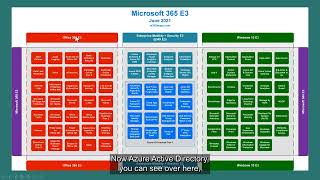
Mike Austin (YouTube, Aug 1, 2024) explains Microsoft 365 vs Office 365 licensing bundles, common customer pain points, and practical guidance for license optimization. He reports survey results (~190 respondents): ~38% struggle with cost, 17% with understanding bundles/plans, 11% with licensing programs, 7% with tracking/managing installed licenses, ~6% with data/visibility. Austin clarifies that Office 365 is a subset of Microsoft 365 (M365 contains O365 + EMS + Windows Enterprise subscription), explains E3 vs E5 differences (E5 adds Defender, Azure AD P2, Cloud App Security, additional compliance/security suites), step-ups vs full E5 purchases, and F (frontline) licenses (F1/F3) for workers without dedicated PCs. He emphasizes using usage data to decide what to buy—example: account bought 200 M365 E3, assigned 85 (42.5% consumption), but only 22.9% of services used — indicating optimization opportunities.
Chapters
So we actually surveyed about just shy of 200. I think it was 190 some odd people. And these were the results when we asked them, you know, what they basically thought about Office365 licensing. And you can kind of see the big portion over here on the right is that costs are hard to find savings. It's hard to manage cost. And, you know, obviously Microsoft had recent price increases, and we think that's a trend that'll continue over time. And so, in other words, about 38% of people struggle with cost. And then if you look at a couple of the other categories in here, 17% have a hard time understanding bundles and plans and bundles and plans. Another 11% have a hard time understanding licensing. And so, you know, the difference there really is the bundles and the plans, or, you know, what is M365? What's O365? You know, what comes in them and then licensing is, do I buy it through an EA or a CSP program? And then about 7% say that they have a hard time tracking and managing installed licenses. So you get somewhere in the neighborhood of about 35% of people that, you know, struggle with the licensing aspects of Office 365. And then the next piece, the next big piece of these two, 6% up here that are about data and visibility into what's actually being being used. Okay, so here's the. If you kind of break it down, basically what happens. About a third of people are really struggling with the cost of O365 trying to find savings. About a third really struggle with licensing and how licensing programs work. About 10 to 12% of people struggle with getting the data to make important decisions. And I would actually state that that data feeds cost and feeds licensing information. And then you got about 13% that are, you know, not sure if they have any challenges or not. And so, you know, the big thing we're going to talk about today is kind of this understanding the bundlings and maybe touch a little bit on, on the data. But what that really kind of boils down to when I get asked a lot, the number one question that I get asked is what is the difference between Microsoft 365 and Office 365? That is, bar none, the number one question that I get asked, and I'm going to seek to answer that here sometime in the next five minutes and hopefully clarify that. Okay, so first things are we're going to go through how those bundles work. So we're going to talk about E3s versus E5s. We're going to touch a little bit on aft the F plans. And then a couple of things to note is the diagrams that I'm using are provided by a Microsoft employee called Aaron Dinnich. They're located at m3.65maps.com, so you can go and grab those there. GitHub is there. Or if you want to follow them on LinkedIn or Twitter, these are one of the easiest ways that I know to actually look at the O365 bundles and how they work. So the first thing I want to talk about is answering that question of what is the difference between Office365 and M365? And when I talk to my team all the time, I tell them there's no such product as Office365 or M365. Those are not products. Those are a brand and they are bundles. The products themselves are the services that live inside of those. So that's going to be things like Exchange Online Teams, SharePoint Online, the Office product which is now called M365, Enterprise Apps, you know, so it's the services that are products. The rest of it is just a marketing bundle. So when people say to me, well, what is the difference between O365 and M365? The answer really is there isn't really a difference. The O365 is contained within a bundle called M365. So M365 is just the biggest bundle you can buy From Microsoft, where O 365 is a portion of that. And sort of where this comes from, how this kind of all started is if we slide back a number of years, back to when there was this thing called perpetual licenses and on prem software versus the cloud, Microsoft used to create their products into three buckets. They had an applications bucket that was your office licenses. So anything installed on a desktop, Office Licenses Project, Visio, msdn, Visual Studio, those sorts of things were application products. They had server products. So those were things on servers. Windows Servers, SCCM or System Center, Exchange Server, SharePoint Servers, and then they had the desktop OS, Windows, it's Windows 11 or Windows 10 nowadays. But they had these three products and they were kind of distinct and they kind of sold licensing separately from those. Now when they moved to this O365 world, they started kind of in that server world. So they created a, you know, a service where you moved your service, your server products into their Cloud, Exchange, SharePoint. And back then it was Skype. When they first started out, which is now teams, and so they created this product called Office or this marketing bundle called Office365. And they push those server products in there. And then, you know, you fast forward a little bit. After the launch of O365, they had so much success driving that that they decided to move their other perpetual licenses, the stuff that remained on premise, into subscription licensing. And they wanted to get into subscription based licensing because in subscriptions you kind of always got to be paying. You can't stop paying and just write a perpetual entitlement to, to a license. So they created a bundle called Microsoft 365 and they added into that their Windows Cals, their SCCM Cals. So those were the client access licenses that allowed you to access those servers. And then they added the Windows OS in as a subscription as well. And so that's why when you hear back in the day on premise, if we talk about Windows for a second, you probably are familiar with Windows Pro and Windows Enterprise. And then all of a sudden these windows E3 show up. Windows E3 is just windows Enterprise as a subscription service, okay? As a subscription license, so to speak. So if you look at this chart here, Microsoft 365E3 is everything on this page. Office 365E3 is just the stuff in red. So what is the difference between Office 365 and M365? That was the, like I said, the number one question that I get asked, the difference is Office 365 is included. M365. M365 doesn't just include your kind of old traditional server products. It includes, it includes your what was on prem, or still could be on prem, access to Windows servers and System center servers and your Windows os. So if we take a look at this slide for a few minutes, I'm going to talk about office 365E3. Now there is lower ones. There's an office 365E1. There's some differences in what you get in Exchange and SharePoint and things like that, which we won't go into depth on this call on. But the biggest difference is you don't get Office in those. So Office365 includes Office, whereas an E1 does not. And then it has some lighter, lower level access to Exchange. So smaller mailboxes, smaller onedrives, those sorts of things. But if we look at Office 365E3 here on the left, the stuff in the red, it is made up of 35 different products or services. So some of the things in the little red boxes contained within, you know, kind of the whole thing here labeled O365. So these 35 boxes, some of those are products and some of those are services. So the difference being a product is something that I can buy and use. A service is something that is included and can. You can choose to use it or not. So a good example there is Alert policies. Alert policy is a service. It's not a product that you go out and buy. You just get alert policies as part of purchasing. And O365E3, okay, so the product itself is made up of these services. It's made up of these 35 different services or products. So when we talk about a product, what would be a product and not a service? Exchange Online would be a product. SharePoint would be a product. Exchange Online Protection would be a product. Okay? Microsoft Teams would be a product. OneDrive would be a product. The Microsoft 365 apps for enterprise would be a product. Now, in this bundle, some of these products I can purchase separately as standalone products. So for instance, if I didn't need all 35 of these services, I just needed a user to have, say, an email account. I could just purchase Exchange Online. Some of these products are only contained within the bundle and cannot be purchased separately. Now, not necessarily this O365 bundle, more when we get into the Security products and Compliance products in a little bit. But the thing to note is that sometimes some of the services or products can be purchased separately and sometimes they can only be purchased as part of a bundle. Okay, so Office 365E3 are these products and services on the left, and then in the middle you get this product or I guess marketing bundle called Enterprise Mobility Security Suite EMS, and this is the E3 version of it. So EMS, again is a bundle of products. Okay. And those bundles of products are down here in the, I don't know, brighter blue, I guess we can call it, is a product called Azure Active directory premium plan 1. Now, Azure Active Directory, you can see over here for O365 is included as a service inside of Office 365 E3. Again, we're not going to dive into the depths of the differences between Azure AD for O365 free versus Azure AD Premium Plan 1 or Azure AD Premium Plan 2 that we're going to talk about here in a little bit. But you can see that there's a progression. The Azure AD for O365, the free version is going to have limited functionality. You can Google the differences between Azure Ad Plans. There's a whole chart that'll come up and show you the differences in those plans and you can sort of move through them and understand the differences there. But just note that the things here within this dotted line and the brighter blue are the services that make up an Azure AD Plan 1. That is things like single sign on, that is things like password protection. There's some conditional access included in there. Now I cannot purchase any of those services that are inside that Azure AD Plan 1 as a standalone product. If I just wanted, I don't know, say Microsoft Conditional Access. I can't just buy conditional access from Microsoft. I have to Purchase Azure AD Plan 1. That is an example where a bundle is all that I can buy. I can't buy an individual product or service. Now when we're talking about Azure, the EMS suite, the stuff up here in the, I don't know, greenish blue, I don't know if that's the color of it or not, are other products that are included in this bundle. So you see here, these are Windows Server CAL rights. So what that is is back in the on premise licensing days, I bought Windows cals, either user or device based that allowed my users or devices to access Windows servers. EMS gives you the right to do that. So I no longer need to buy a Windows Server cal. If I have ems, it gives me the right. You'll see the Microsoft Endpoint Configuration Manager. That is your System Center Manager license. So same concept I used to buy that on premises. A device or user cal. If I have ems, I don't need to purchase that. You'll see an intune for their MDM or their MAM product. So you can actually purchase that product as well or that's included. If I want to use intune and have ems, I get that they also have the Azure Active Directory Rights Management Server in there. So again that's another product. It controls access to Excel and Office documents and who can print and who can see it's an access control product in some way. And then you get a couple of other things like an information protection product and some endpoint analytics as well. And so all of the stuff in the blue category makes up this product that Microsoft calls the EMS suite. Okay, over on the right here in the green is the Windows os. So this is the old Windows Enterprise product. It's now called Windows E3. I think this slide probably needs to be updated to say Windows 11, but it's, it's your Windows Enterprise. So you still need to purchase licenses. When you buy a your desktop or your PC or your map or your laptop, you get the Windows Pro Edition that comes with it. This allows you to put Windows Enterprise that has additional functionality over and above the Windows Pro license that comes with a PC when you buy it. And so you'll see things like mdop, that's the Microsoft Desktop Optimization plan, which has some tools in it to manage desktops, manage BitLocker, and some other things. But again, you can see the services that make up the Windows 10 Enterprise product here in these green boxes. Now, again, nothing here you could purchase separately. So if I had a Windows Pro machine and I just wanted to get Windows hello for logging into PCs using hello, I couldn't just buy hello. I would have to buy the Windows 10 E3 or, you know, I can still get Windows Enterprise on premise licenses, but I can't. I can't just buy that as a standalone product. So we have three products here and a fourth that I'm going to talk about. So we've talked about the first three, which is Office 365 in the red, EMS in the middle in the blue, and Windows 10 in the green on the right. Everything on this page as encompassed in that sort of purple box that kind of runs from the right to the left, makes off makes up Microsoft 365 E3. So to go back to the question, the number one question that we get asked, what is the difference between Microsoft 365 E3 and Office 365 E3? Microsoft E3 365 E3 is a bigger bundle of products that contains as a subset Office365E3. So. Or I can say that as Office365 is a subset of the products contained in the bundle that is Microsoft 365 E3. So there really isn't difference other than with Microsoft 365, I get the EMS suite in the Windows OS O365, I only get the O365 products. So hopefully that that clarifies that question because we get asked that a lot, like I said. So I'm gonna go to the next slide here and talk about the Microsoft 365 E5. Now this is the big Uber bundle that Microsoft has. It's the biggest one that you can get in the family. And this is where they're trying to sell everybody. And I'm going to start a little bit different on this one. I'm going to work from the right and then go to the left on this one. So with Windows, There's a Windows 10 E5 license. Okay? Now it says Step up here. And the reason it says Step up is if I have Windows E3 or Microsoft 365 E3 and I just want it to move to Windows E5, I could do a step up of Windows E5. If I have a Windows E3 or a Microsoft 365 E3 license, I can step up to Windows E5. Now if I do that, what do I get by stepping up to Windows E5? I get Microsoft Defender for Endpoint. So that's Microsoft's antivirus product for the Endpoint. And that's the difference between an E3 and E5. There's no other functionality difference. It is just their Endpoint Defender, their, their Endpoint Security product. And again, you'll notice that Endpoint for Defender over here in the bottom right hand corner is in a dotted box. So those are the services that are included in Endpoint or Defender for Endpoint. Again, I can't purchase just Threat analytics or Tamper Protection or you know, Block at first sight as a product or service. It's included in the Endpoint product itself. It is a service that's contained there within. Okay, so next if I move to the middle, we're onto the Enterprise Mobility Security E5 step up. So again, if I have an EMSE 3 license, an M365 E3 license, I can step up to E5 for EMS. And if I do that, I get these products that are included here in the middle. The big one is the one down here that is in the blue, the brighter blue in the dotted blue box, which is Azure ad Premium Plan 2. That's where if I'm doing things like Privileged Identity or risk based Conditional Access that I need to azure AD Plan 2 in order to use those functions, that's where I can buy that product. Now I can buy Azure AD Plan 2 as a standalone product or I can buy it contained within the EMS E5 bundle. If I buy the EMSE 5 bundle, I also get Microsoft Defender for Identity, I get rule based AIP or rule based AIP for rule based Classification. So that basically allows us to create rules on files and users that say do certain things with them. And then I also get the Microsoft Cloud App Security product. Okay, so again, I can just purchase Azure Ad Plan two, I can just purchase Microsoft Cloud App Security and I can just purchase Microsoft Defender for Identity as standalone products. So whether I wanted to purchase the EMSE 5 would basically be based on the price of the MSC 5 and what I need to use in there. So if I just want it Microsoft Defender for Identity. And I don't know the prices on these, so don't, don't quote these, don't write these down. Let's say that's $3 and the EMS step up is $7 a month. And I just want Defender for an identity. I would probably just buy the $3 Defender for identity, not the $7. Step up to E5. Okay, so when determining what I need to purchase, I'm going to look at what I can buy, how I can buy that, and then determine from there. Okay, so now we're going to move over to the left and go into Office 365E5 step up. So again, if I have a Microsoft 365E3, I can step up to E5. If I have an M365E3, I can step up To E5. Or I could just buy an Office 365E5. So when you use a step up, the difference between a Step up and just buying an E5 license is if I already have a license in place that is a lower version, then I would step up versus buying the full E5 product. If I don't, I would just buy the full E5 product. So typically where these are used is I'm in an enterprise agreement. I signed up for the E3 product initially. Eighteen months later, I decide I need the E5 product. I step up to the E5 product and I move from there. Now, you do not need to step up to the full E5. We have a lot of clients that are looking at certain portions of this product here and they think that they need to step up to a full M365E5, and they really don't. Okay, so before we go there, let's talk about the stuff in the orange, which is the E5 step up. And so really what happens here? Again, there's a change that needs to be made to these slides. This is from June 21. Aaron hasn't updated these, but the audio conferencing product that is here is now included in E3. Okay, so audio conferencing are the bridges for teams. Microsoft basically said those were free and moved them out of the E5 and put them in the E3 and in some of their other packages. I think the reason that they did that is, you know, post Covid. You know, it used to be prior to Covid, people would want A telephone number to dial into an audio conference. Now, 90% of people are just using, we got data to support this. 90% of people are just using the teams client itself. So they're not actually using, you know, a landline or their cell phone to call into these things. 90% of calls are done actually through teams itself. So that audio conferencing bridge is really not, not as valuable as it once used to be. You'll see the phone system here. So that's if I'm replacing my PBX with Microsoft's soft phones. I'm getting rid of my old handsets going to Microsoft soft phones. That is the phone system license that allows me to replace a user's handset with a Microsoft version of that on the soft phone. And then it also includes a Power BI Pro license. Okay. Now we also get into some of their compliance and some of their other security products with this E5, right? So I get Defender for O365 Plan 2 and Plan 1. So again, I'm not going to go into this. The stuff that is in the dotted lines that say Defender for Microsoft Plan 1. Those four services make up Defender Plan 1 and Defender Plan 2 is Defender Plan 1. Plus these other six services here, I can buy those as standalone. So I could just buy Defender for O365 Plan 1 or Plan 2. Now some of the names of these have changed recently coming out of Microsoft's Inspire Conference. But you know, we'll just, we'll stick with the old ones for now because some of the naming on the security products is getting a little confusing and we need to let some of that settle in. But so I get those. I also get some of their compliance products. So I get teams Data, loss prevention. I get, you know, some of these other products in here as well. Now you'll notice here that the whole page makes up the Microsoft 365 E5. But there's these other two boxes with the compliance one split into three. And so these are two other products that we can purchase or I guess five other products that we can purchase. So E Discovery. So if I just wanted to do Ediscovery, I could buy the Ediscovery and Audit sku. If I wanted to do Insider Risk Management, I could just buy Insider Risk Management here, which is like Privileged Access and Lockbox and things like that that controls again access to confidential documents. Or I could buy the Information Protection and Governments which is includes Endpoint DLP and Teams dlp. Now a lot of these products, not all of them. But this Insider Risk Management, again, these are four services I can't buy separate. Same with the E Discovery. I can not buy endpoint DLP separately. I have to buy it within this bundle. So if I just want an endpoint DLP from Microsoft, I'd have to buy the whole. I'd have to buy either an E5 like an M365 E35 or the information Protection Governance Suite and get all those products. I can't just get that one as a standalone product. Okay, so if I want all three of these, that's the Microsoft 365 E5 compliance. So again to figure out whether it makes sense to move to that or just buy one, two or three, depends on what services we need. And looking at those individual prices versus purchasing the bigger, the bigger bundles. Okay, now the next thing that we have is the Enterprise Microsoft 365E5 security product. So again that is just all the stuff across the bottom here in this, you know, Microsoft U5 security sort of box or rectangle that includes everything. So I get defender for O365 again Azure AD Plan 2 and I get this Defender for Endpoint. Okay. So as I was saying, a lot of companies, Microsoft is trying to drive everybody because a Microsoft 365 E5 is everything on this E3 and everything on this E5. Microsoft's goal is to drive everybody to E5. Their price increase on March 11 or March, sorry of 11% on the E3 was to decrease the delta between E5 and E3. The reason for that, I haven't read their, their quarterly report that just, that just came out. But last year, their last fiscal year, the E5 was less than 5% percent of their install base. And so they're increasing E3 pricing, not giving incentives on it, trying to get more people to move to E5. They want everybody in this big bundle where you, you know, you get everything from Microsoft. So in order to determine what I need to buy, really depends on what I need to, what my end users are using. Right. I've seen people come to me and say I need insider risk management and I need it for all my, I need to buy for everybody because it's in NEA and I gotta buy it for all my users. Then you start having a conversation with them and it's for, you know, the top 10% of the organization. So corporate VPs or VPs and above in order to protect, you know, people that have top secret documents and you know, financial information and things like that. That they don't want, you know, should not be leaked to the public, you know, but not everybody needs it. The shop floor person out in a manufacturing shop doesn't have access to that type of information. And so again, you really have to not just look at what I need, you have to look at how many I need, how much that cost me versus moving everything to bundles and what Microsoft is offering and all of that sort of stuff. So it is very complicated. So if I go back to, you know, the kind of, you know, 12% of people, maybe even I would add the 7% that have hard time understanding, tracking and managing and then understanding the bundles and plans. But if you think about it, this 19% in here, that, that's looking for data. They're looking for data to figure out what should I be buying. Because Microsoft and all their partners are just telling them to buy E5s and everything they do is designed to drive them here. But they know that that's an expensive proposition and they're trying to figure out how do I actually make this decision? Is the E5 the right thing? Now we've, we've got clients that E5 was absolutely the right decision. We've got clients that were on E5 that we moved back to E3. We've got clients that we put on E3s with one or two pieces that are on this E5 slide. Again, all of that is an analysis that needs to be done to figure that out. But when they talk about getting the data, this is part of it. The second piece of getting data is looking to see what am I actually using that's in use out there, right? So if I go into, this is our tool that we use that allows me to go in and take a look at my actual usage. So I'm going to just take a look at that O365 SKU for a second. So just give this a second here to, to load. But what we're going to be able to see is how much have I bought, how much have been assigned and subscribed to and what am I actually using. So over on the left, these are the SKUs. This is just a small demo account. We use this on customers that are, you know, as big as 400,000 employees. But in this demo account, you can see here, There's a Microsoft 365 E3 and I'm just going to click on that and you'll see everything has changed. So what I can see here in the middle is we, this, this account has bought 200 has only assigned 85 and 57 have been active within the last 30 days. Now, the reason that this is important now, this is exaggerated for a couple of reasons. You know, the 200 licenses are because their partner, and they got them for free. They would never buy 200 and only need 85. But there's a of the times where we'll see 200 and they've only got 140 assigned or 2000, they have, you know, 1600 assigned. But we want to look and see, okay, what have we bought and what do we have assigned? Microsoft considers consumption based on the percent of licenses that are allocated. So in this case it's 42.5%. And that's because 85 of 200 have been assigned, which is 42.5%. So Microsoft assumes this account is 42%, is consuming 42% of the licenses. Now, as we talked about on the last slide, we said that O365, M365 is made up of a number of services. So when I clicked on it, the services that M365 are made up of showed up over here. And so some of these are very easy to see. These are the plans within that skew or those services. So some of them are pretty easy to understand. This Office subscription is your Microsoft 365 Enterprise apps or Office. This is your active directory, right? The Azure ad plan, that's the free one or so that's the. Sorry, that's the premium one. So that's the plan one. So all of these map back to services that are in these boxes. What we can actually see is that although 42% of the licenses are assigned or consumed, in Microsoft words, this, this customer, this account is only using 22.9% of the actual services in that bundle. And so I'm not going to go into a lot of detail in this today, but we can actually go in and start looking to see, okay, should these users be on Microsoft 365 v3, or should they be on E1s or other plans and things like that? Okay. So very similarly, when I start to look at other products, a standalone, here's a Power BI license, right? So I can see again, 100 have been bought, 28 have been assigned. So Microsoft assumes 28% consumption, but only 26 have been used in the last 30 days. I know it says 23 over here, but if we drill through, we'll see what's going on. So if we go over in here now, this is anonymized data but here, you'll see if it's green here and green here, that means they've used the plan. They've used it in the last 30 days. If it's green here and red here, it means they've used it in the past, but they haven't used it in the last 30 days. So this person hasn't used it since June 16th. This one here has never used it, and they own. They've been assigned a license. So again, this gives me that opportunity to go in and do some license optimization. And this is the sort of data that people are looking at, trying to get into to understand what is actually going on in their environment, what they need and how to actually use, how to actually correctly license the products. Okay, so just to summarize what we've covered so far, we've Talked about how Office365 is a subset of a bundle of products that is called Microsoft 365. Microsoft 365 includes Office 365. It includes the EMS suite. It includes Windows 10. We talked about what makes up E5. We talked about how if I have an E3 or standalone version of a product, I can step up to the E5, or I can buy a whole E5 suite. And that the way to do this and figure out what I need to drive cost out is to look at the data. Now, there's another type of license that Microsoft offers, and these are called F licenses. So the E stands for enterprise, whereas F stands for frontline license. Now, Microsoft considers frontline workers as people that do not have their own PC. So they don't have a dedicated PC. They use kiosks or shared PCs. Some examples would be nursing staff in a hospital, shop floor, people inside of a manufacturer, retail employees within a retail shop, warehouse employees in a warehouse, pilots and flight crew, maybe even ground crew for an airline. You know, so there's all kinds of people that do not have a dedicated PC. Microsoft considers them to be frontline workers. And they basically have two classifications of frontline workers. They have an F1 and they have an F3, okay? And so an F1 worker, as you can see here, this is what Microsoft provides to an F1 worker. So again, I can buy just Office365, F1, okay? And you can see it's not nearly as comprehensive as all the products that are in an E3. It's very. A very limited subset, right? So I get Office for the Web only, right? So I can just. I can log on and use Excel online, Word online. I can't use the Office client. I can't use Outlook to access email. It doesn't allow you to do that. I get SharePoint, you know, get some other stuff that nobody really uses, like Yammer or Sway. But you know, the users can't be administrators. They can't use the desktop app of teams. They can't do app sharing, they can't schedule Skype meetings. They just participate in teams meetings basically. And they don't get access to productivity servers. So what that means is they can't access Exchange online, they can't access SharePoint online. They can only use. Sorry. On premise. Sorry. They can only use online versions of those. Okay. Now the EMS product, you'll notice this is exactly the same as this. So there's no difference in the EMS product. And they don't get a Windows license. Okay. So this is basically for those people that just need, you know, very limited access to technology. I could just buy an office 365F1 or I can buy an M365F1 if I want them to be managed within Azure AD or they need access to some on premise servers, I could just buy office F1 and buy them Windows Cals if they need access to Windows servers. Again, you're going to do an analysis to figure out what's the most cost effective way to do that. And then I can move to a Microsoft 365 F3 license. So again, what's the difference here? We'll talk about Windows here in a second. You can see now all of a sudden there's a bunch more services offered in here. Right? So again, they just get a few more products. So you want to look at these users to figure out is what's in F1 good for them or do we need what's in F3? Right. And again, you can kind of see that there's some restrictions. Right? So they don't get access to desktop apps. Right. So you'll notice, you know, they can't use Outlook. Sorry. To access email, they don't get voicemail, they don't get a OneDrive for business sync. You know, so there's limitations in terms of what these products actually do because they're the frontline worker versions of them. And so from a technical perspective, if you're looking to make the change to move them here, you just need to make sure that that can be. That that can be done and we can use that. Now we sometimes have people that say, well, I still want my end users to be able to access Outlook, but You know, they're really app users. Well.
More from Mike



Microsoft Add-Ons Hidden Costs Explained | EA Renewal Risk & License Optimization Expertise Sharing

SaaS Sprawl Explained: How Decentralized Software Buying Destroys Negotiation Leverage.

Microsoft EA Renewal Strategy: Mike Austin Explains How the War Room Method Works.





