Noomap Tutorial Intro (Context and Signing Up)
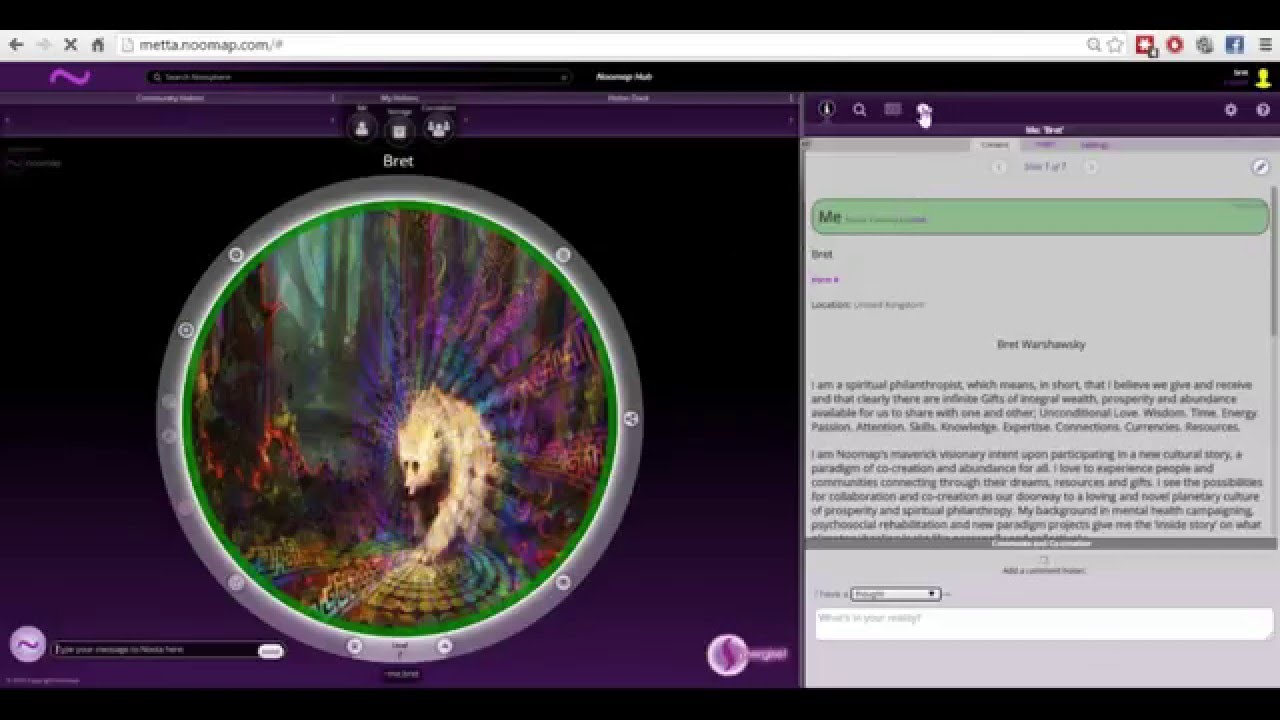
Bret Warshawsky introduces NuMap, a prototype social-coordination platform. Sign up at meta.numap.com with a simple username and password, use Ctrl/Cmd plus or minus to zoom, and avoid entering sensitive information. The platform aims to be a gift civilization and particle accelerator for consciousness.
Chapters
Hello everybody, my name is Bret from NuMap. I'm also part of the United Earth Platform and another thing called Meta Alliance, which is a social architecture working in conjunction with NuMap, the technology, and United Earth, the platform. So this is my first video in a series of tutorials to help early adopters and pioneers and people who are part of the community in signing up for New Map and starting to use it a little bit so we can all synchronize, coordinate, and co-create together. So I'm going to try to make about 8 or 10 videos that are just about a minute or 2 long each that focus on specific things you need to learn about or be aware of in New Map. This video may just be a few minutes longer. I'm gonna ramble just a little bit to give some context and provide some details. So first of all, thank you for watching this video. We have a lot of gratitude and appreciation if you're— if you've been given a link to this tutorial or to sign up for NumMap. We're really happy to have you, to have your feedback. There'll be ways to do that. In further videos, I'll explain different things. So the first thing— excuse me— that I'd like to share is before you actually create your username, we'd like you to visit this Google Doc I'm going to bring up here. And this is a work in progress, but we just need you to kind of go over this and in your heart, you know, accept Some of these things we're sharing here, you know, that NuMap is in prototype, that right now we're not responsible for the data you input. And of course, we're super concerned and interested and will be, you know, having the benefits of owning your own data and privacy and transparency and all the things we're all interested in. Right now, let's be clear that we're in prototype and we can't guarantee anything. So please do not put in sensitive information that you feel like others can't have or can't see. Please be aware of that, and that these are the first line of tutorials as well that we're going to be making, and there's going to be bugs and things like that. So please take a look at this link, which will come as part of your invitation from a friend, you know, to sign up for NuMap. You also should be receiving this link, and it may automatically also show up when you try to log in. So you have to check a box saying, yeah, I've checked this out. And that's that, and I'll get back to NuMap and get you started on the first things you need to know in getting signed up for NuMap. Okay, so the homepage right now for NuMap is something called metta.nuMap.com. That is where you're going to go to log in. Now, as far as signing up, you will have gotten a link from somebody with the signup URL for NuMap. So you'll see I put it in there, meta.nuMap.com/?enableJoin=1. I'm just going to reload this from that, from that place of the signup link. All right, now the first thing you'll see is up here in the top right corner it says Join. You click that, enter a new username. Now I'm also asking at this point if you could please keep this simple, um, lowercases, and if you could leave it at just typing in your name or using lowercases, that would be great for a username. And you can also Add some numbers if you'd like. Hit OK. Add your email. Create a password. Please also try to keep this on the simpler side, just lowercase and numbers if you can. I'm not sure if there's bugs around that, so please, whatever you feel comfortable with, go for it. And if you're having trouble, you can let me know through email, which I'll have in this link. the best way to contact me. So I'm just gonna go for keeping it simple at the moment. All right, then it'll say ready to go, ready to make your request now, and then it'll say welcome to NUMAP, you're part of the network. Hit OK, and you'll see in this upper right-hand corner your username will be up there. That's how you know you're logged in. Now, um, when you refresh and when you come back to NUMAP in the future, Make sure you're not refreshing or caching this signup link. You just go to meta.newmap.com. I'll show you. Just like that. And I'm going to log out of the account I just created. I'm going to log back in with my New Map account. And that's what it looks like. So I'm logged in as Bret. This is the homepage, meta.nuMap.com. Now, I'm just going to show you a couple things to get oriented before I stop this video and start working on all the individual tutorials. So the couple things I'd like to share right away is number one, be aware that you can slide this information panel by just left-clicking and dragging, holding it down and dragging. I'm on a mouse pad right now. So I'd like to find the space Hilo. Determine for yourself what you like depending on the further you use the map and you see how it looks. The other thing to be aware of is using Control on a PC or Command on a Mac and plus or minus. The resolution looks different for different people with different monitors and laptops and desktops. So you've got to use the plus and minus zoom function. And I'm in Chrome now. I'm sorry. Please use Chrome or Safari. Those 2 work the best right now. I'm in Chrome. So you see, if I do minus, it gets bigger and the text in the panel gets smaller. The hold-on in the middle gets bigger. And if I hit plus, it shrinks down. So you'll just get to know which size you like the best. I generally like this, and then I slide this over a little bit. I like to find a balance that makes me happy. Um, so really, that's all we need to do to get you signed up. And oriented and ready to start the first tutorial. And what we're going to do is we're going to start with what's called the Me Hold On. The next videos will have that. And please be aware that we're still working out some kinks on the sign-up, so if you can do your best to remember your password and username, that would be really great right now. Um, We can do anything we need. So again, if you do lose your password or forget it or need to change your username, all of that can be done for the early adopters. It's not an issue. It's just asking your patience and kindness in trying to remember those things so we don't have to do it on the back end. And welcome to New Map. Welcome to a gift civilization where we all share and co-create and collaborate. Welcome to a particle accelerator for consciousness. And one of the changes we're all being, and one of the solutions we've been looking for, and you're going— we're all co-creating this. New Map won't be realized in the world other than be a reflection of the ability for all of us to cooperate and share and collaborate and co-create. New Map is going to be a direct reflection of that, so we're super excited to have you. We're super excited to be building this with you and for you and for the world and for the community. And there's a lot more to come. There'll be Google Hangouts and tutorials, and there's ways to get involved. And the YouTube page will have some information about our website, about United Earth's website, and some contact information. So if you don't see that right away, just come back. Please bookmark the YouTube New Map page, and we'll get going. So thank you for your patience, and I look forward to meeting you all on New Map. Thank you. My name is Bret on New Map, lowercase B-R-E-T. You can use this chat function here once you sign up to create a new conversation to Bret, and you can have a thought or a question or a vision, and you can just say, hey Bret, how do I copy, copy paste? And I will do my best to interact with all of you on New Map. And I'll also be looking for people who really enjoy NuMap and who understand it quickly to help me be ambassadors as well on NuMap to help people answer questions and use it. So have a great evening, great day, great night wherever you are. Much love, and I'll see you again. Thank you. Thank you.