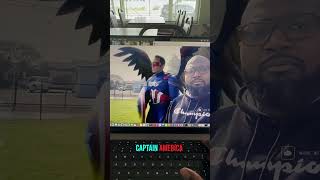
Justin R. Lester demos Pika 2.0's new Editions feature, which lets you add characters or images into videos. Upload a photo like Captain America and it appears alongside your speaking video, or include someone who's passed away.
Questions this video answers
Captain America
Chapters
You ever wanted to hang out with a different character and didn't know how to do it? Well, Pika just updated their software where you're able to do so online. Before I show you, be sure you hit that like and follow button because I'm going to give you the business for your business. Check this out. Go to that, Go to this website and in their homepage you're going to see what it means to introduce Pika Editions. You get started, Peak Editions. What you do is you upload a video. We're going to upload an image. We're going to upload an image of Captain America and we're going to add this to the video. Really simple. And then you click this button here. As you can see, we have my video here. We have Captain America here. And add this to my video based upon the actions of my reading video. Go with the natural, engaging way to fit the objects of the video and make it. And we're going to press it and here's the video. Hey, everybody, I'm here hanging out with Captain America. So that's dope. So imagine the possibilities you have of this where you can add different characters, different people to videos. I see this as an opportunity for, like, loved ones that have passed on and things like that. I think Pika really, really did something special with this. Especially. You can get opportunities like this for free. So go try it out. Go to Pika, see what you can do with it. As always, like, and follow that tech pastor giving you every day the business for your business. Peace.