Katie from The Autism Helper shows how to build a word spinner on wheelofnames.com for remote OT groups. Add gross-motor activities like jumping jacks and crab walks as individual slices, then customize sound, spin duration, effects like confetti, and colors to keep students engaged without overwhelming them.
Chapters
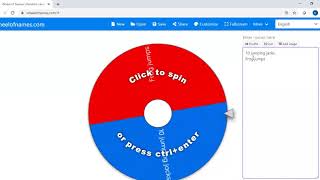
Hi guys, it's Katie from The Autism Helper. I'm here today to show you how to make your own interactive spinner that you can use with your students during distance learning. I have been using this spinner over the past few weeks and it has been awesome, and it's pretty easy to customize for your specific needs. So when you go to wheelofnames.com, this is the default spinner that's going to show up. So in this example, there's a whole bunch of different names which would be super easy to use in your sessions. You could put the list of students who are going to be in your group and use the spinner as a way to make some choices. Today I'm going to show you how I would use it in my OT session. We're just going to focus on making a spinner with words in this video. I'll do a separate video on how to create a spinner using images.
So over here where I've highlighted the, the names, this is where the content goes that is then going to be on the spinner. So I highlighted these because I'm going to delete them. I'm going to start fresh. And I'm going to customize a spinner for my OT group. I typically start OT groups doing gross motor activities. It's a great way to get kids moving and to get some good sensory input. So I'm going to go ahead and list out a couple different gross motor exercises. So let's start with 10 jumping jacks. And then I'm going to press Enter. That's going to bring it to the next line, which also indicates another slice of the spinner. So now I'm going to say, let's do frog jumps. Did you see how that made another slice of the spinner? I'll press Enter and we will do 10 wall push-ups. And let's do hop on one foot and crab walk. All right, so that looks good. That's a quick and easy way to add in some gross motor exercises to our spinner. Now I can customize it a little bit more. So I can go up here to Customize, and all these different options are going to appear. I can change the sound. So let's say I want to have some cheerful music on while the spinner is spinning. I can change the amount of time. I can change the amount of names that I have on the wheel. After the spin, I might want some exciting things to happen. Maybe I want applause, or my students have liked the fanfare. Maybe you want confetti to launch. If you don't want that to happen at the end of the spinner, that's fine.
You can just take it off if it's going to be too distracting for your students.
And then I always try to change the pop-up message. This is what will pop up when the spinner has made its selection. So in this case, I'm going to write, "Let's do this exercise." Oh my. There we go.
All right.
So "Let's do this exercise" will pop up then with the chosen exercise from the spinner. You can also change the colors. So let's say we want to pretend that we are out in nature, maybe enjoying a beach sunset. It will adjust the colors of the spinner to be calming, beachy colors. And finally, you can add an image to the middle of the spinner if you'd like. So there are some preloaded ones.
I am going to add a heart to the middle of my spinner.
When you press OK, you can see that all of these adjustments were made. So I'm going to go ahead and share my sound and click the spinner, and we can see exactly what it looks like when it is completed. [MUSIC] Alright, so here is the exercise that it chose. So here's our custom message, "Let's do this exercise." and the spinner stopped on hop on one foot. So you would have the students do that activity, and then you could either remove it from the spinner so that it doesn't get chosen again, or you could just close out and go back to the spinner and have the next student take a turn spinning. So I hope that was helpful to show you how to make a simple spinner using Just Words. Thanks.