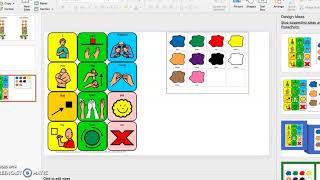
In this tutorial, Gina from The Autism Helper demonstrates how teachers can design a Halloween (or any holiday) party schedule and accompanying core and fringe communication boards using PowerPoint (or Word) without needing Boardmaker. She walks through creating a blank slide, adding a title, searching for and inserting inexpensive activity images (pumpkin decorating, Monster Munch snack, Play‑Doh spiders), arranging them with copy‑paste shortcuts, numbering, and optional borders, and printing double‑sided to save paper. Gina then shows how to convert a PDF of a county‑approved core/fringe board into a PowerPoint board, resize it, add color choices, and customize it with specific snack items (M&M’s, popcorn) for a holiday recipe activity. The boards enable students to request items during themed activities, streamlining communication across multiple language boards and devices. Throughout, she emphasizes low‑cost, classroom‑ready solutions and offers practical tips for efficient workflow.
Chapters
Hi everyone, this is Gina from The Autism Helper. I am here today to show you how to make a schedule for your Halloween party or any holiday party that you have coming up in PowerPoint if you don't have access to Boardmaker. And I'm also going to show you a couple different core and fringe boards that you can kind of tie together to make it seamless within your classroom. A lot of times we have a lot of different language boards and technology devices, which is wonderful, and we want to keep those out, but But sometimes during theme parties and other different activities, I like to streamline them a little bit more if I can. So this is how you do it in PowerPoint. Word you can also use. I tend to like fight with Word a lot, so I like PowerPoint. Um, I was just going to show you an example of a party schedule that you can make for Halloween coming up. Uh, I just have a blank slide. I added the words "party schedule" to it, and then I went on Google and just Googled some images of some things that we might be doing. So first, we might be doing some pumpkin decorating. So I literally just typed in the word pumpkin decorating and saved this to my desktop. And then we are going to make some Monster Munch, a little snack. Have a little picture of that up there. And then last, we're going to make some Play-Doh spiders, which I love. This is all really inexpensive ideas. You probably have all the materials already in your classroom, so very easy to duplicate. I like to— you can double-side this and then, you know, be able to cut them out side by side. That way you can save on some paper. And just copy and paste. That's all I'm doing. If you have a MacBook, it's Ctrl+C to copy and then Ctrl+V to paste. Or you can do the old-fashioned right-click and have that option there. So in this instance, I would, um, even add some little dark lines around it, and then you can just copy this. You can put some numbers on the side so that it's 1, 2, 3, and then you know you're finished. Cross them out, whatever you want to do for your class. So that's how you can make a party schedule. And then the next thing I was going to show you is how to make a holiday type Core and Fringe Board. This is one that our county already uses. You can do this on Boardmaker, or a lot of— there's a lot on Teachers Pay Teachers, or you can even probably screenshot this one and copy and paste it. But all I did was I have the PDF on my desktop, so all I had to do was just drag it over and there it is. And you can resize it if you want to make it smaller. And then you can just add to it. You can add a little color board so they can say, "I want red," whatever you have. You can also put on there, let's see, if you, let's see, if you're making your Monster Munch recipe, then maybe you wanna put on there, let's see, the M&M's. And the popcorn and everything else that might go in your Monster Mash recipe. And so you can size these different ways you want. That way when you're cooking with your kids, these are already made. They can tell you, "I want M&M's," or "I want more popcorn," or just "more M&M's," and you can use this board to request. So you can fill it in with all the different things that you're going to put in your holiday recipes for your class. So I hope this is helpful. Um, this was something that I did. It just was so much easier, especially with all the craziness that comes on, you know, these fun holidays when kids are in costumes, or we're not sure if we're using costumes this year. So I hope you enjoyed this tutorial, and good luck this holiday season!