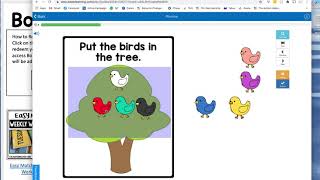
Sasha from The Autism Helper shows the Easy Matching Weekly Workbooks, digital resources with eight pages of matching tasks and automatic feedback. Available as Boom Cards or Google Slides, they work for independent practice, homework, or group instruction with errorless learning built in.
Chapters
Hi, this is Sasha from The Autism Helper, and this is a product preview of my Easy Matching Weekly Workbooks. These were such a hit. People loved these when I first came out with them. I originally made them to use with my own kids, and I love how they turned out, and I was very excited to make a digital version. So you'll get the Boom Card and the Google Slides. I'm gonna show you both. So the Boom Card first, they are set up in a bundle, but you will get 5 separate decks. I did that on purpose because I want you to be able to sign them on the days of the week You can also hide this card if you don't wanna like coordinate it with the day of the week at all. When you assign it, you can hide this first card and then it'll just be a regular workbook. So let me show you what it looks like in preview mode. So the great thing about these is you can work on the same skills you were working on in the classroom, but digitally. So these books have errorless learning, which I'll show in a minute, matching with up to a field of 6. And it'll tell you if it's correct. And some, like I said, basic color matching, errorless learning. So this task is an errorless task, right? You can't get it wrong, but you do have to complete all of them. This is what I love. If I don't move over all the pieces, it'll tell me I'm incorrect, so I have to move over everything before I move on. So, so great for your kids that are newer to technology, that just need some independence, need to practice a previously mastered these are so awesome. There are 8 pages in each workbook, so you can assign a different one every day of the week, and your independent work, your homework, all that good stuff is, is done. It's ready to go. So I think these are gonna be really useful to you. I also set these up in Google Slides because I've heard from many of you that are like, I can't give my parents another login, or I use Google Slides and I want to be able to use all of these fun things as either a small group activity, as a large group activity. I think there's so many ways that ways you could use Google Slides with these activities. When you download it, it'll force you to make a copy. You can then assign this to your kids in Google Classroom. So you could assign this and say Wednesday Easy Matching Workbook Adrian and assign it to Adrian, and then Adrian will open this up like this and he'll have to do the work. So he'll have to move over all the pieces, he'll have to match each thing, and same thing, it's errorless, it's easy matching, and it will automatically save. So you can go back and look and make sure that Adrian did it correctly. So it's a great way to, again, still work on these skills virtually. And I think a lot of these virtual tools are gonna be so useful in person. This would be really fun to do within your video calls. You could have students help you count as you put candy in a jar, name the colors. You could talk about what items are there. It's gonna be a great visual tool to assist you in your video calls even. I think you could pull, you can pull specific slides out, for specific activities, um, have kids take turns naming the colors, naming the items, talking about the animals you're putting. There's just a lot of social activities, vocabulary activities. I could just keep going on and on and on. Um, so you'll get the slides version and the BoomCard version included in this resource.