Make the Day Easier for You and Your Special Ed Students with Classroom Schedules
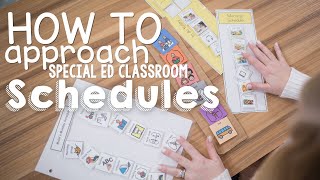
A special ed teacher shows her K-2 classroom scheduling system: magnetized, color-coded daily schedules students move around the room, a Google Sheets master schedule shared with speech and OT therapists, and a laminated school calendar for staff updates. The setup rotates assistants to prevent favoritism and lets related service providers adjust appointments without interrupting class.
Chapters
I'm getting ready to reset everything for the day. I thought it would be a perfect opportunity to show you not only my student schedules, but my staff schedules. These are student schedules. These are the Real Photo Daily Schedules. I love them. I have magnets on the back. Just about everything in my classroom is magnetized, so this is perfect because students can bring it from place to place. Every student is color-coded, and so that's how they identify their schedules. We are resetting these for the day, but I wanted to give you a sneak peek at what some of them look like. They're all differentiated. I love that there are words as well as real photos. I think that is so important for our learners. I teach K, 1, and 2 mostly self-contained, but about half of my kids are autism, half of my kids are OHI, and just Well, we're a hodgepodge, what can I say? I just cover up the daily schedule with the color and then students know to find their color, easy peasy. Everything on this schedule will correlate to a different part of the room. So, for example, if I come over here to my independent learning, you will see independent work matches the schedule for independent work here. This actually says the student name, I just have that covered up. But this is the symbol for independent work, and it matches that individual schedule. And then the tasks that students are supposed to do are right here. So when they do books, they can peel that off. Oh, guess what? Magnets again. And they can bring it down, they can put it on their books, and then they do their books for the day, which by the way are all Autism Helper. Are we surprised? We shouldn't be. I love them to pieces. Um, and then when they do task boxes, they pull their task box card, they put it right here on their green circle, and then they do their task boxes. These little pieces can be a bear, so one of my favorite things to do— ta-da! This is where we keep all of our schedule pieces, PECS cards, all cards, you name it, um, schedule pieces. They are all in here. Any visual I need, right here. So for example, if I want centers, ta-da, it matches. For students, we keep each individual student's in a crate every day. They've got their names on them, but for confidentiality reasons, I won't show you individual ones. But any schedule pieces that we're not using for the day, there's a bucket that we put inside these little crates, and that's where we keep them. So my assistant's job before they get started for the day, when they first come in, is to grab their schedule for the day. So this is the Monday schedule. It's shared between 2 students. So this person is in charge of 2 students. One student is here, one student is here, to go through the schedule and then set the schedule cards for the day. Now, we check out, like, we do a schedule 3 times a day if you're in kindergarten and twice a day if you are first grade and 2nd grade. So I reset schedules with my assistants between 3 times and 2 times. So that means this is our morning schedule, and then we'll clear those off, and then we'll put on our afternoon schedule. For our kindergartners, we'll put like our beginning morning, our mid-morning, and then our afternoon. And the reason we do that is because we have 3 recesses for kindergarten, 2 recesses for everybody else, one after lunch and then one in the afternoon. Um, and so Recess just seems like a natural break for everyone, and then when we come back in from recess, it is time for centers, and centers has its very own mini schedule. Uh, so just in case you were wondering what our schedules look like, I mean, we have absolutely every single minute of the day planned from whether or not the child eats breakfast, how they get to school, who picks them up from the bus, where they should be going, if they're going to a special with a gen ed teacher, when the assistant lunchtime is. All of those things can be found here. We go through these, we correlate them right over here for the schedules, and we're ready to go. My assistants carry this and then also carry one in their badge, and that is how we get through our day. I told you I love a good schedule. So this is my assistant schedule. So every day we rotate students. We do this for a zillion and six reasons, mostly because I don't want there to be favoritism between students and staff. Most importantly, because I want consistency and expectations across my entire classroom. And so if I were to only put Mrs. Knebel with my first graders and I was only to put Mrs. Frank with my kindergartners and Ms. Frank was gone and I had no first graders for the day, Ms. Knebel had to step in, she wouldn't know what to do. It would just be a mess. So everyone rotates, everyone takes a day. And so these just slide. Guess what? Magnets again. And so these just slide down and so then every day, It rotates. The kids' names that they have are underneath these little stickies right here, but then this time indicates the staff lunch time. And yes, the staff lunch time 100% rotates. Some days you will have a 10:25 lunch. FYI, my lunch is at 9:55 and my last lunch is 12:20 to 12:50. This is everybody's favorite, um, because it's the last part of the day. I even have a sub that we can just pop in. Um, I did have an extra staff member at the beginning of the year, so I just added that in the rotation. Um, anyone that you see by themselves has a personal care aide. Um, I did start my year with 2 other students, um, but we did some little shuffling and shaking of our classroom. So right now I'm at 5, but it looks like in the next 3 weeks I'm gonna get 2 or 3 more. So it's ever-evolving, ever-changing, and what I love about this system is if I do get a new student, easy to pop them in. Just add another student name tag, add them right to an assistant, and we're good to go. So I want to share with you my master schedule, and I know that this probably looks like a bunch of hodgepodge, but what you can't see is over here on the left are student names. And again, I've got those covered for confidentiality, but what this allows me to do is see where any student is at one given time. It also tells my administration exactly what I should be doing, exactly what my students should be doing, and exactly what my staff should be doing at any given time. And I keep this all in a Google Drive folder and I put all those individual schedules for my assistants in there as well so we can access it. This is just Google Sheets. What I love about this is that my related service providers have access to this as well, and so anytime that they're like, "Oh hey, can I move speech to such and such time?" They don't have to ask me. They can hop in, they can see what the child has at that time, and they can see if that's something that we can accommodate or something that they shouldn't even ask for. A lot of scheduling happens on the weekends because we, you know, discover meetings and those kind of things that kind of pop up. And really, this allows a lot of flexibility from our related service providers to see when they can move kids and when they can see kids and those kind of things. Any white space that you see is time that we work on individual IEP goals. So these are non-movables. These are non-negotiables. These are the things that are written into the IEP. This big black session section right here is recess and lunch. So anytime you see black, it either means it's lunch or recess. My morning meeting, that's not negotiable. Social skills, not negotiable. Snack is often with gen ed. Pat time is phonemic awareness time. Any specific curriculum that I'm pulling them out for, I will indicate that. If they go to library with their gen ed peers, related services, and I even try to put in my prep time. I know that that is a pipe dream, but I promise it can happen with the right amount of scheduling. But this just gives everybody an idea, and I just want to say too, sometimes we have that, "Oh my gosh, where is that student?" And this is the first thing that I look at because my students, my classroom's a revolving door. So this tells me exactly where the student should be. 9 times out of 10, they are at a related service and I just forgot. So I just need to take a hot second and look at this and identify where they are and what they're doing. One thing I haven't yet done this year because, well, I told you I keep gaining students and losing students, is I blow that up. I make that poster size and then I hang that in my classroom. So again, if it's like a, "Oh hey, by the way, I have a student absent. Can I see your student in that place for speech, OT, PT?" Instead of coming to ask me and interrupting me while I'm teaching a group, I typically hang that right here and then they can check that schedule and they can see where is that child supposed to be, they can see what child is available, and then they can check their times and see if they can fit that in. Just having that accessible allows me to continue teaching. I don't have to stop. I don't have to go to my computer. I don't have to open up the spreadsheet. I don't have to take a look or stop the staff member from teaching and say, "Hey, what is so-and-so doing at 12 o'clock?" They can identify it themselves. If I can give my staff and my related service provider and any adult in my classroom Autonomy. It's going to allow me to perform better as a teacher, and it's going to give them the power to perform better as the educator that they are. That's my role. By empowering my staff with a schedule, it's life-changing. My girls— I only have ladies this year— my girls know exactly what to do, when to do it, and they remind each other. That is so Cool. They remind each other like, "Oh, hey, don't forget we've got PE." Fascinating. They're just absolutely amazing. We know that schedules should ever be evolving. I've got a student who is ready to move beyond pictures. He no longer needs an image. He's ready just for language and for written schedule, and I'm so excited for this move. It's a second grader we've been working towards this for 2 years now, and I want to show you one of the reasons that I absolutely love these from the Real Photo Daily Schedule. I just cut the bottom off, so that's what I'm doing right now. I'm cutting that off, and then look, it goes right on the same daily schedule, so I remain consistent. I can continue to use what's familiar, and eventually I can move this into a daily, like, written schedule, but this is going to get him used to it. It's going to kind of baby step that into the next step, which would be a written schedule or a schedule that he can write down and then can follow. I'm about to head out for the night, but I want to show you one of my greatest accomplishments as a teacher. If you teach in a self-contained room, you know that sometimes, well, sometimes you just get left out. Sometimes teachers tell some teachers things and not others. Sometimes your support staff finds something out and you don't know, and so we found a way to combat that. So in my building, we have a bunch of self-contained teachers, a bunch of support staff, a bunch of gen ed teachers, right? So here's what we did. We made giant calendars, and then we laminated them. We put a sticky note with the week of, and then we put all of the important dates that we know about on sticky notes right here. So we start with what's on the school calendar. We typically have 3 up. We just took August down. We— and, um, are ready to place it with December. Believe it or not, the next 3 months are October, November, December. We don't have anything up on November yet because we don't have any major dates, but look at how filled October is already. We have things on there like Kinder Garten field trips. I would not have known. Fire truck days. And then on these bulletin boards out here, any important things that we might need that we have a copy of that other teachers might not, we put so everyone can make a copy of. And this is just right outside classrooms. Forgive the recycling, um, it's late at night and they haven't taken the trash out. I mean, literally, we've got classroom upon classroom. We've got bathrooms down here and a zillion more classrooms that way and a zillion more classrooms this way. It's just a central location. We all walk by to go to the bathroom and we remember This is the first place we put something. So if somebody gets a piece of information that we might need, this is where it goes. Okay. And by we made, I mean that my assistants made, like I made the first one and then they took over because they're way better artists than I am. And I know that that sounds ridiculous that I said that's one of my most prized accomplishments as a teacher, but it's one more way that I can make sure that my students are included in what they need to be. And I can make sure that other students are included in what they need to be. And I can just make things a little bit more accessible. I actually have my Jenna teachers pretty well trained. If they've got something, they come stick it up there with a little thumbtack and they give me a sticky note so I can put it right there. Everyone's involved and it just took a little bit of creative and out-of-the-box thinking. That's how we should approach scheduling— creative and out of the box.










