Gina from The Autism Helper shows how to build a 40-minute daily e-learning routine for 4-year-olds using a PowerPoint template with welcome videos, songs, calendar time, read-alouds, and math activities. She uses free tools like GoNoodle and YouTube screencasts, keeps slides short, and includes her dog to keep kids engaged.
Chapters
Hi everyone, this is Gina from The Autism Helper. I wanted to show you what I've been doing for e-learning so far with my pre-K3 early childhood kiddos and 4-year-olds. I just want to say that I think it's absolutely amazing what everyone's doing. Everyone's, you know, there's different things that are going on, and just know that you're doing the best that you can in this absolutely insane type of crisis situation that we're all going through. I've been so impressed with just teachers in general sharing resources and helping each other and making tutorials. I think it's just absolutely amazing. It's hard, you know, I don't want you to compare yourself to anyone else and be like, "Oh, someone else is doing more than me." We're all just doing the best we can. In my district, this was a PowerPoint kind of skeleton that they provided all of us, which I thought was absolutely wonderful. It gave us some expectations and kind of guidelines of things that we could do and add and delete as we saw necessary, and it goes all the way up through our 12th graders in our, our district. We have— we are smaller county, so we have been giving out devices and hotspots to families in need, and that's been wonderful. However, I know that's a little bit more difficult in the bigger counties. So I just wanted to show you my little PowerPoint that I do daily. Obviously I do it the day before. I've been getting a little bit better at it, so I'm getting it finished a little bit faster. And it's just a shortened version. My time allotment that they would like for me to target is about 40 minutes daily. Of course, it is whatever is best for families. We, you know, that's, that's just there for them as a guide. And I like to include things that we did in circle time and things that they're familiar with. So let's go ahead and go through it. Just a little welcome. In the, in the first video on Monday, I had a little video of myself showing them that, you know, school is going to look a little different, and, but I'm still here for them and I love them, and it's been really great for them to see my face. And then there's a little time allotment, just, you know, take your breaks, do whatever you need to do. I shorten the agenda. You know, we do a little circle time, a little reading and math, a little work with teacher activity. I have a little sound button here. Hello, my friends! Good morning! It is time to start off with our GoNoodle Say Hello song. So just a little interview or intro into what we do every day. My kids are used to that. And then this is a link to a Hey Go Noodle song. And then next we start with some circle time. And I use screencast with this video. And that's been working very well.
All right, my friends, let's look at our schedule for the day.
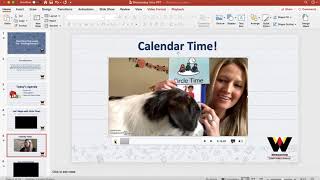
My dog comes in.
We have a guest joining us. We said hello. So now it is time for us to do our calendar routine.
So my kids are used to this circle time routine. It was on a bigger board and I just was able to bring it home with me. And so it keeps me on track and them on track. And then we go into our Days of the Week song, which I probably can't play right now, but it's Days of the Week, The Addams Family kind of motion sound. I have a little reading, what we're gonna do, identifying letters, and then I go into a little letter of the week.
Friends, so now we are gonna review our letter of the week.
—And I'm silly and I pretend my dog's in it. Then I have a little YouTube video that goes along with the letter. Then I do a little reading sometimes with screencasts.
"Good morning, my friends. I thought it would be fun if we read a book together. Think About the Pictures likes her aqua quilt." I love screencasts.
It's free and it's so easy to use. I will show you how to use that next. And that way I can read books and I don't have to have parents keep clicking around. And then there's a little skills choice board. Maybe they want to do something a little bit extra. Then we go into math. I have a little agenda of what we're doing, a little sorting time video from YouTube. My amazing— oops— my amazing educational assistant is making little videos. She's doing our next two shows. A big and little sort, and then I go into activity choices that they can do. Alright, in class.
So now if you want, you can with an adult or by yourself go ahead and find something in your house that you can sort. Maybe you're going to sort some food and some toys, or me, I have these really cool little mats at home and I can sort things that are foods and sea animals.
So, different types of animals. So just a little example for you. And then special areas, they made a few slides of some things that the kids can do in their homes. Some of the PowerPoints are longer. I tried to keep it very short for the first week and just tried to get the parents used to logging in and clicking on videos and links and all that stuff. So we've kind of scaffolded that through the week.
So I hope you like the PowerPoint.
It's a great idea. You can make it for your class and enter in videos. That way it's all in one spot. Then I'm gonna show you some more things.