In this product preview, Sasha from TheAutismHelper.com demonstrates a classroom resource packet designed to teach students—especially those with autism—how to respect, use, and care for classroom technology such as iPads and computers. Sasha explains the motivation behind the packet (preventing broken devices and teaching responsibility) and walks through each component: (1) color‑coded labels for technology storage to help students return devices to the correct spot; (2) two social stories that script appropriate ways to ask for an iPad and to take turns using it; (3) laminated visual rules for iPad and computer use that outline concrete expectations (e.g., sit in a chair, use headphones, two‑handed use, no food or drink); (4) a visual cue for waiting your turn when the iPad is in use; and (5) communication visuals for low‑verbal or non‑verbal students to request specific items (mouse, headphones) or help. Sasha emphasizes that these visuals make implicit rules explicit for students with lower receptive language, reduce aggressive or inappropriate behavior, and have been a “must‑have” solution for managing technology in her classroom.
Chapters
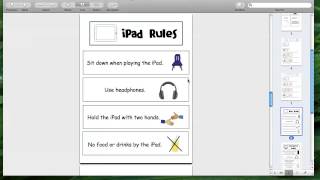
Hi, this is Sasha from TheAutismHelper.com, and this is a product preview of Technology Visuals and Social Stories. So I'm fortunate enough to have a decent amount of technology in my classroom, which I love, but one thing I've been really noticing that is a big area of weakness we have is really how to respect that technology and making sure we take care of it, because I would hate to go to my principal with a broken iPad or having to buy a bunch of headphones. So really teaching our students how to respect and take care of technology is really, really important. So my class was in big need of this unit. So let me show you everything that's included in here. So first off, I made labels for all the different types of technology in your class. I will be using these to show where they're stored so the kids can be putting back in the right spot. Last week I saw an iPad hanging off the edge of a shelf and I almost had a heart attack. So I really want the iPads to be going back right in the right spot where they belong. Then I have two different social stories. Social stories are a great way for kids with autism to learn the correct way to do things. So often we're telling kids what not to do, but kids with autism need to be told what to do. So this scripts for them exactly how to engage in appropriate behavior. So I did 2 social stories for common problems that happen related to technology. One is asking for the iPad appropriately, and the other one is taking turns on the iPad. So often we have that grabbing back and forth, or the whining, or the inappropriate behaviors to get the iPad. So this scripts exactly how to ask for the iPad appropriately and how to take turns appropriately. Sometimes aggressive behavior or inappropriate behavior can occur when someone needs to give away the iPad, so this can really script how, you know, to pass over the iPad nicely and not to complain or yell and that you'll have another turn soon. This has been my— the thing I've been most excited about. So I made visual iPad rules. I laminated this and put this in several places in my classroom so we can have access to it whenever we need to. So this can show kids, even with lower receptive language, exactly what they need to be doing when they're on the iPad. You need to sit in a chair, you need to use headphones, you need to use two hands, and no food or drink by the iPad. So it's really clearly showing them. We can't assume that our kids are knowing these implied rules if we're not showing them in a way they understand with visuals. I also made the same thing for the computer, and these are posted right next to my computer, again laminated so we can pull it over whenever we need it. The last one, waiting for a turn on the iPad. Obviously this is a common problem we have in my classroom. We can pull this as well as a quick way to show these are what we do while we're waiting if the social story is not available. Last are different communication visuals. I laminate these, cut out this whole piece, and I post these near where our technology is used. For students that have less verbal language or nonverbal and need help, instead of coming and whining or pulling on someone, they can bring this over and say, "I want the mouse," or "I want headphones," or "I need help." Separated the words because I think sometimes that helps kids with less language really focus in on those little words, especially when a sentence as long as "I need help with iPod," they can really point to each word as you're prompting them to say it. So that's everything included in here. This packet really has saved my butt because we've been having a lot of technology issues in my class, so this is a must-have if you have iPads or computers in your classroom. Again, this is a product preview of Technology Visuals and Social Stories by theautismhelper.com.