Gina from The Autism Helper shows how to build IEP goal programs for Pre-K students in 30 to 60 minutes. She walks through organizing 11 students into goal groups, inventorying classroom resources, and creating data sheets using existing materials like picture cards and the Ladybug math game. The seven-step method keeps prep minimal while aligning programs directly to each child's goals.
Chapters
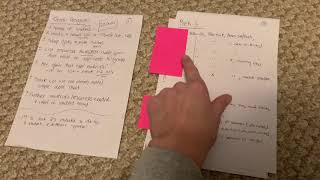
Hi everyone, this is Gina from the Autism Helper. I wanted to show you a very, very quick tutorial on how to create action steps to write out goal programs that link directly to your students' IEP goals and how efficiently you can do this in 30 minutes to an hour at the most. I have 11 students on my caseload right now in 2 different grades, Pre-K 3 and Pre-K 4, so making sure that I had all the materials available at all times with all their changing needs was really important. Um, actually creating the goal program seemed a little daunting at first, so I was really intentional on the action steps that I created, and I even timed myself to see how long it would really take. And timing yourself also makes you work very intentionally and much quicker, and you're focusing more. So for— to create a goal program, especially— and this is for early childhood, however you can use this for any grade, you just change the materials obviously— um, I gathered around 7 steps. And so the first thing that you want to do is write the name of your students. That took me about 1.5 minutes. Make a broad list of the goals, so as in Touch C, WH questions, object counting. This shouldn't take you too long. Um, a lot of my kids in Pre-K 3 have around the same goals because they're coming in around the same type of levels, and we're working on following a picture schedule. And a lot of My friends are nonverbal at this time or don't have a lot of functional language, so we're working on a lot of word meanings, labeling, and so on. So anyway, so write your goals out. Nothing really strict, just a broad list. And then next, you're going to group those goals and write the names of the students. Took me about 5 minutes. Um, the next one's really, really important. List the resources you already have made that will be applicable to those groups of goals. The reason why I say already made is because like many professionals, I tend to go down the rabbit hole of thinking, oh, I'll go on Pinterest and I'll find a really cool idea that really matches it when I already have so many things in my closet or that I've forgotten about. And so this is a really, really big time saver. And we often don't reuse effective strategies. Sometimes we get bored as adults before the kids get bored. So think about the things you already have made and stick to those. If you have a goal that you really need materials, list that and then create 1 to 2 only. Don't go crazy creating a whole bunch of them. Step 6 is create or use one already made, a simple data sheet. You can do this simply on a journal paper, notebook, and then transfer it to a Google Form, which I will show you later in the blog. And then step 7 is gather materials, resources needed, and label with the student names. So the first 5 steps only took me about 25 minutes. To do 11 students for 2 different grades. And then actually going ahead and creating the data sheets really quickly and gathering all the materials took me about another 30 minutes. So here I just broke it down. Um, obviously here I have names over here, so I covered them up, and I just made my very broad list of all the goals: following a schedule, play imitations, my noun see touch programs. Most of them have the same, but if they didn't, I put a slash or an X And then I added whatever goal they had, so counting objects, matching shapes. And then in Pre-K 4, the goals are a little bit, um, a little bit bigger. So responding to questions after a story, using visual cues. Some of them do have a See Touch Now program, counting objects, and some of them are doing addition and subtraction with manipulatives. So again, just a really quick, um, little list. Then I took those goals that I just wrote out and made them into groups. So in Pre-K 3 these were the main goals that I have, and then there were a few extras. I put their initials next to them, and then I did the same thing for Pre-K 4. Then last, I wrote out the resources that I already have. So I'm— for the Now See Touch program, I'm using picture cards. I have 2 sets of them. I might need a duplicate copy, I'll have to look. I have a Language Lotto game, which is awesome for object to pictures. I have identical matching folders already made, uh, level curriculums from the Autism Helper. And then for counting Objects, I'll need some bears, different animals so I can give them choice. I already have a Ladybug math game that has dots on it. Um, instead of making my own, I was gonna go make something else, and I was like, you know what, I already have something for that. Matching shapes, I have tons of shapes in my classroom and file folders. And then WH questions, I have the Autism Helper WH Picture Book and a lot of adapted books. And then with addition and subtraction, the same thing. Need anything else? No, Nope. So I stopped right there. Um, so this is just a quick tutorial. Obviously it's nothing fancy, it's not typed up, but the main thing is when you have a really big task is to really break it down into actionable steps and then you will be able to complete it much faster and efficiently. This is Gina from The Autism Helper. Hope you found this helpful.