Axion Mount Sinai training 15 mins 20151013 151237
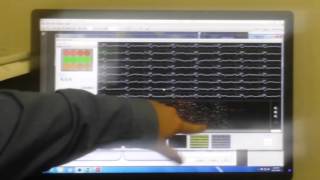
Russell Hanson trains a new user on the Axion Maestro electrophysiology system. He covers live neural recording, spike detection with built-in algorithms, cell culture setup for signal quality, and the stimulation module for building pulse trains across a 64-electrode plate.
Chapters
Every time there's a spike, it scrolls by. Again, we can zoom out if we'd like. Alright. So now if we go to the save disk icon over here, you need to have an experiment folder. These guys are optional, but just more information to keep track of things. And all we need to record is the axis. AXIS-RAW. So there's a dropdown, not recording, or AXIS-RAW, and it's coming from the Maestro. We've also got this filter, spike detector, burst detector. All these things are just software for the displays. Is there a way to do spike sorting in real time, like principal components analysis? No, there isn't, unfortunately. That would be neat. But yeah, so right now we've got this Another thing some people will record with the neurons is the axis spike file. So what the axis spike file is, is it's all of these waveforms and their location and time. So if you have a PCA analysis software, usually this is what it will take in, and we've got MATLAB scripts for converting over to MATLAB.
Can I point to that?
Yeah, absolutely.
So how do we record?
All right, so first we need to make sure that's recording. You want to always record from a running start because every time you hit stop, that voltage offset is going to redo it when we first hit it. So go ahead and hit start schedule. So again, my options were either manually do it here or start it here. So if I start it there, stop it here, start it here, stop it there. At the bottom, this is how long it's been recording for. This is how long it's been playing for. So with this recording schedule, you can set it up, say, record 5 minutes every hour for X number of hours, and it'll just continue going.
I was expecting that nothing appears here.
So it's just good. So good.
Yeah, expecting way more signals appear in that row.
Well, actually we were just talking, what kind of media are the cells in?
They're all appropriate medium, all astrocytes in the right astro medium, neurons in neurons medium.
But is it a neurobasal?
It is an intermediate.
27. Okay, so I warn people about neurobasal.
What is it?
Uh, it's just so it has really low sodium, so you get really low activity.
Oh, I see.
So they actually make it like a neurobasal ephys kit that has— that is made for electrophysiology recordings. So if you have really low sodium, then it's easy, more sensitive Yeah, then you get— live data display, there's a yellow box around whatever well is currently active. You can do that, the XY scaling, and then if you have multiple files open, the one that's in color is the one that's active. All right, so the narrow, we've got kind of saw them briefly. We've got the activity map and we've got the spike plot. The spike plot has the rasters and the waveforms. The activity map is just a plate-wide view.
Is this map a combination of all the different time points? Or can we generate this map in real time?
This map is just live activity. And if you want, you can— we've got— let's see, They still install that.
So we can generate a related—
We've got CamStudio, so if you want a recording of it to stick into a presentation, you can just— it's just a screen grab type software.
But it's always recorded in the raw data, right?
Yeah, so when you have the raw data, you can come back and everything you can get from the raw data. It doesn't really distinguish between the two. Cardiac we'll get into more in later sessions. So for the data acquisition, obviously, we have the cell culture. When it comes time to recording, you're going to want to make sure you've got an appropriate media, so it needs proper ion concentrations, your salt and your potassium, essentially. And then when you change the media, it's usually good to give it a few hours before you put it onto the Maestro. It can really change, if you're doing cardiac, the beat rate, the neural firing can also kind of take a hit depending on how well the pH and temperature is balanced on your media before you put it on. And when plating them, you want to make sure that your cell coverage over the electrode is nice and consistent and even. Alright, then we'll turn on the temperature. That was the simple on/off button and the setpoint. Setting up the data acquisition on the hardware. So you might not have seen too much, but it was here on the Maestro, right-click, Configuration, And then it's neuron or cardiac. So what that brought up for the neuron is it gave us a filter just to go on top of the hardware filter. It gave us a spike detector, which is what's detecting these. Our recommended setting is 6 standard deviations. If I zoom out— how did they not show these? Oh yeah, they're there. They're very faint, but there's little gray lines right here on each electrode. So the threshold's done on a per-electrode basis, so if you have a noisy electrode, it has a bigger threshold. It's just so it's not picking up a lot of noise. In general, we recommend 6. Sometimes if you have smaller amplitudes, people will go down to 5.5. But you'll start to see some false positives, right? You'll have equal positive and negative peaks. Whereas when you have a true signal, you've got a very reproducible waveform coming through. It's not always perfectly reproducible. Sometimes you'll have multiple active neurons and they'll each have their own waveform. So that's where you get your principal component analysis and start to separate those out. So now those are like false positives, right? Exactly, yeah. What's the red versus the yellow? Down here? Yeah. So the white is every event, the red is our burst detector. So these light blue come from this light blue, this red comes from here. So if I change the color down here, it's going to change the color on here. One more thing we have is network burst detection, which for some reason is off by default on here, and I don't see many network bursts, but if we had a network burst, what you would get would be the contrasting color of this red as a line that bracketed it. With AXS, anything you double-click on is going to bring up the settings. So double-click on the Maestro. You can also right-click and get there. It depends on if you're in a rush or not. The only settings that really can't be adjusted after they're recorded are the Maestro settings. So those are hardware settings and they influence how the data is acquired. We've got various settings for neurons or cardiac. You can choose your favorite. The default is this neurospikes. The differences between them are just the gain and the bandpass filter, so the range of frequencies that are allowed into the signal. So this is our stimulation. Studio, which— sorry, I am recording because like one of our lab couldn't be here. That's fine. So this is our stim— yeah, I'll sign a release form later. You'll notice it's got A, B, C, D. This is intended— right now only A works. The others are placeholders in the software. We've got an upcoming stimulation update coming for Access. It's supposed to be out with the new, the new light stimulation as well. But so this is where you build your stimulation train, and it's a drag-and-drop with the components over here. For cardiac, it's the heart and you're done. It's got a biphasic pulse with the artifact eliminator designed for cardiac. Delete. For neurons, you've got a monophasic, biphasic, monophasic pulse, biphasic pulse, a waiting period, and an artifact eliminator. Oops. So we'll drag that over, so now we have a biphasic pulse with our artifact eliminator. And with anything else, you can double-click on it, That'll bring up the settings. So this is where you can change current or voltage stimulation. Actually, this is a good time to point out, if you go to the stimulation section, which I believe they changed the page on me since 2.1 came out. We've actually got a note for a publication on just stimulating neuronal cultures where it talks about waveforms, size, durations, all those good properties. So I'd recommend checking that publication out. It's a little bit of a play with each culture you put on. You've got to find the electrode the neurons are on in order to shock them there. But build the pulse here. If you want, you can do a loop, drag things into it, repeat it however many times. In this case, I'd probably stick wait period between the pulses if you want to look at data between there. So by this function, I mean stimulation, we can, I can recapitulate the evoked current clamp? So we don't have any current clamp, but you could evoke a response. So you can essentially shock the cells into activity. So you couldn't, yeah, you can't do a nice clean current clamp step for an action potential. So can you, or can you adjust, like, current? Or like— So all we can measure is the is the extracellular voltage. Okay. Voltage, but yeah, so it's the sum of the voltage over the area of the electrode. Okay. If you click on this little well guy with some electrodes icon, I guess, it's not icon, it'll bring up another plate map. The difference in this plate map is now if I click over here on this well, it selects electrodes, and those electrodes are now stimulation. So you make a pattern on the well, you select a well, and then you hit over, and it applies that pattern. So currently with, with Access, you can have up to 64 electrodes stimulate at one time. They all get the same pattern and they all go at once. Is it per well or per plate? Per plate, yep, so 64 anywhere on the plate. And there's a yellow thing around the ones that aren't stimulating? Yeah, so there's a little red box on the individual electrodes, it's hard to see from a distance.
Why do you actually give us special, like, pattern notes?
So this, yeah, this padding is random.
So it is random, but I mean, it's the most normal sense to stimulate all?
So one, you've only got a limited number of electrodes. The other, typically you'll stimulate an electrode that has a neuron. So if you've got a cold— Yeah, so you put the plate on, hit play, watch it, and then you can just see set up the stimulation while it's playing.
So then it could reduce the volume of the file size if you select the right electrode?
No, it'll be the same size. But typically what people will do is they'll have a culture with a network burst, and then if you stimulate one of the electrodes involved in that network burst, it'll trigger the whole network to burst. So you can use this to get a nice pacing of a network first for testing that, or like you were looking for, for stimulating a response out of it, or seeing if it gets a response. I haven't seen the data, but I'd really love to see if you can get like "Hello World" in Morse code to kind of come out in there. Just keep sending it "Hello World" until it says "Hello World" back. And then you have to stop because they become sentient.
How did you get into this screen?
This is the lightning bolt. Oh, that one. Yeah, all right, and so once you have it all set up here, go in and figure out which electrodes you'd like to do here. Close this. You can save this stimulation for future uses, and I recommend saving it for its notes. The next version should be saving those. Waveform and all that, but right now it doesn't.
So if we have all this set up for version, then we can set up all of that?
Yeah. So how do we put in an arbitrary waveform? Sorry to interrupt. Or is there— can we import a CSV file or an Excel file of data? They're built in here right now. So right now it's just step functions and sine waves? Yeah, and so we also don't have a RAM function currently built in, so you'd have to do monophasic short pulses stepping itself up. Kind of a pain to build, so definitely save that once it's done. And then once we hit play, it's going to flash the stimulation onto the Maestro. And down here there's a stimulation start button that'll turn green. We can also set it up so it will auto-stimulate. —stimulation. What's in it? Huh? What's in it? Right now this is just the storage plate. Whenever it's not in use, keep the storage plate on it. But there's an auto-stimulate where you can tell it to record for X number of minutes and then stimulate at a given time. Stop. All right. Let's see.
More from Russell



Black woman tried to ram her friend with her car at Eldridge & Delancey, NYC on May 24, 2021