#31: AI makes you a project plan
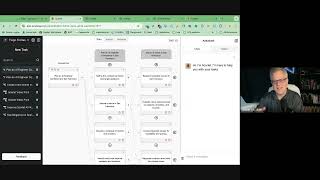
Thiago built Scarlet AI, a platform that breaks down big tasks like "plan a conference" into subtasks, assigns them to AI models or team members, and runs them in parallel. It automatically gathers data, figures out dependencies, and streams results into a document interface with built-in chatbots for each task.
Questions this video answers
Scarletai Co (spoken as 'Scarletai Co' / site referenced as Scarletai.co).
GPT-4 (used as the example executor for tasks).
Runway (entrance scene), Agen (AI avatar for talking scenes), DreamStudio (image-to-animation example).
Free to try with a few credits; subscription plans are being experimented with.
He said he started Scarlet AI in the US at the end of last year (spoken: 'end of last year').
You trying to use AI to manage your projects or get more done? Well, today's going to be fun. Who. Who are you?
Who are you? So I'm Thiago, I'm based in Portugal, but I just started Scarlet AI in the US end of last year. So a bit of my background. So I did my master's in Generative AI even before LLMs. So before it was cool. So I did this program to teach Portuguese to foreign students, to English speaking students. Portuguese has some pretty difficult parts of the language. So I will generate multiple choice exercises from any text. So you just give me the text from your interests and I will generate the exercises. And this was a hybrid between machine learning and rules because at the time machine learning was just getting started. And so after that I went to Deloitte to be consulting firm just to incorporate consulting. So I got lost a bit in my builder background. I used to be a builder as a kid, so I would like dismantle all my toys and was in the local robotics club and all like that. So I went a bit into the dark side. And then GPT3 rescued me because I started building again, experimenting with AI again. I built my own telegram bot and other experiments. And then during the pandemic I had a baby. And at the time I was automating my family business. But I decided to stay a bit more in pandemic mode, working remotely. I quit my family business and I started doing salesforce consulting while I was doing these experiments with GPT. And I started thinking how to automate my job. Even though I just got started as.
One does, let's fire ourselves.
So I started thinking, even though GPT3 was not good enough yet, but how could I create an AI consultant? So I started thinking as the client projects came in or tasks, I would need to learn from the project management system and so create basically an AI project manager. That would be the first step to basically plan what would need to be done in that project when the project came in from the client. And so I started thinking I would have to decompose it into smaller subtasks until they were small enough to actually be dealt with by the AI. And so I kept doing consulting and thinking about this problem. And I was thinking then I will need to create specialized agents for each of the kind of tasks that would appear. Yeah, and also I started thinking and imagining the kind of user interfaces that would be needed that would be better than just a chat box like we had in ChatGPT.
And when we see it, I think that's what really caught my eye was you're. You're one of the new companies that's building new user interfaces for AI, right. You're not just doing a chat, but where you talk to it. You're actually trying to do something much deeper than that.
Yeah. So we'll see what we get started with. But in the future, what we really want is to do generative UI on the fly. Create a kind of AI operating system where you can just delegate any task to the specialized tool or agent, but have a unified interface as an entry point. And this is the vision of Scala.
Very cool. So can we see it? That'll give us a lot better context for having a conference.
So you basically enter the task that you want. Anything you want. This is Scala. You basically input the task that you want. I have two examples here. Plan a conference and create a marketing plan. It can be anything you like. Let's look at the Planning a conference. The first thing it does is basically decomposing the task into subtasks.
It did this all automatically, just by prompting. I need to plan a conference?
Yeah. So I just blend it into these three of subtasks. So first we have identified and secure the venue, and inside that task we have research the potential venues, evaluate the capacity, location, etc. Negotiate the contracts, and then if we go to any of the tasks, we can open that one and see what's inside. In this case, identify the key topics, for example, and so we can even continue planning it. So to identify the key topics, you need to conduct micro research, consult with industry experts. So you can basically decide when it's good enough, when it's detailed enough, you.
Can keep planning for people who aren't quite up to date. This was built automatically by the AI. You didn't have to type each of these like the old way.
Actually, maybe we can even see it in action. Okay, so maybe we should start over on your edit, because then people will understand it better.
Yep.
So this is the entry point where you just explain the task that you want in as much detail as you need. And it will also get data from your sources, some of your data sources, like your Google Drive, your Gmail, and this is what I'm working on right now. So let's look at an example like planning a conference. So now, Scarlett, you'll start to plan this task into subtasks. And we can see it planning. So it's basically decomposing the tasks into smaller subtasks just from doing that one prompt.
It knows how to plan things, it knows what you're trying to do a little bit and it starts filling them in. Can you manually edit any of those?
You just click a button anywhere and you add a new task you can delete.
Got it.
You can add subtasks or children of the existing tasks. So in this case, to plan a conference, you need to first define the conference team. In this case, secure a venue. If you go to secure a venue, you have to research the potential venues, evaluate them on capacity, amenities, etc. So basically you get a detailed plan of everything you need to do. So this is great also for personal projects or solo partners, where sometimes you don't know exactly what you need to do. Of course, you can always have tasks manually and edit them. And then you create basically the plan that will need to be followed to execute what you need to do.
And does it then once you get this plan going, does it help you complete the tasks? And when you complete one of these.
Tasks, is there a way after you're happy with the plan and you take it to your liking? Yeah, you can just say you finish the plan and then what it does, it starts gathering the best data sources for each of the subtasks, so the most relevant data.
So it's like having a bunch of little interns that do your stuff before you even get started.
Sure. So for now you can do web research, so you can search web to get these data sources. And so we have this UI which is like a document where you have the concept of executor, who is going to execute the task. In this case it can be a tool like with ZPU integration, it can be a model or it can be even someone in your team where you can upload their CVs and the system will get all their skills and then auto assign the best team member to work on that task or the best model or a tool. In this case, we'll just use GPT4 for everything. Just an example. And then you have all the sources that are going to be used for this specific task. So it just searched online for relevant websites that are relevant to this task. But in the future, the idea is to integrate with many data sources, like your Google Drive, email, et cetera. So you can just upload a folder with all the relevant data to this project and then it will extract information that's relevant for each of the tasks.
Got it.
You can also just add more detail here if you want to add some detail on how you want the task to be executed so that the human rai can know how you want things done.
Yeah. Does it hook up to Enterprises Information Source? Because at Microsoft I would have to do plans like this and I would have to talk to Joe over in Microsoft Research and Jane over in the Tablet team or whatever. And it knew a little bit about who was involved in each of those. Or it was easy to look them up because we had had directory of all the employees. Right. Does it hook into anything like that to sort of say, oh, you should talk to Joe about this?
Yeah, not yet. So right now this is only an MVP that I did myself on my own few months. So I posted actually last year, end of last year, I posted a prototype on Twitter of this initial plan UI which was very basic, not what we have now. So I raised from a few angels on that. And I've been working on implementing all the features the initial users ask. But the long term plan is to integrate with existing project management systems and then for companies, learn from the existing project management so that it actually plans the tasks in the way that the company's project managers already do, and then also integrate with all the company systems to get all the employees and also to get data from the company systems for each of the tasks.
Wow.
So then also the plan is to create a marketplace of AI agents and tools so that we can assign each of the tasks to the best AI agent. And even if some of the tools don't have an API, we will use our web agents or integrate with web agents to basically open the tool, sign up for you, and get you started with the best tool for the job. Basically because there's so many AI tools coming out all the time, like maybe dozens every week, and it gets overwhelming to keep track of what's the best tool for this and that. So we'll also provide that kind of curation of tools to help you get started with any project you'd like.
Wow.
Basically now we can go to the execution phase. I don't know if you have any questions about this.
No, no, go ahead.
Now you're happy with all the spec that you have. You already had all the selected executors for each of the tasks and the data, you can just click ready to execute. Actually, during the planning phase, it calculated the dependencies between tasks so that some of them can be done in parallel, others can need to be done sequentially or they're needing information from other tasks. So it calculates all that and then it starts basically executing, in this case with GPT4.
Wow.
So we're having some issues technically. I think we need to rep the.
Internet It's a little slow sometimes.
Well, yeah, let's just repeat this one so that we can see it's actually happening. Okay, I'll just refresh the.
Go ahead.
I'll go to this one that I already had prepared before. Okay, so now after you're happy, Let me just. So now if you're. You're happy with all the spec of anything you need to do, like all the data and all the executors, you just click a button and it starts to execute the task in parallel. So it basically streams all the results from all of the tasks in real time.
And this is, this is what I'm seeing as a trend across a variety of AI companies that they're running a lot of things that parallel, which means you can do a thousand things all at one time. Humans can't do that. That's really a superpower, isn't it?
Yeah, it really is. And also it calculates if it can be done in parallel or not, depending on the kind of task. And maybe you need some information from the user or it needs some information from other tasks so it can calculate that and do them in the execute in the correct order.
Yeah.
And so it's still basically streaming the results for each one. So it looks like a kind of notion document where you have blocks and each block is a subtest. So it kind of gives you some structure, but at the same time it's flexible enough that now you can. Okay, this is Murphy's Law close. Yeah, I guess you can edit this out later.
Yeah. Well, here's try number three.
After you executed all the tasks and you're happy with the results, you can just click one of the blocks and you get this sidebar, which is basically a chatbot. For each task that you click, it knows the context of where you are right now. So there's different data for each task. And then you can just ask it to improve it or work with it. Basically iterate like you are using ChatGPT, but because it's integrated into the same UI, you don't need to leave it. And you can just work on different tasks and know that you always have the right context and the right history and you don't get mixed up with copy pasting.
Yeah.
This is also a big advantage of having this system.
Does it let you talk to it and sort of say, ah, my budget's not good enough for Moscone. Can you rejigger them and pull up the bias? The venues that have a cheaper budget than. Than Moscone? Because Moscone is the most expensive in Silicon Valley or in San Francisco.
You can just find me some budget.
And your budget will depend on how many attendees you have. If you only have 500 attendees, you're not going to be renting Moscow. It's too expensive for that kind of thing. Right? Yeah. So, and so, yeah, my wife plans conferences, so it's like, oh, that's what, that's what really caught my eye about you. It's like, oh man, you're using an example that I know something about and it's, it's doing pretty good. What is it doing underneath the covers? Because it knows it's mind blowing about how you just put in a task and it knows what, how to break that task up and sort of how to start doing research and going out to the Internet and looking for information. It's really cool.
Yeah. So basically we integrate with different tools and we have different techniques for each of the phases. So for the planning we just use models and special prompts and fine tuning to plan each of the subtasks.
Yeah.
So, so in this case I just asked you to find a budget venue for smaller number of attendees.
Yeah.
And so it asked me for a few more details.
Yeah. So somewhere near San Francisco Bay area. Right. So you could, could you would say, hey, I need a venue with within a half hour drive of San Francisco International Airport.
Right, sure. So this is basically the same as you are using ChatGPT, but because it's integrated, you don't have to copy paste.
Yeah, yeah.
And what I want to implement next is actually the agent being able to edit a specific part of the document.
Yeah.
Now it's just a shed and then you can click a button to replace the output.
Yeah.
So you click the button and it asks if you want to replace the outputs.
Yeah.
Okay. Merch is login. I've been working on this.
That's an interesting little bug.
Yeah, I think it's getting overwhelmed.
Which brings up first of all, how much does this cost to use?
Let me just refresh it. Yeah. So for now it's free to try. So you get a few credits, you can try it for free. Yeah. Again, I'm experimenting with plans, but right now I'm. Right now I stressed out. Yeah. So right now it's free to try. You get some free credits, you can try it for free. And then there's a few subscription plans.
Yeah.
But I'm mainly wanting to get feedback from the early users to improve the tool.
Yeah.
This is.
Can we go back to the menu where it Plans out. Yeah, sure. That's really cool. This is all automatically done. Can you give it hints of things that. Let's say make sure you contact the San Francisco Marriott or include that in the planning. Tell me a little bit about how you would work with this.
A little bit more information to a task. So you just add it to the description of the task here like oops, yeah, sorry. So yeah, if you want to give it more information about how to execute the task, you just add more information here to the inputs. So make sure you include which one.
You'Re saying like the San Francisco Marriott which, which has ball rims that can hold a couple thousand.
We just added to the description of the task so when you execute it will take that into account.
Got it.
Well enough. And also it, when it searches online, it will probably also search for information about this venue and include it.
Got it. Okay. So you can mix in your human knowledge into the project along with the AI based knowledge is really where I was going.
That's the idea. And we'll also integrate, as I said, you can upload PDF files or integrate with our Google Drive so you can dump a bunch of documents about the project and then the system will just pick up the relevant information for each of the tasks. So that's what I'm working on next.
Okay, cool. Well, it's, it's. I wanted people to see this because you represent a new user interface onto the AI. You're not just chatting with it anymore, right? Yeah, it's quite unique to lay it out like that. I lay out a project and, and be able to do project management like this. Really cool. So congrats. What else do we need to know about this and what do we need to know about where, where project management is going to go? Where is your company going to go in two years, for instance? You know, what do you expect to be able to do in two years that's hard to do today?
I have to think of it. All right.
Yeah.
Yeah. So in two years I expect to integrate with all the major AI agents and tools and basically be able to execute on any, any kind of task you'd like and delegate it to the right tools and make sure it all fits together. So that's the main vision and goal of the project. Integrate with your existing project management tools and augment them. Make sure that the solopreneur can become a unicorn on his own. I guess that's the test for how good the tool is. The plan is to go to Enterprise and integrate with all the enterprise systems. But I think also a big market would be the solopreneurs, because AI will allow them to. To manage big, complex projects and companies on their own.
Is there anything else to see? Because then we can close the demo window. And let me see you.
Something else I've been working on. The tool is multimodal, so it can only generate text, but also video. This is not out yet in production. I can show you the demo right now.
Yeah.
So the idea is instead of only outputting test, you can also output video. In this case, each of the tasks is a scene in the movie. And so you could use this for marketing videos or even to create your own TV show or movie. And the idea is that each of these scenes will be delegated to the best AI video generator for this kind of scene. Yeah, there's a bunch of AI video tools coming out. Each one has their pros and cons. And so in this example, I'm doing a pitch to an investor. And so we start with a company logo with some music in the background.
Yep.
And then here I'm presenting the idea and then a reverse reply. So this is all AI generated. Even myself.
This is all AI generated.
Yeah. So in this case, I'm using.
You just started out with a project. You just started out with a project. I want a video. And you just kept talking to it to have it build this automation, you.
Just write the script like you see here. Then Scarlett will automatically choose the best AI video generator for each of the parts of the movie. Like in this case, the entrance will use.
Oh, this is a new way of working. It's really fascinating to me, you know.
Sorry, I. I just closed the. The server before my accident. Before our call. Yeah, just show it again very quickly. That part.
That's cool.
I just wanted to show how each scene uses a different model.
Yeah, that's interesting. How did it figure out which model.
To use for what I'm implementing now? So it's not finished. That's why it's not live yet. Okay, but I will have. It's the same as the other tool. So I have a database for each model. What's it good at then I use that to match what you want with the best tool. Okay, but I'll just repeat this for the record. Yeah, just load it. Because, for example, for AI, if you want to have a person talking, it's called an AI avatar. And there's tools that are good for that. And if it's something else, you want to use another tool. And if you want to upload an image and start from that and animate the photo. Then you use a model that's good for that. The strength of this tool is that you don't have to worry about being up to date to the latest models.
Yeah.
Okay, let's go again. Okay, now it's working.
Yeah.
Okay. So like I was explaining, for each of the scenes in the movie, I will choose the best agent. So it's the same thing as the tools. And so, for example, for the entrance, I'm using Runway, which is the best model for this? Kind of.
And your AI picked Runway for that task.
Yeah.
So you didn't tell it to use Runway. So you didn't have to know about Runway. You just gave it a task and it figured out what. What service to go and use.
Yeah. So that's what I'm working on.
That's cool.
Basically, from the description of the scene.
You'Re the first one to show me something like this. And this is really important because on x.com I have 5500 AI companies that do various little things. I want an AI just like this to use all 5500 companies based on the task I'm giving it.
Yeah. Because then you don't need to keep up to date on what's the best model for this and that. I will do that for you. Of course, then you can always change it. You can just click a button and choose another one. But at least you have this entry point where you just say what you want to do and it does it for you. Yeah. And so you just describe what you want, for example, about the audio in the same description. And then for the audio, I'll also use an audio model. And if in the second scene where it's just me talking, I will figure out that this is an AI avatar, which is someone talking. So in this case, I will use Agen, which is one of the AI avatar generators.
Yeah.
So, yeah, so I'll just figure out what's the best tool for the job. And then you'll also be able to upload images if you want to animate an image. So I will choose a model that can animate. Starts from a photo.
Yeah.
Dream studio.
Yeah.
So, yeah, this is the idea. And I hope to have this in production in the next few weeks.
No, this is really awesome. I. I can't wait to try this, because, you know, I made a list of 5,500 companies. That doesn't mean I know anything about those 5,500 company. I mean, I know I know enough to put them on a list, but I haven't tried them all. There's no way I can't try 5,500 companies.
You.
Yeah, I want to talk to your tool and just have it do things right, you know, if I need. If I need a conference mate or whatever. How broad is the number of. And can we close this window so I can see you?
Sure, yeah.
Unless we have something else to see. I think we've seen the tool and understand how deeply it changes our work. I just want to talk to you now.
Let me stop sharing.
There you go.
So.
So, yeah, you know, this is a new way of working and. And it's hitting spreadsheets and other things as well. But you're the first person who showed me a project manager done this way. What are you learning by building this? Because what are you learning about how work is going to change? Because that's what's going on here. You're changing work for everybody.
Yeah. So I think in the future we'll have what I call the delegation economy. And so most people will be delegating work to AI agents or to other people. So you'll become a manager yourself. And I'm building the tool around that idea that everyone will be a manager. And so the tool will help you to basically manage better and not having to worry about delegating, but you will still be able to use your knowledge to do this delegation in the best way possible. Yeah, it will help you navigate that. Basically, the hundreds or thousands of different AI agents and tools that will be done for each specific thing with their own UXs. And so I'll be an entry point to that new world.
Yeah.
But at some point I will also work on generative ui. So basically generating user interfaces on the fly to get the right information from you in the best way possible without just being a chatbot, which I think is really cool and it's useful, but it's not enough when things get complex.
Is there a trick to putting yourself in a mindset for working with AI tools? Because, you know, I've never managed people. Right. So I don't know how to delegate to other people very often. Yeah, I did a little bit, but most people don't manage other people, don't tell other people what to do, don't have an intern or whatnot, so they're not in that kind of mindset. How do you put yourself in the mindset to tell an AI you know, how to build, what kind of thing you want to build?
You know, so I just try to Be forward looking and just assume that in the future AI will be able to do anything. So I just start right now with that mindset and I try to get, to try different models and different tools and try to get them to do what I want. Yeah. And if they're, if they're not at that point yet, then at least I learned how they work and how they think. Because of course they think in different ways than we think as humans. But you start to build that intuition as more you use it. And so that's why I spend a lot of time trying different things and I want to bring that knowledge to everyone.
What have you learned about AI engineering by building this? Because you probably have a fairly advanced view of what a large language model is compared to normal everyday people who really haven't dug into it. What are you learning about AI building a company like this?
Okay, trick question. I guess the, what I, what I learned the most is that you, how do I put it into words? Yeah, what, what I learned the most is that you can't get yourself meddled with the mistakes. So if you're talking with someone and they make a lot of mistakes, usually you just assume they're not good at doing that they need to learn more or you just dismiss them outright. And I see a lot of people dismissing AI tools because they try them and they made a bunch of mistakes and they really don't work well. But what you need to do with AI is just push through and keep trying and learning how it thinks and why it's making those mistakes. Because most probably you are just not doing a good job at explaining what you want because you are talking to an alien intelligence that's not human.
Yeah.
Most probably that AI can do what you want. You just didn't explain in the best way possible.
Yeah.
And so it's not like people where you can assume that it doesn't know how to do it just because it made mistakes or it didn't understand you. So yeah, you just, you just need to change your mindset. Mindset and assume that I can do that for you. You're just not explaining well enough yet. Yeah. And as the time passes, the AI will learn to understand us better and to do it on the first try.
Yeah, absolutely. It's improving over time. How much has, has the underlying LLMs improved since you started building, building this?
Oh, they improved dramatically. So when I started toying with the idea when GPT3, it really made a lot of mistakes and it wasn't good enough at planning. So you need to break it down into really small tasks. And it was only good at certain kind of things. With GPT4, that improved a lot. And now with O, it's really good at planning complex tasks and breaking it down.
Yeah.
So yeah, it's improving a lot.
Every month, you know, I'm seeing a bunch of entrepreneurs like you doing various things with AI. Whether email, whether project management, spreadsheets, you know, databases, all sorts of new ideas are happening because AI is making new things possible. Are you thinking of partnering with any of those other companies and building like an office suite for new way of working, here's five tools that all work together kind of thing? Because that's how I think.
I'm like, oh, that's possible, of course. Yeah. I'm just experimenting for now and adding as many tools as I can and expanding the use cases and testing. Also wanting my users to just try it with different use cases because that's what happened with ChatGPT in the beginning. Even OpenAI didn't know what would be the emergent capabilities of it until the users actually started using. But that's a good idea to partner with a bunch of different tools and integrate them in a more tight way.
Yeah. Well, cool. Tell me about the fundamentals of this company. This is a fairly small company at this point. Are you raising funding? Are you going to start hiring a lot more employees and building this out?
Yes. So I just got started myself and now I'm raising a pre sale to hire a team, like a development team and sales. So any investors who may be interested can't just contact me. Yeah, yeah. So I'm negotiating with many different investors and I hope to raise and. And then.
Yeah.
Enterprise. Yeah.
Is this like. Do you think of this as an agentic tool? Like this is starting to really help people think in an agent way?
Yeah, it's agentic in some sense, but it's also very based on human in the loop. Because if you have fully agentic agents working in the background, you don't have oversight, you don't have visibility into what's happening. And the idea with Scarlet is to make that visible, especially on the higher level. So for very complex tasks, decompose them. Yeah. And then for the more specific tasks, you can have an agent in the background working on those, but they are small enough that you don't mind not having visibility. But even for those, I'm also working on a framework to give visibility into that and integrate with the existing more agentic frameworks. Scarlet, it's more like in the middle so it's a layer on top of all the agents and tools to help you project manage and to have oversight of also where the data is coming from because in this case you only need to integrate your data once and then the right data is already going to be sent to the agents instead of having the agents having to figure it out where you don't have so much visibility.
Got it. Well it's so awesome to see this in an early state so thank you so much. Anything else I need to know about it? Where do we learn more about it?
Yeah, just go to the website Scarletai Co and you can try it yourself. So it's already live. It may be buggy because I just finished the MVP but I hope people try it and just send feedback. There's a feedback button on the app. You can also send me an email and I'm hoping to just bug reports and suggestions and I'll implement any features that are widely requested.
Very cool. Thank you so much.
Thank you Robert.
More from Robert








45: Sandy Carter Unveils the Future of AI: Myths, Agents, and Creativity | SXSW Insights