Spatial Computing Catalyst #4: Visiting USC's MXR Lab and Animating with Ollie in VR
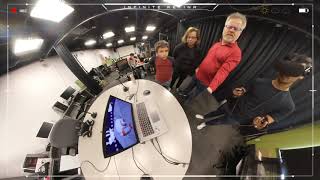
This is a recorded interview/demo (April 2019) in which Robert Scoble tours USC’s MXR Studio with senior animation student Sagar Ramesh and demos Ollie — a beginner-focused VR 3D animation tool developed at USC. The video describes the MXR Studio’s role as a student hub for immersive media, shows Ollie’s simple VR-first UI (trigger-only controls, pick-and-place objects, two-hand scaling), and highlights distinguishing features: an infinite timeline that starts at five seconds, an automatic squash-and-stretch animation effect, a virtual camera and custom export pipeline for generating shareable videos, curated artist model inventory, and cross-headset support. Ollie was in beta at the time (downloadable via ollievr.com) and planned for free release on Steam, Oculus, and Epic Games Store “this summer”; Quest support was noted as “coming soon.” The team began experimenting with the idea the prior spring and started development the previous September. The video also references other MXR projects (e.g., a 30–45 minute multimedia walkthrough called Amaz Momento) and demo events (Two Bit Circus).
Questions this video answers
ollievr.com (spelled in transcript as o l l I E V r .com).
Steam, Oculus, and the Epic Games Store.
Windows Mixed Reality headsets, HTC Vive, and Oculus Rift (Quest "coming soon").
They started development in September (the prior year).
Five seconds (the app uses an initial 5-second timeline and supports extending it into an "infinite" timeline).
So who are you?
I'm Sagar Ramesh. I'm a senior in the animation program here at the UNC School of Cinematic Arts. And today I'm going to be showing you around the MXR Studio at usc.
Yeah, so we're here in Los Angeles, or near Los Angeles, and this is just a small part of the cinematic school.
That's right.
And so tell me the significance of this lab, this one specific room. Sure.
So this is the MXR Studio, which is sort of distinct from the MXR lab at Playa Vista.
Okay.
This is where a lot of student projects that sort of revolve around vrar happen. So a lot of student groups come in for different meetings, different exhibitions. Like a few students here are working on a lot of different projects that are going on simultaneously. So each station, you'll see, you'll have vives, you have rifts. We have equipment for projection, mapping, basically anything related to immersive media. Sorry, do you want some water?
No, I'm okay. Cool.
And that's basically what the MXR Studio stands for now. So there are a few labs on this floor, specifically, this entire building is dedicated to interactive media and games. So a lot of the students and student projects here sort of evolve within that sphere, basically.
Yeah. And so what's the bleeding edge? What is it like to be a student in this age? Because my thesis is in a few years, that a lot of people are walking around wearing glasses. Right. They can do augmented reality or virtual reality. And so you're learning the bleeding edge of that craft and of that genre of media.
Yeah. I mean, the cool thing about being a student, especially at usc, is that there are so many people who are interested in this intersection of art and technology. So people coming in from the engineering school, from Cinematic Arts, from the Fine arts department, basically everyone who's coming to labs like this come in with just a little bit of an interest, even if they don't have the skill set needed to actually build a full project, but they can find the people that they need and the resources that they need to actually bring something to life. So a lot of the projects that my friends and I have worked on for the past couple years, we basically did by just figuring out the steps as we go. So, you know, people come from all these different backgrounds, and we just kind of figure out how to use a different game engine like Unity or game engine like Unreal, just to bring these projects to life. So being a student now is super exciting because all the resources you hear the professors, you hear it's just a matter of sort of putting yourself out there and pursuing a project that you really enjoy. And then the rest sort of unfolds really naturally.
Yesterday we visited intel, which has a big dome for doing volumetric capture. A lot of green screen around it. Right. We talked about the bleeding edge of entertainment and movies and how 85% of movies now are built on a green screen using a computer.
Right.
Tell me what it's like right now as a student. What kinds of skills are you learning coming out of it? Because you're just about to graduate and come into the industry.
Right.
So what kind of skills do you have that maybe kids didn't have four years ago?
Yeah, and AW can speak to this as well. He's a friend, he's a collaborator, and he's working on his own set of projects at the MXR studio. But I think the ability to just sort of think creatively and be able to learn new tools on the fly, because so much is changing, especially in the field of immersive media and immersive technology. I think that's probably the most important thing to pick up just as a student who's starting out. The tools that we use today might not exist tomorrow. The applications that we use might change really drastically. And because the field is so early, just being able to pick up new skills and be open to that change feels like the best way to move forward as a student.
And what are you building? What's your project coming out of this?
So today we'll talk a little bit about Ollie, which is a 3D animation tool that's designed for absolute beginners. So the thing is, when you watch a movie like Spider Verse or Wreck It Ralph and you walk out of that theater going, man, I don't know how they put those images together, how they make those movies. A lot of it sort of comes down to building with professional software that's made for people who've been trained in animation, people who know what they've been doing and have been trained in the field for maybe 10, 15 years. If you're a kid who watches one of those movies and walks out of that theater with even the slightest interest of making something like that, there's really no good way to get started with 3D animation with movie editing or anything else you have, say, imovie compared to something like Permanent Mirror, or you have Swift Playgrounds before you jump into building your own project with code from scratch. And Ollie's basically The iMovie of 3D animation.
Very cool. Yeah. Well, let's see it.
Awesome. So we have a demo center back here.
Yay. This is cool. Got a lot of different VR headsets.
That's right. Literally every station you see will have a rifted sound.
How's that? Hi. Hi. It's Marina. Irena is the CEO of Infinite Retina. And.
Yeah, awesome.
Just thinking about how storytelling is about to change. I mean, I'm carrying around a360 camera. I used to have a guy who had two or three cameras, big on tripods and had to aim them. This camera you don't even aim anymore. Hey, Ryan, why don't you come over here? Because you could be our test subject because you're actually the guy who's going to be using animation. Well, he built a whole village in tiny town and he plays with Minecraft and Fortnite. Very cool.
So maybe the best way. So, actually I can show you guys something that people built with Ollie just a couple days ago. So we were at Two Bit Circus running demos. We met Robert there as well. But you didn't get to try it when we were actually demoing. So people ended up. We started sending out maybe 10 or 15 movies that people had built within the app and exported. So the cool thing about Oli is that we've built a virtual camera that sort of exists in VR, where you can export videos to share with people outside of the headset. Not many people have access to a Rift, access to a Vive. And the cool thing about exporting in that way is that people can view it on mobile, people can view it on the web, so you can share your work that you make in the app with friends outside of it. So maybe the best way to do this is for me to just give you a quick overview of what the app has, what makes it different from existing apps like Quill or Tvori or Tilt Brush, and just a quick introduction of what you'll be able to see once you're inside. So one of the first things that you'll notice is the interface is super, super simple. We don't use any sort of jargon like keyframes or having something as simple as a timeline with a really simple playback system that kind of resembles something like Spotify or Apple Music makes it really easy to move forward and backward in time, and we start with a limit of five seconds, but if you keep moving, you can actually go beyond it. So we have this infinite timeline that people can use to create. So on each of these tasks, you'll be able to see little models that you can actually pick up, you can drop in your scene. You can use both hands to scale them up and down. You can place them anywhere. And if you were to move forward in time, say we move to maybe, like, 1.5 seconds, and we pick this object up, we can actually see where it used to be.
A trajectory. Yeah.
We can see the motion path of where it used to be, where it's going, and all we have to do is hit play to actually see it move. So something you'll notice is that there's.
A little bit of. It's like, tiny tone, but it moves.
Yeah. So something you'll notice is that the object actually stretches just a little bit when it gets to the middle of that motion path and then sort of settles back in. So this is actually a principle of animation called squash and stretch that makes animated content feel a lot more elastic. So we're actually adding that automatically. So we're using math to actually create this effect. That would usually take a professional artist a lot of time and a lot of previous training to actually do really well. So that's what makes Ollie really special.
Is this available in Oculus Store right now?
Right now, we're in beta, so we're testing the app. We're making sure that we're actually building something people really want, and then it'll be up for free on Steam, Oculus, and the Epic Games Store this summer, actually.
Very cool.
So the cool thing about how Ollie's organized is that we just boil down animation to the absolute basics. So we're using the same technical infrastructure that a really complicated animation program would use, but we make it really easy to say, light your scene or change something as simple as the lighting of how your models look. And then once you're ready, you can actually add different image filters to change the look of your entire scene. So it's pretty phenomenal how much people can create in just a matter of minutes. And that's what we've been sort of telling people about Ollie. At the end of the day, it's all about just making movies in minutes. And that's something a lot of 3D animation tools can't say now. So when you're done, the cool thing about this is you can pull up your virtual camera so you can scale it up and down just like any other object in your scene, and you can also animate it just like any other object. So let's say I move on my timeline until my ship reaches its end point, and I move my camera over. If you'll notice the camera preview, you can actually see what my camera sees. And whenever I'm ready, I can save that video out. And that's the full flow of how. Of how Ollie works. Let's say if I have animated objects that I don't like, I can just get rid of them with my eraser. You just grab it and then let it go. And then I have other objects that I can still play around with that are in my scene. And that basically boils down the basics of how Ollie works and why we do what we do.
That's really cool.
Yeah.
I kind of want to try now.
You want to try it?
Let me try it.
He's really good with controls.
Very cool. So the cool thing about this is we've made sure that the app is designed so that none of the controls are mapped to any of the buttons. So any primary control is actually just using the trigger and just using your hand moving around.
That's good.
We wanted to make this as simple as possible, not just for beginners in animation, but for beginners in VR, too. So it works really seamlessly on the Oculus Rift, on HTC Vive, and any Windows mixed reality.
Yeah.
How do you move around?
So you can actually just walk around right now. So you have a spaceship in front of you. You have a little asteroid on your left. Yeah, you got it. You gotta walk over to reach it.
Got it. Boom.
So you can put that anywhere in your scene, and then whenever you're ready, you can move forward in time a little bit.
How do you, like, move it? Like, make it move?
Yeah. So right now you're at the very first, or you're at the very beginning of your timeline. If you grab that little ball next to zero. Yeah. Just move forward maybe five seconds, and then move your spaceship somewhere else. Oh, man, you made it crash. So now if you hit play, you see the little play button? Just bump into it right there.
Yeah.
And now when the timeline starts over, when it loops, you'll see your spaceship move.
That's funny. Looks funny.
You know where.
Yeah, I want to turn it again. Wait, I want it.
You have to program it again.
Yeah. If you hit pause, then you'll be able to move it around a little bit more, Actually, if you do me a favor and just use the eraser to get rid of it. Just grab it.
Yeah.
Boom. I think your spaceship still crashed over. Over on your. Right. There you go. So now if you go to. If you go to the second tab, right under the home tab, and you just hover over it and click.
There you go.
You can pull in spaceships, you can pull in pirate ships. You've got a set of cars, too.
It doesn't go down.
Oh, you have to pick one.
Yeah, you gotta just grab them out from the menu. There you go. And then just let it go.
How do you make it bigger?
Once you let it go, you can use two hands just the way that you thought. There you go.
Okay. Okay. This one.
Yep. Awesome.
So now I'm gonna make it like that and then see what happens. Oh, it doesn't shake.
Yeah, you're right. Maybe something that we can add is a way for it to figure out how your controller moves. So then you can actually add that shape to the spacious.
Exactly, exactly.
That would be really cool.
That's a great suggestion. So now, whenever you're ready, you can actually add different lights to your scene too.
I like a car.
Yeah, I love the cars. So once you drop it in, you can put it on the ground, you can move it around, you can make it fly.
That's cool.
So we started experimenting with this idea of what animation might look like in VR around this time last year, so last spring. But we really only started development on the app last September. So we brought a team together, all from different backgrounds, from the engineering school, from animation, from the Ivy and Young Academy. And we all came together, we figured out what we wanted to build, we came up with a sort of mood that we wanted to go for. And this is what we have a couple months later.
Okay. It doesn't like me.
So this is the joy of actually being able to demo Ollie to people who've never animated before. Showing people something like Maya or just a 3D program that's just made for professionals. You don't get this kind of excitement or you don't get this kind of joy.
That's your light, see? And then you can make it different colors.
You can make it different colors.
There you go.
It's gonna be a starry orange. And I will here.
Now, Ryan has a little advantage over a lot of people in that he has entire towns built in Tinytown, which works just like this, except he doesn't animate. So. So now you're just adding animation on top of objects.
I mean, the cool thing about VR is that you automatically have a really intuitive sense of three dimensions because you're just picking objects up like you would in the real world. So we wanted to add an extra layer of satisfaction to that by tracking how your objects move over time. And that just makes everything feel a lot more dynamic and lively. There it goes, look at that.
It's really cool.
Great stuff. If you grab any of those asteroids around the spaceship, you can make them crash in and you can, you can move them around too. Yeah, I think you just have to get out of play mode. That's something that we're facing right now.
Yeah. The other one, what was the hardest thing in building this?
Okay, so a lot of the features that we built are actually original inventions. So the squash and stretch feature, for instance, basically emulates something an artist would do by hand. And there aren't really functions that exist out there that allow models to squash and stretch really naturally. So it took a lot of finessing on our end, a lot of research to see how animation had been done traditionally to basically emulate that with math and with code. So coming up with effects like that were really unique and just a unique challenge for us. Our virtual camera is really special as well because we actually built our entire exporting pipeline from scratch. So even though it looks really unintimidating in the app, there's a lot of technical work that sort of went into the ability to export videos in a really clean way from the app. Yeah, that's the light.
You just made the light.
Where's the light? I think. What happened to the light?
Tell me about what else other people are doing here at USC that caught your eye. Sure.
So some of the most exciting projects in the MXR lab also include a project called Amaz Momento, which which sort of revolves around Awu's grandmother in Taiwan. So the entire installation that will be demoed this may sort of revolves around her story as a Taiwanese art collector. And, you know, it's a multimedia installation that goes from physical photographs, projection, mapping, VR, AR, all of which is combined into just a full walkthrough that lasts about 30 to 45 minutes. And you know, a team of us actually went to Taiwan two years ago to document her life using a 360 camera much like this one. And now we're in the process, or the team is in the process of putting together all that footage, making sure that it tells a really coherent narrative. And I think what makes it really special is it isn't using VR just for the sake of saying it's a VR project. It's using it because it just makes sense. Experiencing her life and her story in 360 degrees is some of the most. It's just a really special way to achieve it.
Any tips do you have for new photographers who are going to get 360 cameras? Like how to capture the world, to tell a good story.
You know, the best person to talk to about this would be Awu. He's handled a 360 camera way more than any other student that I know. But I'd say it's a really great time to get started.
One thing I've learned had to relearn is you don't aim these cameras. You just hold them. You choose how close. Like, if I want to get close to Ryan, I move it closer to Ryan. Right. And then I have to be aware of seam lines. Where would the seam line be? But the algorithms keep the steadiness. Right. It knows where the horizons are. And it's pretty amazing technology.
We actually had a. We had a project just a couple months ago called Race Relay that we shot on an Insta360, and we demoed that at the California African American museum for about 55 people at once. So you can just imagine 55 people in gear VRs, all wearing headphones, all experiencing the same thing simultaneously, and all of it was shot in a camera just like this one.
Yeah, there's a lot of technology in these cameras. The guys who are building this camera came out to my house and talked to me about how, you know, how they take sensor readings, live sensor readings. Right. Because it knows where it's moving in space. And then it is also using computer vision to look for features in the room to figure out where the horizon is.
Yeah.
And it's mixing those two in real time and then moving the ball of pixels around so that it's steadying. Because even though I can shake this pretty violently, it doesn't really. The image stays pretty stable.
And you have a live preview on your phone too, right?
I do, yeah. That's what I was looking at my phone for. Yeah, it's down here.
And the image quality is just. It's stellar, too.
Well, it's compressed a little bit during live shootings. It's 5K, so it's pretty good. You know, once it gets on Facebook or YouTube, it gets cut down a little bit, but not too bad. It's better than. I mean, my first camera was $6,000. This is 400 bucks. A lot easier to hold, too, for sure. But now you can get a scene like this, and people can decide where to. Do you watch Ryan playing? Do you watch the screen? Do you listen to us? Exactly. It's just like you're here in the room. Right. It's pretty amazing.
So I'm wondering about the different scenarios. So what other beginner scenarios do you have in that?
Yeah, that's a great question. So actually during our demo tomorrow, we'll have three different scenes that actually align with the models that you see there. So right now you're in the space scene. So a lot of the spaceships on that bottom row of the inventory. Perfectly. We have a little island. We don't have it in yet. It'll be there tomorrow if you guys swing by.
What are the other two?
So the other two are. So there's the island with all the pirate ships. So it sort of looks like a little oasis that you can actually move the ships around. And the very first one. Yeah, there's a bunch of notes. The very first one is actually just a little racetrack.
Cars.
That's right.
Those very cool looking cars.
Yeah.
So the cool thing about our inventory actually is that we try to feature an artist every time we roll out a new beta build. So this time we used models from Kenny before we used models from Google Poly from specific artists that we've actually curated ourselves. And that's something that I think not a lot of apps out there actually do. So we value artists a lot and we want to make sure that people are using tools like this to actually create and tell really good stories in their vision. Exactly.
That's really interesting.
And some of the most exciting. The most exciting way that we know to actually highlight artists.
Right here is my favorite one. It just gets bigger and then it just slaps you. Watch the. This gets bigger as he just slaps you.
That's because you put those controls in.
Did that. That's awesome.
Yeah, Ryan's going to have a lot of fun with you too.
And then it just disappears. Look, look. Watch. Just goes in the hyperspace.
That's awesome.
I think that's a glitch. It just goes in that hyperspace.
I mean, I guess it's not a glitch if you made it.
No, he.
We put in controls where it did stuff like that. So he doesn't realize that that's what.
It made it do.
Yeah.
You know, at the end of the day, if people are just making silly little gifs with Ollie, that's all the satisfaction we need. Because it's not meant to be. It's not meant to be.
Well, no. He'll build a whole world and tell stories. One thing I learned by watching him play with Tiny Town, he. He builds scenes in his head that aren't animated. Right. So he has like a UFO on the top of a church that goes. I mean, he has a whole story already. Built in his head about what he wants to build, but he can't animate this way. So it's going to be fun to watch him learn this and then over time as these kinds of tools get more and more and more photorealistic. Because right now you're playing with a, a polygon budget, I would guess, right? You don't have very many polygons. You want to make sure that this will work on a pair of glasses, right? You're starting to think ahead. Apple is going to have mobile based gpu, a small little GPU that can't handle very many polygons.
And this only gets better from here, right?
An Oculus Quest, right?
Yeah, that's right. I mean that already cuts down on a lot of the computer compute power because everything is self contained. So even the stuff that runs so seamlessly on Rift might not run as optimally on the Quest. So these are just things that developers like myself, my friends, everyone who's sort of working in the VR AR space right now just have to learn, have to deal with. But that's the exciting part of working with cutting edge hardware.
Yeah. Hey, when people were doing flight simulator for the first time, they could only draw a few lines on the sky, right? You're starting your career a lot more advanced.
Wait guys. This one just goes and gets bigger on the way. My favorite one is the boat.
Nice.
That's one of my favorites too.
I wonder if I, if I can crash the game or something.
You should try.
You gotta put a, put 100,000 cars out and see if it'll handle that many polygons. That's right.
This is what makes building something like Ollie really satisfying. Just having people go in, make their own, you know, make their own little stories, just play around just for fun.
And yeah, it's hard. One reason I didn't try to see it at two bit circuits is it takes, you see, he's been in there what, 15 minutes already or 20 minutes. And it takes time to get your head around the fact that it's not just beat six beat Saber. You can get a five minute demo and get a pretty good idea of what beat Saber is this. You need to play around for 20, 30 minutes to really understand how deep the tool goes or how far you could push it as a storyteller. Right. Where does it go and what is it for? A nine year old figures that out pretty fast, but us old people need a little bit more time.
Wait, look at this big car and bump me.
All right, I'm going to turn off the camera. Thanks so much. Where are we going to learn more about this?
So right now, if you visit our website@olivr.com, o l l I-E-V r.com you can actually download our beta for free. You can read about us in Cartoon Brew and Animation Magazine, both of which covered what we're doing with Ollie and a film that we're making with it to basically showcase what the tool can do. All of that is available online and the app itself runs on Windows, Mr. Headsets, HTC Vives, and Oculus Rifts.
Very cool.
Yeah.
Quest coming soon.
Quest coming soon.
Yay.
Yeah. Yeah. Awesome.
Thanks.
More from Robert







45: Sandy Carter Unveils the Future of AI: Myths, Agents, and Creativity | SXSW Insights