Spatial Computing Catalyst #7: Building Better Factories with NucleusVR
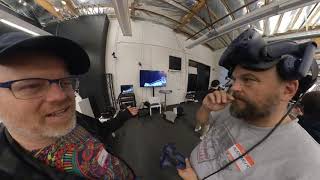
Nucleus VR lets factory workers and engineers build digital twins in VR, then deploy them to HoloLens, Quest, and tablets for training and maintenance. The demo shows drag-and-drop authoring of 3D models, notes, and videos that sync across devices and teams in real time.
Guy over there with the hololens can also see this.
Got it. All right, so what's the company name? First of all, it's Nucleus VR. Okay. And Nucleus VR. And this is a collaborative system to help people work together in VR, AR and laptop.
Yes, It's a tool, basically. So it's a two part tool. There's a player and then there's a data preparation system. So there's data preparation system, you feed in catia, solidworks, all that kind of thing. And it's prepared automatically, simplified to run on the players, and the players are each, if you look here, presentation. So it runs like on VR. So it's prepared automatically and runs on VR, PC, augmented reality, on Android tablets or Surface Windows. All of them is tilt five. It's all synchronized. So it can be synchronized by 5G Wi Fi link.
Yeah.
So it's fairly low bandwidth and it's also quite low latency.
And who would buy such a system? Whereas it's going to be a service. I just joined as a consumer, but who is the same dad.
So we work for mostly industry, 4.0 manufacturing, people who do machinery, oil refineries, nuclear business, Basically everything that has complex CAD models and where they need to do complex reviews, connect from a distance. And very recently we've started working with space companies. So the European Space Agency.
So this is an enterprise app meant for people who work.
People who work, yeah.
People who can afford a system, right?
Yep, yep.
So and so, like the space agency, what are you doing for them? If I was a space agency like NASA, JPL or something, I want to work with a team of 20 or 30 people together building something that goes to Mars, let's say a new kind.
Of rover, because it's the only one we're working with. Esa, with the cdf. So they identified that our tool is the most advanced. It's probably not the most polished because of course we're a four person startup. But the vision like this collaboration between AR VR is very novel.
And what makes it advanced? What sets this apart from other collaborative tools? Because there's other tools like spatial or whatever that let you work together. What makes this something that an enterprise would be attracted to?
Well, basically it's all drag and drop, no programming. It's a real tool that's really easy to use. You can feed 3D data CAD data directly into it. So there's basically anybody can use it or an engineer can design it.
So this would be good for designing cars or buildings, or mostly buildings and factory lines.
That's it factory lines. Yeah. And what makes it really different is that you do your AR authoring in VR. So explain that to me, because people.
Have never been in either. Some of my audience probably has never been in either. Explain what you mean by authoring in VR for the ar.
Yes.
So you're putting virtual interfaces on top of the factory floor or something like that. Tell me a little.
Basically, we have a digital twin where you can add data. So you have the 3D model of the factory. You can add notes, videos and all sorts. Like a hyperlink. Like imagine your icon of your hyperlink. Yeah, just take it and put it in the. In the factory. So to do this, we do it in the VR digital twin of the factory.
Yeah. So like Volkswagen has virtualized its entire factory floor. They have a digital twin, and so they use that for training and also redesigning the factory floor, stuff like that. But you're using it to actually augment the factory floor, to add notes and add new interfaces on the machines and test out new user interface ideas with data streaming off the servers, that kind of thing.
It's a tool so everybody can use it as they like. But there's. So I don't know if it works. This word in French say capitalize, build, like a database. So rather than storing your files in folders, you just pin them to the machine in the right place.
It's like spatial computing. Yes.
Okay, so I can show you a few examples.
So yeah, yeah.
Can you see the screen?
Oh, yeah.
Wait, I just have to.
Let me get off your screen, your cord.
Okay, so what's this thing? So I'm in the. In the 3D, in the digital twins, I can just take these, what we call authoring tools. So if I like a 360 picture. So I take like a blank 360 sphere and then I go on the Explorer here into my hard disk.
Yeah.
And I select this. So I have like the inspector of this 3D link and I just. All you have to do is get this 360 picture and drag it into here. This is a 360 picture. This doesn't work in AR, but say I want to add a note. So note. So where's this thing? A post it, post it note. So basically I have this. It's the link. Y. Okay. I just say, okay, this cube here.
So you're just adding a note there. So you're adding a note out of the system. Y.
Okay, the notes there. So now if you go and wear the Hololens, you will see this note in the real space station in real time.
So that guy over there, as I.
Move it, he sees it move.
Got it.
And then if you look at all these, the notes here. Okay. Oh, yeah. And that's me moving it around. Okay.
Yeah.
Okay. And then I have like, I can change, like the size of the arrow. I want it big, I want it small. I want the node bigger, wider. So that's a node. That's not bad. But then you can do.
No, but you could add machines. You could add anything.
Right. Objects. So look, I want to add like a 3D model of a HoloLens.
No, but you get the idea. The Toyota manufacturing system made factories much more efficient. And now you can really test out new workspace designs before you even set down any machinery. Right? Yep.
That's it. Yeah.
And your team can walk around a new factory floor before they even build the factory.
That's it. Okay.
This is really cool.
And you can train somebody. Yeah.
After the factory is built, even you could keep training new people. Hey, this is how the factory works. Go in here and learn how this machine works. Try it out for a few hours. Get comfortable with it.
Say, like the older guys, they retire, but they are the only ones who know how this machine works. So what they can do, the young guy just films the guy who has the know how. And you just drag and drop the video onto the digital twin and it's done.
Got it.
So.
Oh, that's really cool. You can mix flat video into the 3D environment like this.
I'll try and show you an example.
Are you starting to hook up any. Any of the real factories? The data coming off the sensors to the machines and starting to make them work.
One plan where we're working on this. Yeah. Okay, so if you look here, link panel. So I just grab this link here. It's just a blank panel. Okay. Drop it in the scene.
Yeah.
Then I can just drop a PDF file into here.
Oh, he just dragged a PDF file into that white box. That's cool. For a video.
I just. Oh, here's. Oh, yeah, it's a Timehouse video.
Yeah. Yeah. So you can drag a document, a picture, a CAD file. Yep. All that into the. And.
Okay, now you see the video. I just grab something else. No, you won't. And there you go. It's a picture. And then I can close it down and open it back again. And if you look. So you see, I dropped it in here. And if you look here. Yeah, it should be there. So wait just a second.
Yeah.
Which Mouse. There you are.
It's here, it's right there.
Right down, up. See? Document. So I'll swap that document around again just to prove.
No, no, that's fine. I get it.
I get it.
That we can work collaboratively in 3D with either 2D assets or 3D assets.
Yep. So once you have the digital twin of your factory, you just add these documents and when the workers have the hololens, they will see the documents appear in front of them. It's like just as easy as drag and drop, basically.
So this is great for training, it's great for designing, it's great for working on virtual things like a car design. Right. And being able to think about how it might move down a factory line.
Yep.
Can you train robots in here? It's not that advanced.
Next step, next step. Well, I have one example. We work a lot for the nuclear companies in France and we, I can't say too much about it, but basically they use it for the cleaning up of the Fukushima disaster. They have these robots, they can just drag and drop them into the scene, move the arm around and kind of. But yeah, so it's just really easy. And you can actually also drag and drop stuff into a point cloud data so you can scan an area which could be contaminated and you can work for it in it for weeks in VR and work out how to do the stuff. And the day you have to go and do it, you know exactly what to do, you don't waste time. And that's it.
Very cool. Very cool. And this is, this system is probably a six figure. It's. It's a fairly expensive system for an enterprise. There's probably a lot of customization. Right. So a company like a Volkswagen would hire you to come on site and set this up and.
Well, actually, so it's not going to.
Be a thousand dollars.
I'd say it's hurry up because it's still fairly cheap because we're still designing it with the customers. So we have some really cool customers who understand who understood like say three or four years ago how it could be useful. So basically we're self funded. We are funded by our customers. And say the customer wants this functionality. Okay. Say we, okay, this would cost you €50,000, but we'll do it for 15. But we just keep the IP of the functionality and build our tool like this. And we've been building step by step this for five years now.
That's smart.
Yep. And the double benefit is that the functionalities we have have been asked by customers.
Yeah.
So it's not just something that we imagine could be useful. It's something that has been asked.
That's really brilliant. And I bet you're really excited by Oculus Quest because that brings the cost of buying 10 headsets way down. Right. And you don't need rooms, and. And you don't need nerds to set up sensors, and you don't need a lot of complexity.
Yeah. So, of course. Yeah. But for really massive models, we need more polygons.
You need a big Nvidia card.
Yeah, that's it. But we're working on LOD streaming and all this.
So what's lod?
Level of detail. Level of detail, yeah.
So you're thinking of compression algorithms to take down the number of polygons so that something like Oculus Quest could display it.
The further the object is, the less detailed it is. But you can't see it from the naked eye anyway. You just see the contours, the colors. So we're working on that, but our system already works on. It works on, like, the Google. It could work on Google Cardboard, but of course, you won't have the same computing power. Like, the user interface is the same. Same on hololens VR PC. It's kind of designed in a way that it's a common user interface, a common engine.
That's why it works on HoloLens and Oculus Rift or HTC Vive or something like that.
But one benefit with Quest is for doing demos for customers. Customers who are, like, quite far away. We just put one in a box, send it to them. Yeah. Okay. Fire it up. And we can show them all the functionalities with a small data set. But at least the menus work and they know how it works.
Very cool. And I gotta let you go and earn some more money, so thank you very much.
So we're here for three weeks. Get in touch. You can contact us on direct.
Nuclear VR.
Nucleus.
Nucleus. Here we go. We just do that. Thank you very much.
More from Robert




45: Sandy Carter Unveils the Future of AI: Myths, Agents, and Creativity | SXSW Insights