How to Prevent AI Hallucinations in Delphi

10 Oct 2024 · 0 min
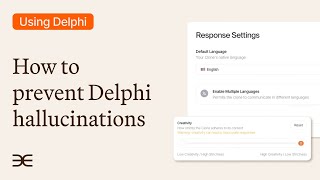
0:26

A short instructional clip demonstrating how to reduce AI hallucinations in Clone Studio by lowering the 'Creativity' setting. The speaker directs viewers from the Overview page into Build → Response Settings and advises dragging the Creativity bar down to zero so the clone only references the trained content.

Questions this video answers

Overview page → Build tab → left-hand Response Settings → Creativity bar.

The clone will reference only the material/content that was trained into it (reducing hallucinations).

More from Scott

youtu.be

Gene Lim: Infusing your company philosophy into your brand

10mo ago
youtu.be

Lessons from Unexpected Places

10mo ago
youtu.be

Matt Theriault: Moving from "Wantrapreneur" to Entrepreneur

10mo ago
youtu.be

Paul Oster: Nation's Credit Repair Man

10mo ago
youtu.be

Lessons from Sir Richard Branson

10mo ago
youtu.be

Michelle Patterson: The Power of "I Matter"

10mo ago
youtu.be

Don't Talk About It Be About It: Dan Fleyshman

10mo ago
youtu.be

National Entrepreneurship Kick Off Highlights 2017

10mo ago
youtu.be

Business & Burgers-Sequence Collection bracelet for National Entrepreneurship Week

10mo ago
youtu.be

Richard Swart: NextGen Crowdfunding

10mo ago
youtu.be

David Meltzer: Sports Marketing Genius

10mo ago
See all content