Monetize Your Delphi with a Membership

Set up a paid membership for your Delphi clone in Clone Studio's Monetize tab. Choose engagement channels like text and video, set monthly allowances (200 texts per month), add overage pricing, and customize your payment page.
Questions this video answers
200 messages per month
10 messages (later adjusted to 30)
28 minutes

Chapters
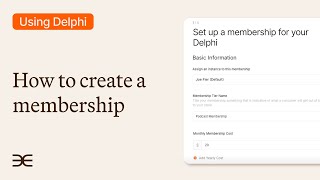
You want to set up a paid membership to access your clone. With Delphi, it's super simple to begin making money from your clone. Let me show you how it's done. From the Clone Studio overview page, you head over to Monetize on the top. Click that and then you're already under the membership page here. Go to the far right and create a new membership on this page. You can now create a new membership from here. The first selection is you can select your default or your main clone or an instance that you might have made. Down here is where you want to name the tier name. I'm going to call it Podcast membership. And then you want to assign a cost, a monthly cost to that. You can also assign a yearly cost if you wish. I'm going to hit next. Now on this page we'll select the types of ways people can engage with this membership. We can have web messaging. I'll do texting. I'm going to skip telegram. We'll do calling and video calling. I'm going to click next. And now on this page, we set the allowance each month that people can engage with those mediums. I'm going to set the text to 200 messages per month. I can also allow unlimited if I wish. And then you can also put an overage cost for people who use more messages. I'm going to scroll down here and just skip to next. Now on this page, we can customize what the payment page will say when someone wants to join. Going to plug this in. Join my Premium Podcast membership in perks. You can see on the far right side. This is also what it's going to look like when someone is on the payment page. And then from here you click Create Paywall and then boom. We now have a membership ready to go live. Now let's say you want to activate a free tier so that way users can have limited access to your clone before having to pay for a subscription. It's very simple. There's a button up here that says manage free tier. Let's enable that free tier, click that and then boom. Now you can set all of the different limits. You can message limit to 10. In this case, you can make it more to let's say 30, 30, 28 calling minutes, video minutes. And then you can also set the free tier quotas and reset that monthly if you have that selected. So let's just hit save. And now let's just take a quick look at what this looks like. Let's just preview and boom, it's all ready to go. Now.
More from Scott

Business & Burgers-Sequence Collection bracelet for National Entrepreneurship Week