How I Buy Cold Email Infrastructure for 2M Emails/Month (ScaledMail Walkthrough)
Spencer from Growth Alliance walks through buying email infrastructure on ScaledMail for 2 million emails per month. He shows how to choose volume tiers, split between Google and Outlook, set up domains and mailboxes, and breaks down pricing for a 30k-email-per-month campaign. The setup includes pre-warmed mailboxes, domain registration, and integration with lead verification and sequencing tools.
Chapters
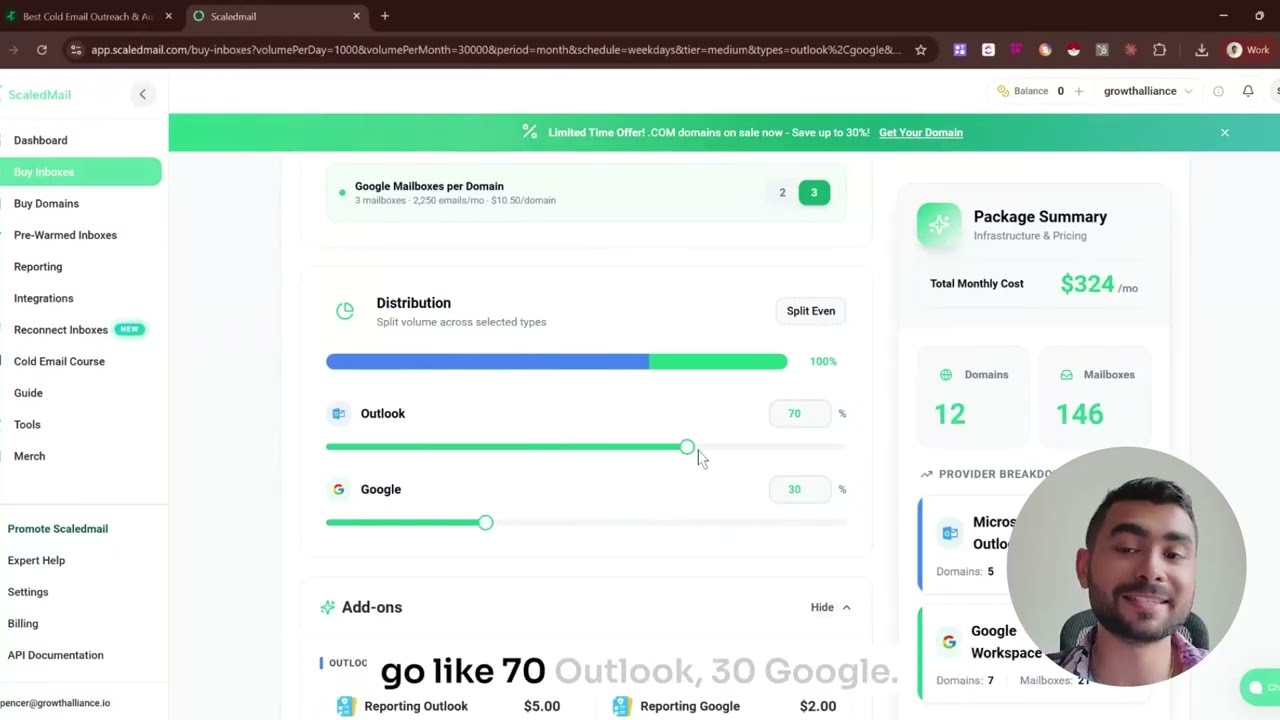
Hey guys, so today we're going to kind of bring you through my favorite email infrastructure tool and the team that supports me and all of our clients. So welcome to ScaledMail. So I'm just doing this because I want to give you guys a real background of how I run everything. So ScaledMail is kind of awesome. They work with a lot of different brands. I use them. And honestly, the reason why I keep on going back to Dean is the owner of ScaledMail is because the service is just freaking awesome. To be fair, the UI is also really great. If you've got— this is not endorsed in any way, but if you guys want to look at how I buy email inboxes for all of our clients, I'm going to walk you through it. So long story short, the dashboard inside of ScaledMail kind of lets you do everything. And I don't want you to be like, like surprised about everything because this is the simplest experience that I really have buying domains and buying mailboxes. We do this for all of our clients at Growth Alliance where we send email outbound for people. We're sending up to 2 million emails per month. We're sending, you know, even 5,000 emails a month, depending depending on kind of what the go-to-market strategy is. That's something that I help businesses, uh, go through, right? So either way, if you're looking to send emails as part of your go-to-market strategy, whether you're SaaS or you're even another agency, feel free to keep watching. Anyways, uh, Build Your Sending Package— this is a new thing, but their old pricing was, uh, was really, really well made. Uh, it was just like $45 a month, $70 a month, $79 a month, $100 a month. You can kind of see like how many domains you need to be able to send But over here, like kind of what they've done, like this was really great before. Now it's something that caught my eye and it's something that I really wanted to show you because I was showing this to a prospect and they're like, what the fuck? It's so easy. So either way, so we come into ScaledMail, you make an account, whatever you get in here and you're like, okay, what do I do? How do I buy domains? How do I make mailboxes or whatever? Right? So you can make a new order. It's super easy. Just come in here. And everybody's so worried about buying domains and buying mailboxes. All right, well, here you can do it all in one window in 5 minutes. So come in, go into ScaledMail. If you're going to do it yourself, this is how you do it. Come in, build your own package. So based on your volume, like it doesn't really matter. So let's just say like reset everything. Scheduling sending tier. How many do you need? Like how many emails are you going to send per email inbox that you guys have? Medium volume, low volume, of course, like the max volume that you can send. Safely without getting your domain blacklisted, that would be like max volume, right? Like if you're just going to like keep it super safe, you'd probably select low. Let's just say like medium volume for right now, right? Like maybe you're just getting started or maybe you're like kind of intermediate and you don't need that much. So the selection period, like how much volume do you need per day? So before you buy domains and before you do go-to-market strategy using the email channel, or as a lot of people like to think it's called, go-to-market engineering, what I would really recommend that you do is you start to think about your conversion rates from cold to sold and sold to, you know, purchased, right? Like, this is, this is really hard. You work the CRM backwards and you try to figure out what is the conversion rate that you need to get in number of meetings and how many are we— how many meetings are we expecting for every 1,000 emails that we send, right? So this is the easiest way that we can think about it. Let's say per month we need just to— let's just say we need to have 20 meetings on the calendar, right, from this channel to maybe make it more beneficial to go after and put more money into than having pushing your ad dollars into LinkedIn or Google Ads, right? Like, what is the return on ad spend spend, uh, but for the email channel, like, what is the ROI of dumping money into email as a channel? So to do that, all we have to do is we have to send an X number of emails a month with the expectation of a conversion rate of like 1 to 10%, roughly, right? And how many of those convert into offers or, you know, whatever it's going to be. So regardless, outside the strategy, this is how you would buy your sending package with ScaleMail. We're going to start with the sending package. We're going to select low, high, medium, max volume, whatever it's going to be there. We can change it over time. And I would recommend that you just go per month, just like make sure that you can get your projections correctly. Let's just keep it simple. I want to do 30,000 emails a month and that's going to be spread across the whole month. If we want to spread that across all the time, we can. There's like, like some people send 6 million emails a month, which is absolutely insane. We're sending around like this much, around 2. But for our clients, let's just keep this like really simple. 100,000. Screw it. 100,000. You want to send 100,000 emails a month. For a lot of companies, that's going to be completely overkill and it's just going to be like outside their budget. If you guys are like a seed, seed round funded company or Series A, you're probably not going to send 100,000. You're probably going to send around like 30, right? So for 30, for sending 30,000 emails a month, you're going to want to send probably weekdays only. That's what I would recommend. If you guys are going after like C-level and stuff like this, like maybe these people are going to be on their phone on the weekend so we can send every 7 days. Like this will make it even split. Weekdays only is what I usually run with, and I usually just run with Google and Outlook. So they've made this super easy and dynamic. You can see like everything is popping up on the right-hand side here. So honestly, great job, Dean from ScaledMail. And this is why, like, what prompted me to make this video, because I love the interactive element. Uh, you can see if I only want to do Google, which is really good for, you know, like mid-market and below. It's not so great for reaching out to enterprise-level customers because all of them are using Outlook and Mimecast and stuff like this. Probably going to Outlook. What I usually do is I usually split my clients between Google and Outlook. So you can say, just to, just to say, 30,000 emails a month, we're going to have a total cost of $326 a month. We're going to split that between 22 domains. This is what they're suggesting and 136 mailboxes. But like, kind of like, what is that? What does all this mean? Like, it's like all some crazy crap, right? Like, how many inboxes do you want per domain? Like, a lot of people are saying like 2 to 5, like nowadays, right? So I usually do 3. If you want to do 2, you can do that too, but it doesn't really matter. You still need the same number of mailboxes. It just depends on the number of domains. Let's just select 3 and just see where this goes, right? So that's mailboxes, just a very high-level definition. We're going to go Spencer, Jonathan, Sonke at Growth Alliance, right? Those are going to be the 3 aliases that we use, or we're going to do Bob, Dylan, Dylan, or Bob, Dylan, Jade, Daniel, whatever the names are going to be on the mailboxes. Those are going to be the names of the mailboxes. The domain is the thing that comes after that symbol for distribution. This is kind of like where you kind of need to think like you can ask me if you need some help on this. But roughly speaking, distribution, how I like to think about it is what percentage of your market is going to be enterprise? Okay. Is 80% of your market going to be enterprise? All right. Let's set the outlook to, to, to 80%, right? If only like 10% of your ABM level accounts are going to be like enterprise or like 15%, if 15% of your volume is just going to be spent going after those like larger accounts, then you should probably just put your outlook mailboxes and your Outlook domains on like anywhere from like 10 to 25%. So the 85/15 split or even the 80/20 split, it's like perfect for me. Once we start to get to like 95/5, like in my opinion, like this doesn't really make any sense. It's like eating a good burger. You need a little bit of fat on there, right? So you want it to be around like 15 to 20% fat. That's just me. So I usually go 80/20 between you know, 20% just expectation that a client of mine is going to go after other enterprise clients. If it's enterprise to enterprise or like business to government, then like maybe let's go like 70% Outlook, 30% Google. This is a very rare case. If you just kind of don't know what you're doing, just go 50/50, right? This is— let's just go 85/15 or like 80/20. Let's just go 80/20. So that being said, like there is a provider breakdown here. You can see like how the prices change over time as you slide the levers back and forth. I love this because it's like clicky and visible and everything. But that being said, 8020 is going to run you a monthly bill of $300. And also the provider breakdown, you're going to see how many domains you need and how many domains you need for each different provider. That all being said, like if you don't, if you don't know what you're doing, this is, this is like a great video for you, hopefully. But like if you need to set up the domains, maybe you know that you can go to different registrars and like buy them elsewhere. What makes it great about ScaledMail and why I do it is because I am not a genius when it comes to doing this, like very transparently, and I don't want to deal with it. So I come in here and I buy it from ScaledMail and I— it tells me 21 domains required. I'm going to just click buy from ScaledMail. If you want to go to your own registrar, you can go from your— buy your own registrar as well. But I'm going to just go through and order, right? Domain transfer policy, they're going to manage with them. They're exclusively managed through ScaledMail currently. That may or may not change over time. But anyways, You can buy all of your domains through here. So if I wanted to say like growthalliance, like I know it's not going to be okay. Yeah, it's the TLD. You can just think of the TLD as being the ending there. You can select different endings, but you can see like herb growthalliance. Okay, great. I need to purchase it for minis growthalliance global, whatever available only 22 available. Great. Load more ideas. This is like buying domains. Like I'm just going to like purchase all of them. Like, I'm not going to do it right now. I'll show you kind of like what it looks like here. And you can kind of see that more domains are like being loaded. And then this is going to bring the shopping cart up to $141 per year. That's for the domains. But for the, for the rest of it, for the package configuration, for the, for the mailboxes, that's a different bill. So just like be aware of that. Like it's two different bills. One is like for the domain and the registrar, and then the other one is for like the mailbox and like all that. Stuff. So like, don't get confused on that. I get super confused on it as well, and I have to explain it to a few different clients at a time. But then it's just a matter of just like selecting the domains, buying the package, and then literally they take care of everything else. I have a Slack channel with Dean and Sri from, from the ScaleMail team. Every single time that I have a question, they respond in like 2 hours. It is, it's absolutely ridiculous. If you just like don't want to deal with any of this crap, just go to their, just go to pre-warmed, just go to pre-warmed mailboxes. And just go and buy like what I need. Like they already have my domain because I have an account with them. It's growthalliance.io. And if I want to buy like they're suggesting 168 domains that I could buy, maybe I'm actually going to buy more right now. But like warmup time that they've already warmed up, Growth Cloud, Growth Cloud, spend Cloud Space, Growth Connect, Connect, whatever, Growth GroupScale. If I want to buy this like right now, one time and then $8 a month, like I can do this. Like I don't have to screw around with it, which is like amazing. I just go to checkout and it's done. So I'm going to pay this much now and then it'll be done later. As far as like what is possible at this point in time, I do kind of everything manually. If we wanted to like ask for like an integration, I mean, I usually do that inside of Slack, but they're coming out with more and more features and they just, just like I have really great things to say about them. The cold email course that they have, they send a ton of different emails. You can just like go and get the course. If you log in, it should be free. And then as far as like reconnecting inboxes, this is just the biggest pain in the ass. If you're sending emails or if you're like a go-to-market engineer, it's like now you can kind of schedule when you want the email inboxes to be like reconnected or the jobs that have been completed, which is honestly, I haven't really seen this anywhere else. And then other tools like they actually list their competitors here as well. So like Local Lead Business, like they have like their own agency and then like Plusfy Email Bison, right? Smartly, Clay, Bitscale. Like Clay and Bitscale are great. Fathom, Lead Magic is great. Smartly is a sequencer, right? Like every time you run a— every time you run an outbound email campaign, you need a sequencer, right? Like ICPs will validate Apollo. You're going to go find leads. Porkbun, you're going to go and register. So this is where I go. I go and buy all of my domains directly from Porkbun and then I transfer them in very transparently. And then of course, like if you're looking to verify leads, Million Verifier, HeyReach is going to be a lot of LinkedIn outbound. Prospecto is great too. I have Riverside. I'm using this Riverside to record. And then overall, like, you can definitely build more and more off of their resource library. So that being said, like, this is, this is scaled mail transparently. This is just me giving you the juice in the kingdom right now, right? It's like super easy max volume. Let's say a client comes to me and they say like, oh, we need 10 meetings on the calendar. Okay, let's just assume 1% worst case scenario, 1% positive reply to meeting out of every email and we need 10. So we need 1 times 100 basically. So it's going to be 10 times 100. So it'll be 10,000 at minimum per month. Let's just say it's 30,000 emails a day. You want to have 10, that's going to be your projection. So let's say weekdays only, we're going to go mid-market and this is how I put together the strategy. We're going to go, we're going to go after a mid-market SaaS build where 25 or 20% of their accounts are going to be in the ABM sphere and they're going to push ads to them and everything like this. And then the rest, they're going to do cold email. They're going to try to pierce another vertical. I would probably recommend that a mid-market SaaS or funded SaaS is going to send max volume per month, 30,000 emails a month managed by like Growth Alliance or something. Google and Outlook, I would probably put them on 3, 75/25 split between Google and Outlook., I wouldn't get any of this like reporting and everything. I would buy everything from ScaledMail or I would bring my own. Then I would click continue. It's going to prompt a menu to come up. I'm going to pay now, like for, like basically for them, for everything. And then once this window gets finished, I'm going to go and I'm going to connect all of my, my domains that I bought from, that I've bought from Porkbun. So if you just want to go in here and you don't want to do anything, you just set it to— just set it to medium volume. You don't know what you're doing. Rank that to 30,000. Nope, 30,000 a month. Split it for weekdays only. Google Outlook 75/25 split and be done with it and just let it rip. Buy from Scaled Mail. Continue. What's your— what's your name? Okay, maybe we are like Cargo or it's like theswarm.com. Sorry, .io, The Swarm. And then let's just say like we want to buy domains for The Swarm. Okay, there's like the searches that are going to be here. Domain ideas available only. How many do we need? It says that we need— how much do we need? Da da da da da. All of these, right? 7 domains. Let's just buy all of those now. Push all of those in. It's not going to let me like continue to check out unless I like fill the quota of what I need, which is like kind of interesting. And then I could just like keep on going basically, right? More domains loaded, showing more creatives, and then we're going to go and we're going to purchase both and that's going to be it. And then it hands off to their team and it's done. That's all you have to do. Hands off work. Again, that would be my marketing strategy for anybody that's like trying to do email marketing. I would go straight to Dean, go straight to ScaleMail. Be done with it. You don't even have to worry about that. Anyways, uh, definitely the best, the best way to do email inboxes. They've been a great, great, great help, um, and their UI is awesome too. So that's it. Bye.
More from Spencer









Mega GTM Talk #2: Spencer Tahil, Brian Ragone & Pawel Nical on Where GTM Is Headed