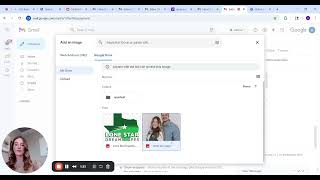
A short tutorial demonstrating how to create and set a professional email signature (in a webmail settings page), including inserting a profile photo from Google Drive, sizing the image, naming the signature, setting it as the default, and saving changes. The speaker walks through the steps from opening Settings to composing a new email where the signature appears.
Chapters
I'm going to show you how to create your email signature. There's a Settings right here in this top right corner. You're going to click Settings. Now you're going to go all the way down to the bottom where you see Signature off to the left and then off to the right. You should see where it says Create New. You're going to click Create New. I already have a signature, so we're going to change my signature name for this purpose. And you're going to click Create. You can put whatever name you want, mine's main signature, but it's whatever you want. You should have the copy or the template of what my email signature looks like. You can copy it, you don't have to. It's up to you. But this is what mine looks like. So you see my name, all my information. Now I'm going to insert my photo because we want people to be able to see a picture of us. I'm going to click Insert photo here at the bottom. I've already pre uploaded my picture into Google Drive. If you haven't, you'll just click this little upload and then upload it from your files. But I have this picture of Callan and I am going to click this. I'm going to click Insert. You want to make sure that it's going to insert here at the top, otherwise it'll look funny. So make sure you insert it here at the top. Click it, Click Insert here at the bottom. It's a rather large picture, we don't want it that big. You can do medium or small. I choose to do medium because I think it's a a good enough size where they can see, but it's not too small. So once I'm done with that, I'm going to make sure that my email defaults to my signature. So I'm going to click my signature, I'm going to go all the way down here at the bottom and make sure I click Save changes. Now I've clicked Compose email and you can see my signature has already popped up. And then this is where you would put your client's email. And then the subject line is mortgage protection. Okay? That is how you create your email signature. If you need any help or have any questions, please feel free to reach out to us. You've got this.