Ashlyn Miller walks through setting up a Whereby account for client video calls. The free tier gives you 30 minutes; paid is $8.99. You sign up, verify your email, create a room, customize it, and copy the link to paste in your email signature.
Questions this video answers
whereby.com
30 minutes
$8.99
Ashlyn Miller
Into your email signature.
Chapters
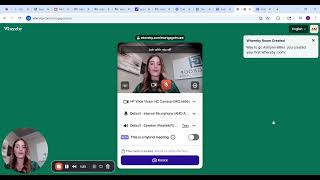
Now I'm going to teach you how to set up your Whereby account. Whereby is what we use to get our clients on video so we can show them and verify our license. And Whereby is a free website for 30 minutes. If you need it longer than 30 minutes, it's 8.99. I recommend paying the 8.99, but it's honestly up to you. Okay, so you'll see up here in the top right corner where it says Sign up, it's just whereby.com you're going to click Sign Up. I'm going to click Sign up with Email and you can put whatever name you want displayed. So I'm going to put Ashlyn Miller and then my email is going to be this email right here. You can choose whatever email. If you have a professional work email, which you should by this step have a professional work email set up. That's the email that you want to use. You want to click I'm not a robot and click Sign up. Okay, it's going to send you a code to your email. So you're going to go to your email and code put that code in. So I'm going to click Log in and then I can choose whatever company name I want to put. So I'm going to put Mortgage Protect, Ashland. Okay, And I'm going to click Create Room. Okay, so when you log in and you create your whereby, it's going to look something like this. This is where you're going to get your Whereby link. So you're going to go over here to the left and you're going to click Settings. Okay, you can change the name of your room and whatever you want in these settings and you can put a picture. Okay, now when I go to Rooms, I'm going to click Rooms and this is how you're going to copy your link for your whereby. You're going to look off to the right, right here where there's these two little chain links. You're going to click that. When you click that, it's going to copy your link. Okay, now I'm going to show you how that link copies works. When you copy and paste it, you'll copy and paste it into your email signature. That is how you set up your Whereby account. Don't overcomplicate it. If you need help, reach out to us.