In this product demonstration, Tony So explains the two connection methods offered by MySubaru Connect: the in‑car overhead console buttons and the MySubaru smartphone app. He details the red SOS button (emergency response, auto‑connects on airbag deployment) and the blue iButton (roadside assistance or personal assistant). He then walks through the app’s capabilities: remote engine start with climate control, horn honk, door lock, and engine ignition; vehicle location with map pinning and directions via Apple or Google Maps; vehicle diagnostics showing open windows, tire pressure, odometer, and fuel level; and Driver Alerts that let owners set geofences, curfew reminders, and speed alerts to monitor teen or family drivers. The overall message is that these tools enhance safety, convenience, and peace of mind for families.
Chapters
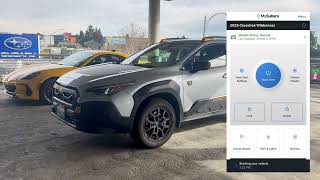
There are two types of connections that you get with the MySubaru Connect. One that you get from the inside of your car, and the other you get connecting from your smartphone. When in the driver's seat, you can find these two Subaru Connect buttons in your overhead console. The red SOS button allows you to call emergency response and can also connect automatically when your airbags deploy. The blue iButton gives you the chance to speak with a MySubaru agent for either roadside assistance or even with a personal assistant. And from the MySubaru app, you could do things like starting the engine remotely with climate control. In doing so, it's going to honk the horn, lock the doors, and then start the engine. Another great benefit for the app is the ability to locate your vehicle. In clicking here, it's going to open up a map to pin drop your location. In addition to that, you are able to find directions to your vehicle by pressing this bottom arrow, and it will open up Apple Maps or Google Maps. Also, you can keep tabs of your vehicle by selecting Vehicle Diagnostic, and you can check if the windows were left open, how your tire pressure looks, your odometer reading, and at the very bottom, how much fuel you have left. Also, to keep an eye on things when someone else is behind the wheel, you have Driver Alerts. These notifications can be handy to make sure your teenager or family member is staying within a set boundary, and it'll even give you a heads up if the car is still on the move after their curfew. And to go one step further with their safety, you can also set speed alerts. So aside from where the car is, you can also monitor how it's being driven and encourage better habits behind the wheel. These tools are designed to keep your family safe and your mind at ease.