A short beginner-oriented spoken tutorial by Tsahi Levent-Levi that explains how WebRTC calls are established. The video uses a concrete example (user A on a laptop calling user B on a phone) to show discovery via a signaling server, an SDP-based offer/answer exchange (which lists supported codecs, resolutions and media types), and then direct peer‑to‑peer media transfer — with the caveat that media servers may be introduced. The presenter closes by pointing to further courses and resources.
Chapters
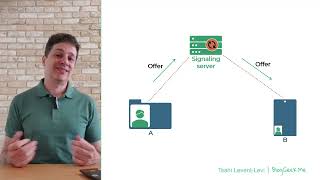
Hi, I'm Tahil Vent Levi, founder of Blogikme and WebRTC courses. I'm here to break down real time communications so you don't have to time for a short explanation of WebRTC for total beginners. Now if you ask me what WebRTC is exactly, this is a definition that I almost always use. Let's go and see how calls are actually made with WebRTC. So we have a user, let's call him A. That user runs on a web browser on his laptop, like I am now. He wants to call or to communicate with someone else with B. B is actually running on a smartphone, on a device. She might be doing it in a browser or an application. We don't really care for this example. Now how does A and B know that they exist or that they. How can they even find each other? The answer to that is through something that is called a signaling server. Both users are connected to a signaling server. They both made the decision that they want to communicate with each other and that they are going to do it based on a specific network. It might be WhatsApp or Messenger or FaceTime or a Google Meet call where third party of some kind or whatever other service. There is a decision that was made that is capable of the discovery part of making sure that when A wants to connect to B, he can actually do that. So what happens now? When A actually wants to connect to B, he sends a message, an offer to the signaling server. That offer message is not part of WebRTC. It is done out of the scope of WebRTC, which again complicates things a bit, but brings a lot of flexibility. That offer message that is being sent has a piece of data in it called SDP Session Description Protocol, which is part of WebRTC. Inside the SDP, A says things like, well, you know, B, I want to do a video call with you. These are the ways that I can do audio. These are the ways that I can do video. These are the resolutions that I'm supporting. These are the codecs that I use. Codecs are used for compressing audio and video. The different codecs would bring different compression ratios and different qualities to the actual results. Okay, so we've got an offer that is being sent with the sdp. The signaling server received this offer. He says, well, this is a message that A wants to communicate with me. So the signaling server is going to send that offer to B. Now B is going to look at that offer. In this point in time, the phone might be ringing because that's what the application decided to do with that incoming offer. Once B decides to accept this call or this meeting, he's going to send back or she is going to send back an answer. The answer is again an SDP message with an answer component to it that says, well, you know what? These are the things that I support and these are the things that I selected from what you are supporting. Let's start a call. And again, that message itself, besides the SDP part is out of scope of WebRTC. How it is being sent, you decide in your application, the signaling server receives the answer, checks whatever he wants about that, and then he sends that to A. At this point, both A and B have two SDP components or two SDP blobs of the offer and the answer. They now use these SDP blobs in order to make magic happen. And that magic is sending media directly from A to B and from B to A, having an actual voice or video call between these two participants. And this is done peer to peer. The actual media is sent directly from one user to another, not going through the signaling server at all, or through any other server for that matter. This is why in many cases People refer to WebRTC as a peer to peer technology, because it doesn't require servers. But it does. We've already seen One server that WebRTC requires, which is the signaling server. Okay, so it's not always peer to peer. The other thing is that you might not want to have it run peer to peer directly because you might want to introduce media servers into the mix. If you want to learn more, you can follow me at Bloggeek Me. You can also check my courses@webrtccourse.com There are free courses there around WebRTC Basics and the WebRTC Code Lab that will take you hand in hand to build your first WebRTC application with an explanation of how to use the APIs. So see you there.