Andrea Jones walks through the Execute Agility Assessment, a tool that measures your team's ability to execute growth projects across four pillars: alignment, available time, competence, and project-management structure. The video shows how to set up an account at executeagility.com and invite your team to take the assessment.
Questions this video answers
January 10, 2025.
executeagility.com.
Alignment; available time; competence (technical know-how); structure (standard project-management process).
Your company's website (without "www") and your email address.
Chapters
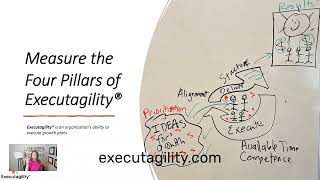
It's time to measure your executagility, your ability to execute your growth projects. So you have all these ideas and things that you want to do to grow the business. To get to these results with money and happy people and happy customers.
You need to align the team on what they're going to do first, second, third and so on. All the specifics about that. The team needs to have time to do that on top of doing their day to day job. They need to have the technical know how to execute those growth projects to get to the results and and they need to have a structure, a standard project management process so that they can confidently execute that work. You can measure it, it is transparent, it gets the results in a timely fashion that you are looking for. Those are the four pillars, alignment, available time, competence and structure.
Here is how you measure them. Go to execute agility.com and click assessment. Take Assessment here or there.
The first time you do this you're going to have to enter your company's website. No www or anything like that, just ajc company.com and your email address andreajc company.com and then you click Create My Link.
Once you're in there you just click.
Take Assessment now and you're on your way.
If you've already taken the Execute Agility Assessment before, even only one time, you can log back in and take it for the next round or check your dashboard by going back to execute agility.com and this time click on Member Login. Here you'll enter the email address that you used before and the password that you have now. Remember, if you forgot your password, all you have to do is click Forgot Password and it will send you an.
Email for you to reset it. No problem.
If you want to send the Execute Agility Assessment to others, it's pretty simple. Once you're in your dashboard the first.
Time you log in, it will automatically send you this email.
If it doesn't bring up the email.
You can also copy the link and then you go to your email and you find this email. Please take this three minute assessment today. It's pre scripted for you and you can put in your team's names. You can even put in an entire distribution list. Send that thing off and everybody can take the assessment.