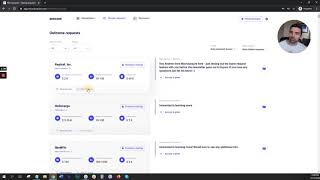
MicroAcquire added two features to help you manage deal flow: favorite startups to save them for later, and hide deals you're not interested in. The video walks through how to use both tools to organize your conversations and keep track of opportunities.
How's it going, everybody? In this quick video, I'm going to show you a feature that's been highly requested, which is the ability to favor your favorite startups and then to hide deals that you may not be interested in from the main view within the Microacquire marketplace. And the way it works is pretty simple. So when you're going through the marketplace, you'll now see in the bottom left corner of each deal before you click for additional information. I can now favor this startup. Now, what happens when I do that is it creates a list of my favorite startups. So any startup that I favorite, I can go to Startups, click Favorites and you'll just see the deals that you're most interested in. And if you don't want to see certain startups from view, let's say you're just going through the marketplace. I can now hide these listings from view, so I no longer see it. So just gives you the ability to better organize your deal flow, focus on the deals that you're most interested in, remove the deals that you're not interested from view. And then for conversations that you're actively engaged in, let's say you're talking to a lot of different founders and a lot of buyers. And also sellers have told me this as well is it's hard to keep track of all the messages. So now you can sort by unread, date requested, oldest to the newest. So your newest request will show at the top based on how you're sorting. And then if you're going through these and maybe you know this conversation is no longer moving forward, you can hide it from view. You can also favorite deals that maybe you're getting close to terms with a founder where a transaction might actually take place. You can favorite these and then you'll just click Startups Favorites and that's all you're going to see. And then if you hide a startup that you want to bring back to Vue, just click make the startup visible again and you'll be able to see that in your view. So this is just the start with the filters. Have a ton more coming soon, but just want to share this with everybody and just thank you all again for your support. It's been amazing seeing Microquire grow and it's just going to keep getting better. So thank you.