Training AI Into a Useful Team Member | Amazon X AI Working Sessions

Nathan Grimm shows how to build AI agents that actually work for Amazon sellers. He walks through training Claude to diagnose Buy Box losses using CSV data and Amazon browsing, costs about $125 monthly, takes 12 hours setup, and requires precise instructions and security controls to prevent hallucinations.
Chapters
Andrew, co-founder and CEO of Reason Automation. Welcome to our Amazon x AI working sessions. Joining me today is Nathan Grimm, founder of Mercantile Commerce. He's here to talk about turning AI into an actually useful team member, which I think a lot of us could use some help with. Nathan, do you want to give us the quick introduction?
Yeah, I'd love to. I'll start sharing my presentation if that— That'll probably help.
Have at it.
So yeah, I'd love to share with you guys how AI has made me more productive and no one lost their job. I think as someone who's worked a lot in Amazon for a really long time, I think, you know, tools that make us more productive has never really worried me or bothered me because I think, you know, back in the mid-2010s, I was doing this work, I think my initial thought was, you know, this is really hard now, but Amazon's going to make this easier. They're going to fix these problems that take so much time because they're solvable. And I think Amazon did solve those problems. But then at the same time, they made twice as many problems that we had to deal with. So, so as things get easier, there's a lot more to do. And so really what I have been working on with AI as an assistant is to try to get it to do the work that I do, as well as do those things that it's uniquely good at and humans can't do. But this particular session is about getting AI to do the things that I do. I'm the founder and managing partner of Mercantile Commerce. We're a full-service Amazon agency. I do that with my co-founder and partner Megan returns. And so we, we do— we manage Amazon accounts on behalf of brands is, is my, my day job. So I'm in the accounts doing the work. Um, but today what I'd really, uh, like to go over is the difference between, um, using AI for common knowledge tasks versus deep knowledge tasks, uh, the refinement loop, which Jack covered, covered a good bit of that as well, that it takes to turn, to basically train AI to do something that you know how to do very well, and then the payoff for doing that. So first, when AI chat agents or chatbots came out initially, it was pretty obviously useful at common knowledge tasks. And I still use it for that. You know, an example that I used in my business is, like I said, we do full service management. But every once in a while, we'd get an opportunity to do a shorter-term project for people. And I just couldn't figure out how to repackage it. And I know this is something that many people have done. I was just having trouble getting over these mental hurdles in my own business. And so, you know, I had a pretty lengthy conversation with the chatbot, like, how do other people do this? How would I do this? Give me some examples. And so that was, that was super useful. And, and for areas where I don't have deep expertise, ChatGPT can be really useful because I can introduce a little bit of my specific context. I can go back and forth, and, and it's, it's pretty useful as a thought partner, uh, and I get a lot out of it with that. But what I found, um, very frustrating is, uh, it's whenever I got— tried to get it to do work that I was doing for my clients and my products and my accounts, it would just— it could never be helpful. It was like you know, you're talking with somebody who knows a lot of things but just can't actually get something done. So what I've found through, uh, kind of poking around at this process is there's a few specific challenges that get in the way that are solvable, uh, with AI, uh, agents. Um, and the first one is that AI tools lack specific knowledge. They don't know what products I'm selling, they don't know my clients, they don't know their priorities, they don't And what will become very relevant is they don't know what problems don't apply to my situation. So it's very, very broad general knowledge. So what I would always find is it's introducing problems that I don't have into the processes I'm trying to create. Second, they don't have any access. It's like they can't look at my product record. They can't read my data. They can't send email. Like, so they— so there's— and again, this is solvable, but by default, they're not going to have any— they're not going to be able to look at your data about your stuff. So they're just going to spout generalities until you get them that access. And then the third, which I just, which I think I just mentioned, is they, they intro— it has such broad knowledge, it introduces things that overcomplicate processes and overcomplicate tasks because it's not that they don't apply, but they don't apply to my situation. So building with that in mind just overcomplicates things and prevents— it gets it off track, prevents it from actually getting done. And then lastly, I found that it, at least it appears that my brain can hold a lot more context in it. Than an AI, than an LLM tool can at any given time. And so without giving it a lot of structure, it tends to forget your instructions and do things you already told it not to do, or do things out of order and, and start failing that way. So giving it a lot of structure is really critical to keeping it on task and making sure it has the context it needs at any given point. Because without that, it, like I said, it just it forgets things you told it and starts reintroducing errors that you thought you'd solved. Really what this takes is a loop of refinement. Typically what I do is I start with documentation that we're pretty early on in this stuff. This is usually documentation I've already written to train humans how to do a task. I give it to the AI tool, say, hey, build a skill so you can do this. Then I say, hey, run the skill. And then I see all the things it does wrong. We update the documentation that the tool needs and we keep going. And eventually, if you're, if you're doing this in a fairly systematic way, you can, you can— I won't say quickly, but you can end up with a, with a, with a tool that is doing work for you on a schedule basis, on an automatic basis. And so eventually it will save you quite a bit of time. What I found is it takes about 2 to 4 times more effort to train an AI agent to do something than a human. Uh, and a lot of it is because it has all this general knowledge it's trying to introduce, whereas a human only knows what you— who doesn't, hasn't done something before only knows what you, what you tell them. And so, um, it can be— you have to give a lot more structure, a lot more negative instructions to, to an AI agent.
But that said, Nathan, one thing I do want to call out here is that 2 to 4 times more effort, but the process and the artifacts are essential. The mental models are essentially the same. And to your point, that initial document is even written in human language for a human. You haven't had to do anything necessarily different or unique there. And so for folks who are struggling to find ways to get value out of AI or to accelerate their own adoption and ROI process, starting with things that they've built to train other team members, to onboard new people to the company, to outsource, offshore, etc., those are all very fertile starting grounds.
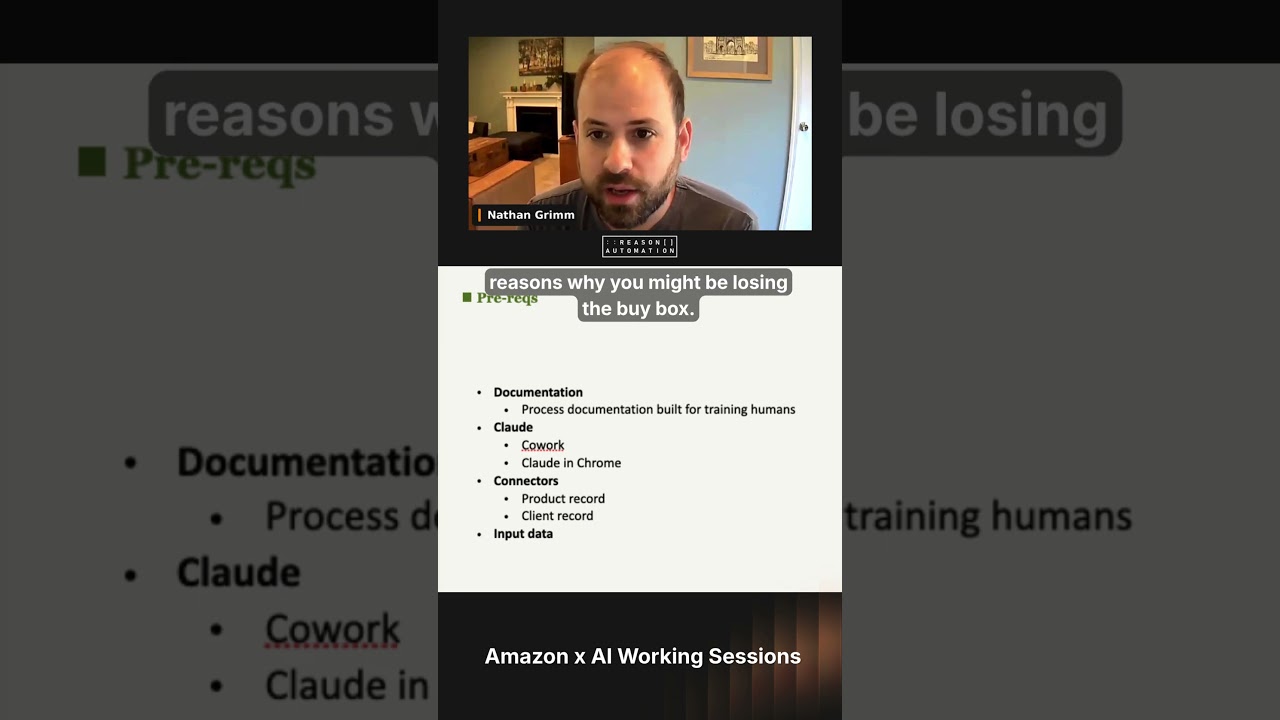
Oh yeah, yeah. And you start out way, way further down the line if you just start with those things you've already documented. So this is all fine in theory. Let's build a skill. So I'm going to try to, you know, there's a lot of back and forth and dead ends and trials and errors. So this will probably be a little bit cleaner and you'll see more of the finished product. But there's a few skills I've built that I use frequently every week. But I think this is one that applies to a lot of Amazon businesses. Why am I losing the buy box? You know, for us, we manage a few thousand products. There's always 10 to 50 that have some lost buy box in a given week, even though we work with brands that control their distribution and have good control of their pricing. But still, every week there's a bunch of products. And so really what I was trying to get this to do is, okay, I go and look through all these products and I look at a bunch of things and I figure out, okay, it's losing the buy box because of this, and then there's a, there's a follow-up task. But this skill is just about figuring out why am I losing the buy box. So, uh, there's a few prereqs to this. Um, one is the documentation. Um, obviously you could start writing that from scratch, but, um, but you need to tell Amazon, um, a little bit about, uh, about it. Uh, you need to tell it the reasons why you might be losing the buy box. You need to tell it what outcomes you're hoping to happen. But just think about this as like you're training a new team member, like, hey, here's 10 products that are losing the buy box, here's what you need to do to figure out why. I've used Claude for this, and so I'm sure there are other tools that can do the same or similar things or do it in a slightly different way, but Uh, Claude's a fairly widely used tool, and, um, and so I'll just speak about their tools specifically. Um, uh, we pay for, um, a level of Claude which gives us access to Cowork. It also gives access to Claude in Chrome, which are two tools that are very helpful for why am I losing the buy box.
Uh, really quick, Nathan, like, if you don't mind sharing, like, roughly what are you paying for that access?
Oh, it's the $125 a month. Uh, we have a small team and so everybody has a small seat. So got it.
Cool. Just to help level set expectations that this isn't like some giant investment.
Yeah. Yeah. Sometimes I pay for a few extra credits cuz I'm using these, these skills a lot in a month. But, um, you know, you can get, you can get a decent amount done every day with, with that level of investment. Um, I think Jack was having it go, you know, grind for 30 hours at a time and I think that might be a few hundred bucks a month. Uh, but, uh, But yeah, to get, to get started and to do these tasks, it doesn't have to be a huge, a huge burden. Um, and then real quickly, Cowork— what Cowork does is it will read and create files on your computer in folders that you give it access to, which is super helpful. And then Cloud in Chrome will basically use your Chrome browser like a human would. And, uh, that's really important because when, um, software tools ping websites directly, they usually get blocked. But Claude and Chrome, I've not dealt with issues of websites blocking it because it acts like a human when it's navigating the internet. And then a couple more important things for this, for this process is I needed to get Claude access to our product record because I'm just giving it ASINs and lost buy box percentages. It doesn't know anything else. And so we keep our product data in a tool called Airtable, which has API access. It has a connector with Claude.. And so Claude can read, can't write, but it can read my product records. And then the other thing I found to be useful is that some clients, uh, react to lost Buy Box problems in different ways. And so for this process, I made another table in Airtable because Claude can access it, uh, that basically, um, noted the different dispositions of my client. Basically, so with some clients I'll use a repricer, uh, and with some clients I will never use a repricer. So as a potential action, I needed to tell Claude, you know, what are my clients, what kinds of actions are they, and are they not willing to take. And then finally, we needed input data. Claude doesn't know which products are using the buy box until we tell it. So there are, depending on where that data lives, perhaps you could give it an automatic connection. I just configured this skill to— I give it a spreadsheet that says here's a list of ASINs and their lost buy box percentage for last week., and that's a pretty easy place to start. So to start building this skill, uh, we start with the prompt. Uh, Claude has a built-in skill builder skill, um, and so if you say something like, let's make a skill, it'll, it'll access that skill. Um, um, and so basically what I do is I say, hey, here's some internal documentation, and then the first thing I do is I, I assume it's going to get some stuff wrong. So instead of just having it build a skill and then move straight testing, I have it ask, ask me questions first, a general prompt and then a more specific one. So general, just what are the— what are your questions? And then, are there any parts of the process where you aren't sure what to do next? Because really what I've found is that if you're trying to train a computer to do something— humans are really good at navigating complex workflows without actually understanding the whole step-by-step, do this, then this, then this. But if you ask Claude in particular to do this, it'll get lost, it'll skip steps, it'll repeat steps.
It'll—
so really what I'm asking it to do is like, I'm sure my human-written instructions have logical gaps in the procedure of what to do and then what to do next and what data you need to do the next step. So I ask it to help me identify what those might be. So just holes in the process. And then it'll give me a feedback like this. I couldn't go back in time far enough to find the specific feedback it gave me about this one, but this is a different skill I was chatting with it about. And I was like, what do you need to know? And it came up with a few things that I hadn't explicitly written down. But read it and revise your documentation and your instructions. And then when it seems like— and do that, you can do that a few times and when it seems like you have a pretty complete process, ask it to make the skill and then run it. So in this case, we have a skill. I said, hey, here's a list of ASINs, here's the last buy box, run the skill. And, and basically you're— what you're going to do, it's going to get it wrong probably for the first 5 to 10 times. And so basically what you're going to be doing is you're just going to be looking at the output It's helpful to read what it's doing along the way because you'll see it going off on side quests and rabbit trails it doesn't have to. And so really what you're doing is looking for all those inefficiencies and problems, logical flaws, and then just keep going back to your instructions and updating them. You can also be chatting with Claude about this and say, hey, you did this wrong, you did this wrong, you did this wrong, update the instructions. And that, um, and that can help, uh, that helps it go quickly because you can just give it incremental chat-based feedback without having to fully write all the instructions on the side. So after a bunch of iterations, uh, I'll give you a tour of the skill we ended up with, uh, and the reason I'm doing this is because you're going to see just how much more detail a computer needs written down in front of it in order to navigate a process as simple as why am I losing the buy box. Than a human might. Really, your brain is doing so much more than you think it is when you're doing your work, especially in areas where you've— it's your job, it's your profession, you're really good at it. So this is really just a distillation of all the things that go on in your brain when you're trying to figure out why am I losing the buy box. I'm not going to read all of this stuff because this is— there's probably another dozen slides going through this, but I think it'll be helpful to go through these these steps. So the first is it says collect the data. You'll see it mentions Power BI. That's where my data is coming out of. I'm hitting download and uploading it to, to the tool. But basically it's, it's got a list of like, this is the data I need to start, start running this, this skill. You'll notice one thing I, I'm giving it is the inventory levels of what's available and what's total, because if you're out of stock, then great, that's why you're losing the buy box. Don't keep investigating, stop there. Um, but this is the input data. It's the lost buy box metric. Um, I include shipped product sales because it helps sort. Um, Claude's not super fast at running through this process, and so if you can give it the most important ones instead of giving everything with any lost buy box, that can help it prioritize. So this is the input data, and this is uploaded as a CSV or an Excel file. Um, 2, it collects data about these products. Um, you see it mentions Airtable. That's the tool I use to hold, um, hold these structured tables of data about products and about clients. So here specifically, it's pulling, okay, what are— what clients do these products belong to? Um, the pricing policy, you'll see basically if it's active, I'll re— I might, um, edit a repricing tool. Whereas if it's passive, the client always wants to stay at full price. And so the only output would be, you know, if there's somebody else, it would be maybe me fixing a problem on the backend or me letting the client know, hey, somebody else got the product, you need to go follow up with them. But it's, but this step is important because it's accessing Airtable to collect the info, like what brand and client does this ASIN belong to? What types of actions are available to me for that client? Um, this is it loading the— again, loading data about the products it might need. So what's the price, um, and then the brand and the status. You know, some products are old and going away, so again, if it's just end of life, it doesn't need to keep researching. Um, and then 3, it has to go match. Okay, this product matches this, this ASIN. So that's, um, again, something your brain does really fast, but something you need to tell a tool to do. Uh, so we're at step 3 before we're actually doing any diagnosis because the first couple steps were just loading the information it needs to start navigating this process. So the first check, uh, you see is does it have inventory? Um, great, uh, that's in the data I already gave it. Step, um, uh, oh yeah, 3A. 3B, uh, is it looks for, uh, is there another seller on the page with an offer?, that's winning the buy box, um, because obviously that's, that's the reason why we might be losing. Somebody else has it, uh, for the same or lower price, um, and if it finds somebody, uh, I tell it what to do with that information. Um, third one, it's— thing it checks for is a suppression, um, so basically is it redirecting? Is— does— is there no— is the page there but there's no buy box? Um, you know, there— that could be for suppression. It could be because there's another retailer that Amazon has found with a lower price. I'll note here that if, if the Buy Box is suppressed and it says there's a high price, I tell it to actually launch a new skill to go find other retailers that might have a lower price. And then 3D is unsure, and the reason I included this is because there could be other reasons that we're losing the buy box, but if I let— if I don't give Claude a— or if I don't give the tool a specific list of things, it'll start inventing new things and new tasks for itself, and I don't want it to. Because if it's not those 3 things, I, I know the universe of things it could be already because I'm good at this, uh, and, and I know I don't want Claude going in and trying to figure that out. I just wanted to say market is unsure, stop. And then, um, a really important piece of this is constraining the output, um, and that's because Claude will try to invent new things when you don't give it, um, the discrete list. And so I basically have defined a table with these columns, and I told it where to get the information to fill in these columns and say, great, fill out this table. And what that does is it keeps it from inventing new solutions to that we don't need for an existing problem. And so at the end of this, here's— and so basically what I do is once a week I'll download the list of products that are losing buy box. I will tell it to run this skill. It will go through all those steps and it will give me this structured output of here's the list of reasons I've identified. Like I said, if there's a suppression, it will run another skill and to see if there's a retailer out— different retailer out there that is undercutting the price. And then it will produce this output, and we can take this and make tasks in our task management system. We can have it write an email to our clients, letting— updating them on the issues and what they could do to address them on the distribution side. And, and I don't have to spend, you know, the time it takes to go look through all those 10 ASINs. So what we get at the end of this is you get something that can run on the side. If I connect this to the data source, I could have it just run on a schedule in Claude Cowork. You can schedule tasks. Okay, it's Monday, pull the data, run the, run the process. I have a structured output of, okay, you don't need to figure out what's going on, you just need to do these things. Some of those tasks could be fed to humans, some can be fed, you know, like I said, and put into an email to inform our clients. And some tasks could be given back to a different— to AI with a new skill to go in and action those problems that were identified. And so basically, that took, you know, it probably took me about a week, you know, half of that was learning how to build skills, and half of it was just going through this skill and training Claude. On how to do it and how to action these things and how to not do all the things that it invented that it thought it needed to do.
Nathan, real quick, when you say about a week, like roughly how many hours?
Oh, sure. Probably like 12 hours.
Okay. Nice. Yeah.
So I think it'd probably take me like an hour of training a human and then another hour to follow up once they've done it a few times to retrain them or to, you know, give them iterative feedback. I think probably took about 6 hours of just training Claude on this just because like I said, it just would introduce so many things and then it would also, there's enough steps in this that it would lose context. Really what I did is I chatted with it iteratively for quite a while and the skill kept getting more and more complex. When I noticed that happening, I started over. And rewrote the documentation with the very clear steps and the instructions of what not to do. And then started over so that it basically had a step-by-step process and the instruction to, you know, follow the process and not deviate from it.
Got it. Yeah, that makes sense.
Yeah, because it would start— you'd give it some— because a lot of times when you give it chat-based feedback, it will insert instructions where it's at in the process and not necessarily at the optimal point of the process.
Yeah, exactly. As an aside, I went through the same thing going through multiple iterations through my own design and writing files. And then one day I actually opened up my Markdown files and said, holy cow, like there's so much in here, first of all. And a lot of it is just contradicting itself, as you know, there's the original set of instructions and then later on a set of like modified versions for these scenarios and then a subset of modified versions, all of which ultimately could have been rolled up into the One Master thing. And then when I actually had myself and Claude go look at those things again, I was able to reduce it down to, you know, 20% of what it originally was, just through some creative compression.
Yeah, yeah. And, and it's— I, I think, you know, I— the main takeaways I have from, from doing this is it's really useful once you have it, because it can work on a schedule, it can be automated, you know, it helps you get a lot more done. But also training these AI tools to do things that you're uniquely good at is also a lot of work. And it's not, you know, it's not the type of thing that executive, you know, tech executives like to say, oh, well, sprinkle a little bit of AI in this and it'll be easy. It's not quite, doesn't quite work out that way, but it is possible. And it is really useful once once you get there.
Awesome, man. Cool.
That—
did we get through everything?
That's my presentation. So I'd love to talk about questions. I could also give a few other examples of processes that we've built out just to get the juices flowing for this Amazon crowd.
Love it. Okay. So really, first, thank you so much, Nathan. You know, the— not to compare and contrast sessions, but I feel like with Jack, I got like the fire hose and with this I got sort of the more steady controlled drip and it was a good contrast, I think, to different approaches to how to build. I would love to take a bunch of questions from the crowd. If you have any questions and would like to drop them into chat or into the Q&A, please go ahead. The one that came through so far from Henny that I addressed a little bit was the biggest issue is buy-in to fully integrate an AI agent and that they don't have Claude approved. In your limited experience, Nathan, have you encountered, or do you think that there's going to be any reason they wouldn't be able to do this in Copilot or any other tool?
I think there's a lot, a lot of people building similar things. And so I just had to— there's a lot of tools and they're all changing very quickly. Claude's only been able— started to be able to do stuff like this in January of this year. At least for a non-technical person who's not using code or a coding agent like, like myself. And so I don't know if Copilot has all of the features that it would take to do this exact thing right now, but I do know that I'm sure they're working on it. I'm sure, or they have a different way to do the same thing. So yeah, I'd encourage you to dive into the tool you have and see if it can, one, store skills, two, edit files on your computer, three, access your product record, or perhaps you could duplicate records, you know, for the time being in a place it can access just so that it can do, you know, create files on your computer, browse the web, produce an output.
Yep, makes sense to me. Uh, related, uh, from Maurice: how secure is the data you're putting into Claude? Is— are there any worries about data sensitivity, governance, etc.?
Um, I'm not a security expert, um, but, uh, but yeah, I'm very cognizant of the access it has, uh, and, and what it's allowed to do. And so, um, if you work in a large company in a high compliance area, you probably have to do more due diligence than I am selling outdoor gear and products. But, um, but basically, um, I'm only giving it access to things that I would paste into a chat session. Um, and so, um, it does not have free rein to go do anything. Um, and but it does have, you know, API access. So when I tell it to go access records, it can— I don't have to go hit export, hit upload, which makes, makes this automatable and be able to run on a schedule.
Yeah, just expand on that from my own perspective. Since we do run data at scale and we do leverage AI, we're very cognizant of this as well. And similar to Nathan, it's really just starting with being hyper-aware of what you're inputting, and then from there about access. And our mental model is twofold. The first is that that you have to trust the provider itself. So Claude and the way that you use Claude through the specific products that you're using, you should understand what the data usage agreement is, where and how they're allowed to use your inputs to train models, et cetera, et cetera. And I mean, not only what it says in like 2 sentences in the UI, but you know, maybe get your legal team to actually review and understand in deep detail what that actually means in specifics, particularly if you're working with client data like Nathan and I are, because your responsibility's quite a bit greater in that situation. And then there's the principle of least access in general, which is to say that whenever you're granting Claude skill or Claude in general access to a dataset or a tool to give it access to the smallest amount possible. And tools, whether it's Claude or Copilot or what have you, are all pretty good about giving you layers for this. If you're interacting through what's called an MCP or a model context protocol, a super common way that people use tools and skills. It'll often have permissioning layers built into it where you can say either you can never do this, you can do this, you, I want you to prompt me every single time you try to do this and I want to approve it every time, or you can auto-approve. And then finally is the actual physical control of what's there in the data sources. So if you point Claude at your giant production database and just tell it, don't look at 90% of the tables, that's, potentially a lot less safer than pointing Claude at a database that only contains the data that it ever needs. So layering all those things in together, I think, is just part of a best practice for making sure that you're being secure. Although to Nathan's point, I also am not a security expert.
Yeah. And with Cowork in particular, it will— it can access files on your computer. And so what I've— I have a mass Claude folder that's called Claude. And then I just make a subfolder with every new task or project. And if, if a spreadsheet or some other file exists elsewhere, um, and I want to work on it in Claude, I make a copy of it, put it in that folder so that Claude can access it there. And that's for two— one, one of those, you know, the first reason is, is for security and privacy, and then the second is because Claude really likes corrupting files. So, um, You don't want it to go screw up your important file.
And yeah, don't point it at your master bookkeeping Excel.
Yeah, yeah. So always, I always have make a copy when I'm working with Claude in an Excel file, for example. Usually that's the most important context, complex type of files I'm working in.
Cool. Got a couple more questions that came in while we were talking. One came in anonymously. A question about suppressions. Can you figure out which suppression you're getting from Amazon through the API, for example?
Um, I don't develop against the API, so there's potentially API endpoints that have that information in them. Uh, you'd wanna— but yeah, I'd be looking through Amazon's documentation to see, um, to see what's there, uh, and if that actually tells you And again, you, you'd probably need to go through process to see like, does the suppression reason that I'm getting, is it accurate? 'Cause there's a lot of suppression reasons inside Amazon that are not accurate.
Yeah. Just to expand on that, at Reezon, we do provide that data set and it's a combination of listening to the Notifications API for all the various notifications. Then to Nathan's point, sanity checking them for which ones are noise versus not noise as best you can. And then calling the Catalog API as well, because the Notifications API will only tell you like, hey, there was a problem. It won't tell you enough detail about what the problem was unless you also call Catalog to pull some of the attribute information from the ASIN. So, um, you can pull all that stuff together and we do that for our customers. Um, it is extremely noisy even with provider help because Amazon only tells you when something goes down. It doesn't tell you when they put something back up. It also communicates a ton of false positives or false negatives, I guess, however you want to frame that. And it's just really, really noisy in general. Also, depending on the size of your catalog, the number of suppression notifications you get can be comical. For one of our customers who only has maybe like 1,000 SKUs in their catalog, which for us is relatively small, that suppression dataset is their largest table by far. They get more suppression notifications than they do transactions. And so that can— you can imagine how hard that is to get insight from and make it actionable.
Yeah, yeah. With, with the suppression on my side, really what I've, what I've done is say, well, I know that, you know, I can identify, positively identify this reason or this reason. And so I go have Claude run through the processes to go identify, is it this or is it this? If it's not, mark it as unsure. But it, it gives you a much— it gives you a much better result than saying like, I need an answer for everything. Because then, um, there's going to be some stuff that's just not super clear. And so, and if you told Claude it needs to give you an answer, it'll keep— it'll try to keep going until it finds an answer and, and just waste a lot of time. But, um, but if you can get through those, well, it's usually this, this, or this, or I can action it if it's this, this, or this, and have it positively identify those situations, then you're going to get a really useful output, even if there's a list at the end where it's like, well, these are suppressed, but we don't know why. And then, yeah, if you have another data source that could help get to those answers, you could, you could build that or, yeah, do more research.
Cool. A couple of related questions about how all your skills are connecting to Amazon. Is it through API or an MCP? Through— is it all through Claude and Chrome or what's going on?
Yeah, so it uses Claude and Chrome a lot. Which you'd need to use anyway. A lot of times the data that Amazon gives you doesn't actually reflect what's happening on the product detail page. And so it's really, you know, whenever I'm as a human, I'm trying to figure out why am I losing the Buy Box, it will usually involve a visit to the product detail page to see what's happening. Like, is my offer even there? Who is winning the Buy Box? Is that price lower than my price? What's going on. And so to view amazon.com as a human would, you need to use, uh, Claude in Chrome or a similar tool, uh, and not just an API. Um, so, uh, I am not using Claude to connect to Amazon APIs or Amazon MCPs at all. Um, I— it does, um, when I'm getting it data from Amazon, I'm usually exporting it from Amazon or from my Reason Automation dataset. Or something that's a mix of things that I've also added in with, with— we use Power BI to incorporate some other data sources as well. So typically, typically I'm giving it an export when it's data. I don't actually have it connected to API, to Amazon APIs or our Amazon datasets at the moment.
Yep. And actually, I invited Nathan here today specifically because I knew that he didn't have that perspective. But we do have somebody speaking tomorrow on the much more technical perspective. Brett has gone a little crazy on connecting directly to the APIs and MCPs, and he'll be able to give you a lot more insight on what it takes there. To Nathan's point, I really love his approach because so much of what Amazon does well, the record of it is the detail page. And ultimately a lot of what you need to do as, uh, you know, an ASIN-level operator is contained there on the detail page. And a lot of the Buy Box specifically, that's the cleanest read is at the end of the day, if you look in the browser and you are on the detail page and the Buy Box and you don't have the Buy Box, like that's inarguable proof of what the CX is, at least for one person, um, as opposed to what data might be coming through any of Amazon's various sources.
Yeah, and the skill I'm in the middle of developing is called walk the store, um, which is basically the process of visiting all your pages on Amazon and seeing what's wrong. Um, most of the problems you'll find are not going to be contained in an API, um, so you have, you have to go and visit the page. And so I'm in the middle, I basically am at the point where I need to start over and rewrite that process in a more structured way, uh, because I think it's gotten a little too complex. And, and I, I need to either use a too expensive of a model or Claude will forget the instructions I've given it. And so I just need to rewrite it in a more, uh, uh, work, you know, structured workflow so that it can navigate it successfully and a little more quickly. But, um, but yeah, there's a lot you can do with the data that comes out of Amazon, but then there's a lot you have to just go visit the page and see what's happening and what has to what has to change to make it better. So Claude in Chrome is the best tool, the tool I've found that can do that with an API, or without an API, but with a tool like Claude.
It's also for everybody here listening at home, this is again a really unique arbitrage opportunity in the time of AI and what it enables for businesses, because what Claude in Chrome is doing is actually incredibly complex and technically difficult. Amazon, as you might imagine, hates that tools like Claude in Chrome can shop the website and do all kinds of things, and they work as hard as they can to block them. It's what prevents big providers from scraping Amazon's website at scale. It's a big part of why if you had been getting reviews and ratings from a third-party provider for the past 10 years, why all those have gone away. In the past 2 to 3 years because Amazon has locked all of that down. And yet there is still this path through Cloud in Chrome and through similar tools to be able to do some website automation in a way that even a company like us at Reason Automation, we can't do because we can't do it at scale. Amazon would catch us and yell at us and put us to bed.
Yeah, and I burned through my, my subscription level. I burned through my credits walking the store on 50 ASINs. Yeah, but if you have a tool like Cloud, but I could also do that on each employee's, from each employee's machine. And then if you have that running while also you're doing your job and walking the store manually as well, it really augments, you know, a team of humans who are trying to find, you know, these types of problems and figure out, you know, what can be done and what the next step is.
Yep. The other plus side, to get a little technical, of going through Cloud and Chrome like Nathan does is that you don't have to deal with a lot of the technical crap. From Amazon's APIs or secondhand through their MCPs. And this is why, like, we have a business is because dealing with those APIs is kind of brutal a lot of the time. And a lot, a lot of folks who are now in the vibe coded era of connecting directly to those data sources understands, oh wow, now I know what a rate limit is and what a 429 error is. And like that, there's all kinds of other ways that it can technically go wrong before you're even able to make an insight on the data or perform an analysis or let AI do its thing.
So yeah.
Yeah.
One of my constant frustrations with Claude is it forgets that Claude in Chrome exists and tries to call the URLs directly. I don't know the technical jargon for that, that method, but it always fails when it tries to call Amazon's pages without using Claude in Chrome. Got it.
Any more questions that we can share with Nathan while he's here? Nathan, thank you again for joining us. I really appreciate your grounded, real-world, non-technical perspective on how to get value from this, what some of the challenges were, and how to overcome them. As a reminder for everybody, you will get access to this recording when it's done. So if you or your teammates want a copy, just wait around until the end of this week and we'll be ready to share that. And if you have any questions for Nathan, you can find him on LinkedIn @nathangrim or mercantilecommerce.com. Super smart team. Thanks again, everybody, for joining us. And thank you, Nathan.
Thanks, Andrew Hamada.
Take care, everybody.
More from Andrew
Beyond Chatbots: AI for Cross-Channel Media Optimization | Amazon X AI Working Sessions


How we scaled 2M+ Amazon content updates without losing control | Amazon X AI Working Sessions

Connecting to Amazon’s APIs with MCP servers and Skills | Amazon X AI Working Sessions

Working directly with LLMs, code, and your Amazon data | Amazon X AI Working Sessions