Bill Hanna shows how ChatGPT Agent Mode beats XLOOKUP for matching vendor data across spreadsheets. When vendor names don't align exactly, XLOOKUP returns errors, but uploading the file to Agent Mode and describing what you need populates multiple columns automatically with far better matches. He recommends spot-checking results and notes it requires ChatGPT Plus.
Chapters
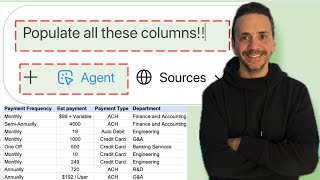
In today's video, we're going to go over a data problem in Excel. We're going to attempt to solve it with the regular methods that we know using Excel formulas. And then we realize quickly that that's not going to help us. So we'll shift gears and use the agent mode inside of ChatGPT, and you'll see that that's going to give us a much more efficient outcome. If that sounds good to you, let's dive right in. It's quite unbelievable that a couple of. When ChatGPT came on the scene as an accountant, I was only using it like maybe once a week, twice a week, maybe once a day at most. Now I find myself spending about 10 to 20% of every day interacting with an AI tool of some kind. All right, guys, so in my Excel file here, I have a vendor spend by month, which is a direct download from the accounting software that I'm using. And my mission, should I go ahead and accept it, it's going to be to create a forecast for, for spend by month by vendor. For me to go ahead and do that, I need to get some information like the payment frequency, the account owner, the department. So this way I can go ahead and inquire within the teams in my company in terms of these vendor engagements. Right now, this information that I need, I know that it lives in a different list right here in Excel. This list is owned by the purchasing department and my company, and it includes all the information. So normally, to bring in this data, I will use an xlookup. Let's go ahead and try an xlookup and see what it does. So to bring in the payment frequency, I'm going to say equal to xlookup and choose that the lookup value is going to be the vendor name, comma, lookup array. That's going to be where the column where the vendor name lives here, comma return array. It's going to be the payment frequency column right here, close my parenthesis, hit enter, and then I can drag this down. Now, when I look at the results, I'll see that I got a bunch of nas. So the formula broke down because the vendor name probably didn't match. So, for example, Carta Eshares, right here is maybe written in a different way in my second list. So if I look down here for Carta, I'll find Carta written without the word E shares in it. Okay, so that means that Excel formula like xlookup is not going to work for me. So what I'm going to try to do is use the agent Mode inside of ChatGPT to help me figure this out. So let's go ahead and try it out. So I have Chat GBT open here, and I'm going to add Agent mode. Now, to be fair, Agent mode is only available in ChatGPT plus, which costs $20 per month. But I've found that this is an investment worthwhile because I use it quite a lot on a daily basis as an accountant. Okay, so to go ahead and give it the prompt, my prompt is going to be spoken prompt. I don't write it down. Writing a prompt down slows me down because I take a while to write it. It's going to be a long prompt because I got to give it context. I got to give it my role. I got to give it what goal I'm trying to achieve. Right? Because I think of ChatGPT as a genius child. It is genius, but it's still a child. You need to give it as much information and context as possible to give you the right output. Okay, so again, I'm going to speak it, but the nice thing about AI in general is that you can fumble through it. You don't have to speak so fluently. Right? Nobody speaks that fluently. You're going, But AI is nice enough to kind of take your sentences and piece it together and figure out what you're trying to do. So hear me out and see the example that the prompt that I'm going to say. So I'm going to click on the microphone here in the box and I'm going to start save my prompt. I am the director of Finance at a software company, and I'm conducting an analysis in Excel on the vendor spend by month. Some of the columns that I need in the first tab in my file are missing. These columns exist in the second tab of my file. However, the identifier is the vendor name, and the vendor name is not the same. In the first tab and the second tab, the vendor name is similar, but it's not identical. I need you to go ahead and populate the columns for me. In the first tab, I want you to populate columns M through column W on the first tab, using the vendor name as an identifier for these columns. I am going to go ahead and give you that Excel file now. And now that I spoke it, I am going to click on the check mark and right now it's just transcribing what I said. Again, if you look at the prompt, it's pretty long. I spoke it, which was faster. For me, if I would have to type this, that might take me maybe 10 minutes to type it, because I'm going to try to be perfect. But again, you can just speak it. And AI is smart enough to understand if you make even one mistake in the way that you spoke it, it will try to correct it for you. Okay, so I'm going to click on the plus sign and I'm going to add a photo or file. Click that and I'm going to go ahead and select the file that I was working with. And then I'm going to hit Enter and I can actually see it in action, running a Python code that is trying to locate all this information. Now I can go and make myself a coffee, get some popcorn, or maybe catch up on my email while it's doing its thing. Or I can just sit here and watch it. It's pretty amazing to see what it does. So while all this magic is happening, I'll take this opportunity to let you guys know that I'm working on an AI in Accounting and Finance course that's going to release in mid December 2025. The course is going to be about four hours, and it will give you about five or six CPE credits recognized by Nasba for those of you who are trying to accomplish your CPE goal for the year for your CPA license, or if your employer pays you back or reimburses you for taking CPE credits for your job. So go ahead and check out the link in the description. I'm going to leave it in mid December 2025. All right, now it's telling me that it's finished and I can go ahead and download from the download button right here. Let's go ahead and check it out. All right, So I can tell right away that it did a much better job than the xlookup in fulfilling or filling all of the columns here. Some of the columns are blank, but that's because the other tab is probably blank for these vendors. And because this is AI and we cannot trust it 100%, we should probably do some spot check on some of these vendors to make sure that it's pulling the right data into my file. And this is the way that you should be working in general. Now, whenever you are given a task to do, you should spend about a minute or two thinking of maybe I can use ChatGPT or Gemini or some other trick, maybe Copilot, to solve this problem. Thinking for one minute or two can save you maybe half an hour or an hour and trying to do this with an xlookup and then some manual intervention after that. And if you spend a minute or two and you figure out that you can't be there's no AI solution for what you're trying to do, then fine, then go ahead and go forward with using maybe Excel formulas to try to solve it. I hope that you enjoyed this video. If you liked it, give it a big thumbs up and I'll see you guys in the next video.