Dispatcher KPIs| CSR / Dispatcher Lunch & Learn Sessions
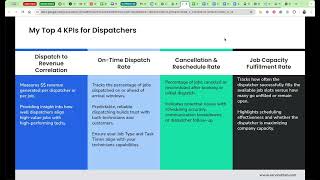
Krista Landon from Gulf Shore Air Conditioning walks through the KPIs that matter for dispatchers: on-time rates, cancellation rates (aiming for 5%), and job capacity (70% booked with 30% emergency buffer). She shows how to track them in Service Titan and set up your dashboard to watch what actually moves revenue.
Hello, everyone. Hello. Hi. Hi. How are y'? All? There we go. Still is incorrect. There we go. We have a full crowd here today, y'. All.
Nice.
Super, super excited about this and having everyone here. Brittany is not going to be leading this session today. Unfortunately, she's had to take the afternoon off. So I will be posting. I keep pressing the wrong button. So what we are going to cover today is KPIs for the dispatcher role with inside your organizations. Get you all over here and get the chat open. Is everyone having a good week?
Yeah, thank you.
How about you? Yeah, can't complain. We are kicking off for season here down in the panhandle of Florida. Spring breakers have. Have pulled in and so we are getting busy. Lucky. Where is everyone tuning in from? Michigan. It's snowing. It's snowing. Going hard today?
Yeah, no thanks.
It's the first day of spring and it's snowing.
Yes, sure is. That's how Michigan does it. Yes. Wow.
I'm in New York. We're supposed to have snow next week.
So, you know, snow next week in like.
Yeah. Okay. Can everyone see my presentation? Yeah, I guess. Okay, perfect. Yeah. I can't believe that today is the first day of spring at all and that we're having like a cold snap here in Florida. So it's like a breezy 56, I think, today. So that's. That's pretty, pretty interesting for. For us this time of year. Now, where did that chat thing go again? I had it all set up and then there we go. And when I shared my screen, it all went away. Got you all back here in chat. Yeah, but those spring breakers are rolling in, which I'm really happy to see. That means all of the H VAC service calls will be coming in and no time at all over the next week. Then we loll off for about two or three weeks here and then it picks back up and seasons on. So really, really excited that that 2025 is off to. Off to a good time. Okay, so let's get started. So, as some of y' all know, this CSR lunch and learn and group is hosted by Angie Snow with service titan, Brittany Burgess with service titan, and then myself, Krista, and I with Gulf Shore air conditioning. So I'm a contractor, just like all of you attending here today. Our agenda today is to welcome y', all, go over some service titan events, what the key KPIs are for you for your dispatcher roles in your organizations, do some question answers and then wrap up with anything that we need to cover. So a little introduction to myself is I am Krista Landon. I am the Marketing and IT Manager at Gulf Shore Air Conditioning. I am our longest standing employee in my my 14th year in this industry. I started off as the administrative assistant which was kind of an all encompassing role in terms of everything admin related just below the office manager and the owner. So I did the CSR role, I played dispatcher, I did all of that until we started segmenting out the roles within our organization and I got a promotion to office administrator and then to my marketing and IT role. I am also the Director of Marketing for the Lady Titans Organization and if you all would like to find out more information about that and how you can join and be supported by other women in the trades, you can scan the QR code there and we would love to have you as a member of our organization Service Titan events coming up first and foremost next month, April 24th and 25th. If you have the capacity to break away from your organization for two or three or four days depending on your travel, we would love to have you at the Call Center Edition in Miami. Come down to sunny South Florida and join us for a few days and learn everything you need to know about how to make a huge impact on your call center before the season really kicks off. So it's going to go over a lot of key features inside Service Titan, a lot of ways that you can grow your organization by utilizing your CSRs and dispatchers. So if you are in a capacity in your organization where you can attend, please attend or pass it up the chain so someone from your organization can attend and and create some growth in your organization. The next event that just was announced is the Financing and Accounting Edition Toolbox Live which will be in Salt Lake City, Utah May 7th and 8th. If this doesn't apply to you, please pass it along to your teams so that someone can join and learn more about how to use utilize financing inside Service Titan and properly set up the accounting features with Service Titan and their partners. Any questions there on the upcoming Service Titan events? No. Anybody already registered to attend the Call Center Edition next month? No one's going to come and see us. Come on now. We're going to have some fun in Miami. Let's go. So Amanda, yes, it's for your dispatcher, so it's all encompassing everything around your call center. So for your csrs, for your dispatch team, for the managers over those, it really goes over everything that you would need to know. Service Titan features pro products and how to utilize them more effectively in your organization. Really takes into consideration the entire call center. Yes. Amanda, you need to let your managers or your boss know that you need to go take a few days away, come to Miami, learn a few things. Awesome. Yeah, y' all definitely need to come. Robin, I'm not sure on the cost. It's on the Service Titan website. If you search Service Titan Toolbox Live, it'll be there. Then I can also if you drop your email in the chat, I can also email you directly after this, the direct link to register. But I know that it is a minimal fee. The most expensive thing for me was the past ones that I had traveled to was really the travel and the hotel. The actual expense of the conference was really, really reasonable for the two days because they do bring in other partners and sponsors to make the cost on the organizations to attend the training very reasonable. Okay, so here are my top four KPIs that I feel like your dispatchers need to know what they're, they're responsible for and how you can track those. So our first one is Dispatch to Revenue Correlation. This measures the revenue dollars generated per dispatcher or per job. And this allows you to provide insight into how well dispatchers are aligning high value jobs with your high performing technicians. Okay, does that make sense for everyone? So it's kind of like the right tech, right call mental. And then the next one is our on time dispatch rate. So this is tracking the percentage of the jobs dispatched on or ahead of your arrival windows. So making sure that your dispatchers are keeping up with client communication, keeping up with technicians in the field, and making sure that the jobs that were scheduled before their next job are fitting in within that window of time that it's set for. And then updating the client or moving the appointment if it's necessary. So what this does is it makes it predictable, reliable dispatching that builds trust with both the technicians and the customers. So your technicians in the field know that if they call into a dispatcher and say I'm running behind or this other repair came up, or you know, I just got handed a crap sandwich and I can't find where, you know, this leak is and I've got to figure this out, whatever it is that happens, your dispatcher can then have improved communication with other technicians that may be in the area that may need to be rerouted to go give some assistance. Or you can provide updated communication to the homeowner and adjust that arrival window for their next jobs. One thing to keep in mind is settings inside Service Titan related To this are your job types. So make sure that your job types are set up effectively to automatically have the appropriate amount of time based on that job type and your task times from your price book. Because if you have a job that you're going back on to do and you create that job based on the sold estimate, it will automatically put those task times and make that job time the same time that it's needed to cover. So if your task times are equal to three hours, it's going to automatically make that job a three hour job time. So making sure that you and your team evaluate your job types and those settings related to that and your task times before season will help you effectively dispatch and communicate with a homeowner on yes, Ms. Jones, I understand that we're running a little behind today. The technician's job initially before yours was slated to be three and a half hours. However, he's run into an issue and now it's going to be closer to 5. I can either set your arrival window for us to get there later today or we can reschedule for another day, whatever is most convenient for you. So making sure that those are already pre set out for you is going to help you better have an on time dispatch rate higher than if you didn't have those set correctly in your price book and in your job type settings. Then our next KPI that we're going to go over is cancellation and reschedule rate. So the percentage of jobs that are canceled or rescheduled after booking or an initial dispatch. So if for whatever reason a job has to get canceled, you know, we initially were scheduled to come out today between 12 and 4. However, the technician ran late, the homeowner or the client is upset and now they just want to cancel their appointment. They just don't even want to work with us anymore. Or if we have to reschedule it completely to a whole nother day. Tracking those how frequently they're having to be rescheduled and how frequently jobs are being canceled after they've already been booked is critical to understand potential issues with scheduling accuracy, communication breakdowns or lack of dispatcher follow up. Kathy is there an average cancellation rate? Kathy I would say it kind of depends on industry and time of year. So Kathy, what, what industry are you in and do you have like a shoulder season, that type stuff? Okay, so you're all the trades. Kathy so I would say you probably don't want a cancellation rate. Gosh, I would say probably no more than like 15% in your peak season. I mean you're going to have homeowners like what our policy is to do is put them on, get them scheduled. Even if they tell us that they're going to call around and find out where they're at and put them on an urgency list so that we at least capture that client information. Because even if we don't secure them as a client for this service or no cool or issue today due to marketing campaigns, you know, lead attribution, all of that, we could potentially tap them on the shoulder six to eight months from now with a promotion and they may come back. So I would, I would say probably no more than 15 to 20% during inseason when you're dealing with like emergency related service calls. And then I would just track it. I would just, you know, set your goal is. Okay, this is what we want our goal to be for June. I don't know what state you're in, Kathy, but like our peak season is anywhere from May to September, you know, so that would probably be our cancellation rate at that point and then track it for summer and then reevaluate it in the wintertime. Okay. Our cancellation rate was only 5% which is phenomenal. So next year that's what our goal is going to be. We want it at 5% or below. And then Toya, I'm sorry if I butchered your name on that. Is there a way to track the reschedule in Service Titan? There is, there is a report or a setting on the back end of Service Titan. I don't remember exactly what that is called. We can look at it in a minute after this and I can tell you the specific setting. But there is where it will track based on. You can set it to just be all encompassing of all CSRs or dispatchers or you can break it down per dispatcher, like name, like per profile and how frequently you want the reschedule report to come up and ask them to prompt them to answer a question on why they're rescheduling. So you can set it to all of them or half of them or less than half. So we can go over that a little bit later. Toya, just remind me at the end. Stacy, we have a lot of cancellations all the time, especially because people calling other companies to see there who is the same as plumbing. Yes. So in those cases, you know, that could be a area of improvement looking with your leadership and your service manager that maybe you. It's time that you potentially need to hire another plumber to take on more demand service calls. So that you have more capacity on your board to handle those calls appropriately and not have to put people off to tomorrow or on urgency list and be able to solidify them and get them scheduled scheduled quickly. And then Robin, this might be a huge ask but does anyone in the plumbing industry have a list of job types and times? I'm struggling with this and would love to see others. We do service residential plumbing so yeah, if anybody is in here that does plumbing and would love to help Robin, that would be great. Oh and Toya, Stacy in the chat gave you those settings for where to get the reschedule reason and you could also set an automated report as well through Service Titan to email you every day on what the reschedules were from yesterday. Okay so the last KPI that I feel is really really important is job capacity Fulfillment Rate which tracks how often the dispatcher successfully fills the available job slots versus how many go unfilled or remain open. This highlights scheduling effectiveness and whether the dispatcher is maximizing company capacity. So ensuring that there's clear communication from the dispatcher, the service manager and the CSR team to where if we need to do some outbound calling to get more jobs on the board or if the dispatcher needs to schedule some follow up calls, get some repairs back on the board and making sure that the technicians have a full board however many days in advance that your company likes to fill that also based on your overall needs for your area and your industry known needs. Like right now our capacity is set that we're booking to 70% every day and we're leaving a 30% buffer on our service technicians to run emergency calls. So we're pre scheduling them up to 70% with the idea that there will be emergency calls coming in, there will be other repairs that are high level and urgent that we needed to get done as soon as the part hits the door things of that measure. So making sure that the schedule is as full to whatever capacity your company wants to set those goals at. Okay. Other important KPIs that I feel you could track and define based on your company's business goals. So drive time efficiency it calculates the average drive time between jobs which is important for a dispatcher to aim to reduce unnecessary travel, optimize routes and group jobs by location to save fuel and time. For us right now we're really really sticking to we want to drive revenue and we utilize Dispatch Pro so we want to drive revenue and send the right tech to the right job. Now where we're at serving Destin Florida in the summertime it gets crazy here with all the tourists coming in and so our drive time goes through the roof this time of year. However, with utilizing Dispatch Pro we will then be able to toggle that and say we want to maximize drive time efficiency and that's really where we want our focus to be. So we want Dispatch Pro to arrange jobs on the board based on location over the amount of revenue. So our technicians are likely going to have jobs that are within the same neighborhood or jobs that are within the same zone, instead of the potential of driving from one area to another area way across town. The next item is your technician utilization rate, which measures the percentage of technicians available time that is booked for revenue generating work. So this shows how well dispatchers are filling tech schedules and balancing workloads. So this is making sure that your CSR dispatcher and manager are effectively scheduling non job events in terms of truck stocking, truck washing trips to the parts stores, utilizing other non revenue, other non revenue generating employees to go pick up parts, run parts, do things like that. And not necessarily on your revenue producing technicians in the field. Then the next KPI would be your average response time, which is tracking the average time from when a job is booked to when it is dispatched from the technician. So when a customer calls in at 8 o' clock in the morning and your team has already effectively booked the schedule to capacity, or less depending on your year, how quickly are they able to get to that call? From the time that it came in to the time that they dispatch. So if the call comes in at 8 o' clock in the morning, are they dispatching that call at 10am? Are they dispatching to that call at the very end of their day at 5pm and making sure that you're effectively getting to the customers as quickly as possible. So shorter times equals more efficient workflows and faster customer service, which then improves overall customer experience. It makes it easier for your technicians to ask for Google reviews, show the value of your business on why they should join the maintenance plan. Because you know non maintenance members versus members, you know, how quickly are you getting to your members that call in for demand service versus non members? Is there really a priority for that membership? And you can, in tracking this, you can actually have the data to prove that. Well Ms. Jones, I understand that today you're not on our maintenance plan, but six months from now when it's 105 degrees in your house and you know the repair that you've chosen to do today, the capacitor that I think that should be replaced. You know, if that fails in, in July, you know, our maintenance plan members get priority and what we saw last year is the priority for those members. We were able to from phone call in that there was an issue to dispatch time. We were able to get to those customers within an average of 3, whereas our non maintenance numbers, we were only able to get to them within five and six hours. So you'll have information to track that and be able to show the value of your maintenance plans. Okay, we got a couple questions in here. Okay, Bobby Jo, how do we manage this if a customer requests late PM but calls in early in the am so Bobbi, I would just evaluate those on like a one by one as you're reviewing the report and kind of flagging those as okay, those, you know, were outliers and not necessarily relevant to the data in this report. And then Lily, is there an average response time report? Okay, so that's one thing that we're going to go over. 1. I just had a quote for y'. All. A positive attitude plus your effort equals performance. So I'm, I'm really, really big with my team on always coming in with a positive attitude. If you're coming in with a positive attitude and you put the effort in, regardless of how the day goes, you're going to be successful. Even if shit hits the fan, you're going to have a successful day because you've got a positive attitude and you're putting in the effort to make sure every technician is satisfied with their work that they're doing. Every customer is satisfied with the technician coming out and your effectiveness of getting a technician to them as quickly as possible. What happened to my other slide? Okay, so I had a slide, Lily, that was going to cover this, but I must have accidentally deleted it. So Lily, one thing that I was going to hit on is that in order to track all these KPIs, a lot of them, you're going to have to create reports. And so you're going to have to go into reports, find reports that will track all of this, create them one by one, go through them, and then the next thing that I would advise doing is putting them on a dashboard. So every report that you create inside Service Titan, you can then push to a dashboard. And with those dashboards, I would utilize using them as charts and graphs so that the information that you're wanting to track and the key KPIs that are important to your business, you're able to just quickly look at and understand where your team is at and where you want your team to go. And for a lot of you, Some of these KPIs may not be something that you've ever thought of or ever realized as, as ideas to track and implement in your businesses. So one thing that I would recommend is that you begin evaluating these KPIs over one to two months, evaluate them as your team, come up with what your goals are once you know where your current data is at, where your current team is performing, and create a goal of, okay, we want to either meet this or lower it in terms of like a cancellation rate. Like I talked about earlier, you know, our cancellation rate currently is at 20%. Okay, well, we want to get it down to 15, and let's try and work to get it down to 15 over the next quarter, something along those lines. So take some time as your. Your business and your team begins to evaluate these and then come up with what's right for your business. Every business is going to be different because we all have different business goals. We all have different business industries. Like, I'm only H Vac, some of y' all are just plumbing. Some are plumbing, electrical, and H Vac. So every industry is going to be different, even in the same business. Some of these scores for plumbing may be different from H Vac, maybe different from electrical. So just begin evaluating each one of these KPIs and evaluate them over one to two months, see where you're currently sitting, and then work towards some goals as a team of where you want to improve them to be. Or if you already feel like they're great, leave them where they're at. And that's your goal? Our goal is to not exceed this. Okay. Does that make sense, Lily? Okay, well, that is all I have for y' all today. Does anybody have any questions, comments, concerns? What can we. What can we help you overcome in your business right now? What are y' all gearing up for? What are you trying to improve in your businesses before season really kicks off? And feel free to come off mute. I don't. I don't mind to be the. The only one talking. I have a question. Yeah, go ahead.
All right, so currently, right now, we don't really run what you call after hour calls, really don't run any calls on Saturday unless somebody's available. So we're hoping to expand our technicians and stuff, you know, to be able to do that. But, like, when we're doing our memberships and stuff, they're putting in their priority scheduling. Well, my concern is I really can't Run priority schedule, especially if they want after hours. So that, you know, that kind of concerns me how that's going to hurt us if we sell these memberships with that in it and then they call in to schedule it but there's nobody to run it. Does that make sense? I just wonder what maybe your suggestion was.
So, I mean, that really is just going to have to come down to your operation. So in implementing that at your organization, are you willing to call a customer that has only ever used you one or two times in the past, doesn't have an aging piece of equipment, so it's not a high lead for a turnover and system replacement, or has never used you, so you have no idea what you're looking at. You ask them what the age of the equipment is and they tell you it's ten years old, but it really could be a three year old piece of equipment. You have no idea and you're just kind of believing in them. Is your business really going to allow you to reschedule that job and put them on an urgency list for tomorrow? Or do they really want to follow through with the priority service that you're claiming your maintenance members will get? Because that's what you'll have to do. If your technicians are only running calls until 6pm every day and you've already maximized your board for 6pm today, what does the priority scheduling really mean? Does that just mean the next day at least we're going to prioritize you and we will for sure get to you tomorrow? Or does that mean today? If you call in today and you say that you have a problem and you're a maintenance member, are we going to service you today? Even if a technician has to work until 9pm So I would just take that to your leadership team and ask for those clarifications. These are the scenarios that we potentially are going to have. I am potentially going to have an extremely full dispatch board where a technician will either have to work late, maybe not necessarily on call, but a technician will have to work late. I will have to move a no cool call or a maintenance call or something else that may be potentially lower priority to the next day and lose that call because they'll likely call someone else, or I will have to cancel someone altogether that we've never been to and I have no idea what we could be walking into. It could be a lead turnover, it could be a brand new unit that was installed by a competitor six months ago and they just don't know who to call. So making sure that your leadership team gets you all that information on what they want for their business. I can tell you in the past we advertised and we still do. We're a same day service. Same day service 24 7. But that doesn't mean that that's not going to come without a punch. Our after hours rate is excessive, it's extremely high and most people choose to wait to the next day when we start talking about after hours fees and just on the diagnostic fee increases like 45% after 5pm so it's extremely aggressive to make sure that we're not burning out our technicians. But when we were really advertising same day service and if you want it, we will come to you same day. If you want a technician to be there, you know, by 9:00pm you know, our technicians, our technicians understand what industry they're in and they understand that from, you know, about June to August, you know, they're going to be working until 8 or 9 o' clock every night and they know that they're prepared to do that. Plus we have an on call technician that will pick up calls after that. So it just kind of depends on your actual business and what your business and technicians are willing to endure when. When the money's hot.
I had a question for you. You said something earlier. You had something, said something earlier about you leave like a 30%. Does that pay for bookings or something? Totally separate?
Yeah. So right now our capacity is, we are previously booking for a 70% capacity with a 30% buffer to handle emergency or urgent repairs that need to happen. So the 30%. Yeah, the 30% that we're not currently booking for our service technicians is urgent repairs of where maybe they went out yesterday and diagnosed a compressor failure. And that compressor is going to land at our door sometime this afternoon. Fire warehouse coordinator, he's going to drive to the Lyric, he's going to drive to the distributor, pick it up and it'll be here sometime this afternoon. So we leave that 30% open for emergency service calls. So no cools, no heats, whatever we're getting this time of year, water problems, whatever it may be, or urgent repairs. I think that's a lot of.
Yeah, I'm totally separate then because we do like 100%. That's what, you know what I mean? You know, that was a little different question. I mean a different answer that I was based off what I doing. Yeah, I mean earlier when you said it.
Yeah. For our maintenance technicians, they're booked at 100%. We know what their schedule is going to look like. 10 days. 10 days before our maintenance technicians are booked at 100% capacity year round. But our service technicians are booked 70 to 30 right now because as parts come in, we reschedule them to go back on the same technician. And so if he went and diagnosed you a motor and the motor just came in on Monday, we're going to work to get it scheduled Tuesday or Wednesday. And so we leave that 30% in his capacity for emergency and urgent repairs. So if he's already, if we're calling on Monday when the part came in and he's already booked to 65%, we're likely not going to book that motor for Tuesday or Wednesday. We're likely going to start looking for that motor to be Thursday or Friday to not exceed that 70%.
Thank you.
You're welcome. Krista.
I have a quick question about that kind of thing. So I definitely want to set something up where we are doing that more. So instead of just like looking at it and trying to book so that it does like help us pull down our reschedules a little bit. Now using our capacity, our adjustable capacity planning has helped, but I want to do it like especially with a 70, 30. Is there a way to set that up so that we only. That at certain times it only sees so much availability for certain technicians or do you just have to look at it and go, okay, well this is all that's available at this moment. Does that make sense?
Yeah, I don't know if that setting is available per technician, but I know it's per. Well, per business unit doesn't necessarily work either because you can only have one business unit associated to your technician on their technician profile. So it's the other setting and adjustable capacity planning that you can choose, choose to look at instead of by business unit.
I don't know if this helps, but I live off of like the dispatch board too. That helps.
Oh yeah, no, definitely we do.
Yeah.
It's just because like then we're trying to, we want to book the guys up, we want them to be busy. But then when we run into the issues, that's when we have to start scrambling, you know, being like, okay, well somebody else going to get done with another job sooner or not. So that's why my thought was, well, if we do the 70, 30 for certain technicians, then that would be a little bit more helpful to us if we left it that way instead of just living off the dashboard because like we can live off or the dispatch board because we can live off that. But like I also can't always have somebody else in the office thinking what I'm thinking at the same time. And even though we are a small office, but it's still just, you know, people forget things, we do other things and we just have to scramble. And I want. I want the scrambling to stop.
I'm sorry, Stacey. It's a new feature that they're just rolling out. You'll have to get with your CSM to see if you can get into the beta. It's called Adaptive capacity.
Okay, then I'm going to go ahead.
And apply for that then. So, yeah, I would apply for that. I haven't necessarily completely set it up and turned it on in our account, but I've gone through all of the trainings in the academy, read through all of the knowledge base articles, and, and it's on my list to get this set up in April so that we have May and June to test it out and then, you know, really get it going and make any changes before July hits. So I would totally look in, into that configuration setup because it isn't based on business unit. Okay. Because right now, for some reason I.
Can'T even find where I even edit my capacity planning in my settings, which is. It's blowing my mind and it's been a long day.
It's under settings and it has its own category called capacity Planning. And then it has Business unit groups and configuration. Yeah. So if you just search capacity. Right.
So I guess, yeah. Because I looked at configuration, I was like, well, that's not really what I want because, you know, because it's not asking me for like, buffers. They only put in like certain percentages. So that's what I was hoping. So but if that's in the adaptive, then then definitely I'm going to.
I was already thinking about it.
I just hadn't pulled the trigger yet.
But now I'm going to. Yeah, yeah, I would totally get into that beta and work with your CSM on getting everything you need to know about that. Because we have the same problem with utilizing Dispatch Pro and using the Get Availability button is everyone had to go into the same business unit. And then I had to use the business unit group to group all of my business units together that I wanted to use for scheduling for dispatch. And so it just really wasn't effective until this, you know, was turned on in our account. I think I got this turned on in my account like last week or the week before. So it's brand new to me. Okay. Yeah.
Okay, perfect. Thank you so much.
No, you're welcome.
It can be tricky.
What is the adaptive capacity? I guess can you explain that this is the first one? Yes. Yeah. So it's a new feature that they are putting into to beta. So you have to get with your CSM to see if your company qualifies to have it turned on. And what it does is you'll be able to create there's a buffer for account drive time, there's thresholds, there's a whole bunch of settings in here that you can turn on, toggle, make edits to but it doesn't have to focus on the business unit. Seems how in your technician profile you can only assign a technician to one business unit but your technician may actually also need to handle multiple business units. So if you have like us, we're H Vac only but my service technician can also perform maintenance. So if I were to put his business unit to just H Vac service but then in the off season it would never give him any capacity to also run maintenance. So then I would be down to just service and so it would never see capacity for him in the off season of okay, he has the potential to run maintenance calls now, but in the summertime he doesn't because I'll be able to in adaptive capacity turn him off from from that from maintenance. I'll be able to tell it these are my three maintenance technicians. These are the ones I want you to focus on capacity for maintenance. These are my six service technicians. I want them focused on service related capacity jobs. And so it'll only look when you go to that get availability button on your dispatch your call booking screen of get availability and it'll tell you based on type of job that you've chosen what your next availability is and the booking that it's out to. So if you are already at 100% capacity today, it'll tell you tomorrow, the next day or whenever has the availability for you to book this job. Isn't that like the skills for the technician?
If you put their skills in that's kind of what capacity works off of. So if they have the maintenance skill.
And the service skill then they're. That's the same thing. That's what that's what Dispatch Pro uses is the skills to assign the job. But if you want to use the get availability button you're not able to toggle that by technician by skill at this moment it's by business unit assigned in their tech profile and you can only have one currently you can adaptive capacity can use skills though. Yes, that's what I'm talking about. Yeah, adaptive capacity can use the skills. It's the adjustment adjustable. Correct.
I think adjustable gives you that option now though that you can choose for it to include the skills.
It does. I used it at a previous company, but it's not as user efficient because the skills are just set. So even in your busy season, a technician that has serviceability and maintenance ability, it will show the csrs. Hey, we have all this maintenance open when you want to reserve it for demand calls.
Right? Okay, what else do we got? What else do we got? Quick question.
So I just went and looked to see if we could get on the like, you know, the adaptive capacity like testing wait list or whatever. And it says that form is no longer accessible and that it should be released generally mid April.
Okay.
So I don't know that we can request it anymore.
Right.
Because then it's just at which point your customer service manager will be able to help you.
Yeah, but it's supposed to arrive in the next release. The like spring summer release is when they're gonna make it available for everybody.
Yeah, yeah, it says mid April in here.
So I mean it couldn't hurt to message your CSM and see if he can help enable that feature a little quicker for you if you want to start working on the setup of it now. And I would just phrase it to him, hey, I want to get ahead of the settings of this. Is there any way that you can send me information, you know, directly to the Academy? Because that's what they did for me. They sent me the direct link to the academy and the knowledge base articles to set it up. So maybe just reach out to your CSM and see if you can get it enabled just to start working on settings. Okay, what else does everyone got?
I have one actually. So we do H Vac and plumbing and right now most of my plumbers can. It's a weird conundrum. So we're in Boston, so there's a lot of boilers. All of our plumbers can work on the boilers. Not all of our plumbers can work on furnaces or condensing units or mini splits. So right now they. They all are basically plumbing H Vac and then we are manually pulling the jobs that are like for a furnace for the techs that know it, however, we just just hired a solely, strictly H vac tech. So I'm assuming I need to adjust my business units and the technicians.
But.
I don't know what that's going to look like. We're a small group. I have four Lead techs. And then the service manager and I have juniors. The juniors don't have their own vehicles yet. They are not running maintenance alone. So everybody, all my trucks are doing maintenance service, etc. So I'm trying to wrap my brain around how I will fix this.
So one thing that we have turned on is a tag and a skill that are linked together. So maybe add a skill for furnace maintenance and add a tag for furnace maintenance. So are you using Dispatch Pro?
No, ma'. Am.
Okay. Because that's how we added it so that it would automatically only look at the technicians that had that skill and that tag on their profile. What? Or I'm sorry, that had the skill on their profile based on the tag that we added to the job. So if they said that they had a furnace when we booked the maintenance job, we would add the furnace tag and then it would only look at that skill on the technicians that had that and automatically assign the job to those technicians without doing it. Utilizing Dispatch Pro. I would say you're probably doing it the best way other than maybe on your dispatch board if you want to put.
Like separate teams or something.
Maybe separating with teams. Yeah, go ahead.
Bobbi Jo When I was working at an H VAC company in Massachusetts, I had separate job types for plumbing and furniture, for boilers and furnaces. I also had separate job types for oil and gas because you probably have that too, where some of your guys can't do oil. So I would do different job types. Just to be really clear, it guides your CSRs into asking the right questions about what kind of equipment is in the home. And then you make sure the right tech gets on the job and then assign skills to those job types.
Okay. Yeah. And we were, we're about to launch a whole new job types because we're, we now have memberships and we now have mailers that need associating job types. So. Okay, I was just like freaking out about the business unit part, but okay, okay.
I mean the business unit, I'm happy.
To talk more about that too. Bobbi Jo if you want to talk about job types and business units, I'll put my email address in the chat.
Thank you. Jessica.
Yeah, I was gonna say the business units is definitely important, but matching your skills to your job types is what really has helped us with utilizing Dispatch Pro to making sure that it's only sending technicians that can maintain one to five year old units. Because we, I mean we had a brand new maintenance tech join our team last year. And so for like his first six months we were Only sending him on systems knowing that a major failure. He wouldn't foresee that to have to do major diagnostics on a maintenance. I mean, of course he was trained on how to do like minor diagnostics, but you know, him walking out there and finding a compressor failure or something like that major. So we created a whole separate job type skill for him to where that based on when the CSRs were booking the job and they would ask the question, if it was a new homeowner, how old is the equipment in your home? They would choose that and then they would change their job type to be maintenance 1 to 5 year old. What else y' all got? Y' all are a lively bunch this afternoon. I'm loving it.
I have a question.
Yeah, go ahead.
Somebody just mentioned in the chat about the tags and the skills. Can you explain that a little bit more? Because we were told that you can't. That they don't like link them.
Hang on one second, let me read this. So Dustin wrote Dispatch Pro. You can also attach tags and skills so that when the CSR puts a tag on the job when booking at service site will also put the skill on that job. So yes, that is in your. Let me get to the Dispatch Pro setting and then I can share my screen for y'. All. Click the wrong button.
See anything related to talent.
Okay. All right. Can y' all see my screen? Okay, so here is the setting inside Dispatch Pro. It's under technician settings and then it's down here where if you have a geothermal job, it's on our dispatch board, it's marked as a geo. And then the skills are H vac geothermal. So this is a tag to where if we are doing a maintenance on a geothermal system and it's on that location, it automatically will populate on the job. So when that job populates with that tag, it automatically will go and look for the skill related to geothermal question.
On top of that.
So if, because so what we do.
Right now so that we don't have a million job types, we put like plumbing just kind of as a general. So like not everyone can do plumbing, but everyone could do drain cleaning. But then I have certain texts that are older and so like I don't want him going to do like a toilet clog or like a shower clog. Like he said strictly only sewers because he's also like our sales guy. So if we added a tag to that job type. So like if I'm using drain cleaning, which. So my sales guy is in that Business unit, you know, looking at the capacity because he has that skill level. But if we then added a tag that said toilet, would it add that skill additionally to that job? Instead of us going back in afterwards and adding that skill additionally to that.
Job, it adds it when you add the tag. Okay, so if Azure CSR is booking the job and it is a job type, toilet repair or toilet clog or whatever your job type is set as, you can set that as a default tag to that job type, right? Yeah.
If we wanted to manually add that tag to that job, to that job that we're booking, it would still additionally add that skill level to that job. Is that accurate?
Okay. Because like, you could we have the.
Job type just say it's just as drain clog. You know what I mean? That's our job type.
So therefore it could be sewer, it.
Could be toilet, it could be shower. But then if we added a tag that then said toilet and then we looked for capacity, it's not going to include him. And therefore also it. It's going to have both skills on there. Right.
You use the new adaptive capacity, it should function that way.
Okay. But in the meantime, until I can get there, if I still added that tag though, it would add that skill additionally to the skill level that's already on that job type though, right?
Yes.
So then it would have multiple skills. Okay, that's what I just want to make sure. Because we go back after right now and do that manually. But this at least would help us maybe less forget.
So. Okay. Awesome.
That's awesome to think about.
Thank you. Danielle, had a question. On average, how many skills are you guys listing out in Service Titan? We have more than 900 skills across three trades. So I'm thinking about grouping them together. That's a lot. I don't even know how many skills I have. I think we are pretty minimal on our skills, but I think that that could be improved as we're hiring new employees. So it looks like I'm H vac only though. So I only have 12. I have real high confidence in all my team members. If you're going, you're doing it. By gosh. By golly. So the only ones that we have broken out are our. Out of the like, way out of the box that we don't necessarily do a lot of. We're actually one of the only contractors here locally that are licensed to work on boats and boat geothermal units. It takes a special license down here, a special insurance coverage. So that's like a special skill for Us. So I have boat, because if someone called in needs their boat repaired, there's only two technicians that we can send. Same thing with boiler. We are in Florida. We have a client that has a boiler, and I only have one technician that has ever even seen a boiler. So he's the only one that has that skill. And then geothermal, you know, some of our newer guys to the team don't necessarily know if they've, you know, had the training on boilers at their prior organization or have even ever maintained or seen or diagnosed a boiler or a geothermal unit. So we don't usually add that till they've been with us for about six months and we've assigned them to go with another technician for training on geothermal and then service overflow and maintenance overflow. So we do have a few of our maintenance technicians that are capable of running service calls in an overflow standpoint. So it would be by pick and choose that we would go through with dispatch pro and reassign those to the job and that skill or that tag that this is a service overflow and reassign it to one of our maintenance techs and prioritize this over a maintenance this afternoon. So it just kind of depends on there in terms of service overflow and maintenance overflow. If we want any of our service technicians to prioritize the maintenance. If it's a system replacement opportunity and, you know, maintenance tech has gotten behind, we can add that skill and tag to it and it'll automatically apply it to the right service technician. Then Amanda. Stacy, you have 20 skills. Amanda said, is there a way for a tag to automatically be added to zip code on a customer location? I wonder, Dustin and Amanda, if you can add that based on zone. If you have zones attached to your. If it will automatically let you add a tag. No, that's not a setting. Sorry. That's an idea, though. Put it in the ideas. I'll vote on it. I have a few. Yeah, I'm also. There's also an idea in there. We want to do our zones differently because of where we're at. There's only two bridges to get to the other side of our planet here in our service area. And so we want to separate our zones differently. But right now we can only separate them by zip zip code for it to actually apply it to the location. And so there's actually an idea out there already to have zones not be directly correlated to a zip code so that we can manually add different zones based on the location. And we would come up with that. So go vote on that one too. While y' all are in there, can you share that one? Because we have a lot of small towns that have the same zip code. Because there's only one. Yeah, I put that as. I think it was like my first idea when we onboarded with Service Titan because we wanted to bring over 35 different zones and couldn't because they would not automatically. And there's no way of editing that on the location page either. You can't automatically tell it, even though it's pulling in based on zip code zone 25 and telling it no, I want this to be zone 31. You can't change the zone either. But yeah, I'll find that. That idea. And for y', all, thank you. So, question in here from Rainforest. Has anyone tried using Dispatch Pro Assist? If so, feedback. I have not. Ours is set to full speed ahead. I mean, I think it has great potential. If you want to ease into it and see how Dispatch Pro is thinking and why it's doing what it's doing. Go for it, turn it on, let it run, see where it's brain at. I just wanted it to collect as much detail about our technicians and how our technicians are performing as quickly as possible.
So we were on Dispatch Pro for quite a while before we started using the Dispatch Pro Assist. Just because we felt like not everything worked the best for us on Dispatch Pro. We still like to have that human touch when assigning calls and dispatching and doing all those things. So we found we are trying the dispatch process to see if that helps us and just gauging, you know, what, you know, what suggestions that it suggests and see if it would match what we were thinking.
I mean, I definitely couldn't hurt. If you're at a point with your, like, utilization of Dispatch Pro and you're not utilizing it, then I would say turn it on and at least see what its brain is thinking on why it's choosing that technician to send for that job type at that time, so on and so forth. What do you have to lose at this point? You're still paying for it and it's running in the background. You might as well at least see what it's thinking.
I think part of it too is because we are primarily commercial. We do do residential, but like, we've. We noticed that it works better in the residential because the skill set for those technicians is the same where in commercial it is. They're all different. All the texts are different between boilers and chillers and all that kind of stuff.
It's.
They don't have the same skill sets. Obviously, that is taken into account, but we were noticing, like, just this very distinct gap between it working well for residential, but not for commercial.
I mean, that could be some of your settings inside Dispatch Pro as well in terms of each technician. So in the settings, when you go to, like, technician settings, you can stage how you want Dispatch Pro across 1, 2, 3, 4, 5, 6, 7, 8, 9, 10, 11, 15 different settings per technician. So that might be something that you want to dig into based on their max drive time, how do you want it to route them, how do you want it to drive to their end location, their starting location, all of those things. And maybe try changing some of those features in there based on your commercial technicians. Because if you want your commercial technician, I don't know how large your service area is, but ours is huge. So if your commercial technician's max drive time needs to look more like two hours to get from one industrial plant to the other industrial plant across your zone, then you can change that directly for that one technician so that it will route him appropriately based on his max drive time. Yeah.
Maybe it is just a tweaking the settings issue. We'll keep working on it.
Yeah. I mean, but, you know, at this point, I don't think that you have anything to lose in terms of turning on the assist and, you know, running the assist for two weeks and evaluating it. I. I'm big on. We're not changing anything inside Dispatch Pro except for every two weeks, because I want to see how it's evaluating the changes that I made based on the technician's performance and then evaluating if that was a successful change or we need to go back to what it was before. So maybe make one or two changes this week, let it run for two weeks, see if anything improves or if it's worse, and then, you know, potentially make another change and evaluate how that works for you.
Yeah, we might have to a little bit down the road, because right now we're like, like for Service Titan, where we're evaluating the assist for them.
So we're kind of stuck right here for a minute.
But definitely, once we kind of, if we decide to transition back to just using the full Dispatch Pro, then we'll get it tweaked in or dialed in.
So. Thank you. Yeah.
And with the new dispatch console, you can adjust those settings to be for revenue, for location, for whatever you want to prioritize with your team. So it's pretty exciting. And that's a fairly new feature that just came out as well.
So dive into that.
Krista, thank you so much for leading our session today for the CSR Disposition Group.
Appreciate it.
And it sounds I know I joined a little late, but I loved all the conversations. Great questions.
Really, really appreciate.
Appreciative. Glad that all of you could join us today. Thank you so much. If you have future topics or things that you'd like us to train on during these sessions, please let us know. You should have all gotten an email reminder yesterday about the group. So just reply to that, let me know as snow servicetime.com reach out to us. Let us know. And we will see you next month, same time, same place, third Thursday. Hope you all have a great month. Thank you so much. Thank you Krista.
Y' all are welcome. Thank you Krista. Thank you.
More from Bill




Capturing the 80%: How SmartAC’s Gen-2 Targets Non-Membership Homeowners | Podcast Ep. 296

Build better customer data with every booking in ServiceTitan | TAD Tune-Up Series

The Biggest Change for Roofers Coming From Other Roofing Software to #ServiceTitan?

