Webinar - A Fully Integrated Customer Experience
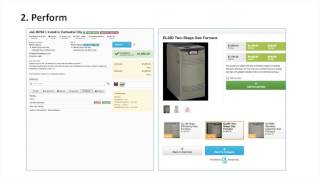
Matthew Rowell shows how ServiceTitan connects scheduling, pricing, dispatch, and performance tracking in one system. Instead of juggling separate tools, field service businesses get a unified dashboard that tracks jobs from prep through completion and review. The result: less time switching between apps, better visibility into technician performance, and higher conversion rates.
All right, thank you, everyone, so much for joining us today. Before we get started, if you could just do me a favor and use the button to raise your hand just so that I know everyone can hear me. Looks good to me. Thank you, everyone, so much. So, as an introduction, first, my name is Matthew Rowell, and I am a customer success manager here at ServiceTitan. And the purpose of today's webinar is to discuss a fully integrated software solution. For full integration, there are three main requirements. First, you have to have the ability to prepare. You need to know what you sell, how you sell it, and who will sell it. Second, the ability to perform. You need a platform that provides accountability, performance, and safety measures that are baked right in. And third, you need the ability to review. You have to be able to refine the process and start again. This is the type of feedback loop that we have to keep healthy so that our businesses can thrive. So as we talk about what a successful software solution works, let's talk about what we're aiming to avoid. I call it the Frankenstein software. Let's just think about all of the moving parts that you have to create and keep track of in your business and everything you've bolted together. Whether it's different software or complicated spreadsheets or some kind of convoluted reporting, the point is that these are the type of things that are only up to date if you can find the time or if you dedicate someone else's. What I'm talking about is your price book. Scheduling, time tracking, phone calls, marketing, job costing, inventory, payroll, and last, goals for yourself and the business. Now, this is a lot. And when you bolt it all together, it gets ugly. It means well, but it's ugly. And let's be fair. These portions of your business are not going away anytime soon. So let's consider something. How much time do you think you're spending with this creation every month? Altering it, tweaking it, fine tuning, overhauling, reimagining it. Take a moment to think about this, and do me a favor. Use the poll that's going to show up on the left to tell me if you think you're spending 5, 10, or 20 hours or more every month. From the answers that have already come in, 70% of you said that you spend 10 to 20 hours or more on average monthly tracking these things. So the next thing I'd like to ask you is, what's your time worth? Have you put a dollar value on your hour or the cost of the people that you assigned to these tasks? Could you have spent that time better would be the second question. What could you have been using that time for that would have been so much more impactful on your business? So before we get started really Talking about how ServiceTitan offers this, I just want to let you all know that this is a very broad topic. We do have a lot to cover and so we'll be viewing these features from a really high level. And at the very end of this, I'm going to do my best to tie it all together and tell you how you could learn more or dive into these even further. So I mentioned that there are three steps to this feedback loop, three steps to that full integration and they're the ability to prepare, perform and review. We're going to start right in the middle, we're going to start in the thick of it and we're going to assume that we are a multi trade business and we do a little bit of everything right. So here we are in Servicetitan at home base, we're on our dashboard. Over the course of the day, it's likely that we'll be taking calls, communicating with our team in the field, booking jobs, gathering customer information, and ideally that means that we would be performing some work. So here you're going to see three technicians. Each of them has a job to do this morning. So up at the top you're going to see our teams broken out. You see Charles, he's assigned to our flex team. He's heading out on a job to just install a new furnace. In the middle you see Robert, he's a comfort advisor and he's on his way to make a proposal for some new ductwork. And last, we've got Scott on our plumbing team. He's heading out on a demand call. We've got a customer that's saying they have no hot water. So let's take a look at that first job. Here's Charles job from the office. Without digging into anything other than just clicking on that job, we can see everything we need to know right away. We can see first how the job went at a glance. Charles wrote two estimates, he very clearly sold one of them and that job got closed out for the higher ticket amount. So what we know is one, Charles gave options and two, Charles made the sale. We see his timesheet at the bottom. We know right away how long he was driving, how long he was working. Bottom left we can see what forms he filled out. He completed that required checklist to make sure that he's ready to go to work in the Middle of the page, you'll see all of the notes that the call taker put towards the job so that we had accurate information about why the call even took place. And up at the very top, you're going to see opportunities. You're going to see tags that might have been automatic or otherwise, but they let you know that this job was a potential member, someone without a service agreement, and that it was a replacement opportunity. Something on this job triggered a tag that said there is good reason to believe that this person needs a new piece of equipment. So let's look at what he sees in the field. All of the pertinent information is available. He can see those notes. He can see who he's servicing. He can quickly get directions to the location. And up at the top, he sees those opportunities as well. He knows exactly what he's going out to do. Let's dig into one of those estimates that he wrote. Right here is the visual price book that you created for Charles. Charles sold them a furnace, right? And as he offers them this furnace, and he has good, better and best options presented automatically built by you in the price book that you created for Charles, he has alternate images. And let's assume that that YouTube video link, there is maybe a message from the manufacturer. Maybe it's a demo of the product in action. The second that Charles adds this furnace to either an estimate or an invoice, Charles was presented with a recommendation to offer the customer. This didn't look like an upsell. This looked like a recommendation from you, the expert with the customer's best interest in mind. It says, hey, most of the people who buy this furnace, they get a membership, they end up with a service agreement, and I'm going to tell you why. Let's look at the second job. Here's Robert out in the field and Robert in the office. We can see everything again that we need to know at a glance. We know right away that a dispatch bio was sent to the customer with Robert's photo and information to warm the lead. Second, we can see that Robert provided three estimates and all remain open. What this means to me immediately is that if I was to go to my follow up tab, I could log notes and calls to make sure that we keep the ball rolling on this lead until we close that opportunity. At the bottom again, we see how long he was driving and how long he was working. And up at the top, we can see those tags once more, this time a bit different. This customer that he serviced was a high priority customer and a member of our Atlas membership program for H Vac on the right hand side. His view from the field shows all of the same information. And now let's look at the third of three jobs. This job here was for Scott. Scott is way outside of his normal stomping ground. Let's assume that he only services a certain neighborhood and for some reason he's sent outside of that. For this demand job, he's on his way. We can see that his option on the right is to arrive himself, so we know he's already driving. But on the left hand side we see what's going on in the office. That CSR is about to hit cancel on this job. Customer called in and they said they cannot wait any longer and that call is right there recorded and accessible to everyone. When that CSR attempts to close out the job, they have to take notes on why it was canceled and give a predetermined reason. These notes and that call are going to live forever in the audit trail and accountability is going to be there as to why this job failed. So we talked about your day in motion. We talked about seeing all of these moving parts that were presented to the technicians and the office staff. And now let's go back to the beginning. Let's go back to prepare and how you actually achieve this. First question is what do you actually sell? In Service Titan, creating and managing your price book is a breeze. You have two ways to look at it and this is the first of two. This is the Excel spreadsheet that can be uploaded or updated at any given time. And the screen we're seeing right now is the category page. What this lets you do is determine how you segment your services and how detailed you put them into buckets. Here we have options for H Vac services only being available to members of my H Vac team, and likewise plumbing services only being available to my plumbers. However, at the bottom I can make my memberships and promotions company wide at the same time. This gives you a lot of options for how you limit or open up your services to your team. Maybe you have particular services that you only want your salesman to utilize and at the same time maybe you have mirrored services for commercial and residential work where where the only difference is the price. And the biggest concern would be making sure that that mistake is never made in the field. Next, a quick look at our services tab on that spreadsheet. Here you can see how many options are visible for every service. We can determine pricing for a regular customer, members, add on prices and add on prices for members and the list goes on. In addition, you have the option to link your materials, your inventory to given services. I assume that every business owner here knows on average with their normal services, the install of a toilet, of a water heater, a furnace, a ceiling fan, or your most popular tasks. You're probably well aware of the parts that are used on those jobs. So take the work out of it, take the responsibility away from the technician and pre populate those materials on those tasks automatically. Next, the second way to look at your price book. Here's the price book. From the actual Service Titan interface, you can see that we have our services, materials, categories and equipment all editable at any given time and in detail. Let's dig into that furnace that Charles actually sold. Right away. We can see how many options we have. We can edit this one at a time or in mass through the spreadsheet. But again, we can edit every facet of this service. Down towards the bottom of this page you can see that there's where you built in those good, better and best options. This is where you set your technicians up for success. You said I know the best way to make this sale and and I know the best recommendations and the best add ons. There's that membership, there's those alternate images and there's that video from the manufacturer built in for your technicians recommended automatically. The second question when it comes to preparation is where does the work come from? So we all know the importance of a phone call. We all know that it doesn't happen unless a phone call comes through. It's just as easy as clicking get a new number. To acquire more tracking numbers in Servicetitan, you are opened up to options for area code, zip code or a certain set of numbers, local or toll free. When a number is acquired, you can assign any number to any lead source. Let's assume that maybe you give a different phone number for your different salesman's business cards. You want to know exactly who brings in the most referrals, who brings in the most leads. Second, this doesn't pertain to acquiring business. But what this does pertain to is making sure that you free up your office to continue to acquire business. Blocking numbers is a click of a button. You can determine who added that blocked number, when and why. And last, your marketing campaigns. In Servicetitan, you can have a campaign for every potential lead source. You can determine what it actually sells, what portion of your business it's aimed at, and the number that's tied to it. If someone calls in on the number ending in 2119. At the top of my campaigns, service Titan automatically contributes that revenue to the H Vac sales portion of my business. And it knows that that should be measured for the investment I've made into my Amazon marketing campaign. The cost is right there. The third question for preparation and the last is who's actually going to do the work? So here's your team, here's your list of technicians, and here's our series of questions. How do we actually segment these guys out? How do we determine what work they do, what where they do it, and how they're compensated for that work? We can dig into an individual technician. We can determine that this guy works in Pasadena. And what this means is that he will be color coded on the dispatch board, as will jobs. The dispatcher doesn't have to think about it. They know that zone for Pasadena and the technician for Pasadena get matched up and that guy keeps driving job to job and doesn't miss a beat. Underneath that, we can see his team. Maybe you segment your guys by the license they have. Maybe you segment them by the scope of work that they can perform or by their rank in the team. Underneath his inventory warehouse. Every time Scott uses a part, adds a material to a job. Where do we pull it from? Whose truck, what location? And underneath this, his daily goal. What would you like Scott to do in a day? How are you going to measure his performance? Second, we can drill into Scott's permissions. Every technician can be given different permissions based on their role. Maybe there are certain people who you do not want to edit the price, whereas maybe your salesmen have to on the fly. And up at the very top, the option to book a job. Maybe you don't want any technicians to book a job, but you have guys who work after hours. You have the weekend crew that's on call, and you want them to be able to operate on the fly any time of day. They'll be able to book their own jobs from their tablet. Third, how do you pay your team? Every single technician can be on his own pay structure. Commission, hourly, sold hours, piece price. We can determine his commission rate and likewise we can determine if the rate is different, if he's only the salesman and not the performer. Down at the bottom, you'll notice that he has the option for an hourly rate and also a burden rate. This is for job costing. This is so that you can ask yourself not what you're paying him, but what it costs you to have him perform work. And last, his range bonuses for anyone that works on a performance based system, you can add as many ranges as you'd like. If he sells within a certain tier, maybe he gets a different level of commission. So the next question would be, when are these people available, your business hours, for you to be determined. What blocks of time would you like to book people for work? What days are you available and what time on each day? Second, who in particular is available for those blocks of time and what's their scope of work? This open capacity table that ServiceTitan offers allows you to specify which guy works where and when. And last forecast for the weather. You can plan for inclement weather. You can plan for when those pipes are going to freeze over. You can plan for when it's going to overheat. You can look up the actual weather for the week, and you can decide, maybe we need to keep a couple more guys on call for Monday when it's going to be hot. So now we've done the prep work. We saw the day in motion. We saw how we got it ready, and now the question is, what do we do with that information? How do we close that feedback loop? And first, that starts with how can we improve? So over the course of those three jobs, we saw some things that we liked and we probably saw some things that we could have done better. So, well, let's look at a few reports. Tag conversion. This right here is related to those opportunities that we saw on the job, those potential member opportunities, the opportunity for replacing equipment. We can see day by day, week by week, year to date, or however you'd like, who sold what, how often did you consider their job a true conversion? When we're talking about memberships being conversions, we can dig into the new member report. We can see that this week Charles sold that one membership that we got, one new loyal customer. We can dig into that customer and we can build a marketing campaign around saying thank you to the people who've joined our family. Next, we know that we had a canceled call. So let's dig into the canceled calls report. We can see what business unit, what tech, what job, what customer, and why the job canceled. Now, to get into the details, we can look at our dispatch performance report. We can ask if maybe it's a particular profit center or a particular portion of our business that is experiencing those canceled calls more often than not. Is it before dispatch or is it after? And here's the question. Maybe they're just sending the guys too far. There's your information right there. Scott was sent way outside of his normal stomping ground. Can he be blamed for not being able to get there on time if this dispatcher consistently sends people outside of the average distance that you'd like. Next, a technician performance board. There are several variations on this board, but this is a great example of a quick way to drive performance and show who's carrying the torch. Who's at the top is the person with the most revenue for the time period. You can see who's closest to hitting their personal goal, who went out on the most jobs and who had the highest close rate. And last, if we want to look on a bigger scale, not just the technicians, but a business as a whole, let's look at the daily huddle. Here's a great report for that morning meeting with the technicians. You can see exactly what you're doing, exactly what's been going on week to date, last week, for the month and for the year, and what you need to do to get back on goal. So next, with all this information that we've acquired, the question is, how do we refine it? With Servicetitan, it's all in one place. You can revamp or revise your price book on the fly. Even in the middle of the day, you can maximize your schedule with our options for capacity planning. You can track time through GPS devices with auto arrival and get a detailed breakdown of activities. You can record your calls automatically for coaching. And by integrating your phones, you get immediate access to customer records. You can see a live return on investment throughout the day. With marketing scorecards, you can accurately track profit and efficiency on a job to job basis. With reporting, you can manage your warehouse, keep your trucks fully stocked with inventory replenishment and audits. You can confidently start cutting the check with an undeniable audit trail of who sold what and when and last. You can establish and drive goals for both the individuals that make up your business and the business as a whole. So without Servicetitan, all of these things, all of these moving parts that we talked about bolted together, they're ugly. But with this fully integrated software solution, you can continue to repeat this process. You can continue to prepare, perform and review so that your business can be extraordinary. So for our existing customers, we have a training website which is a great resource for more information on these features and these workflows. Also, I'd like to let you know that all of you have a dedicated person here. If you're in the onboarding phase of things, you have a go to and after that you have a success rep. For the lifetime that you spend with Servicetitan, we are your dedicated person and our performance is based on your success with our software. That being said, feel free to reach out to us at any time. It is our job to roadmap these features out for you to strategize and help you implement your so that you can achieve your goals as a business on this training website. In addition, you will find live daily training webinars and recordings of past ones along with self paced training modules. These are great tools so that your technicians, your staff in the office and you yourself can become familiar in a matter of minutes with every set of workflows and then test yourself to become an expert. That being said, thank you all so much for joining me and I'd love to know if there's any questions that I could answer while I have you here. So something that just came through and I'd like to address is the reporting. All of our reports are available immediately to you and the list is 80 plus reports long. It is growing all the time and they are filtered by technician, business unit or profit center and by date ranges. You could look on a daily basis or for the lifetime of your business, how you've performed and who are your performers. Great. Well, thank you all so much for joining us today. Again, my name is Matthew Roel and it's been a pleasure speaking with all of you and I hope to talk to you soon.
More from Bill




Capturing the 80%: How SmartAC’s Gen-2 Targets Non-Membership Homeowners | Podcast Ep. 296

Build better customer data with every booking in ServiceTitan | TAD Tune-Up Series

The Biggest Change for Roofers Coming From Other Roofing Software to #ServiceTitan?

