Billy Sticker shows how to add a PayPal one-time offer to a ClickFunnels funnel without a new account. The OTO discounts an annual membership to $2.97 (normally $297/year) and includes three bonus books. After payment, customers land in a private Google community.
Chapters
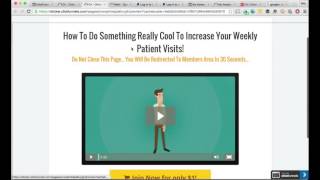
Hey guys, Billy Sticker here and I just wanted to do a quick tutorial video on one of the ways that you can set up a one time offer in click funnels using PayPal, integrating with PayPal. And the reason I'm needing to do that is I already have Stripe set up for a different product basically through a different company and I need to be able to. I don't want to set up a whole new Click Funnels account. So this is what I'm doing and I wanted to show you. Let's look at the back end here. Now this will not work for everybody. Depending on what kind of upsell you're trying to do, it may not work, but in my situation this was perfect. Let me show you what I'm doing here. In the back end of Click Funnels we have the opt in sales video, a one time offer and then a thank you page. And this is actually going to be, I'm selling a membership course. So. So $1 trial, $37 a month. The upsell is $297 for the year instead of the monthly fee. Okay, now let's take a look at these and let me show you exactly what I did. Here is the opt in page. They'll put in their email and stuff and then they're directed to the sales page. Now this is just the template. I still, you know, I was just sort of working on some of the framework. Obviously this is the original ClickFunnels video here. Then I have this set up to come in once the video starts a little toward the end when I get into the pitch. But here's the thing. Both of these buttons, these do not take you to any kind of shopping cart or PayPal. The only thing that these two links do is bring them to the one time offer page. Okay, so that's key. Both of these just takes them to the one time offer page. Then in here, this is where, you know, it's wait, then I'll be going through a presentation on extra bonuses. They get a couple of, you know, two or three. I think we're going to do three. Three of my different books that I've written. I'm going to get them a copy of all the different marketing books and then if they take advantage of paying $2.97 a year, it's instead of the $37 a month. Now if they do that, both of these links will take them to PayPal. And I've already set up the button which shows it right here. Chiro candy coaching community 33% discount plus bonuses, $2.97 a year. If they click the button down here, this is no thanks, I'd rather join and pay full price. This takes them to the original offer they saw on the first page. So all you do is set that up in PayPal and I'm assuming if you're watching this, you know how to do that. Just Google tutorials on setting up PayPal buttons and then the action I have in PayPal once everything is complete, I have them going to the thank you page that I set up in Click Funnels, which is going to be right here. And then this is the link that's going to get them over to the membership community that we already have set up, which is a private Google community, is how I'm doing this. So that's it. Like I said, I know this isn't going to be the answer to everyone's problem. If you're wanting to add additional products, I can see where there's still an issue there, but this worked for what I was trying to do. And so I wanted to record this video to help you guys out and hopefully it'll help you or at least give you some other ideas. If you have other ideas of other ways to do this, comment below and let's help each other out. Thanks.